We remain fully operational. Our teams are working around the clock to ensure your deliveries continue safely.

下载应用程序




🚀 Elevate your Raspberry Pi projects with touch—because your ideas deserve the best screen time!
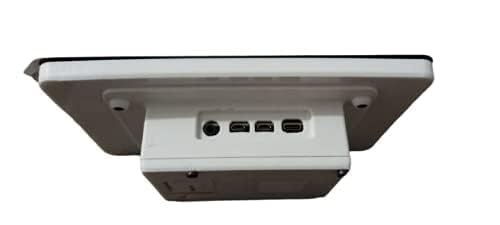
The Raspberry Pi 7" Touch Screen Display delivers a vibrant 800x480 resolution with 10-finger capacitive touch, designed for seamless integration with all Raspberry Pi models. Its minimal wiring—just a ribbon cable and power connection—makes it perfect for portable and embedded projects. The kit includes all necessary hardware for quick assembly, empowering makers and professionals to build sleek, interactive devices with ease.
| ASIN | B0153R2A9I |
| Average Battery Life (in hours) | 100 years |
| Best Sellers Rank | #672 in Single Board Computers (Computers & Accessories) |
| Brand | Raspberry Pi |
| Customer Reviews | 4.5 4.5 out of 5 stars (2,034) |
| Date First Available | September 8, 2015 |
| Graphics Coprocessor | RaspberryPI |
| Is Discontinued By Manufacturer | No |
| Item Dimensions LxWxH | 3.94 x 2.99 x 0.79 inches |
| Item Weight | 13.4 ounces |
| Item model number | 7TOUCH |
| Manufacturer | Raspberry Pi |
| Max Screen Resolution | 800x400 |
| Product Dimensions | 3.94 x 2.99 x 0.79 inches |
| Rear Webcam Resolution | 800.4 Pixels |
| Series | raspberry pi |
| Standing screen display size | 7 Inches |
L**I
This is the screen to get.
Wow! Plugged it in and it just works. No adjustments, calibration, driver loading, etc. I am running the most current version of the OS so that is probably the reason. At first I was afraid that the lower resolution would be an issue but at this size, I don't know if a higher resolution screen would make a difference. At least not for what I plan on doing with this. The photos show that the screen, posts, driver board, and ribbon cable are separated and I saw a video that says that you need to assemble all the pieces. My unit was already put together. I just inserted the ribbon cable into my Raspberry Pi. There are no instructions, but search Youtube and you'll find something. I purchased the Smarticase Case for the Official Raspberry Pi 7" Touchscreen Display - LEGO compatible front and adjustable angle and it fit perfectly. I highly recommend getting this case. Or some other case if you prefer, but definitely get something. There is nothing protecting the edge of the screen. It won't get damaged just by handling it, but leaving it propped up is just asking for trouble. Also the driver board is exposed so you are risking a short. One note. If you use this screen, the HDMI port on the Raspberry Pi is disabled. So you cannot use both this screen and a second monitor connected to the HDMI port. People smarter at this than I are working on this, but as far as I can tell, they haven't figured it out yet.
D**Z
Easy installation, widely supported.
This is a great plug and play solution to a lot of cool projects with Raspberry Pi. I have two of these now, one in a retro Volumio speaker project and one in a plastic case to use for Crankshaft Android Auto (car interface.) Both were simple to install and work perfectly. The jumpers to power from the Pi directly are a nice feature. The screen driver board is pre-installed and makes final assembly simple (you only need to attach the ribbon cable and power jumper wires, then mount the Pi with the supplied Phillips machine screws.) Touch is responsive and the display is bright and clear. Highly recommended if you just want it to work and have wide ranging software support.
J**N
Quality and size are great!
Picture quality is good. Screen is sturdy. ETA Prime’s video review and instructions of this made it very easy to setup. I did not use the touch quality, so I can’t speak to that. Only flaw is that I don’t think it supports HDMI out while using this screen. There might be a software fix to this, but I didn’t bother to look into. I just tried plugging in the port to see what would happen. Not much. When not directly side-by-side, screen size feel is comparable to a Switch. Also bought a case with this that paired very well. Only issue was overheating with heavy use and the back cover on. I didn’t have a heat sink.
S**.
ZERO instructions provided!
Got one of these to use with a Pi 3 B CanaKit Raspberry Pi 3 Kit with Clear Case and 2.5A Power Supply to run Kodi along with this case RS Raspberry Pi 7-Inch LCD Touch Screen Case, Black . The hardware works fine, but....THERE IS NO SETUP INFORMATION WHATSOEVER! Inside the box is a large sheet of paper with "safety" information in every language known to man, but ZERO information on how to connect this thing to a Pi board! Connecting the ribbon cable is pretty much self-explanatory, but the minor detail of how to provide power to the device is nowhere to be found. You have the manufacturer's website printed on the box but that's the top level URL. After searching and drilling down several layers you can find setup information where you are told that you can use two of the provided jumper wires to pull power from the Pi board. The next minor detail is that if you use the housing linked above like I did to make a nice compact package, you find that the display is rotated 180°. The case's feet and holes for wall mounting won't work with the native Raspbian configuration. It's not a simple matter of rotating the display in the housing as housing is made for a specific orientation. There is a workaround, but you have to spend some time searching for it. Finally, I was hoping for a compact unit that I could run without having a keyboard or my monitor/TV connected to it all the time. Apparently, with this display connected, the Pi's HDMI port is disabled. So...I guess I'll be putting this display back in its box (which thankfully I did not trash) and putting the Pi back in the small box that came with the kit. In the future, I might buy another Pi kit if I want to do something else.
A**Q
Great display, easy to work with.
Built myself a Pi3 Touchscreen PC using this display and the new Raspberry Pi 3.. This display works as well as my Galaxy S4, and is more accurate with overscan turned off. When it boots, you may see a lightning bolt or a small icon like the boot screen (color chart).. this means this section is reporting a brownout.. the 2.5A power supply that comes in the Pi3 kit is not enough, but the 3A supply handles it just fine. This unit fits perfectly into the tilting container that also holds the Pi. The only wires I have connected to the display is the ribbon cable (handles video and touch response) and the 5V splitter.. they've included the wires to go from the 40-pin connector, but it might be better to use the 5V MicroUSB power port for it's protection. great color response, listed as 800x480, but I think it may be 720x480. Have even been able to scan barcodes from the screen. haven't played a video yet, though. For the 3A power supply: https://www.amazon.com/gp/product/B01L8DVOFM/ref=oh_aui_detailpage_o02_s00?ie=UTF8&psc=1
A**R
Bezels are pretty big, the touch is OK on raspbian. Plug and play unless your case mounts it upside down. Which is a super quick fix
I**R
H**N
Poor Quality Control, the LCD isn't even on straight.... Very disappointed DO NOT BUY
I**M
Proper follow up and excellent quality
A**L
Good product
TrustPilot
1 个月前
5天前