We remain fully operational. Our teams are working around the clock to ensure your deliveries continue safely.

下载应用程序


Buy anything from 5,000+ international stores. One checkout price. No surprise fees. Join 2M+ shoppers on Desertcart.
Desertcart purchases this item on your behalf and handles shipping, customs, and support to Hong Kong.
❄️ Master your PC airflow like a pro—cool, clean, and connected!
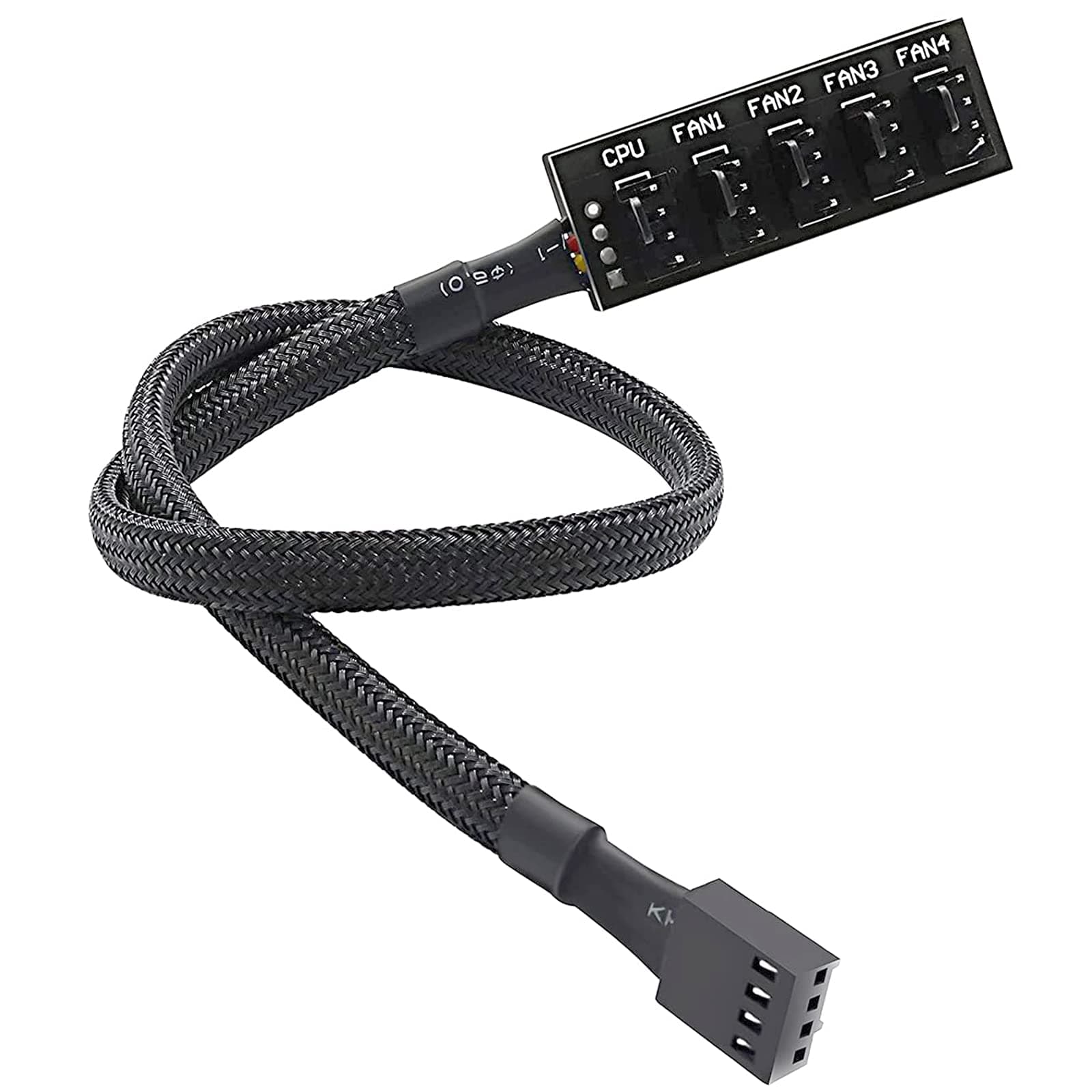
The ThreeBulls PWM Fan Hub is a 15.7-inch 4-pin splitter cable that expands one motherboard fan header to support up to five 3-pin or 4-pin case fans. Featuring durable black nylon braided sleeving, it offers reliable power delivery and PWM speed control for efficient CPU cooling, making multi-fan PC builds cleaner and easier to manage.
| ASIN | B07M5P7VHG |
| Brand | ThreeBulls |
| Cable Type | 4-pin PWM |
| Colour | 1 to 5,1 Pack |
| Compatible Devices | Desktop |
| Compatible Phone Models | No Compatible Phone Models |
| Connector Gender | Male-to-Female |
| Connector Type | 4 Pin |
| Country Of Origin | China |
| Customer Package Type | Standard Packaging |
| Customer Reviews | 4.5 4.5 out of 5 stars (4,283) |
| Indoor Outdoor Usage | Indoor |
| Item Shape | Round |
| Item Weight | 0.02 Kilograms |
| Manufacturer | ThreeBulls |
| Maximum Voltage | 12 Volts |
| Model Number | 8541606340 |
| Number of Items | 1 |
| Number of Pins | 4 |
| Other Special Features of the Product | Braided |
| Outer Material | Nylon |
| Recommended Uses For Product | Connecting and extending power supply to PC case fans, particularly suitable for 4-pin and 3-pin fans in desktop computers. |
| UPC | 786705448292 |
| Unit Count | 1.0 count |
| Wattage | 1 kilowatt hours |
C**J
Excellent fan hub, perfect for multi fan setups
I recently installed the ThreeBulls PWM fan hub to connect multiple case fans in my PC and it works really well. It lets me run up to five fans from one motherboard header without any power issues. The cables are nicely sleeved and the build quality feels solid. Setup was easy and I did not need extra adapters or splitters. The PWM control works as expected and the fans adjust speed based on temperature with no flickering. Everything stayed neat and tidy with the included cable ties. The only minor thing is the hub is a bit longer than expected so I had to find space behind my motherboard tray. It did fit in the end and does not interfere with any components. Overall I am very happy with this hub. It is reliable, well made, and makes managing multiple fans simple. I would buy it again and recommend it to anyone looking to improve airflow in their PC.
C**M
Has been working well for awhile
The fan hub works well and performs exactly as intended. Installation was quick and straightforward, and it made extending and organising my fan connections inside the case much easier. The sleeved cables feel good quality and connect securely, and it has been working reliably for a while now.
E**A
Good and cheap but a pin was bent
The quality of this is okay as it is as seen in the picture it’s just a cheap fan hub. It looks fine but you can hide it from sight if you fit it in the right place. It works well however one of the pins were bent. I’m not sure if it was bent beforehand or not but I straightened it and it worked just fine.
R**3
Worked.
Did what was required
J**N
Small, dirt cheap, PWM or voltage control and solves header limitations, especially for mini ITX
Accepts 3 and 4 pin and solves the issues of connecting multiple fans to your motherboard with limited headers. It also has double-sided cushioned tape so it can be securely stuck to the inside of case wherever you like (out of sight preferably!) and without risk of movement. It works perfectly for me on a mini ITX board limited to three headers (CPU, FAN1 and FAN2) but with 6 case fans and AIO. A couple of things to mention: 1) the design seems to infer that you should plug your CPU fan into the splitter, and the splitter into the CPU header. You don't have to do this of course. I use my motherboard CPU header for my CPU cooler, the other fans connect to this splitter, one of the free fan headers, and are then are easily controlled from the bios setting for that fan header. 2) any fans connected to this cannot be individually controlled for speed or voltage. This seems obvious but is an easy mistake to make. If you require variable speeds for your fans, don't connect them all to this splitter. Yes, it's cheap and ugly and the solder points will be a weak spot, but just don't pull on the connectors or wires. Can't really go wrong for the price.
T**D
Works well
Working now for the past 10 months or so without issue.
E**E
Received damage but rest work
one was bent rest work
M**A
Great
Worked great, no issues and includes a sticky tab so I could hide it out of view.
P**P
I picked up this ThreeBulls PWM Fan Hub for my ITX build and it does the job. Right now, I’m running three fans off it—two in the front and the top exhaust—and it’s working fine. Just a heads-up: make sure your fan cables are long enough, especially if you’re building in a tight case like an SG13. I had to get some extension cables because things got unplugged when I put the case back together. At one point, I actually stripped a fan connector and had to swap out the fan, but after that, no issues. The cord length was perfect for my ITX build. This splitter isn’t powered, so I wouldn’t run more than three fans off it. Four might be pushing it and could stress your motherboard header. For what it is, though, it’s great for squeezing in extra cooling on a small build. It comes with a sticky pad so you can mount it wherever you need I have mine stuck in the back corner of my case and it hasn’t budged. Build quality is decent. It’s just a basic splitter, nothing fancy, but it gets the job done. If you’re working in a small case and want to add more fans, this is definitely worth picking up. I might grab another one if I need to add more fans down the line.
S**D
It will be very helpful if you have a lack of sys fan header and i like it because it’s very simple and you can install 4 fans
C**.
Literally no issues with this product at all. Comes with 2 adhesive strips (one on the product and 1 extra in case you get a new case or something). Its a 3M adhesive so it'll stick really well, just be sure to wipe down the area a bit with some rubbing alcohol or something. It feels sturdy, but the wire connections could maybe be done a bit better? Might didn't come off or anything, but just don't play around with it too much. The connector is a PWM connector and would fit on a motherboard, but I would actually recommend against doing so. Most motherboards have an average amp rating for 1 fan header at around 1 amp or so. Many non-LED fans will pull around 0.15 - 0.2 amps and some LED fans will pull a bit higher around 0.2 - 0.25 amps. If you do the math, having 5 fans at 0.25 amps running off a single 1 amp rated header will cause issues and COULD potentially fry your board. My recommendation is either; A) double check your user manual and see if your fan headers can handle a bit more power than most. I know some gigabyte motherboards are rated for around 1.5 amps. or B) do what I did and plug a molex to fan connector into it. If you wanted to adjust the speed of all the fans, just use one of the little resistor extension cables (that reduce RPMs) that come with most fans in between this product and the molex connector. All the fans will run at the same speed. Anyways though, good product and does everything it should.
A**Q
Didn't fit the CPU fan adapter well.
C**S
It’s great for the motherboards that don’t have enough fan connectors it’s easy to use the look is great it works really well the size is beautiful there’s no noise it’s perfect
TrustPilot
5天前
2 周前