We remain fully operational. Our teams are working around the clock to ensure your deliveries continue safely.

下载应用程序


Buy anything from 5,000+ international stores. One checkout price. No surprise fees. Join 2M+ shoppers on Desertcart.
Desertcart purchases this item on your behalf and handles shipping, customs, and support to Hong Kong.
⚡ Power Up Your Setup with Effortless USB Expansion!
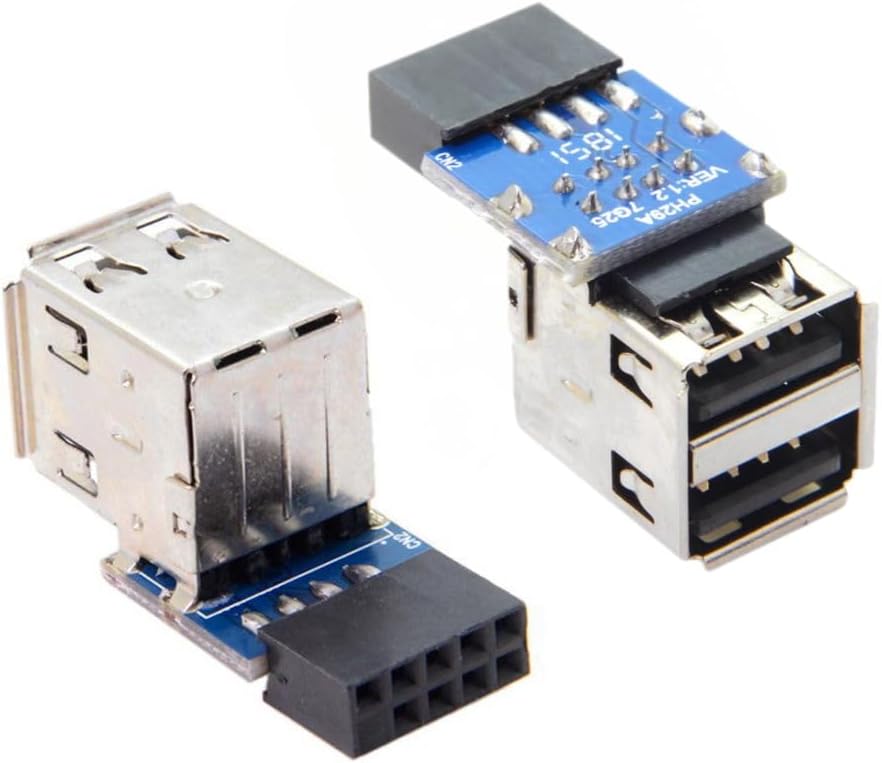
The chenyang 2 Pack USB 2.0 Front Panel Header Adapter converts a 9/10 pin motherboard internal port into two USB 2.0 female ports, delivering up to 480 Mbps data transfer speed. Its compact, plug-and-play design supports a wide range of peripherals including wireless and Bluetooth devices, making it an essential upgrade for tech-savvy professionals seeking flexible, high-performance connectivity inside their PC builds.


| ASIN | B07YFXH5K9 |
| Best Sellers Rank | #2,275 in Audio & Video Connectors & Adapters |
| Brand | chenyang |
| Color | Adapter 1 to 2 type |
| Compatible Devices | Wireless Devices, Bluetooth Devices, Mobile Devices, Peripherals |
| Connector Type | USB 2.0 Female, USB Type B |
| Customer Reviews | 4.6 out of 5 stars 534 Reviews |
| Finish | Metallic |
| Finish Type | Metallic |
| Item Weight | 0.02 Kilograms |
| Manufacturer | CY |
| Model Number | U2-029-CY |
| Number of Items | 1 |
| Number of Ports | 2 |
| Package Quantity | 1 |
| Power Plug Type | No Plug |
I**A
Works great
works just as Described
S**T
Great Y-Adapter!
I bought this USB adapter to power an internal floppy disk drive that I had to purchase some adapter that connected to the old school PATA-type pins on the rear of the floppy drive to some small circuit board that sat between the floppy drive rear and plugged into an internal USB port (hence the reason I purchased this Y-adapter). I didn't use this adapter because the circuit board was not soldered very well so I returned it, but I did keep this adapter. one single end of this USB Y-adapter plugs directly onto a free JUSP Header on the motherboard (just a few "pins" that stick up from the motherboard) and is then spliced somehow into 2 regular USB 2.0 female ports. If your tower has external USB ports, they usually plug directly into the motherboard as well. I still use the USB 2.0 ports to connect USB keyboards, mice, and even have some speakers that receive power through an available USB 2.0 port (that makes use of 3 USB 2.0 ports still to this day at least) So when I build or buy computers, it is a plus to see these ports. It's nice to power a modestly proves pair of speakers through an USB port rather than have to worry about opening up an available electrical outlet on a power strip. I have found these 6-inch extension cords that make it simple to use all the available electrical outlets on a surge protector as well when a plug is rather large for those of you whom may be interested. This cable is well designed and built. It is a bit long, but I found it easy to roll up the excess on the bottom of a new build and secure it with a small zip tie. The uses are fairly endless - one being you could boot from an available internal USB device inside a locked tower that has a specialized Linux distribution installed on it as well as a Windows Operating system installed on the internal hard drives. For instance, if I am working on some older laptop or tower for someone whom may wish to simply replace an old platter hard drive to a solid state drive and they wish to simply backup up particular files like some photos, music, movies, and documents and trash the rest, I can easily do this with one of my machines, swap out their drive, install Windows 10 (or something else) and, once the device is delivered at their location, they set up their local account preferences on their own and once they are finished, I can restore their files back into the default "MUSIC", "PICTURES", etc. folders. I stress them to look over the files i have recovered and give them an option of leaving the old pattered drive the way it is or securely wiping them which can take from several minutes to several days or more depending on the eraser algorithm I use. It takes times to wipe drives securely and money to have a dedicated PC to wipe drives for minutes to days. With this Y adapter, I can effectively wipe drives securely and can place a padlock on the computer I use to wipe the drive and even set a BIOS password that can prevent an intruder or "false friend" from booting a specialized LINUX distribution can cause damage. There must be precautions if you will be using this cable - at the very least, lock the back of your tower and place a BIOS password that will simply ask you to type a specified password before your computer actually boots your windows operating system. I kept this cable for a reason because I am a PC Tech, among other trades and side jobs. I find it an invaluable tool for any PC Tech that sees the benefits to the above and dies not mind placing a BIOS password on a separate computer. If you have 2 computers at home or in your apartment, one can be shared with a guest user account or even a separate account and the other can be, for instance, an older DDR2-based Desktop with sufficient power and RAM housing Windows 2012/2016/2019 server on it AND be used to boot from the internal LINUX distribution. BE CAUTIOUS IF YOU USE THAT SPECIFIC SCENARIO AS USING SPECIALIZED LINUX DISTRIBUTIONS CAN CORRUPT FILES ON YOUR INTERNAL HARD DRIVE/DRIVES/RAID VOLUME! I tend to simply not mess with the internal hard disks in a scenario like that and simply wipe a drive over a weekend or during a time when I don't need to use the server for anything else. I'm happy with everything about this cable - even it's length. As I said, as a system builder I have seen numerous types of cable management clips, ties, strips, and have even used electrical tape. It's nice to route a cable end to a perfect ending point that perfectly connects to a male end USB device. That being said, the USB 3.0 ports on a motherboard look different that the USB 2.0 as do other connectivity points. I still make use of the USB 2.0 port on a regular basis and find that at least 4 is a good number of them - in the right setting at least. On laptops, and other mini devices, there are simply not enough room or the designers have chosen to use the latest USB specifications that are backwards compatible with the USB 1,2,3,3.x, etc, specs. This cable is a great addition to any PC Tech or knowledgeable system builder / upgrader / customizer. Final thought.... BRAVO!
T**R
Ideal for new motherboards without external USB 2 ports
Works great on my new AM4 Asus motherboard. I was running out of usb ports and needed to plug in a Bluetooth dongle. Since it was never going to be removed this seemed like the best and least expensive option. It worked exactly as I had hoped. The header plugged right in to the USB 2.0 header on my motherboard (after verifying the correct orientation). The cord was long enough to route everything behind the motherboard and out of the front of my case behind the front panel for optimal Bluetooth signal. The wires and connectors are of good quality and the USB ports are not loose fitting.
P**N
Good way to use additioanl headers
good way to utilize some additional headers on your motherboard. Speeds are 2.0 so I wouldn't use them for any low latency/high bandwidth devices.
3**O
Works like it should
Plenty long and works like it should. All it does is provide USB type A female connectors inside a PC case. An example would be to host an old IDE device in your PC case using an IDE to USB converter.
V**E
Exactly what I needed
Case swapped an Optiplex sff and this was perfect to replace the front I/O. Literally plug and play.
J**E
Met my needs but with one flaw
The review is for the Stackable Dual USB 2.0 A Type Female to Motherboard 9 Pin Header Cable. It met my needs but it didn't come with any mounting screws as other cables like this I have bought. Despite living in a major megalopolis, I was unable to find the needed screws locally (and had I, I probably would have had to buy a box of 100). Fortunately, after wasting time looking for them at local vendor, I spent over an hour digging through my junk screw collection and, luckily, was able to find two matching screws that were the correct size. Not providing the mounting screws is inexcusable. had they been provided, I would have given a five star rating.
R**O
Internal usb plugs
Absolutely great and extremely useful. I ended up putting my mouse and Bluetooth usb plugs through this cable so I can have a more cleaner external look. Freed up some usb plugs outside in the process as well. It is a simple plug in and it works.
TrustPilot
2 周前
1天前