We remain fully operational. Our teams are working around the clock to ensure your deliveries continue safely.

下载应用程序



Buy anything from 5,000+ international stores. One checkout price. No surprise fees. Join 2M+ shoppers on Desertcart.
Desertcart purchases this item on your behalf and handles shipping, customs, and support to Hong Kong.
🔥 Light up your rig, flex your style, and own the ultimate build space! 🔥
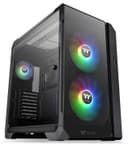
The Thermaltake View 51 is a full-tower gaming PC case designed for enthusiasts craving expansive space and stunning ARGB lighting. Featuring two massive 200mm ARGB fans plus a front ARGB light bar, it offers vibrant, motherboard-synced illumination with 27 LED modes. Its patented rotational PCI-E slots provide versatile GPU display options, while supporting large E-ATX motherboards and long graphics cards. With smart cable management and robust cooling, this case is built for high-performance, liquid-cooled systems that demand both style and substance.


| ASIN | B08451HFPR |
| Are Batteries Included | No |
| Brand | Thermaltake |
| Color | Black |
| Customer Reviews | 4.6 4.6 out of 5 stars (1,327) |
| Date First Available | 23 January 2020 |
| Form Factor | ATX |
| Item Weight | 998 g |
| Item model number | CA-1Q6-00M1WN-00 |
| Manufacturer | Thermaltake |
| Number of USB 2.0 Ports | 2 |
| Number of USB 3.0 Ports | 2 |
| Product Dimensions | 54.99 x 31.5 x 52.5 cm; 997.9 g |
| Series | View 51 |
A**R
Good
Very large case, easy to build in and looks great. Don't buy unless you're planning on liquid cooling. Be advised.
C**S
Great Case For Water Cooling
Really good case, lots of room inside for even the largest of graphics cards. But check the dimensions, this is a very large case and very heavy.
H**A
i think its good becuse today it will dliver so i think 5 stars
but guys becare full 1 year ago i wanted to buy an pc then like i didnt relise that its a case i loosed my 17000$ dollars for this case so please becare full !
F**H
Great case for water cooling
Built my 5th built in this case and felt like a breeze due its spacious and design
J**N
I am loving this case. Bought it for a custom build and wanted to show off every aspect of the build. Arrived in perfect condition. My only downside of the case is that I can not vertically mount a 4090. Small disappointment but would not stop me from buying this case again.
J**I
After looking through multiple cases for my new PC I finally decided to go for this Thermaltake View 51 TG Model... It is giant so if you are looking for a mid-tower or something small look elsewhere lol... This has 4mm thick tempered glass on top, in front, & on the left side... All items within it can be rearranged or removed such as I took out the HDD stand and the vertical gpu stand by that was my decision. The PSU gets installed in the rear compartment so u don't see it at all and the wiring can all be organized thru the multiple holes provided with thick rubber grommets. It has provisions to mount fans on top, bottom, & on the side (which either exhausts or intakes air from the right side metal door that has holes built in with filter screens) It has a filter on the bottom as well. It comes with x1 Rear 120mm Thermaltake Pure 12 ARGB fan & x2 Front 200mm Thermaltake Pure 20 ARGB Fans. These 3 fans are pre-wired into a hub device attached to the right side of the case (behind the motherboard area) as u can see in one of my pics I uploaded... Unfortunately this means that you cannot control the RPM speeds of those 3 fans like you can with others you install due to this... The rear i have as exhaust & front as intakes and while they operate at a dedicated speed which isn't Max but isn't slow per say? They both work fine for me due to the extra fans I installed (x3 pack 140mm as exhaust on top, x3 pack 120mm as Intake on bottom, & x3 pack 120mm as exhaust on side thru the Radiator for water cooling) This is why I purchased all other fans and water cooling my cpu with Thermaltake Pure ARGB fans that are the exact same type as the 3 fans pre-installed... IF you wish to have your own setup with full speed control you'd need to replace the provided fans and install what you want (including if you want to upgrade to other Thermaltake brand fans like Riing etc...) I was fine with going this route... I can control all the other fans speed which are more critical and all fans connected Sync together with ARGB using the Gigabyte Motherboard 5v ARGB Ports & Gigabytes software Fusion RGB 2.0... Just a FYI in case you wanted more info about fans and rgb... The case itself is massive and sturdy and all metal... very easy to build in with tons of choices such as you can easily switch the rear slots in the case from horizontal to vertical if you want... I had no issues with this case what so ever and it is on the more expensive side but I think its worth it for the build I did? The only issue I would say is watch out when unscrewing the screws anywhere as they seem to have been installed via machine and may be difficult to remove without pressure from you... some might seem cross-threaded coming out and lining back up however all screws went back in for me no problem... the screw holes are just a little rough at times so remember to push in when backing out a screw with your screwdriver so u don't accidentally strip the end of the screw... As an Auto Tech this wasn't an issue for me but could be for those not use to stingy screws so be aware! It fit all my items as u can see from the pics including the Thermaltake ARGB 360 Water Cooling Assembly I installed on the CPU & on the side of the case that exhausts case air thru the radiator and out the back (right side of case actually) & it all operates perfectly... My case and cpu have yet to idle above 40°C nor reach any temps. Above 70°C "so far" with basic gaming? I have an AMD Ryzen 9 3900XT Processor Installed... Fantastic Airflow & overall terrific Case to build in!
B**Y
The case is beautiful but I have one issue pictures don’t show power supplies when they are clearly viewable and glass panels hinges screws over tightened otherwise no complaints about it yet
K**E
This full tower is awesome! I love it! Its vary easy to build in and the stand-offs for ATX Motherboards are pre-installed for you and this model coms with 3 140mm RGB Fans 2 up front and one in the back and you get RGB right out of the box! I have a MSI motherboard and the RGB fans look awesome with mystic Light!
C**S
Busque varios dias, un gabinete para poder poner mi Noctua NH-U12A, para aquellos que tiene fans de 200 mm, es tu case, la circulacion de aire es batante agradable para los ryzen 9
TrustPilot
1 个月前
5天前