Some deliveries may take a little longer than usual due to regional shipping conditions.

下载应用程序


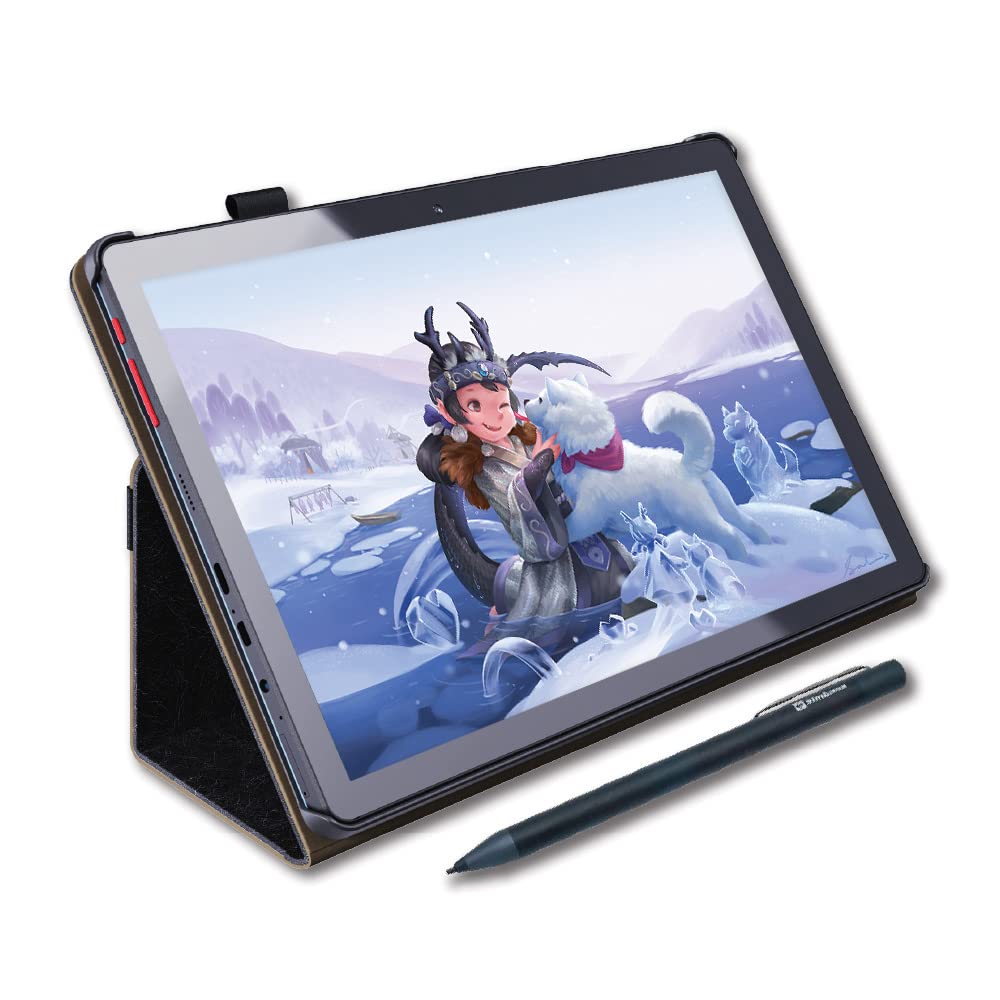
🎨 Unlock your inner artist—anytime, anywhere with PicassoTab X!
The PicassoTab X is a 10-inch standalone drawing tablet powered by a MediaTek quad-core processor, featuring a high-definition IPS screen and 64GB of storage. It comes preloaded with drawing and animation apps, plus four bonus accessories including a stylus pen, case, drawing glove, and screen protector. Certified for quality and safety, it offers versatile connectivity options like WiFi, micro HDMI, and USB-C, making it an ideal, portable creative tool for beginner digital artists and note-takers alike.


| ASIN | B08LPFBPSC |
| Batteries | 1 Lithium Ion batteries required. (included) |
| Best Sellers Rank | #24 in Computer Graphics Tablets |
| Customer Reviews | 4.1 4.1 out of 5 stars (7,046) |
| Date First Available | January 5, 2021 |
| Item Weight | 3.1 pounds |
| Item model number | PCX |
| Language | English |
| Manufacturer | Simbans |
| Product Dimensions | 10.24 x 6.81 x 0.39 inches |
C**S
Smooth pen strokes and excellent customer support
I bought this for my 12 year old who is interested to teach himself animation. It seems to work nicely and the stylus works smoothly. We were really disappointed when the tablet failed to power on one day just 4 months after purchase and very few hours of use on it - not even an indicator light to shownitvwas charging or not. It also happened to be outside the return window - super bummed. I decided to reach out to customer support to see what cpuld be done and the agent was great! He made sure he knew exactlybwhat model it was an gave me step by step instructions to do a reset. The reset was simple and did the trick. I’m very pleased with the quality, preloaded software, smoothness and ease of use and the customer support was top notch. Absolutely recommend!
E**N
Excellent value for the price!
I got this particular device as a first experiment with digital art. I'm a beginner and kind of old, so I wanted something easy to figure out. I also chose it because I use an Android phone and this matches up perfectly. The collection of art tools is just wonderful for me. I've never used charcoal, dry ink, stucco, or any kind of oil paint. This has opened a new world for me and I love it! Everything is easy to figure out, too. I love the size of the pad, the way I can control how much medium shows up by how hard I press, and the nice leather case. I read reviews about it taking a long time to charge, but the charging cord is so long that it's easy to use while it's plugged in. I've had no complaints about this issue. I've shown this to all my friends and everyone loves it. I've only had mine for a couple of weeks but I'm beginning to feel pretty confident with it, already. I think this would be an awesome gift for someone who likes to create for fun.
S**H
Great tablet
This tablet is great! The case has a spot to put your stylus which I love.
M**O
Average at best.
March 22, 2025 UPDATE: haven't turned this on since i first bought it a few months ago and decided to use it today. Charged it all day and it won't turn on. I've maybe used it 3 times total and haven't owned it even a year yet it won't turn on at all. I'm really happy that I finally got a drawing tablet that was affordable for me. That said, I got what I paid for. The added accessories are great, the ease of use is helpful, and the pre-installed drawing apps with upgrade to pro are wonderful benefits of this tablet. The palm rejection would be better named as "palm resistant". The tablet does respond to my gloved-hand, but not constantly. It will draw in the apps or sometimes minimize it, but not so much that I can't tolerate it. I think the biggest down side is the tip of the stylus. It is very difficult to give an honest opinion of the drawing tablet's performance when the stylus tip is blunt and also loosely attached. The tablet tip is also hard, like the tip of a ballpoint pen; but the size of a flat tipped pencil which really gets in the way of the ability to draw fine lines. All of these factors add to the inauthentic feel and performance.. the stylus responds slowly and it does not draw precisely. I will try to draw a line and when I stop in the middle of the line and try to continue the same line, the stylus will not draw where I left off no matter how many times I try. More often than not, the drawing tools in the apps are too big, even when reduced to the smallest point size. That could be a result of the stylus or the tablet, I just can't say for sure because the stylus is designed poorly. I feel like I've wasted the small amount of money this tablet costed because either the tablet or the stylus or both can only create very simple and obtuse artwork. If you're an artist who doesn't really draw a lot of fine line and detail, it might be perfect for you. If you're a young artist just starting out, this might be just what you need, but if you're decades into drawing little details and you're looking to finally fulfill your dream of having a drawing tablet maybe find a sugar daddy who will buy one that you yourself could never afford. I DO believe I would give this tablet a second chance if the stylus was redesigned. My last 5 phones have all been equipped with a stylus that has a very fine point and a rubber tip with supplied replacement tips for when they get too dull.. my phone does a better job than this tablet (I used PenUP on my phone and I did install it on this tablet to determine if I just needed the right software, but the tablet still does just as poorly as with the pre-installed apps as PenUP and my phone far exceeds in quality and performance) but I really wanted something larger that required less zooming and panning to fill in details as well as better palm interference (my hand is the size of my phone so it's not the phone's fault!).
R**K
Very nice!
The apps do crash occasionally, but overall it’s a really lovely tablet! It’s easy to set up and use, it’s lightweight, and it’s very affordable!
C**N
La recomiendo mucho para las personas que les guste animar, dibujar, editar, etc.
C**E
Als Grafikdesignerin und Illustratorin will ich auch unterwegs zeichnen und mobil Online sein ...ich wollte eine echte Alternative zu den teuren Tablets mit Stift und bin dabei auf dieses Tablet gestoßen. Die erste Einrichtig war sehr einfach und intuitiv... ich brauchte an keiner Stelle das Handbuch... es sind schon einige google-Apps installiert, wie z.B. Chrome, Drive, Maps, Play Musik, Play Store, dann noch Soundrecorder, Rechner, Uhr-App, YouTube, UKW-Radio und es gibt eine Sprachsuche via google. Bei guter W-Lanverbindung laufen die YouTube-Videos flüssig und auch die anderen Seiten werden schnell geöffnet. Das Tablet nutze ich nur zum Surfen und für Skizzen und grobe Entwürfe, zum Teil koloriere ich sie grob... aber ich zeichne da nie die finalene Illustrationen, denn diese lege ich in DIN A2 oder A1 an... diese Größe schafft das Tablet nicht. Bisher hab ich zwei zeichen-Apps ausprobiert. Diese Auflösung kann ich in den Zeichen-Apps anlegen und so viele Ebenen habe ich dann zur Verfügung: --------------------- Bei der App "Auto Sketch Book" kann ich max 2819 x 2830 px anlegen = 3 Ebenen 1280 x 800 = 18 Ebenen 1920 x 1080 = 11 Ebenen 2048 x 1556 = 7 Ebenen --------------------- Bei der App "ibis Paint" kann ich max. 4096 x 4096 px anlegen = 0 Ebenen 2560 x 1404 = 15 Ebenen 1280 x 702 = 69 Ebenen A4 (mit 300dpi) wäre 2480 x 3508 = 4 Ebenen --------------------- Die zwei integrierten Cameras haben eine Handy-Qualität... der Bildstabilisator während der Videofunktion ist mittelmäßig ok... es wird einem zumindest nicht schlecht beim Videos anschauen. :-D
C**A
Era un regalo che devo dire è piaciuto molto ed è fantastico
A**T
I bought this tablet well in advance of Christmas and wrapped it up for my son. About two months after I purchased it on Christmas Day he opened it and was over the moon excited! It worked great! Easy set up and (so parent win!) great battery life. Until early March when all of a sudden it wouldn't charge. Life was busy, as it tends to be, and we just kid of put it to the side for another my month. At this point in mid March my son expressed that he missed his drawing tablet and it occurred to me...crap I bought it what 5 months ago.....I am going to have to beg and fight and I will be lucky if this company I haven't ever heard of will even consider fixing it. Well boy was I wrong. I sent an email with basically the story above, bought early used for a couple months and now we can get it to turn on or charge. The customer service was above and beyond amazing. I son was sent a new tablet and he is as happy as can be! The customer service was not just fast and efficient it was pleasant! I will not hesitate to buy any other product they sell and I have already shared this same tablet link with a mom friend who purchased for her daughter. So all in all great product but things can happen, rest assured these guys stand behind their products and super easy to work with.
1**4
When it’s comes to art I’m not a complete beginner but with drawing digitally I am and I didn’t want anything too fancy just something like a portable tablet rather then an entire computer. This drawing tablet is exactly what I was after. For the admittedly cheap price it’s good quality for what you pay. The app they pre install it with is very easy to use and very resourceful in its wide range of pencil types and colouring types. Although the app doesn’t respond sometimes and it freezes and you might have to restart it, it will saveyour work anyways and isn’t much of a bother. I do tend to draw quite fast so that could be a reason it crashes. This tablet is also pre installed with instagram and YouTube so that’s been handy. Also the money you pay for this tablet some of it goes to poverty stricken sick children to help pay for their medical care so that was really nice. I would suggest this tablet if you aren’t too serious about digital art but still want to create good pieces without having to buy an entire computer and drawing tech separately. I would recommend.