
下载应用程序



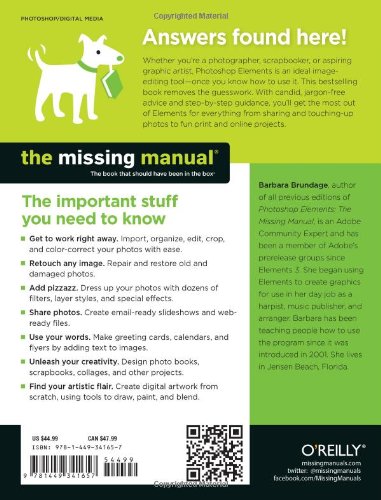
Full description not available
M**T
Very best resource I could find
I purchased this after trying the "Teach Yourself VISUALLY Photoshop Elements 12" book, which I'm sure works well for some folks. After all, I consider myself a "visual" learner. But I found that The Missing Manual has plenty of visuals, and MUCH more information. That information is well-organized (No pun intended, given Elements' Organizer module), and I think the book has something to offer for photographers of all skill levels.A good example is the variety of descriptions and explanations of the Levels adjustment tools. You can get the quick and dirty explanation of HOW to adjust shadows, midtones and highlights, as well as brightness and contrast. But you can also get much more detail about WHAT shadows, midtones, and highlights actually ARE. I've been taking pictures for decades, but never really understood the relative value of each of these adjustment tools, or exactly how each of them worked. The "just tell me how to get it done" explanation comes early on in the Quick Fix area; the book's Retouching section has a much more detailed explanation, for those who need/want it.Even more valuable is the explanation of layers, and how they work. As the book says, this really is the heart of the photo editing program; but you're not going to get very far without truly understanding what layers are and how to use them, and this is the first resource that's given me that understanding and ability.Those are just two examples of how powerful a tool this manual is. After all, knowledge is power, right? The final thing I will say is that Brundage doesn't take herself too seriously, which is a good thing when you're learning about something as detailed and robust as Elements. A little humor goes a long way when you're getting into the meat and potatoes of what elements has to offer.
S**A
To Get the Most Out Of Elements 12, You Need This Manual
For almost four decades I was a high school yearbook adviser. For the past decade-plus I've had to adjust to digital photography. Early on, I easily adapted to Photoshop Elements 2.0. Even when newer versions were released, I stuck with the original program. Fast forward to 2014 and I have a new home computer that won't let me install 2.0; so I bit the bullet and purchased Elements 12.Other than a quick set-up booklet, there was no manual included with the software. That's where "Photoshop Elements: The Missing Manual" comes in. I still believe in the printed page, and I find it simpler to work with a physical copy of a book. Sure, Adobe provides a downloadable pdf file that's 307 pages, but it's difficult to navigate back and forth between the online manual and your open Photoshop program. (I could print this and put it in a binder, but that didn't seem very cost effective.)That's why I sprung for "The Missing Manual." It's just over 600 pages, divided into six parts and 19 chapters and it includes a 16-page index. [In addition, in place of a CD, all Web addresses, practice files, and downloadable software mentioned in the book are available at missingmanuals.com.]For anyone looking to get the most out of Photoshop Elements 12, this is for you. VERY HIGHLY RECOMMENDED
J**E
Not a 1,2,3 manual.
Never having used Photoshop Elements in any version, I ordered this book. It seemed to have been written in a language we can all understand; no robot stuff. However, the problem (not to mention the cost) is that it covers Windows and OSX operating systems on the same pages, often switching from one to to the other. You start reading, not knowing that you are reading Windows (or Mac), then realize that the instruction does not even apply to your OS. To me, It's okay to have instructions on each OS in the same book, but not the same section or page. I do not like fragmented instruction. I will give you an example: I wanted information on how to add a layer from Organizer to an existing background. The index referred me to a certain page. After reading and separating the Windows instructions from the Mac stuff, it abruptly ended by not telling me anything conclusive. I had to refer to another section of the book to continue, and still my question was not answered. It was like searching for an individual bean in a jar full of beans. NEVER write a book with co-existing instructions, then fragment them onto several different sections.In short, if you are looking for a 1,2,3 instruction manual, like I was, this isn't it. I got information presented in a more concise format from the web. I understand that combining information on two different operating systems in the same book probably saves money, but certainly complicates the data.
T**N
Outstanding manual for ANYONE using Photoshop Elements.
This is the third Barbara Brundage PE manual I've bought....one for Elements 5, one for Elements 8, and now this one for Elements 12. I absolutely would not have learned Elements NEARLY as fast without these manuals. Elements 12 has LOTS of changes over the older version 8 I had, so this manual is invaluable in understanding and using the software quickly and effectively. HIGHLY recommended for ANYONE purchasing Photoshop Elements....any edition. Brundage's explanations are clear and simple to read, and the photos with additional descriptions are exceptionally good. I've seen other manuals for Elements and they're not NEARLY as good as the ones Barbara Brundage writes. EASILY a 5-Star rating!
R**S
This is one of the best books in my history of reading numerous computer books
Wow!! This is one of the best books in my history of reading numerous computer books. I am an independent software developer and technical book publisher and needed to do some work on a Kindle Cover page for some of my books. The instructions in this book are so clear, and the knowledge level of the author is top-notch. I already have Photoshop Pro CS5 in my software library, but for the quick fixes, I decided to use Photoshop Elements 12. Barbara is highly skilled in delivering great content. Thank you, Barbara!!
S**M
Well written, entertaining and very thorough tutorial and reference book to unlock the secrets of Photoshop Elements
Photoshop Elements 12 (PSE) is not at all intuitive even for an IT expert. I thought I had wasted my money buying it and was considering buying something else - which would be quite an expense not only for the cost of a worthy replacement but also the wasted investment in PSE.Then I discovered this book and guess what? I found I had everything I needed in PSE - I just needed some expert guidance as to how to unlock its secrets.Barbara's book is a truly excellent piece of work. Her understanding of what PSE is capable of and how to get it done is excellent as is her expert and interesting articulation onto the written page with downloadable examples that you can try for yourself. I am about 85% of the way through this book now and it was worth every penny. Although I've read it cover to cover it is full of hyperlinks that jump from one section to other related sections and it has an excellent Contents and Index all hyperlinked to the relevant blocks of text making it also a truly useful reference book as you can easily find anything. There are also hyperlinks to useful resources on the internet.Also of great value is the great number of embedded TIPS panels - here Barbara has accurately predicted what people would want to actually use PSE for at this point and has intuitively presented just the example you wanted.The ideas in this book led me to seek out more on the internet and has completely changed my view on photography and what makes a really good photo as compared to just an average one.My competency level has risen quite high now but I still need more understanding of layer blend modes - although the book covers these, they are tricky to understand, many are counter-intuitive (with things getting lighter when you'd have expected them to get darker etc) so perhaps the book could give more examples of blending, or perhaps I just need to re-read that section a few more times.Anyway - great book, great author, excellent value for money not only for the book itself but because it enables you to unlock the value in your purchase of Photoshop Elements.
K**R
Great book for learning about Photoshop elements 12
This book is very well written. I have been learning how to use the Photoshop elements 12 programme using this book. I find it better than trying to use the help supplied with the programme as the book explains everything in terms I understand and I can follow the instructions from the book as I go along. It is a very comprehensive guide. However it can become a bit overwhelming sometimes, as there is so much to take in. This is probably down to me rather than the book. I would recommend this book if you are wanting to learn about Photoshop elements 12 and how to use it, as long as you have time to really sit down and go through the basics.
T**E
Having upgraded from PSE 9 straight to PSE 12, ...
Having upgraded from PSE 9 straight to PSE 12, BB's manual was invaluable in getting to grips with the changes. As with the previous editions (PSE 6 and 9) I have bought, I have no hesitation in recommending this edition.
A**R
A very good book.
Very worthwhile book that explains everything is sufficient detail and clearly.I am glad that I bought this book rather that any of the others available.It is also a lot thicker than some of the others, so that should indicate that it has more content.There is no need to read it all in one go , just read the bits that you need each time.
M**N
Four Stars
Takes some absorbing in to your head but patience is rewarded with a very usefull editing system.
TrustPilot
2 个月前
2 周前