We remain fully operational. Our teams are working around the clock to ensure your deliveries continue safely.

下载应用程序


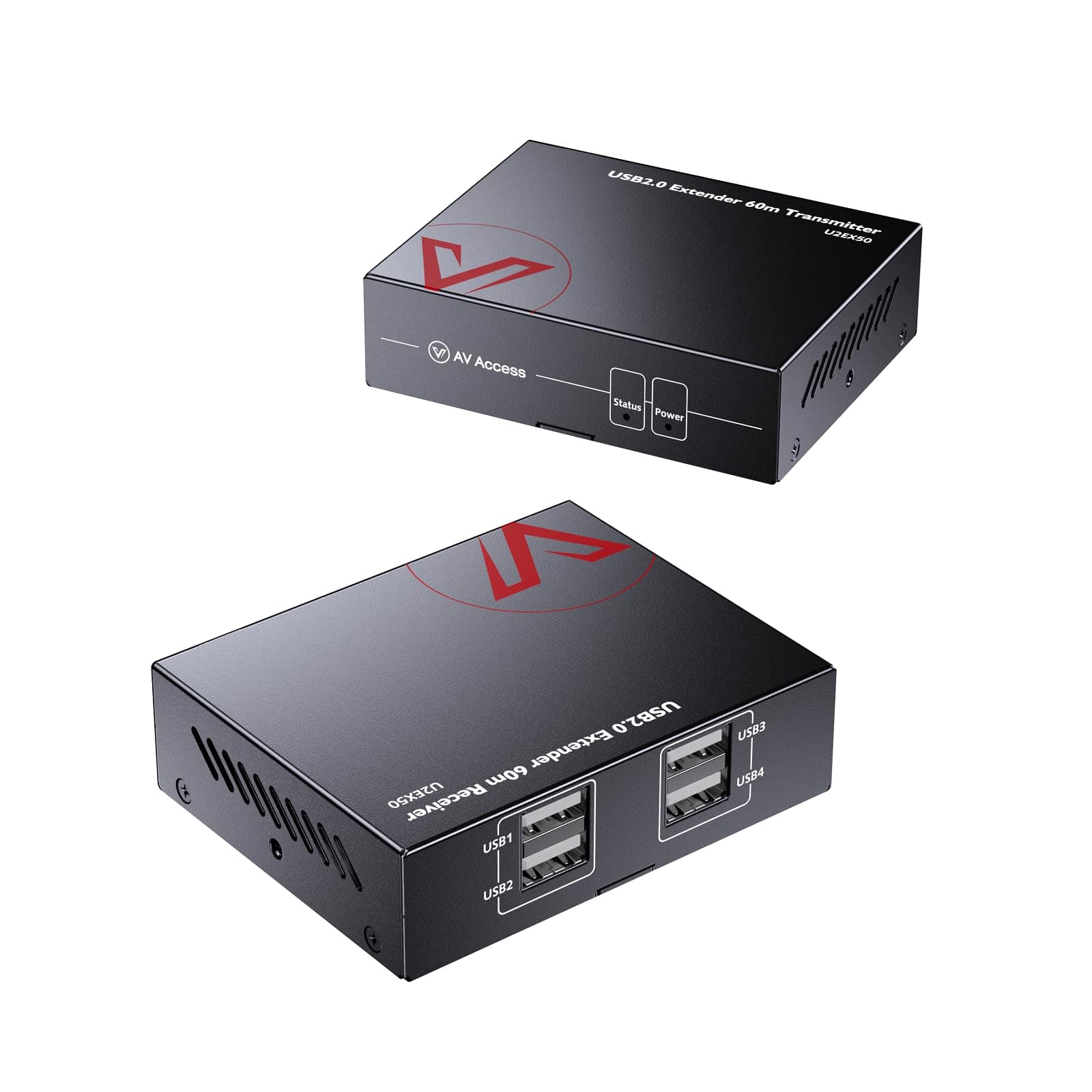
🚀 Elevate your USB game—extend, connect, and conquer your workspace!
The AV Access USB Over Ethernet Extender Kit empowers professionals to extend USB 2.0 signals up to 60 meters via CAT5e/6/7 cables, supporting data transfer speeds up to 480Mbps. Featuring a 4-port USB hub, it enables multiple device connections simultaneously, ideal for webcams, KVM setups, and printers. With plug-and-play simplicity and broad OS compatibility (Mac, Windows, Linux, Android), it delivers reliable, driver-free performance backed by a stable power supply and flexible mounting options—perfect for modern, dynamic work environments.


| ASIN | B01EV33R8S |
| Best Sellers Rank | #27 in KVM Switches |
| Brand | v AV Access |
| Built-In Media | 1x (Transmitter) 1x (Receiver) 1x DC 18V Power Adapter 1x USB-A to USB-B Cable (L=1.5m) 4x Mounting Brackets (with Screws) 1x User Manual |
| Color | Black |
| Compatible Devices | Game Console, Mouse, Printer, Speaker, Webcam |
| Compatible Operating System Family | Linux, Windows |
| Customer Reviews | 4.4 4.4 out of 5 stars (669) |
| Data Link Protocol | Ethernet |
| Data Transfer Rate | 480 Megabits Per Second |
| Hardware Interface | USB 2.0 |
| Item Weight | 0.77 Pounds |
| Manufacturer | AV Access |
| Mfr Part Number | U2EX50 |
| Minimum Required Operating System Version | Mac OS 10.12 Sierra, Ubuntu 16.04 Xenial Xerus, Windows 10 |
| Model Number | U2EX50 |
| UPC | 667673853427 |
| Unit Count | 1 Count |
| Warranty Description | We offer 3-year solid product guarantee to bussiness partners, 1-year and 30-day hassle-free return to end-users. |
J**M
Solid performance, but USB 2.0 limits dual 1080p webcams
This is probably my third time purchasing this product. I bought them for our church to extend two Logi PTZ Pro 2 cameras. While they’re a bit pricey for my specific use case, they’ve been reliable so far, which is ultimately what matters. One important caveat to note: if you plan to use these for webcams (as I did), you can’t reliably stream two cameras at 1080p on a single unit. This isn’t a flaw with the extender itself, but a limitation of USB 2.0 bandwidth. The Logi PTZ Pro 2 typically streams 1080p using MJPEG, which can consume roughly 120–180 Mbps per camera at 30 fps, while 720p uses closer to 35–60 Mbps. Since USB 2.0 has a practical usable bandwidth of around 280–320 Mbps after overhead, two simultaneous 1080p streams often result in instability, flickering, or one camera failing to enumerate properly. In practice, one camera at 1080p and a second at 720p is stable; if you need both cameras at 1080p, you’ll need a separate unit for the second camera, which is what we ended up doing. Your PC will also need either a second USB 2.0 controller dedicated to the second camera or USB 3.0 ports capable of handling the additional bandwidth. Another thing to note: if you need help, use Amazon’s “Get Product Support” option. I wasn’t able to get a response through the manufacturer’s customer service email; using Amazon support was the most effective route. The second unit initially caused the camera to flicker, and while customer support suggested trying a different cable, I ultimately resolved the issue by reterminating both ends of the Ethernet cable the unit was using. TL;DR: This extender works reliably, but USB 2.0 bandwidth limits mean you can only run one webcam at 1080p per unit. Two 1080p cameras require either separate extender units, a second USB controller, or USB 3.0 ports. One camera at 1080p plus one at 720p works fine.
T**1
Works great, plug-and-play, no special software required
Simple set-up, works great, 45 feet between PC and webcam/conference-phone, plug-and-play, no special software required, no stutter in video, no audio lag, does everything I needed it to do. Everything is included. 10/10
S**R
You don’t need a Switch. You need this.
No issue with this, 100ft run of CAT6. No difference in response time. Would highly recommend. Doesn’t run hot or seem to have any problems. Hardcore gamer here so when I swap to the living room from the game room I know I can rely on it. Also works great with wireless KBM. Can’t shut up about it, love showing my friends when they come over how seamless the swap is from room to room. Swap the TV input, pull out my lap desk. I’m set. I keep it plugged in all the time. I can see this being used for more than what I use it for. The possibilities are endless. Didn’t even think about VR until writing this. So I think that’s my next to do. I’ll probably buy more until I fill the house.
T**P
Solid, Reliable, and Saved Me Money
I almost spent way too much on a competitor’s version before finding this one. After digging a little deeper, I saw that this extender actually supports a longer range and has a sturdy metal build—big plus. I’m using it to run multiple laser engravers about 30 feet from my computer, but I’m running them through a 50-foot Ethernet cable with zero issues. Everything works perfectly, including the laser with a built-in USB camera. No glitches, no hiccups, and being able to connect multiple devices at once is a major bonus. Solid performance and great value.
A**R
Device works well, but the provided AC adapter has incorrect specs
I've tried a few other USB2 extension devices and this is the first that works with all of mine. I'm using it for astrophotography between my PC in the house and the telescope outside with a 50m CAT7 cable. I had problems with random disconnects, the entire adapter would go offline for a second, causing all the USB devices to "unplug" and "replug" within 3 seconds. This obviously caused havoc and disruption. After testing for 3 days and the longest sustained connection being 15 hours I swapped the provided 0.5A AC adapter with a 1.5A and so far it's been completely stable. This makes sense, the specs on the device are 500ma per port, and the device itself needs power also. So doing the math, to meet specs each port needs 5v*500ma=2.5W and there are 4 ports so 4x2.5W=10W and lets give an additional 2W for the device itself so the minimum power the AC adapter should be rated is 12W. The provided adapter is 12v*0.5A=6W, which is HALF the power it should be to reliably power everything. I'm powering 3 astro cameras and a filter wheel directly from this device, so it needs the full power spec. I believe that the provided AC adapter was unable to meet the power requirements and the device would occasionally reset or brownout, causing all the USB devices to quickly disconnect and reconnect. The 12v power supply used for this device should be 1A or more. AC adapters are common and cheap, so I have no problem just using a better one than what they provided. It's just disappointing that they don't do the math and provide an appropriate power supply. Previous devices like this that I have tried have had numerous issues working with my devices, some will connect and work fine, others are not detected at all or are intermittent. So far this one has always seen all my devices and works well as long as I don't use it in conjunction with another hub and it has enough power to run it. I haven't tried it with a CAT5e or CAT6 cable, I am using a good quality heavy CAT7 cable.
K**O
Quality Product - Excellent Value For The Money!
I had high hopes for this USB Extender. It worked perfectly for 2 months ... until today 5/11/19. I powered up my Production Server and none of my USB devices were working. It's a nice looking device, arrived well packaged, but alas it only lasted 2 months. My Amazon return window closed 4/15/19, so no chance for return. Since I don't want to reconfigure all of my USB devices over again, I'm taking a risk by buying the same one again. Hopefully, the second one will work. If the second one fails, I'll write back and let you know about it. UPDATE (5/31/19) After writing the above review, I was promptly contacted by AV ACCESS. They apologized for the premature failure of their product. Furthermore, they promptly refunded the full purchase price for the defective unit. I have to say, I was really impressed with their support of their products. My second unit is working fine! It looks like the failure I experienced was just a random failure. So, I've increased their Rating to 5 Stars. This Product is an excellent value for the money! And if anything goes wrong, you can rely on AV ACCESS to make it right! Thank You AV ACCESS!
J**V
Works as advertIzed
Solid construction, and works flawlessly. I use this to connect USB AV devices that needs to be near the TV in the front of my den to a full sized floor standing PC that hosts all my material and functions as my multimedia PC at the back. I have a web camera, and a USB drive that is hooked across this device. Get between 300 to 380 Mbps transfer rate across a 50 foot cat 5 cable from my drive. My use case is that I have a standalone avermedia DVR hooked to the TV and records to WD. 1 TB Drive . I record about a weeks worth of programming I am interested in and then Swap th drive to the USB extender , copy the files over to the pc @ the back and swap the drive back.. The PC Display is also connected to the tv via a 50 foot hdmi cable and have a wireless keyboard/ mouse setup. The only thing I need is o get out my sofa is to swap the drive. The USB device setup is simple. Drop the cat 5 cable, plug the transmitter to a USB Port in the PC, connect with he transmitter & Receiver to the cat 5 cable, connect power adapter and USB devices to the receiver and you are done !
A**G
Works Well - Careful with cable length
There's another review with concerns about the AC adapter that shipped with their unit. My order came with a 12V, 1A (12W) adapter, which should be more than enough to power 4 USB ports at 0.5A. I bought this to extend my USB connection from my desktop PC to stream games in another room. After some issues with other USB extenders adding input lag, I tried this one. My first attempt with an old 25-30 ft Cat5e cable I had still resulted in input lag. A 1 m cable had no issues. I purchased 30ft and 50ft CAT6 cables to test. The 50ft cable still had input lag. The 30ft cable works without any issues. My testing was done with a DS4 controller connected over USB. No actual measurements taken, but subjectively after testing with bullet hell and fighting games, I was not able to notice additional lag added by the extender. I was able to do combos that require links and consistently perform frame traps in Street Fighter V if that means anything to you. If you're worried about 4-5ms of latency, then I would advice trying to keep your cable length down with this product. Otherwise it works great.
TrustPilot
1天前
2 周前