


✨ Light up your stream, own the spotlight! 💡
The Logitech for Creators Litra Glow is a premium USB-powered LED streaming light featuring TrueSoft full-spectrum technology for cinematic color accuracy. Its frameless diffuser provides wide, soft illumination that eliminates harsh shadows, while the patent-pending 3-way adjustable mount ensures precise positioning on any monitor. With customizable brightness and color temperature settings, it’s UL-certified safe for all-day streaming, making it the ultimate lighting solution for professional content creators, streamers, and video conferencing.


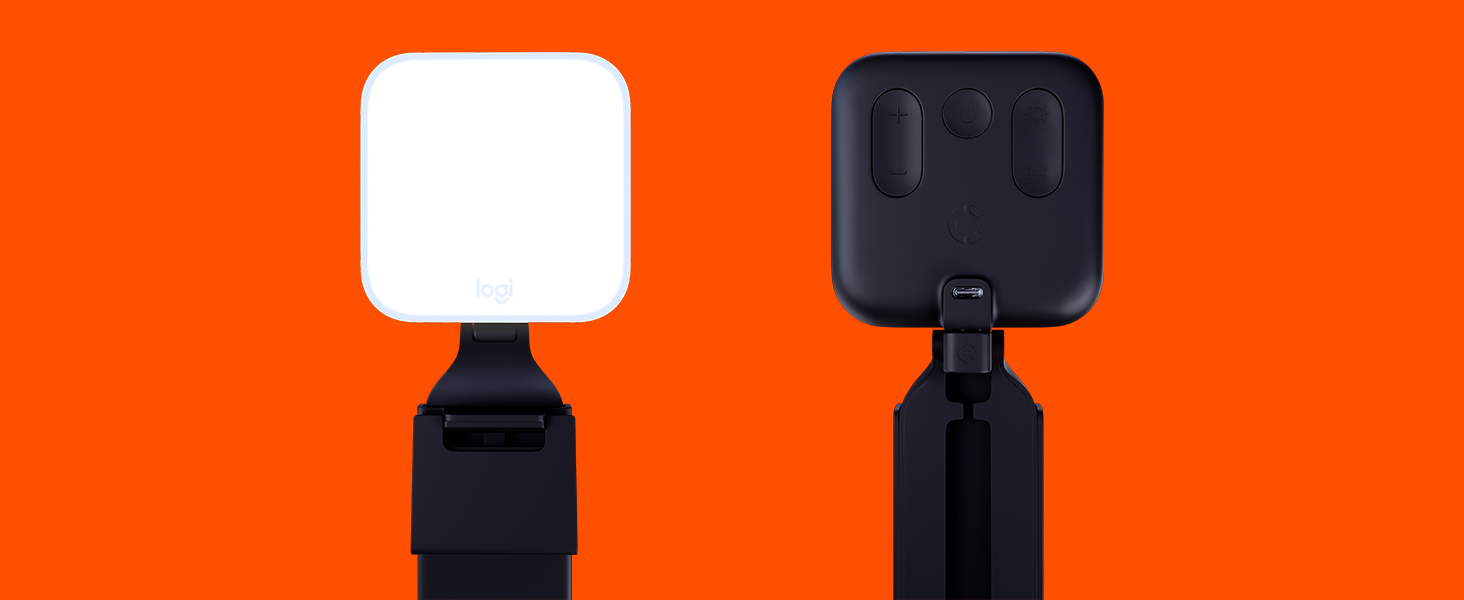


| ASIN | B097QZGRCQ |
| Battery Type | No battery |
| Best Sellers Rank | #4 in Continuous Output Lighting |
| Brand | Logitech for Creators |
| Customer Reviews | 4.5 4.5 out of 5 stars (3,174) |
| Date First Available | January 12, 2022 |
| Item Dimensions LxWxH | 1.71 x 3.56 x 14.41 inches |
| Item Weight | 13.4 ounces |
| Item model number | 946-000001 |
| Manufacturer | Logitech for Creators |
| Power Source | Corded Electric |
| Product Dimensions | 1.71 x 3.56 x 14.41 inches |
| Series | Litra Glow |
| Standing screen display size | 3.6 Inches |
K**R
An exceptional product for a reasonable price
I was a little concerned after reading reviews on this light. Some of the reviews are just incorrect. First, the design: I have a large curved monitor with a small bezel and a curved back panel. I had a tough time finding a webcam that would work with this monitor, so I expected to have trouble installing this light. Not a problem at all. I could put it anywhere on the top of the monitor with no problem. I chose to move it off to one side to create more pleasing shadows while its on. Next: usability. There are buttons on the back for power, color temperature and brightness of the light. Easy to control manually. You can also control the light via software. This is where it gets awesome. You can manually set the light from the software, which is not a huge benefit. On the other hand, you can configure it to turn on when you open specific applications and you can configure the light qualities (color temp and brightness) by application. I only use this light with Zoom and Teams, so I configured it to turn on when those apps are opened. Now I don't need to remember to reach up and turn the light on when meetings begin. I believe the light can also be controlled via a logitech keyboard, but I cannot confirm because I use an Apple keyboard. Finally: light quality. The light panel is about 4"x4". The larger the panel, the softer the light. This light is nicely diffused, but if it were just a bit larger, the light quality would be better. I'm not complaining at all. Just be prepared that the shadows aren't super-soft. Not a big deal for me. Highly recommended!
A**Y
Working Light
The Logitech Litra Glow delivers professional-quality lighting for content creators and remote professionals alike. It performs exceptionally well in backlit environments, providing even, flattering illumination that reduces shadows and enhances on-camera presence. Brightness and color temperature are easily adjustable, allowing precise control for different lighting conditions. The build quality is solid, and the sleek design integrates seamlessly into any workspace without being obtrusive. For anyone looking to elevate their video calls, streaming setup, or content creation, the Litra Glow is a reliable and high-performing solution.
B**T
Very Good Addition for Video Meetings / Streaming
Ambient lights are just not satisfactory for video conferencing. So I bought the Logitech LED Streaming Light to bring my face out of the shadows (so to speak). The device serves that purpose well. It connects to a USB-A port, so is easily used on a computer, but less easily used on iPads or phones. For devices without USB-A ports, I use a power brick. The LEDs do not draw much power so won't draw down batteries by much during use. The light itself is adjustable in intensity and color. The adjustability helps it provide good, even illumination in a way that is not distracting to viewers. Further, the mount is adjustable both vertically and pivoting to angle so as to avoid strang reflections from my glasses or sharp shadowing. I give it 4 stars only because it is a competing light-source to my screen. This cannot be avoided, I think, without illuminating the entire room. Perhaps a backlight would help. Nevertheless, this is a fine product and serves my needs well. Definitely worth the price.
B**R
Well designed and convenient
This light for people who use zoom or teams or FaceTime is very well designed. It could be attached to the top of your screen very easily, without blocking the camera which is usually located at the top of the screen. You can adjust the warmth of the light, the intensity of the light, and it plugged in to a USB a connection. If your computer or laptop only has the smaller USB-C connectors, you'll need to get an adapter. Or perhaps this item is now available with the USB-C cable. There are cheaper items out there, but this one is worth a little extra because it's so easy to use and so adaptable to many different kinds of computers.
S**R
Expensive but so thoughtfully designed, flexible, and extremely useful. Highly recommended.
Frequent pandemic Zoom meetings and classes made clear the importance of lighting. W/o any light, my face was typically dark because behind me are windows or lamps. Ring lights were an improvement, but they reflected in my glasses and the stands they came with took up too much space on my desk, or didn't allow me to get the light in the best position. The Logitech Litra Glow is an almost perfect solution for me. The light it gives off is perfect - not too harsh, doesn't make reflections in my glasses. The quality of the lighting is very adjustable: The light itself has 5 levels of brightness, and 5 levels of color temperature from warm candlelight to harsh blue office flourescent light. I like the middle setting for daytime, and one notch warmer than that for nighttime. The position of the light is also EXTREMELY adjustable: It rests reasonably securely on the back of your laptop screen or external monitor. The light can be raised or lowered, turned left or right, and tilted upward or downward. You can also remove the light from its monitor mount and put it on any tripod, which can be especially helpful for content creators. Also, you can adjust the monitor mount so it can be placed horizontally on your desktop, if you want the light to come at you from a different direction than your webcam, for example. You can use all these features without any app, but there's also an app called Logitech G Hub that you can use to control the brightness, color temperature, and power on/off from your computer. I like using the app because the physical buttons on the back of the lamp are a bit clickly, which isn't bad, but I prefer silent operation, especially if I need to make an adjustment while filming or while on a call. The app also shows you your face using your laptop's internal (or external if you wish) webcam, so you can find the best combination of brightness and color temperature. The light is powered via USB. You can plug it into any USB charger or portable battery, or you can plug it into a free USB port on your computer or computer hub. The light has a USB-C jack on the back and comes with a USB-C to USB-A cable. Since my Macbook has only USB-C ports, I am using a USB-C to USB-C cable (not included) to connect the light to my Macbook. The lamp and monitor mount are made of plastic, of course, but the build quality seems very good, certainly better and sturdier than other lamp I've tried for this purpose. I have only one minor criticism of the Litra Glow light: I wish the lowest brightness setting were a little dimmer. So far, it has not been a problem for me, but some content creators or some people with tricky lighting situations may find the lamp is a bit too bright at its lowest brightness setting. All things considered, the Litra Glow lamp is really excellent and highly recommended, and more than justifies its higher than average price.
J**E
Mal que no se pueda conseguir tan facil en México, es muy buen producto, buena calidad y hablando de iluminación, no deja nada que desear, añadiendo que se puede controlar desde el G Hub, controlar el brillo y tipo de luz, me gustó bastante
P**A
Equipamento fantástico, luz quente e luz fria com regulagem por software alem e claro de um ótimo adaptador.
S**I
I wasn't sure what to expect with clip on lights like these little ones. I use a NEEWER 10 inch desktop ring light and really like it, but was hoping to minimize clutter on the desk and have a portable option for travel. I've tried mini clamp-on 4 inch ring lights that were useless, so I didn't have big expectations for a little clamp on light. I ended up buying 3 different laptop lights to compare, here's my feedback for each below. 1. LOGITECH Litra Glow Truesoft $64.99 PROS: 12 hr full-spectrum LED 5 brightness settings and 5 colour temperatures 5 very simple buttons on the back of the light - easy to navigate by feel when light is set up on monitor. Very easy to adjust by the feel of the buttons alone. Built-in cord organization USB powered No photobiological LED Hazard (UL verified* *see more info on this below). 2700K - 6500K (Kelvin) - this is a good colour temperature range. 250 Lumens max - this is decent as long as you're staying within 1 meter (~3 feet) of the light 360 degrees swivel top, plus angling - handy Tripod mountable - nice to have Truest natural tones - I agree. When I compared this to my 10 in ring light, and 2 other clamp-on lights, the Logitech had the best lighting - very natural looking. It performs as well as my 10 in desktop ring light, even in very low light conditions. CONS: No battery option means you can only use with laptop or desktop - doesn't clip to phone. Slight plastic smell to the light that went away after a few days of use. OPINION: It's worth the investment for good natural lighting that's very simple to use. I'd quickly buy an upgraded model if they were to release a rechargeable battery operated option. Overall this was the best of all three for ease of use, quality of the light. *The UL Verified Mark Program for laser/LED products was created in response to industry demand for an independent verification of laser/LED radiation output level claims by a trusted test laboratory. 2. NEEWER RGB LED Light VL66C $42.59 PROS: 2000mAh battery + USB. 2hr battery time at highest light setting. It charges while using, bonus. 66 LEDs (colour mix) 400 Lux max - it's bright 0-100% dimming 2500-8500K colour temp - this is a great range. Clips to phone, laptop screen, etc. It's very light, only 150g CONS: There are too many buttons options to switch the lighting intensity quickly if needed. Compared to the Logitech (with 5 simple buttons), this one has a whole menu of options to sift through, however the instructions provided are good. It comes with too many extra light features I didn't need, but for some that would be a bonus. I highly doubt I'll ever use the strobe light feature during my work calls. OPINION: I decided to keep this one as an option for travel or using with my iPhone on the go. Adjusting the light brightness and temperature can be a bit annoying, but once you get it right to your needs, it will stay on that setting until you change it. At the end of the day I like it and decided to keep it. 3. WELLCHOME Video conference light ~22.99 PROS: Very low price 3 colour temperatures, 10 brightness levels. USB only 120 LEDs 800 to 10,000 LUX - very bright 360 rotatable, 160 degree tiling CONS: The adjustment buttons are on a dangle attached to the cord, can be annoying as the cord often lands behind the monitor that you attach it to. No battery option means you can only use with laptop or desktop - doesn't clip to phone This is not a well known company. The product claims haven't been independently verified by UL to confirm the output levels or that there's no photobiological risks associated with long hours of use of the product. Claims to be a Canadian company but they fail to disclose that it's made in China. OPINION: I decided to pass on this one because it's not independently UL verified for safety. This is an area that the company may wish to consider having verified.
M**N
Es el producto que pedí y llegó en tiempo y forma.
W**.
I also have an Elgato Key Light Mini, so will offer that comparison: +This is cheaper! +The buttons on the back are simple, big and easy to use for quick adjustments. You don't need an app! +No fuss worrying about battery charge/health/maintenance (it really is a bizarre combo for the Mini that it has battery powered "portability", but also it needs a wi-fi network to connect to the app for proper functionality ... where would you put it that you have wi-fi but not power? And before you say it, no, phone hotspots *don't* work) -It doesn't get quite as bright as the Mini. It'd be fine for most indoor use, but I think a problem if you're competing with a strong backlight in the frame. 2 of these will reliably do the job. And having 2 lights is better anyways, for proper lighting of a human subject you *want* a key light and a (not as bright) fill light.



