We remain fully operational. Our teams are working around the clock to ensure your deliveries continue safely.

下载应用程序


🚗 Navigate Like a Pro, Arrive Like a Boss
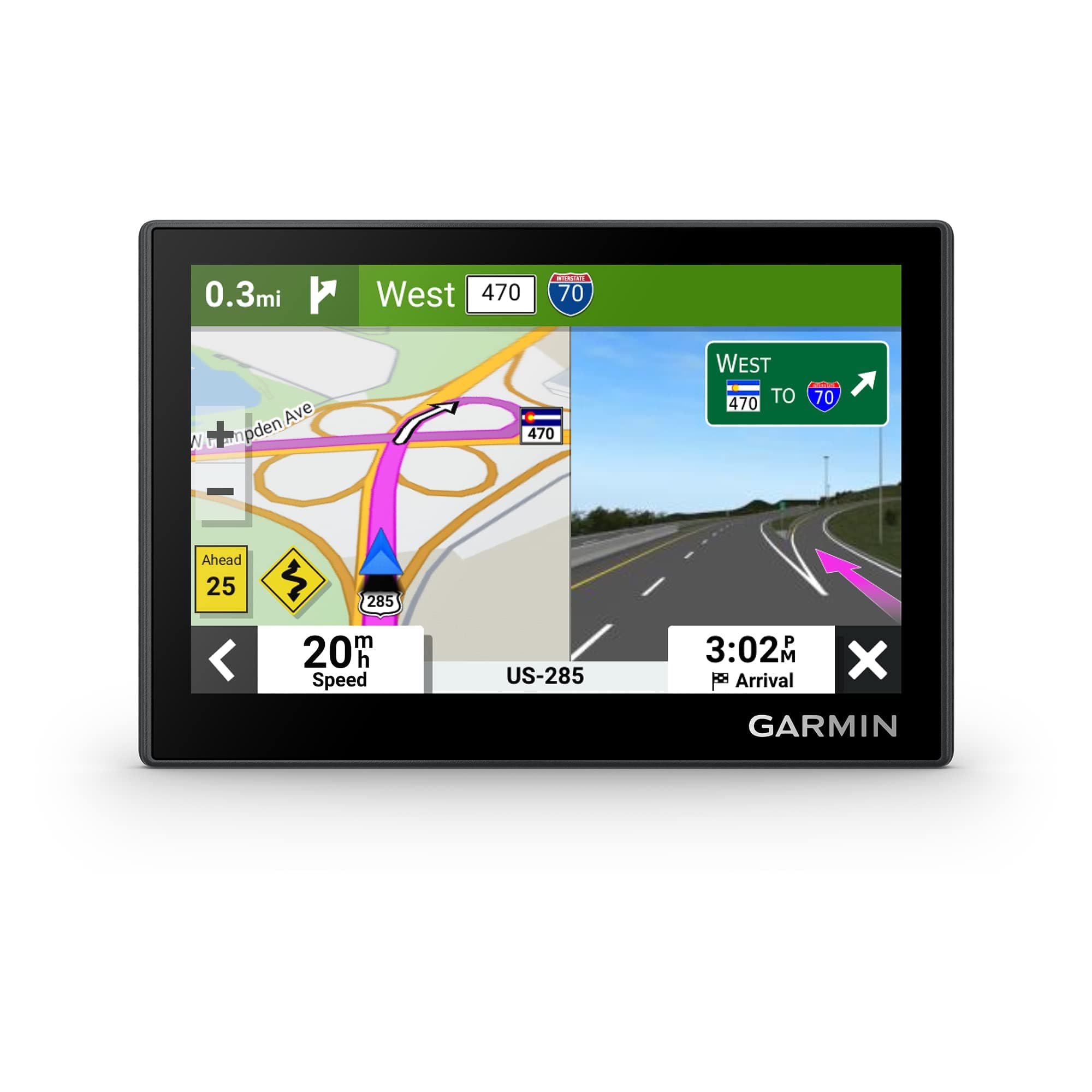
The Garmin Drive™ 53 is a sleek, 5-inch GPS navigator featuring a high-resolution capacitive touchscreen, 16GB of detailed North America maps, and smart driver alerts for enhanced safety. It integrates Tripadvisor ratings for top travel spots and supports Android and iPhone connectivity, making it the ultimate companion for stress-free, informed road trips.


| ASIN | B0BSVQ37CB |
| Additional Features | Touchscreen |
| Are Batteries Included | Yes |
| Audio Output Mode | Stereo |
| Battery Average Life | 1 Hours |
| Best Sellers Rank | #915 in Electronics ( See Top 100 in Electronics ) #2 in GPS Units #8 in Electronics & Gadgets |
| Brand | Garmin |
| Built-In Media | Garmin Drive 53, vehicle suction cup, vehicle power cable, USB cable and documentation |
| Compatible Devices | Android, iPhone |
| Compatible with Vehicle Type | Car |
| Connectivity Protocol | Bluetooth |
| Connectivity Technology | USB |
| Control Method | Touch |
| Customer Reviews | 4.3 4.3 out of 5 stars (1,717) |
| Display Type | touch screen, glass |
| EU Spare Part Availability Duration | 5 Years |
| Human-Interface Input | Touchscreen |
| Item Dimensions L x W x H | 4.97"L x 3.33"W x 0.67"H |
| Item Type Name | Vehicle GPS |
| Item Weight | 2.43 Ounces |
| Manufacturer | Garmin |
| Map Types | North America |
| Memory Storage Capacity | 16 GB |
| Model Name | Garmin Drive™ 53 |
| Model Year | 2023 |
| Mounting Type | Dashboard Mount, Windshield Mount, found in image |
| Operating System | Proprietary (Garmin) |
| Resolution | 480 x 272 |
| Screen Size | 4.97 Inches |
| Supported Satellite Navigation System | GPS |
| Touch Screen Type | Capacitive |
| UPC | 753759313494 |
| Warranty Description | 1 year limited warranty |
R**D
Great little auto gps
So, first, I'm not a Garmin fanboy. On the other hand, I am. I own like 5 now with this one for my car. I've tried knock off brands and they're not the same, not even close. Don't waste your money. Just get the Garmin. This one, just like all, needed a couple of updates. My Mac took the updates and I had it done in a half hour. Very good tracking, bright screen, easy to see. Maps included some newer streets, which was needed. I wasn't sure if I was going to be ok with the small screen, and it actually does well in my Crosstrek. For the money, it can't be beat. Very intuitive, but I know Garmin already so this is a breeze. I'm very pleased.
L**Z
Great GPS
Love my Garmin! In all the years I've had it, it never gave me issues. Was easy to set up and install, screen is great quality picture, very durable! I think the screen size is perfect not too big or too small!
P**Y
Refurbished And Works Great
I ordered this because I already have a Garmin in my van. I thought I would be able to use the app for it like I do with the van, but this one does not have Bluetooth. I didn't realize that when I ordered it. I am disappointed in that. The app is great because I can just easily key in the place I want to go and it sends it to the Garmin. This is a 5" screen and it seems so much smaller than my 7". The screen is clear though. The main reason I wanted this instead of using my phone for directions is because it shows how fast I am going and it is easier for me than looking at the speedometer. My subdivision is very strict on the 15 mph speed limit and they do have patrols giving tickets. The speed on the GPS is about a 1 mph off from the radar screens, so it works for me. This is a refurbished Garmin. It looks new. It was easy to setup. I did the update which took about a half hour. It is a touch screen. It works well. I am happy with it and I saved quite a bit by getting the refurbished model.
T**R
Great GPS Unit
We've used Garmin GPS Units for years and this one was a welcome upgrade. Compact, easy to use and works great in our car. Map update was quick and easy.
S**S
Works great, good value.
Works great, clear screen, good value. Just dont leave exposed to elements in hot car, put away out of sun, cause sometimes does not work till cools down.
P**R
Garmin is not purchaser friendly
I have given this only one star, not because of any Amazon issue, but because Garmin won’t even support its own brand-new product. The essence of the story is that I have had 3 prior Garmin Drives for my car over more than 20 years and I have loved them. They give me much more information than my in-car GPS, and the graphics are better. It mounts easily and unobtrusively. I bought the new Garmin Drive 53 expecting various improvements. Garmin uses “Garmin Express” to update the device and download current maps. This commonly takes more than an hour. After 3 attempts, each time with it abruptly ending with the message “An error has occurred…; but with no error number. Garmin will not let me talk to a human without me paying them something, and the Chatbot is an example of poorly conceived AI. Thus, I have had to return this new Garmin Drive and now find that Garmin had prevented me from updating my previous one which I have used every day. I hope the company management realizes what their AI is doing to them ---Follow-up a week later of the above. Garmin still has no interest in helping with their products unless they are paid. It was a brand new product. Thanks to Amazon, I got my money back. I hope Amazon is active in following up on Companies that charge to support their brand new products.
M**Y
Better made and simple to operate.
Better and made simple to operate. Since I got hold of my first GARMIN, I will always replace with another when needed. ( Like every navigation device they will let you down once a while might take you around and around. If there is a question just tell them "You went walk about" ).
J**B
Built for the Road
I start this by saying I purchased a Garmin Drive 53. And it replaced my Garmin Nuvi 1450 which treated me well. It died a peaceful death. Not having a Gamin made me feel naked. I reviewed the inventory on Amazon. My first choice was the Garmin Drive Smart 66. It appeared there wasn’t anything it couldn’t do. I will comment about this later. The Garmin Drive 53 proved to be a real change from my old Nuvi 1450. I especially liked the navigation voice which was clear and precise. A real improvement. The new unit fit the dash exactly like the old one and everything just worked The suction cup didn’t need moisture. And the new one stuck to the windshield like it had been glued. A real improvement. The final words on this new Garmin are sterling. A great build and a great price. I recommend to download the owners manual annd take advantage of everything built into it. It's also available on the GPS. Now a comment on the Garmin Drive Smart 66 This was my first purchase because I was impressed with the many features. It took time to work through them. And then this popped up. A gray cloud strip covered a portion of the map. Not good. I returned the unit to the seller and Amazon applied the credit. Both operations were flawless. I now have experience operating a well built basic GPS vs a well built GPS with more features. Driving a vehicle requires your full attention. If you are able to talk on the phone, get a weather report, dial in music and maybe get the news, one must weigh these advantages in relationship to the attention needed on the road. Your call!
A**R
Touch screen is sensitive and device is easy to use
A**R
Be very careful and check your purchase within return time as the unit we received was for USA only. It cost a further £80.00 to buy a Europe SD card. Then the sat nav worked correctly in UK! We have had Garmin equipment previously and as with this one we were very pleased with its operation. I don’t know who was at fault here but it left a bad taste!!! Check quickly on receipt!
C**A
Excelente produto
A**X
Mex USA y Canada mapas cargados y con actualizaciones
B**E
Garmin never disappoints. Easy to use and very reliable.