
下载应用程序



🚀 Elevate your server game with silent power and effortless scalability!
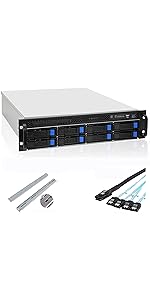
The RackChoice 2U 8-bay hot-swap server chassis supports Micro-ATX and Mini-ITX motherboards, featuring eight 2.5"/3.5" SAS/SATA hot-swap bays, four quiet PWM fans, and sliding rails for easy rack installation. Designed for high-density storage with efficient cable management via Mini SAS SFF-8087 connectors, it supports standard ATX power supplies and low-profile cooling solutions, making it an ideal choice for professional NAS or RAID setups.


| ASIN | B0C95JRCG8 |
| Best Sellers Rank | #668 in Computer Cases |
| Customer Reviews | 4.1 4.1 out of 5 stars (22) |
| Date First Available | June 23, 2023 |
| Item Weight | 13.2 pounds |
| Item model number | 208RM-6GB |
| Manufacturer | rackchoice |
| Product Dimensions | 21.5 x 19 x 3.5 inches |
C**Y
With some guidance, this can be a very good rack mount NAS chassis
I purchased this 2U 8-bay chassis on January 22 and finally got everything installed and mounted today. Several lessons were learned along the way. If you're in the market for an 8-bay 2U chassis, this can be a very good choice if you pay attention to the following: 1. Do not install desktop hard drives because they will not be recognized and they will not be powered up. Only install NAS hard drives. I'm using eight Seagate Exos Enterprise hard drives. 2. The backplane uses two mini-SAS SFF-8087 connectors instead of SATA connectors. This is actually wonderful because each connector supports 4 SATA ports, which reduces cable clutter since only 2 mini-SAS cables are needed. The unit comes with two SFF-8087 cables, each of which terminates in 4 SATA female ports. 3. If your motherboard has SATA ports at the back of the board that are connected at a right-angle rather than facing up towards the sky, then those ports are NOT USABLE because they are too close to the chassis fans. This did not matter to me because I chose to install a Syba 8-Port SATA card that uses two mini-SAS SFF-8087 connectors (https://www.amazon.com/dp/B07NFRXQHC). We will need to buy our own SFF-8087 to SFF-8087 cables. I chose a pair of right-angle cables (https://www.amazon.com/dp/B08C2GN2KF) but straight-angle will work as well. Hence, only 2 cables with a single connector on each side are needed to connect 8 drives. 4. I'm using a micro-ATX motherboard (https://www.amazon.com/dp/B0BZTB87BY). After installing 8 or 9 risers, the motherboard installed easily and lined up perfectly with the cutout of rear IO panel. Although we can use full-size ATX power supplies, I chose a BeQuiet 600W SFX power supply (mounted upside down so the PSU fan will exhaust through vent holes at the top of the chassis; https://www.amazon.com/dp/B07ZTW7TSW). This particular power supply (a) has a SFX to ATX mounting bracket that is necessary, and (b) has a molex cable that is long enough to reach the molex ports on the back plane. I initially tried a different power supply (Lian Li SFX) that failed in both departments. 5. The 4 built-in chassis fans are surprisingly quiet. They are 4-pin PWM fans that I've connected to fan headers on the motherboard. The fans can also be connected to 4 fan headers on the backplane, but the backplane will run them at full throttle all the time (backplane will not regulate fan speed). I had this unit sitting on a table about 2-3 feet from my ears for 3 weeks with no disturbing noise at all -- and I'm quite sensitive to fan noise. 6. Because this unit is mounted in a rack and there's no keyboard, mouse or monitor locally attached, I purchased a Geekworm X650 (https://www.amazon.com/dp/B0C4TPNF7J) along with a Raspberry Pi Compute Module 4 (https://www.amazon.com/dp/B0CLVV545C) to plug into the Geekworm. This provides full remote KVM capability through any web browser. Geekworm X650 runs PiKVM V3. I opted to install the operating system on an eMMC module that came on the Compute Module 4. Now I can start, stop, reboot, and interact with the rack mounted chassis from anywhere in the house or the planet! 7. Obviously we cannot install a liquid cooler for the CPU. I chose the Noctua low-profile NH-L9i-17xx air cooler (https://www.amazon.com/dp/B09HCHYMJM) for my Intel i5-13500 that has a 65W TDP rating (https://www.amazon.com/dp/B0BQ6CFDCX). Not only is it quiet, it does a great job of keeping thermals under control (28-30C idle temperate with chassis cover closed). With this Noctua cooler, there is enough space *between* radiator fan and chassis cover to allow built-in fans to blow that air to the rear. 8. Rack Rails. Let's talk about them rails... This was the only frustrating part of the experience, but as you can see from the photos, the rails finally went in! First, we can lengthen the rail guides as shown in the first photo. This allows the rail guides to be mounted to the interior or exterior of the rack (interior would be better). Next, when sliding the chassis onto the rails, the chassis hit against the upper and lower lips of the rail guides and failed to go in. It seemed as if the rail guides were just a tiny bit too close to each other, but with the help of a friend (who is a professional installer), we managed to pull each rail guide slightly outward with our hands (away from the rack), which was sufficient to recess the chassis fully into the rack. The final result is shown in photo 3. I'm really quite happy with the final result: 1. Build quality of the chassis is excellent 2. Every component I wanted to install got installed quite easily 3. Chassis cover is perforated in one corner for the power supply fan vent 4. Fans are quiet (I was afraid that cheap noisy fans would be included, but we got some good fans) 5. Backplane uses mini-SAS SFF-8087, which saves cables and cable clutter 6. Airflow is quite good as long as a low profile CPU fan is installed 7. There is space near the front for two 2.5” SATA SSDs, which I’ve occupied with two 1TB SSDs I’m running TrueNAS Scale on this system with 8 Seagate Exos hard drives in RAIDZ2 and two mirrored 1TB SSDs. TrueNAS Scale has been running flawlessly for over 3 weeks.
D**.
Awesome Product
No idea what people are talking about when it comes to the rail hardware. The rail hardware is just fine if you "don't" over tighten. The screws are stainless steel so if you crank it down, yes it will sctrip the screw threads. You only need to make it snug to connect the rails to the server rack you are using. as for the Drive trays, I've not experienced any issues they slide in and remove decently. There will be a slight snug fit but this is needed to make sure the SAS/SATA drives align properly with the backplane. if you pay attention to how the hardware works, no issues will be had. this case is 100% satisfactory as a great way to add a NAS to any network or a system with redundant storage with a decent motherboard that supports raid or with a raid controller.
T**.
Perfect for a home or small business NAS
Good: More than enough drive bays for a small NAS/Media server Fits ATX components, so no loud and expensive server grade parts Fits ATX power supplies. There's a hole in the top of the case to vent a standard ATX power supply. Only 3 Molex needed to power midplane for drives Fans are quiet and flow well when run at a slower speed. Bad: Just a little too long. I have a fairly standard home rack (NavePoint 12u enclosure) and the included rails are too long, and the case hangs out the rear of the rack a little. I solved the rail issue by mounting a 2u rack shelf to the rear rails in my rack, and using that to support the rear of the case. Regular cage nuts and screws support the front. Not much clearance for side facing SATA ports. There may be enough, but it gets very tight. Included cables are difficult to connect. Overall, a great case for a large NAS or virtualization server for the home or small business.
E**D
Motherboard standoffs stick past case surface
I bought this for a 3rd system in a rack. My biggest problem with it are standard ATX motherboard standoffs. The screwholes for the standoffs go through the bottom of the case (think riv-nut, or welded-nut, on the floor of the chassis) that are fully drilled out past the bottom of the chassis. So when you fully seat the ATX Mobo standoffs, the screw portion will continue past the bottom of the chassis and starts hitting the server below. This makes it difficult to slide the chassis out without bringing the one below with it (unless locked into place). Even when it doesn't bring the chassis below it out as well, it'll leave scratches in the top of the lower chassis and makes both chassis hard to get in and out as they now get caught on the standoff threads. Otherwise I like the design. The front plane for the 8 drives takes 3 molex power connector inputs, has 4x4-pin fan headers so any fan will go in (i'm not sure these will actually vary the speed). The four fans that come in push enough air for cooling the chassis. My ATX power supply fit perfectly. There's even also several places to route cables though. Small warning, there's no rubber guards at all for the cable passthroughs if you're worried about the cables being chaffed. I'd recommend a couple layers of duct tape around the through holes, or get some automotive vacuum line and razer one side open so you can put it around it if you have any laying around. Where the motherboard is placed is also right up against the chassis fan mounting point. If your motherboard has sata connectors that are 90 degrees off the board (go out to the side), fat chance of getting those connected. If you have sata connectors that plug straight up and down, you're golden. The rails are fine, no complains with them personally, but some notes. Like the Rosewill (Newegg house-brand) 'universal' rails, these will have to be mounted on the "inside" of the rack. You'll be putting your rack nuts on the far-front and far-back, and the screws will go from the inside of the rack out into the rack nuts. I've seen people complain about this with the aforementioned Rosewill rails, but all i've used are those, the rails from this chassis, and some iStarUSA sliding rails and all of them are mounted in my Blackbox rack the same way. When comparing this case to the 4u Rosewill 12-bay HotSwap chassis, this one is /much/ smaller in depth and still packs 8 3.5" drives in 2u's. If price isn't an object, that's 16 drives for the same 4u space (minus the standoff screws problem above). Otherwise though they're similar in price. I bought this over the Rosewill as my rack is running out of space. And no, I have no affiliations with Rosewill/Newegg, this company, nor IStarUSA, nor any other product. I just buy things man.
S**Y
It is the excellent quality server chassis. No issues what so ever were found. The only problem was, just because the server lives in my living room, the noise of those included fans. They were so loud that i had to replace them. I've bought four Be Quiet Pure Wings 80mm PWM fans and now it is like night and day. The noise level now is even less than a regular desktop.