We remain fully operational. Our teams are working around the clock to ensure your deliveries continue safely.

下载应用程序



⚡ Plug into power, speed, and style — your all-in-one USB-C command center!
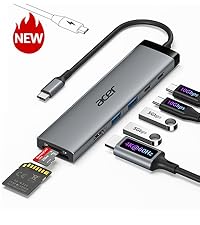
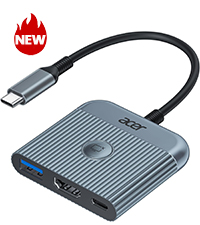
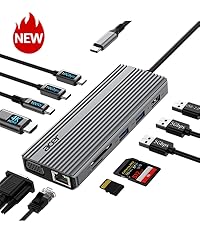
The Acer 7-in-1 USB-C Hub is a compact, aluminum multi-port adapter that transforms a single USB-C port into seven essential connections, including 4K HDMI output, dual USB 3.1 ports, SD/MicroSD card readers, and a 100W PD charging port. Compatible across major OS platforms, it delivers fast 5Gbps data transfer and reliable power delivery, making it the perfect productivity booster for professionals on the go.




| ASIN | B0CF224WX9 |
| Additional Features | 5Gbps Fast Data Transfer, Heat Resistant, PD 100W Fast Charging, Plug and Play |
| Best Sellers Rank | #8 in USB Hubs |
| Brand | acer |
| Color | Space grey |
| Compatible Devices | Card Readers, Desktops, Laptops, Smartphones, Tablets |
| Customer Reviews | 4.6 4.6 out of 5 stars (5,533) |
| Data Transfer Rate | 5 Gigabits Per Second |
| Enclosure Material | Aluminum |
| Hardware Interface | HDMI, MicroSD, USB 3.0, USB Type C |
| Item Dimensions L x W x H | 5.1"L x 1.4"W x 0.7"H |
| Manufacturer | acer |
| Mfr Part Number | ODK360 |
| Minimum Required Operating System Version | ChromeOS 137, Mac OS 12 Monterey, Windows 11 |
| Model Number | ODK360 |
| Number of Ports | 7 |
| Operating System | Chrome OS, Linux, Mac OS, Windows |
| Total Usb Ports | 7 |
| UPC | 195133227919 |
| Warranty Description | 1 Year Manufacturer |
J**R
Beyond Impressed
I recently picked up the Acer 7-in-1 USB-C Hub and I have to say, I am beyond impressed with its performance and functionality. As someone who frequently uses a laptop for both work and personal tasks, this little device has completely changed the way I connect my peripherals and external devices. What I Love: Compact Design & Build Quality: Despite packing so many ports into such a small form factor, the Acer USB-C Hub is surprisingly lightweight yet feels sturdy. The sleek aluminum finish not only looks professional but also helps keep things cool during extended use. It’s incredibly portable and fits easily in my bag alongside my laptop. Wide Range of Ports: This hub includes 7 different ports, which is a dream for anyone who needs to expand their connectivity. It includes: HDMI port (4K support) for connecting to external monitors or TVs, USB 3.0 ports (two) for fast data transfer or connecting peripherals like keyboards, mice, or external hard drives, SD and MicroSD card readers (perfect for photographers or videographers), Ethernet port for reliable wired internet connections (a must for stable work-from-home setups), USB-C power delivery port for charging your laptop while using the hub. Whether you're using it for office tasks, media consumption, or creative work, this hub has you covered. Plug & Play: I’m a huge fan of how easy this hub is to use. There’s no need for extra drivers or software. Simply plug it into your USB-C port, and it’s ready to go! My MacBook, Windows laptop, and even my tablet all recognized the device instantly without any issues. Fast and Stable Performance: I’ve tested the data transfer speeds using both USB drives and external hard drives, and the speeds are consistently fast. The HDMI output worked seamlessly, delivering crisp 4K video to my TV without any lag or glitches. The Ethernet connection is a lifesaver when I need a stable internet connection for remote work or video calls. Affordable Price: Considering the versatility and quality, the price of this hub is a steal! Many hubs in this range only offer a handful of ports, but Acer’s 7-in-1 gives you a full suite of connectivity options at a great value. A Couple of Notes: Heat Management: During extended use, the hub can get a little warm, especially if you're using the HDMI output or transferring large files. However, it never got hot enough to be a concern, and it hasn’t impacted performance at all. Compatibility: While it works perfectly with laptops that have a USB-C port with power delivery, make sure your device supports it for full functionality. I haven’t had any issues with my devices, but it’s always a good idea to check your specs. Final Verdict: The Acer 7-in-1 USB-C Hub is an absolute game-changer for anyone looking to maximize their laptop’s connectivity. It’s a perfect solution for professionals, creatives, and anyone who needs to connect multiple devices without the clutter of extra adapters. I highly recommend it to anyone who wants to simplify their tech setup while maintaining top-notch performance! If you're looking for a versatile, high-quality USB-C hub, this is the one to get.
R**.
Great adapter
Great adapter, really comes in handy and very efficient and easy to use. Material is pretty durable and the sleek design is easy to transport anywhere. I have used it and it works great with my laptop.
K**R
This hub worked when others did not
I have an Asus Zenbook that's at least 7 years old (ancient by technology standards) and it has a very problematic USB hub. I love my laptop. It functions well except for the hub. I usually get OEM peripherals for my electronics. (I use PC and Android. I'm not a Mac/Apple user.) In the case of the USB hub for my Zenbook the Asus replacement hub is garbage with a 1 star review on Asus website with warnings not to buy because of how fast it stops working. The Asus hub I purchased 3 months ago stopped working after using it 3 or 4 times. That's unacceptable in my opinion. I have tried other brands including Belkin, Anker and 2 others that I do not remember. None of them would deliver power to my laptop despite claiming they would. So I decided to try this hub. I need an external hub for the multiple USB ports because the Asus has no ports on the Zenbook itself, and power delivery (in a perfect world when everything works properly) should also be able to go thru the hub to charge the laptop. On my laptop, there's only one USB-C port to connect either direct power supply or a hub. You can't have both connected at the same time unless the hub allows power transfer to laptop, which the other brand hubs that I tried wouldn't support that power transfer, much to my frustration. This hub is the first hub that I've tried that will actually power my laptop. (I also switched my power supply cable to a Thunderbolt, so the combination of the new cable with this hub works.) I use a wireless mouse with a dongle that needs to be plugged in. I have a digital voice recorder that plugs in directly via USB-A to transfer files to the laptop. I use SD cards in my camera and MP3 player that I need a hub to transfer that media onto the laptop. This hub will allow all of that. Every port works that I have tried on this Acer hub and this hub does the thing that the other hubs failed to do on my laptop. The power transfer was the big issue for me and this Acer hub solved the problem that several others including the OEM, Asus, failed to do. Because of how many months I have been dealing with the power supply problem, hubs not delivering what they promised and this being the only hub that did work, I rate this product at 5 stars. It's less expensive than the Asus hub that stops working immediately after purchasing. It has more ports than the Asus hub with the extra SD card reader that the Asus hub doesn't have. It's a heavier duty outer shell compared to the Asus. The cord is thicker and better protected compared to the Asus, so it reduces the chance for stressing or bending the cord in a way that could break the wires inside or break the connector away from the wires. It's just a better design overall, when compared to the Asus hub. I am extremely satisfied with this Acer hub and I would recommend it since it did the "impossible" task that no other brand could do for me. 5 stars, indeed.
A**.
good product
In general, it works well, sometimes there are disconnections, I don't know why, a good product for the price.
L**N
Très bien, de qualité
A**K
This 7-in-1 USB-C hub is super convenient and works perfectly with my laptop. All the ports function well I’ve tried HDMI, USB, SD card, and everything runs smoothly without lag. It’s compact, easy to carry, and a great solution for expanding connections. Excellent value for money.
M**L
Este aparato me ha salvado de llevar mi portátil en mis viajes para vaciar mis tarjetas en un disco duro, en bikepacking el peso cuenta y si documentas los recorridos, necesitas liberar tus tarjetas. Funciona perfectamente en Android si es compatible con OTG, en mi caso también he tenido que comprar un software para abrir desde em móvil los discos en ExFat y Fat32. Ahora si, paso la información súper rápido.
H**N
Good quality
H**C
This Acer USB-C hub works exactly as expected. The 4K HDMI output is clear and stable, and the additional ports make it easy to connect multiple devices at once. The PD 100W pass-through charging keeps my laptop powered without any issues. Build quality feels solid, setup was plug-and-play, and performance has been consistent. Excellent value and a great addition to any workspace.
TrustPilot
1天前
1 个月前