
下载应用程序


客户支持

Desert Online General Trading LLC
Warehouse # 7, 4th Street, Umm Ramool, Dubai, 30183, Dubai
下载应用程序
客户支持
Desert Online General Trading LLC
Warehouse # 7, 4th Street, Umm Ramool, Dubai, 30183, Dubai


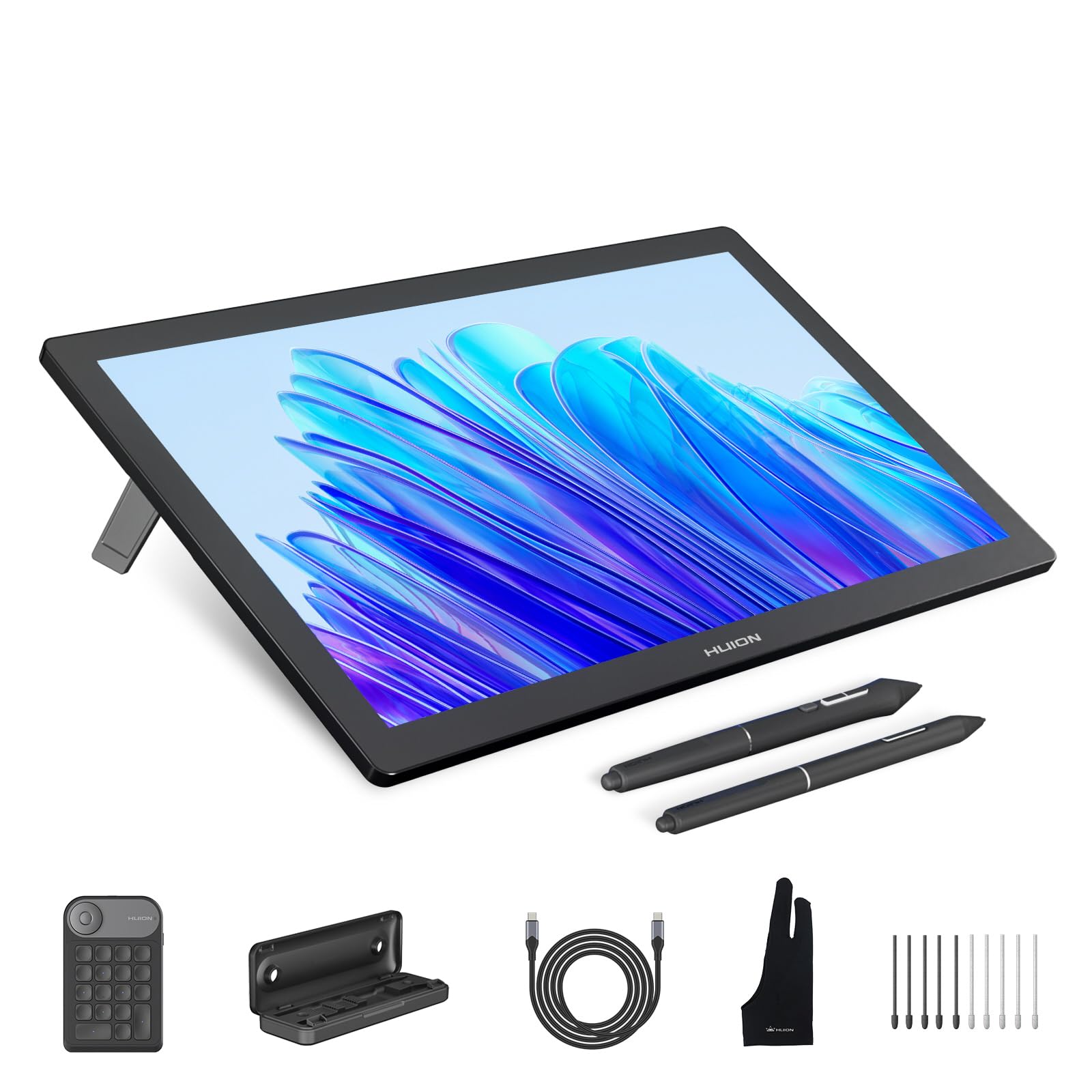

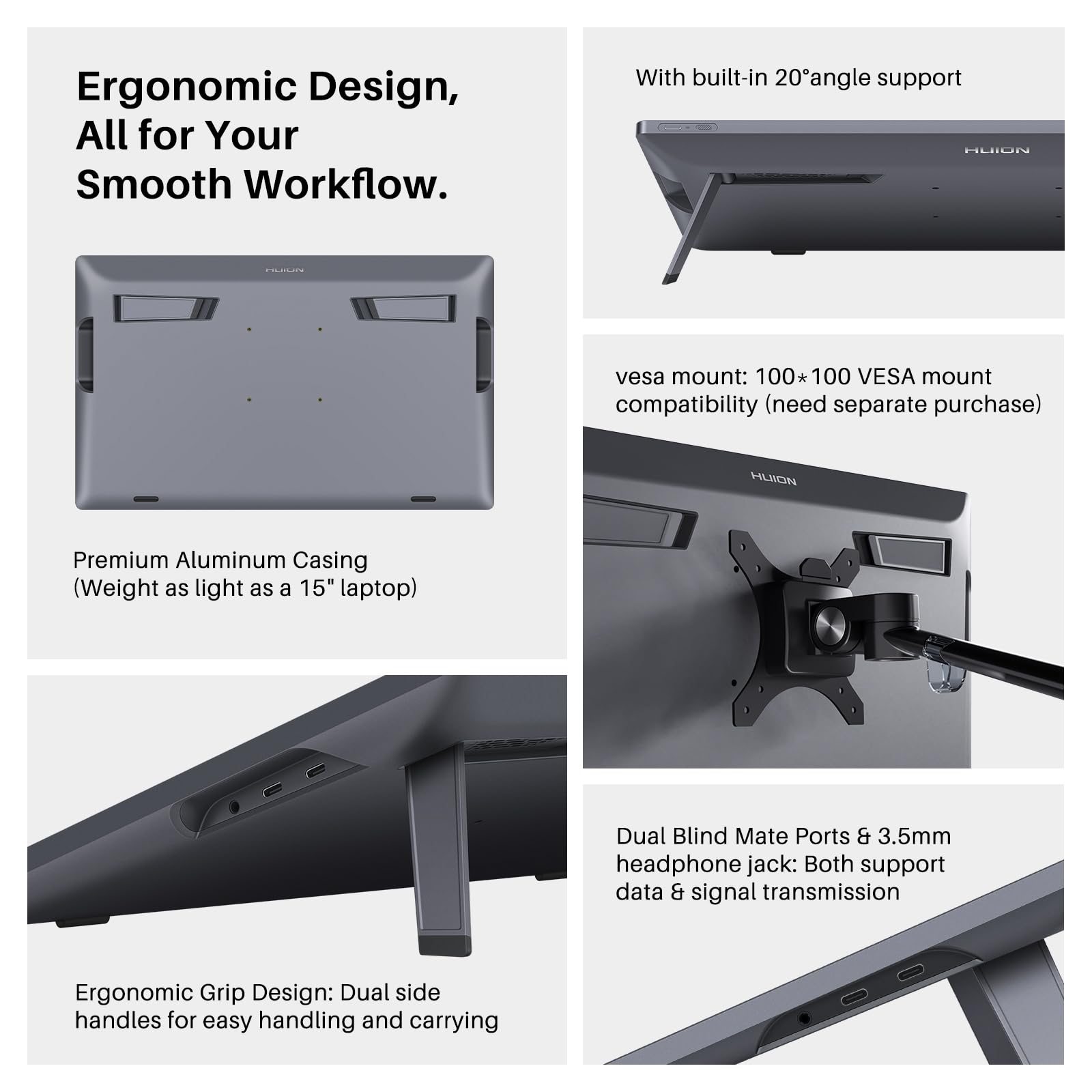


🎨 Elevate Your Artistry with 4K Precision & Pro-Level Control
The HUION KAMVAS Pro 19 is a professional-grade 18.4-inch 4K UHD drawing tablet featuring 96% Adobe RGB color accuracy and 1.07 billion colors for stunning visuals. Equipped with the advanced PenTech 4.0 stylus offering 16,384 pressure levels and tilt support, it delivers exceptional precision and comfort. Its anti-glare etched glass screen mimics a natural paper texture, while the Bluetooth programmable Keydial Mini enhances productivity. Compatible across major OS platforms and supporting fast reverse charging, this tablet is designed for creative professionals seeking high performance and versatility.










| ASIN | B0CPF3KWS2 |
| Batteries | 1 Nonstandard Battery batteries required. (included) |
| Best Sellers Rank | #137 in Computer Graphics Tablets |
| Customer Reviews | 4.2 4.2 out of 5 stars (2,822) |
| Date First Available | January 9, 2024 |
| Item Weight | 8.8 pounds |
| Item model number | GT1902 |
| Manufacturer | ShenZhen Huion Animation Technology Co., LTD |
| Product Dimensions | 17.67 x 10.72 x 0.1 inches |
A**N
Surprisingly well made and full of pro graphic tools
Although, this is it pro level screen. There are many uses for even beginners. The tools for photoshop are abundant and are at the ready. The screen qualities high 2.5 K is not bad but this is not a 4K WACOM. Now withat said, the price pont is unbeatable. The use of the macros on the side make it easy to use. I would rate it 4.5 stars until the drivers get upgraded. The good thing is HUION will get their drivers dialed in. It will take a few weeks after launch.
R**A
Easy to use
Got this for my 14 year old for Christmas. He is loving it. The screen is perfect size for him and was easy for him to set up and begin to use.
C**N
Revisiting the Huion GT-191
This review reflects years of use, speculation, and finally, testing of a variety of products that led me to this purchase decision. The Decision: After hearing about the Wacom Cintiq in 2013, and testing various models of drawing tablets and screens, I knew that one thing meant the most to me: Does it work? Does the device support what do with my style of art? Does the device make sense for me to purchase? In other words, will my experience with the Intous Pro that I have used for so long transfer flawlessly to this new type of device? Does it fit my budget? Does me using this equipment for my everyday work justify the cost of the device, or do what I have already (Intous Pro in this case) adequate to do my work as a digital painter? The Crit of the Intous Pro 16 vs Huion GT-191: I was pleasantly surprised to see alternatives to the much critically acclaimed Wacom Cintiq years down the line in the middle of my research. But I was "comfortable" with what I had, which led me to buying Cintiq Pro 15.6" (or whatever size it is), to which I was very underwhelmed when I saw the low contrast, and oddly enough, the same feel as using the Intous Pro. I guess I was really expecting that grain texture of the surface of the screen, But those things didn't dampen my taste in the device, it was the price. Even for a refurbished model I could not justify the cost for an experience I've had once before for a whooping $1303.45. I returned it. (There was also a defect in the device that left one of the leds to shine brighter than the rest of the screen) It wasn't long, but for a concentrated period of time I overhauled on my research into getting not just Huion but Ugee, XP-Pen, and many others and weighed out the benefits of each device. What was most important to me? What will I do if this purchase doesn't pan out? What were other people saying? Those questions put me over the threshold. I made the purchase once a saw a repeat review for the same device the Huion GT-221 which I also considered purchasing. With the bad taste left in my mouth by a Wacom fanboy, I decided on this device because it had been out the longest. and therefore much more feedback and support. Whats the verdict? Contrast. Even with adjustments in Nvidia Display Adapter, got the colors looking good, but can't quite get those high and low darks you would expect from a normal monitor. Calibration. A pain at first, but once you determine hand placement for each point you calibrate your pen to where hand lays naturally when you draw, you should be golden. The Build. Freaking Awesome, no complaints. I'm a 360 lb man drawing on this surface and it does not budge. HOWEVER: (Fixed) The software is EXTREMELY finicky, often times overwriting my pen pressure settings which forces me to unfortunately reinstall the Huion software. After having the device for less than a week and having to do this twice is making it quite tempting to go back to my Intous Pro. JUST SAYING! I will be contacting Huion over this and I will update this review. UPDATE 7/3/18: Three days ago I tried using Adobe Illustrator, and to my horror the pressure sensitivity doesn't work. I've been hearing that there is a temporary fix using an Wacom driver, but I've yet to find out which one, and if its true or not. I've been trying to make contact with Huion, but to no avail. Getting in contact with them is almost like playing a game of cat and mouse unfortunately, but I will give them the benefit of the doubt, I have been contacting them in the wee hours of the night. Unfortunately, this product is moving from 4/5 to 3/5 stars because of it's lack of support over this specific issue that other users are also having. This is an investment, and a company that sells these kinds of products, even as a cheap alternative, need to understand that the user base is paying attention when they don't respond to these kinds of issues with their investment. UPDATE 7/4/18: I received a response this morning from Huion, but I was again disappointed by their lack of support for their own product. I was told to run in "administrator mode" and "turn windows ink" off in the pen settings, assign "switch brush" to one of my pen buttons, and update to a new driver, which I already had, which they would've known if they were paying attention to my messages. UPDATE 7/5/18: They just got back to me this morning with an updated driver that wasn't available on their website, and that seemed to do the trick. 4/5 stars again. Conclusion: (Updated 7/17/18) My overall user experience/customer service experience with this device has been nothing short of amazing. Aside from a few small hiccups with the driver not working properly with Adobe Illustrator CC, and it being bit of a chore to calibrate the screen with the new driver, I cannot recommend this device more for the artist that wants to break into the drawing monitor scene. I will be giving this a 5/5, because in the end, Huion did reach out to me EVERYTIME I had a problem, and were proactive to solving my issues correctly. My one comment would be for the new 14.5.0 driver to come up with some sort of guide as to get the best results possible without having to reverse engineer the calibration process (see attached link). ~Christopher Ahearn 11/22/2019 After a long time with this machine, I am underwhelmed by the whole drawing tablet experience. I've since now switched to my Intous Pro that I got back in 2013, and I am glad to say I am much happier with the free desk space. It wasn't a bad experience. It was something that left to be desired with all the re-calibrating until I got that settings that felt just right. Overall it didn't feel natural to me in a confined space like I had, and the screen size and resolution also left something to be desired. My workflow changed, it worked, and then some personal stuff happened to me throughout the year and it felt the setting up to paint became a drudgery instead of an experience I was hoping to get out of this device. It's good for it's purpose, but honestly painting for me was never about the tool, but whatever I could create out of my surroundings. I still support Huion because Wacom is just too damn expensive for an experience that concentrated more about the technology than what you could get out of it. In other words, the experience a pen tablet could be to someone with different tastes and needs could lead to an epiphany of creative juices to the same man or woman can get out of an pencil an paper. I really wanted this to work out. But on a side note, I tried the Apple Pencil and Ipad Pro and that to me felt like a better experience.
S**Y
Great Tablet at a Great Price
The Huion works well with ZBrush, GIMP, and Krita. You have to manually set up and load configurations for the buttons. The display isn't anything you'd want to watch movies on, but it's good for drawing. If you need to do color matching, you'll want a separate color calibrated monitor, the colors on this display are muted and a bit off. Good enough for sculpting and drawing, but again, for your finish work in art you'll want a separate monitor to check your colors and contrast. Compared to the industry-leading Cintiq, it's a fantastic value. If I were to take a do-over, I'd consider the version without buttons then get a gamer hand keyboard. They'll load key configurations automatically, and you're less likely to hit them by mistake. I'd also consider getting the 21" version for a little more display height. This one works well and does what I bought it for, however, which is to sculpt more adeptly in ZBrush than with a mouse or non-display drawing tablet. Things are much faster. The screen calibration program in the standard version of the software when I got mine (Oct 2019) was broken--a selection button covered the center X for the calibration, but the beta software was OK. It's not quite as precise as I'd like, I never get a calibration that's perfect from edge to edge from it. Rather than having the first touch of the pen act as the click to go to the next point, I'd like to get the point positioned on the screen, then press a key to mark it. The parallax on this display is very low, much better than competitive displays I've used, so once I've got a good calibration it's easy to be very precise in sculpting or painting. The surface is very good. I normally work with pencils, felt tip pens, or nylon tip pens in physical media, so I use a bit of pressure and expect a bit of drag. This tablet gives me that, I don't get the "ice rink" feel from this where I can't control my stroke because friction is too low that I've experienced on other tablets. The first nib I had wore down pretty quickly, and it was hard to open the pen holder to get another out, but the second nib is holding up much better now that I had a feel for the tablet. So expect the first nib to not last too long, it's not a problem, later ones will probably last a lot longer for you, and it comes with a package of them. To summarize: Good display Good drawing surface Excellent value Big enough to have a lot of working space Excellent palm rejection, best used with an artist's glove Very responsive, no lag Good pen with two-way switch and extra nibs, no charging Lots of buttons, though a separate one-hand keyboard may be a better approach with the other Huion Tiny parallax, you'll hardly ever notice it, way better than non-laminate displays Works with ZBrush like a charm Stand is solid Windows and Mac, I use mainly with Windows Could use better calibration software and procedure, perhaps a "pro" level calibration with more points across the screen and keyboard activated selection for when the nib is on the dot. Should auto-load configurations with software Better instructions both in print (particularly on the new design pen) and information in the software Pen holder could open more easily--seriously thought I was breaking mine when opening it I'm very happy with what I've got, and look forward to using it for a long time (it's been about a month as I write this.) Even if I get a larger one later, this one, while large, is small enough to pack along in an artist bag with a laptop.
M**S
Disappointed
The product don't work as i expected i connecte it and installed driver and dont work i am disappointed. Don't work on phone neither and android tablet. I'm sorry for be so harsh, I'm so angry, I have been waiting for this all my life hoping i could start working digital art instead i receive a damage product that waste my time, only worked one time from there a nightmare i am crying.
S**A
A nice drawing tablet
I have had this drawing tablet for a few years now. It's still responsive and functions perfectly. I mainly use it for fixing up photos and some other fun projects. I really appreciate the stand and the extra ninbons that they provided.
M**R
I see others complaining about lag etc... honestly you can't expect $1500 performance from $250 price tag used or $600 new product. Depending on the brush size and the size of the canvas you will see some lag when using very small brushes while also moving the pen slowly accross the screen. It makes some getting used to. There is a learning curve. If you want performance that mimics using a real brush then you are going to have to pay 4 times as much for the display and also pay for a gaming computer. This display and pen coupled with the huion keydial keypad for use with CAD softwares like FreeCAD or AutoCAD/SolidWorks is more than adequate and comparable to much more expensive alternatives. The most time consuming process is setting the keypad short cuts for each h individual program and also configuring the keys on the edge of the screen that will best suit your workflow. Even not set up properly for my needs yet and I can already see the benefit of buying both items for my 3d modeling. They will increase my efficiency and speed at getting things done to more than justify the expense. If you buy budget equipment you have to accept that there will be a compromise with performance.
R**N
This machine is great and sturdy and work as expected. The anti glare and anti scratch treatment is so good and they include the glove just to be extra sure nothing's gonna be bothering you while you draw.
ع**ل
تجربتي بعد تجربة اجهزة الواكم وسأقرن بينه وبين الواكم تحصل على مسند للجهاز مضاف له قفاز يمنع البصمات على الشاشه ومنديل لتنظيف الشاشة، القلم جيد ولكن ليس بمتانة اقلام واكم مع ذلك يؤدي الغرض. الشاشة الوانها واضحه وطبيعي تختلف عن الوان الجهاز المرفق يحتاج توصيل بالكمبيوتر وتوصيل بالكهرباء في نفس الوقت، الشاشة حجمها كبير جدا ومنطقة الرسم كبيره ايضا وكافيه من اجل الرسم، تحتاج طبعا لضبط اعدادات المحركات الخاصة بهويان يوجد بار لمس من اجل الزوم على الطرف والمسند جيد ولا ينزلق، الجهاز نحيل ومسطح جدا ووزنه خفيف مقارنة بحجمه، قد تصد حراره خفيفه من جهه التوصيل في يمين الشاشه عند الاستعمال المطول. اشكر شركه هويان السعوديه على إتاحة منتجاتها عبر امازون السعوديه بطريقه سهله وبأسعار مناسبة.
L**O
Como artista que já usou uma wacoon e huion básica (sem tela) por anos eu sei dizer o quanto difícil é se adaptar ou o quão demorado fica fazer devido a perda de precisão de riscar em uma tela e olhar em outra . Ainda estou a utilizar e me acostumar, mas desde o início ela é muito intuitiva de desenhar, os traços saem mais precisos e rápidos, a respeito dela facilitar o desenvolvimento de Ilustrações eu senti uma melhora na velocidade e facilidade de fazer traços e linhas mais precisos. Existe algumas questões a respeito dela que é importante estar ciente, a tela tem um tom de cor saturada então é importante saber filtrar as cores utilizando filtros ou editores de fotos, para quem está acostumado talvez não incomode, mas para quem não tá acostumado é importante ficar ciente que pode ter alguma diferença para um monitor normal ou celular. Outro detalhe é a parte dos cabos, achei que mesmo com um adaptador para aumentar o alcance ainda sim o cabo é curto então é importante garantir tomada perto e duas entradas USB no pc ou notebook mais uma entrada hdmi. Ao que se diz a respeito do vendedor (Andu US), posso dizer que é confiável, ao menos não tive nenhum problema sobre as minhas dúvidas sobre a taxação, que não tive que pagar nada, vi alguns casos de outros produtos de outros vendedores que solicitam que você pague e eles retornem o valor, mas não foi meu caso :) Dentro da encomenda estão inclusos a mesa de tela, os cabos 3 em 1 USB, cabo usb-c para aparelhos suportados, luva, lenço para limpeza da tela, suporte para a mesa , pontas reservas, caneta e um manual. Após algum tempo percebi que vem uma película de proteção anti reflexo já embutida na tela <3 Em geral, a encomenda chegou dentro do prazo, como eu pesquisei eu estava ciente de todos os detalhes então nada foi nenhum problema que eu não estava ciente. Se você tem as condições financeiras para comprar eu recomendo, se quiser trabalhar com arte essa aquisição pode ajudar na velocidade e resultado a médio e longo prazo. Espero que meu feedback ajude a tirar suas dúvidas, ao menos tentei abordar sobre os temas que tinha preocupações antes de comprar. Após quase um ano de uso posso dizer que tem ajudado no geral meu trabalho com desenhos, gastando menos tempo corrigindo erros, conseguindo assemelhar de desenhos feitos na folha. No geral recomendo o produto a todos com a disponibilidade :) (nada a reclamar com um ano de uso, com exceção do tamanho do cabo que é razoavelmente curto, mas sendo justo é um problema da huion e não do vendedor)
D**G
I really love this tablet. As a student begining to learn about digital art and art in general, it really helps to have something like this to completely digitize everything I do, as it allows for the easiest alteration if nessecary. The 8000 levels of pressure is amazing for the price that this is at; if you like sketching lightly before hardlining, this is the best feature about it. And also coupled with a huge screen, it allows you to have it as a second monitor if you aren't even using it for drawing. I'm using it for animating at the moment and it saves me so much time than if i was using an intuos or mouse. Great tablet and image quality for a cheap price! However, there are a few drawbacks that come with it. There are no buttons on the monitor so you will need a keyboard next to you while working if you have many shortcuts binded, however, this isn't really a problem so much as a downside of being so cheap. Arguably the largest problem would be the paralax. No matter how much you callibrate it, there will always be a displacement between the cursor and the tip of the pen. Through some online research, this seems to be a problem with all screen tablets so, not really a fault of the product. TL;DR, Great product with very inconsequential downsides!