We remain fully operational. Our teams are working around the clock to ensure your deliveries continue safely.

下载应用程序


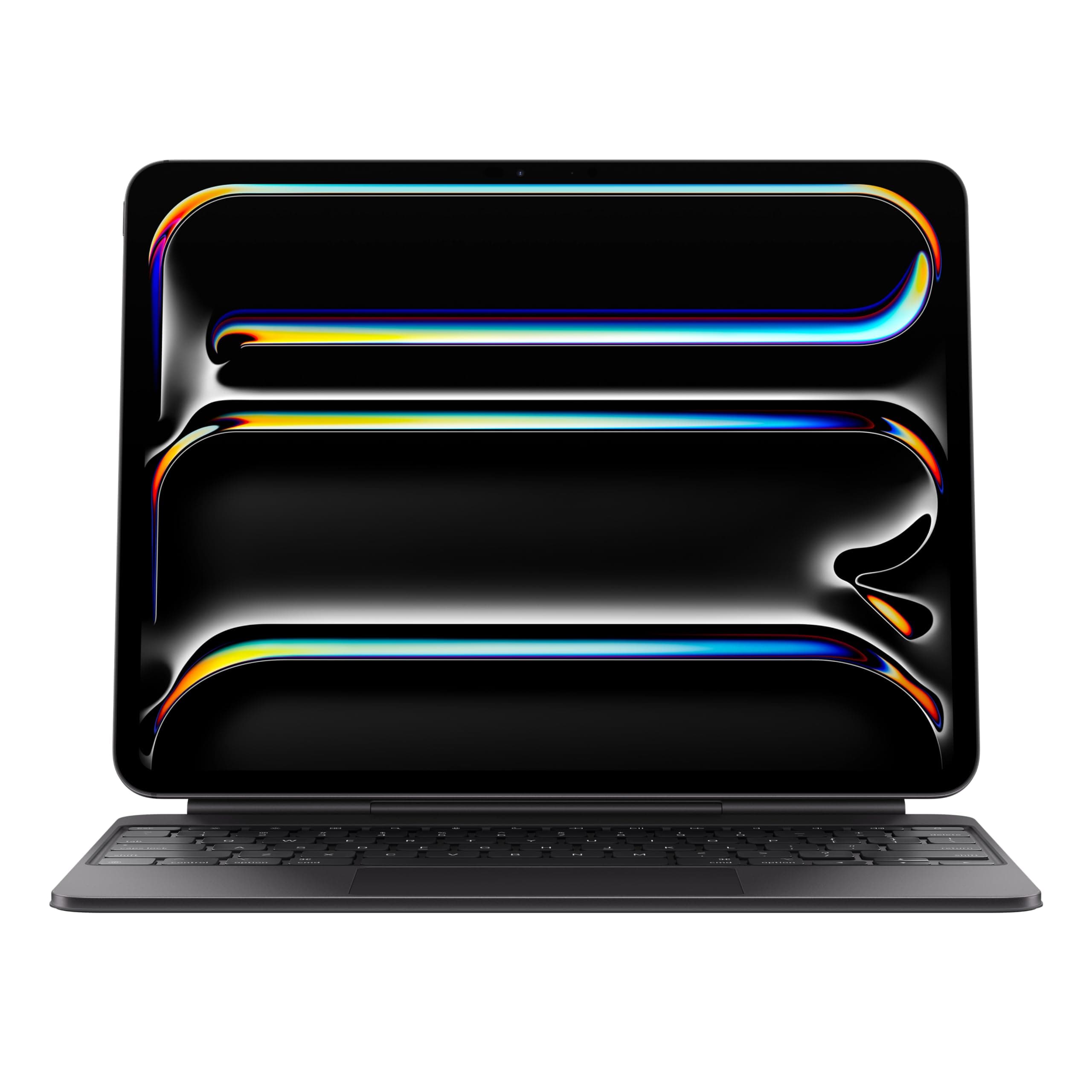
⌨️ Transform your iPad Pro into the ultimate productivity powerhouse!
The Apple Magic Keyboard Case for iPad Pro 13-inch (M4 and M5) combines sleek portability with a premium typing experience. Featuring a backlit scissor-switch keyboard, a glass trackpad with haptic feedback, and a two-cantilever hinge for adjustable viewing angles, it magnetically attaches to your iPad without the need for pairing or charging. The built-in USB-C pass-through port ensures your device stays powered while the case provides front and back protection, making it the perfect accessory for professionals on the go.
| ASIN | B0D3J63BWD |
| Date First Available | May 7, 2024 |
| Item Weight | 8.6 ounces |
| Item model number | MWR53LL/A |
| Language | English |
| Manufacturer | Apple |
| Product Dimensions | 5.91 x 5.91 x 5.91 inches |
A**A
I tried to resist but this is the best keyboard for the IPad Pro 13 M4
Pros: -Specifically designed for the IPad Pro 13 M4 (in this case I think Apple made the best accessory for the product they intended it for, this is NOT like the fine woven case for an iPhone. It’s quality) -Aesthetically and functionally sleek (I find the Magic Keyboard to be the best looking keyboard for the IPad, the new aluminum palm rest is choice) -Stable weight for desk or lap use (Logitech keyboard needs too much space, not lap use friendly and I don’t see what they say about this set up being top heavy) -Backlit keys (same as previous models, I don’t feel the need to customize my keyboard) -No battery, it’s powered through the IPad (IMO very handy compared to charging an extra device and having to carry an extra chord) -Light weight compared to the feel of other cases, the weight is what I would expect from a big Ipad such as this -Ease of setup (you basically place the IPad on and it’s set up) Cons: -Expensive ($350, “you get what you pay for” which is everything I could have asked and more) -No case (I personally don’t use my IPad without the Magic Keyboard so this does not apply to me) -Protection is nonexistent (I only use my set up at home and I have small kids, I’m still not worried about the protection with the way I use it. The IPad stays on the keyboard very well, I don’t travel with it so I’m not worried about drops. I tried resisting the Magic Keyboard by going for the ESR Rebound Keyboard case for $100. I loved it but it was missing what I was used to on the older Magic Keyboard and after much debate and research I returned it and purchased this Magic Keyboard. When I first put this to use, the best upgrade I feel like they had was the aluminum palm rest. It feels nice to the touch and smooth. The haptic trackpad too is just quality. I love the function row although I have to get used to having it. I’m so glad to have the Magic Keyboard for my new IPad Pro 13 M4. It feels and works as it should. It’s just right. If you’re still in debate I say just do it. It’s so worth it. The money put down for this keyboard is worth it for the use and time I will be spending with it, also it’s on sale right now for $299 or you can get an open box/refurbished one for only slightly cheaper. Here’s to another 5 or more years with this set up!
N**.
Great accessory for an iPad
Solid build. Makes the iPad Pro feel like a slim laptop. I like that the angle of the iPad can be adjusted to some degree. The keyboard is responsive and the trackpad works well. It's nice that there is a USB-C port in the keyboard that allows for charging of the iPad and that the keyboard itself does not require a battery or bluetooth pairing since it uses the Smart Connector on the iPad itself. I like being able to easily remove the iPad from the keyboard case when I want to use it as just a tablet. I have a magnetic folio case from Pitaka that I use to protect the iPad when I'm using it without the keyboard and it is easy to switch between the two.
M**.
The best iPad keyboard got even better!
Attached is a picture of my 13” M4 iPad Pro, taken right before I typed up this review. The case never comes off my iPad. I don’t want to write a long soliloquy about the keyboard, as most of you already know what it’s all about. I’d like to highlight the main differences: 1) The aluminum construction is bliss! The keyboard feels cool to the touch, even after long typing sessions, especially on the meaty parts of your hands that rest on the touchpad while you are typing. 2) The touchpad… omg, it’s glorious!!! How they were able to make it even larger, with a great tactile feel with the haptic wizardry that makes you believe you’ve actually pressed a button when using the touchpad, is beyond me. I love it, and it’s one of the many shining stars with this keyboard. 3) The function key row: much needed and well laid out. I am not a fan of the volume button on the iPad itself, and they swapped the up and down for volume, and I am a creature of habit and kept hitting the wrong one. Instead of breaking that habit, I decided to force myself to learn to use the vol up and down on the keyboard instead, and it works great. The function keys are very responsive and it’s nice to not have to leave what you are doing to adjust brightness or volume… or to just skip a song and keep typing away. 4) The keycaps and switches are a little different compared to the original keyboard. There’s a little, maybe 1mm, more travel with each keystroke, with a familiar click with each keystroke akin to MacBook keyboards. I like the change, and my typing speed is as good, if not better on the new keyboard. 5) Weight: Feels a smidgeon heavier, but tbh, I am already used to how the M1 12.9 iPad Pro plus apple keyboard weigh, so I don’t notice a difference. When I am on the go, the iPad is in my backpack, so I don’t feel the additional weight. This is another home run by Apple. I already spent an arm and a leg on a 2Tb 13” iPad Pro, so I knew I had to keep the functionality of the Apple Keyboard. I love it dearly, and would never think to use an iPad without it. I have a Mac Mini for my desktop needs, but the iPad Pros have replaced my need for a MacBook. The Apple Keyboard is really expensive, comparatively, but it’s fit and finish, not to mention is superb functionality, make this worth it, in my book. 10\10, would highly, highly, highly recommend!
K**.
best iPad accessory around!
I absolutely LOVE my Magic Keyboard!! I was hesitant to get it because of the price but I’m so glad I did. It essentially turns your iPad into a full blown computer. It’s very easy to use as the iPad magnetically snaps right to it and you can bend the case to easily get the iPad disconnected if you want to use it solely as a tablet. The trackpad works really well and the keys are good quality and built well. I like the backlit keys; they make it very easy to type in low light environments. I’ve been using this for about 2 months now and it has stood up well to daily use and has protected my iPad screen from any scratches or anything if I throw it in my bag. It does add a bit of weight to the iPad but it is still far lighter and more portable than my PC laptop. My only complaint is that I occasionally have difficulty getting my iPad to charge when connected to the Magic Keyboard but just taking it off the keyboard and then reattaching it fixes the issue so it really is more of an annoyance than anything. Overall I’m incredibly happy with this purchase and would highly recommend it for any iPad user! With the Magic Keyboard, my iPad has more or less replaced my laptop at this point.
C**S
I purchased a cheaper version and did not like it so did not use it. I decided to buy the apple Magic Keyboard and it is considerably lighter!! With the track pad I did not need a mouse and I use it all the time. Not disappointed at all!!
R**N
I went from the 2022 MacBook Pro to the iPad m4 pro 11’’ and I am overall super happy with this. I went with the newer and more expensive on because I wanted all the keyboard functions from the Mac keyboard. It’s super handy for pretty much everything from class and business notes to just scrolling. It quite literally turns your iPad into a MacBook and the I like how I can switch from an iPad to a laptop. The connectivity and responsiveness is at par with a MacBook. The build quality seems okay and I’m hoping it doesn’t deteriorate around the edges but aside from that the functionality is perfect for the size of the iPad. the thing I dislike most is when I’m typing my fingers that aren’t typing seem to bump the screen and cancel the typing. I wish that when you tilt the screen it didn’t fold at the 1/4 on that back side so that the upper keyboard functions weren’t almost under the screen. That’s just my big hands I guess. Aside from that I highly recommend this keyboard, the back glow is definitely handy for lowlight typing
K**I
Make sure when you get your Magic Keyboard that is the right version (M4 Version). I got the old 2020 Magic Keyboard version on same day delivery. I called Amazon to report the incorrect delivery on Saturday and they quickly and calmly set up a pickup and exchange on Sunday. A separate guy picked up the wrong keyboard and a different guy delivered the correct one. Excellent job, Amazon. Now the M4 Magic Keyboard itself is awesome. I have the 11-inch M4 iPad Pro and it clicks on easily and securely. The keys have that familiar MacBook Pro feel and it has a row of function keys. The only downside is it only has one USB-C port for use, but other than that, it's a great way to pick up and go, especially if your iPad has cellular. Now I have the luxury of leaving my MacBook Pro in the office and using the iPad Pro as a laptop at my convenience.
T**5
Works like a typical Apple product. It just works well and seamlessly. Mount your IPAD and there you go, it pairs automatically and works right out of the box. The keys feel solid and not cheap. The hinge is firm and holds the IPAD at the right angle. Just wish you can fold the keyboard back. I also wish there was somewhere to secure your Apple Pencil.
N**R
I ordered an open box from the amazon warehouse, (I couldn’t justify paying full price for it) the plastic was still on it and it looked like it had been hardly used. The box looked a little used but the Magic Keyboard itself has been great. I’ve been using it daily for about two weeks, and it’s been great haven’t had any issues. I’ve been using it for school and work and it’s worked well with no issues. I would recommend, and would buy it again.
TrustPilot
2 周前
2 周前