We remain fully operational. Our teams are working around the clock to ensure your deliveries continue safely.

下载应用程序





Buy anything from 5,000+ international stores. One checkout price. No surprise fees. Join 2M+ shoppers on Desertcart.
Desertcart purchases this item on your behalf and handles shipping, customs, and support to Hong Kong.
🚀 Double your screen, double your impact!
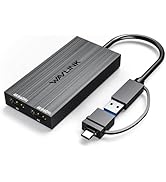
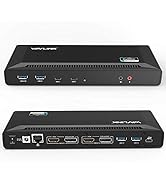
The WAVLINK USB 3.0/USB-C to Dual HDMI Splitter delivers crisp dual 4K 60Hz extended displays from a single port, compatible with Apple M1/M2/M3 Macs and Windows 10/11. Featuring a versatile hybrid 2-in-1 cable and broad system support, it’s designed to elevate productivity for professionals needing seamless multi-monitor setups. Includes a 12-month warranty and lifetime support for reliable performance.







| ASIN | B0D59XJ21H |
| Best Sellers Rank | #57 in Computer Cable Adapters |
| Brand | WAVLINK |
| Built-In Media | USB to Dual HDMI Adapter |
| Color | Black |
| Compatible Devices | MacBook Pro 13" / 14" / 15" / 16", MacBook Air, MacBook Retina, MacBook M1 / M2 / M3 / M4 / M5 / Neo, HP Spectre x360 / Pavilion / Envy, Dell XPS / Precision / Latitude, Lenovo ThinkPad / IdeaPad / Yoga / Flex, Surface Pro 7 / 7+ / 8 / 9, Surface Laptop 3 / 4 / 5 / Go / Go 2 / Studio / SE, Surface Go / Go 2 / Go 3, LG Gram, Acer Aspire / Swift / Spin, ASUS Zenbook / Vivobook, and Most Windows systems with Windows 10 or newer / Most Chromebooks running ChromeOS 100 or newer Compatible Devices MacBook Pro 13" / 14" / 15" / 16", MacBook Air, MacBook Retina, MacBook M1 / M2 / M3 / M4 / M5 / Neo, HP Spectre x360 / Pavilion / Envy, Dell XPS / Precision / Latitude, Lenovo ThinkPad / IdeaPad / Yoga / Flex, Surface Pro 7 / 7+ / 8 / 9, Surface Laptop 3 / 4 / 5 / Go / Go 2 / Studio / SE, Surface Go / Go 2 / Go 3, LG Gram, Acer Aspire / Swift / Spin, ASUS Zenbook / Vivobook, and Most Windows systems with Windows 10 or newer / Most Chromebooks running ChromeOS 100 or newer See more |
| Connector Type | USB Type C, USB Type A, HDMI |
| Current Rating | 3 Amps |
| Customer Reviews | 4.4 out of 5 stars 260 Reviews |
| Item Dimensions | 3.94 x 1.97 x 0.59 inches |
| Item Weight | 0.1 Kilograms |
| Item dimensions L x W x H | 3.94 x 1.97 x 0.59 inches |
| Manufacturer | Winstars Technology Limited |
| Model Number | RCAMUKLY-UG6902H |
| Number of Items | 1 |
| Number of Ports | 2 |
| Package Quantity | 1 |
| Power Plug Type | No Plug |
| Unit Count | 1.0 Count |
| Warranty Description | 1 year warranty |
M**R
اذا وياك ماك بوك M1 or m2 وتريد شي يسويلك اكستند ل 3 شاشات لا تفكر زيادة خذه وانت مغمض انا صرفت قد فلوسه مرتين على منتجات وحده اسوء من الثانية يليتني خذته منزمان وريحت مخي
A**R
I have two MacBook Air M4s connected via a display link adapter, and one directly connected to the main screen. The screens intermittently hang and then readjust, causing issues with my workflow. Update: After opening a ticket, I received helpful assistance and a replacement. I’ve updated my rating to five stars because they’re actively working to resolve the issue and provide excellent customer service.
M**N
This is the thing to buy if you want to set up a 3rd or 4th monitor for your laptop. It works perfectly, as long as you are not putting any heavy workload on the extended screens. If you are using this for work purposes, I have nothing to say to you. But if you are a gamer, I'm here to warn you. If you don't have a beefy GPU for your laptop, setting up a 3rd or 4th screen that uses DisplayLink technology will hinder your performance, "By quite a lot". You might have silky smooth FPS for games running only 2 monitors, adding the one extra will occasionally give you hiccups and frame drops, and they are not for you to expand your game window up to 3 different monitors due to FPS limitations. For games that require processing power, you might not even be able to play at the setting you used to have, because part of it needed to be divided for your "3rd monitor". So please think it through before buying this gadget and your 3rd/4th monitor. Do you really need the extra panels, and are you able to sacrifice the performance power for them?
C**A
Great adapter! Just install the driver using the Quick Start Guide and you’re good to go. Works perfectly, totally worth the price. If you’re using a MacBook and want extra screens for work, I’d definitely recommend it.
M**A
Atendeu todas minha expectativas as duas porta 4k funciona perfeitamente. Meu notebook é um deel i15 trabalho com dois munitores 32 polegadas 4k
T**R
Exactly what I was looking for. Macbook Pro M1/M2 by default restricts to one additional monitor, however this adapter along with the driver you download has allowed me to setup 2 additional monitors plus my laptop screen in a A B C setup, so I now have 3 extended screens all showing different content.
TrustPilot
4天前
1 个月前