We remain fully operational. Our teams are working around the clock to ensure your deliveries continue safely.

下载应用程序


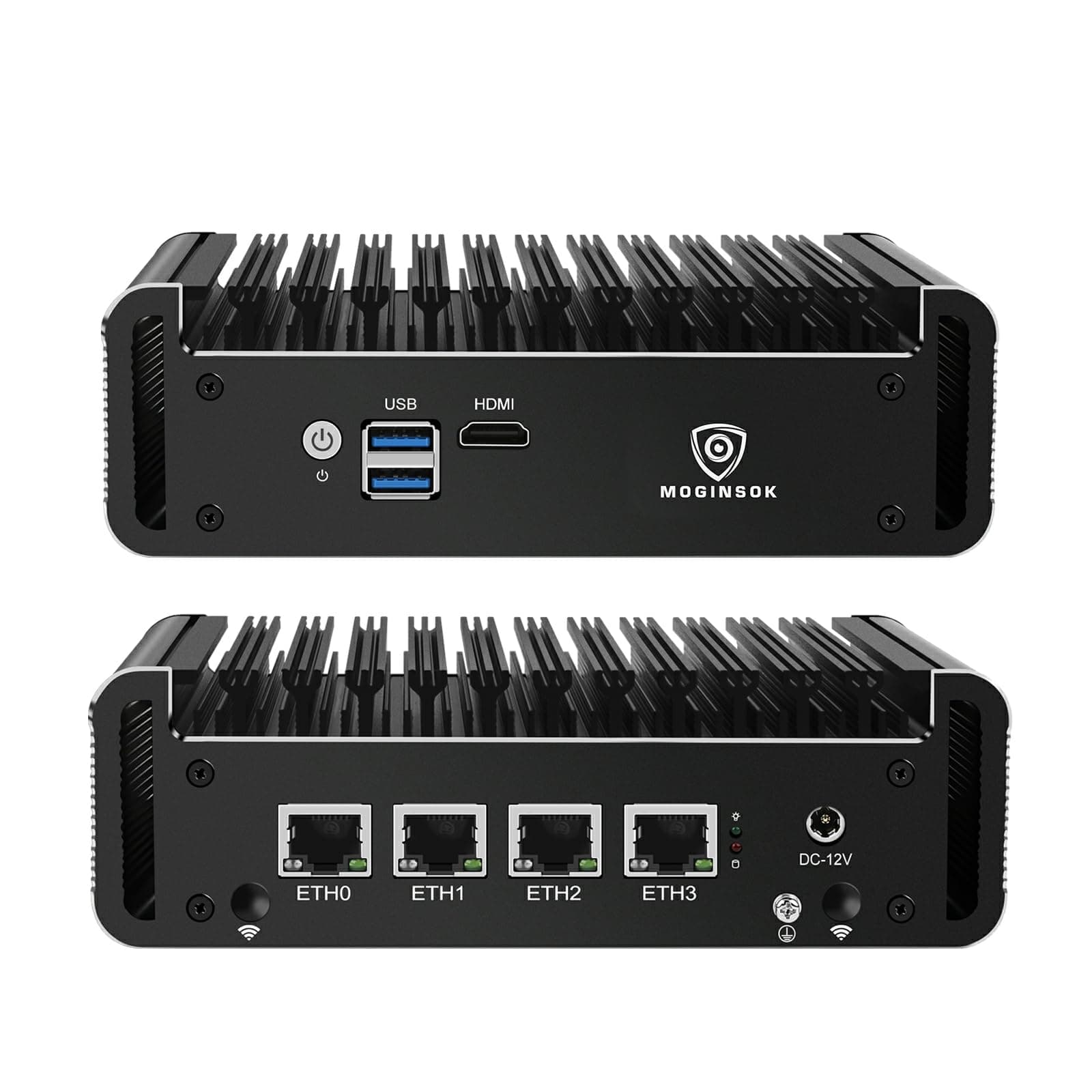
🚀 Secure your network with silent speed and pro-grade power!
The MOGINSOK MGCN50N Firewall Appliance is a compact, fanless mini PC featuring an Intel Celeron N5095 quad-core processor, 8GB DDR4 RAM (expandable to 32GB), and 128GB M.2 NVMe SSD storage. Equipped with four Intel I225-V 2.5GbE LAN ports, it delivers high-speed, professional network performance ideal for pfSense, OPNsense, and other firewall/router OS. Its silent passive cooling and versatile expansion options make it a top choice for secure, high-throughput network environments in modern office or home setups.


| ASIN | B0DLLC232N |
| Additional Features | AES-NI Support, ESXI Support, Watchdog, Auto power on, RTC, PXE boot, Wake-on-LAN, Professional OS Support |
| Aspect Ratio | 16:9 |
| Best Sellers Rank | #15,361 in Computers & Accessories ( See Top 100 in Computers & Accessories ) #521 in Mini Computers |
| Brand | MOGINSOK |
| Built-In Media | RGB Lighting |
| CPU Model Number | Intel celeron N5095 |
| CPU Model Speed Maximum | 2.9 GHz |
| Color | Black |
| Compatible Devices | Display Device, Network Device, Wireless Connectivity Device |
| Connectivity Technology | Ethernet |
| Cooling Method | Passive |
| Customer Reviews | 4.0 4.0 out of 5 stars (149) |
| Display Resolution Maximum | 1920x1080 |
| Graphics Card Interface | Integrated |
| Graphics Coprocessor | Intel UHD Graphics |
| Graphics Description | Dedicated |
| Graphics Ram Type | DRAM |
| Hard Disk Description | SSHD |
| Hard Disk Interface | Solid State |
| Hardware Interface | Ethernet, HDMI, USB |
| Human-Interface Input | Buttons |
| Keyboard Layout | QWERTY |
| Manufacturer | MOGINSOK |
| Memory Clock Speed | 2933 MHz |
| Memory Slots Available | 2 |
| Memory Speed | 2933 MHz |
| Memory Storage Capacity | 34 GB |
| Model Name | MGCN50N |
| Model Number | MGCN50N |
| Model Year | 2021 |
| Native Resolution | 1920 x 1080 |
| Number of Component Outputs | 1 |
| Operating System | Linux |
| Personal Computer Design Type | Mini PC |
| Power Plug Type | Type A - 2 pin (North American) |
| Processor Brand | Intel |
| Processor Count | 4 |
| Processor Series | Mobile Intel Celeron Processor |
| Processor Socket | BGA 413 |
| Processor Speed | 2 GHz |
| RAM Memory Installed | 8 GB |
| RAM Memory Technology | DDR4 |
| RAM Type | DDR4 SDRAM |
| Ram Memory Maximum Size | 32 GB |
| Resolution | 1920 x 1080 |
| Security Features | Firewall, Encryption |
| Speaker Type | External Speakers Required |
| Specific Uses For Product | Everyday Use |
| Style Name | Intel Celeron N5095 |
| Total Expansion Slots Quantity | 1 |
| Total Number of HDMI Ports | 1 |
| Video Output | HDMI |
| Video Output Interface | HDMI |
| Video Processor | Intel |
| Warranty Description | 1 year |
| Wireless Technology | Wi-Fi, 3G, 4G |
S**S
Nice unit with a few minor glitches
This is a very nice little box. The designers should be proud. I had no problem loading and running FreeBSD 12.3-RELEASE (the unit comes with pfSense on FreeBSD 12.3-STABLE.) I vaguely remember booting Fedora 37 on it from a USB drive. I did not try Windows 10 or 11. I've gotten used to powering devices via USB-C. This platform uses a 36W power brick. It has the fairly recent Intel I225-V network interfaces - those can ramp all the way up to 2.5G. It's taken a while for Linux and FreeBSD to get drivers for this NIC, but they are there now. It is easy to remove the bottom cover plate and get to the M-SATA SSD and the memory. I preserved the original pfSense M-Sata drive and replaced it with one that I could play with. (If you do this yourself, make sure you get an "M-SATA" SSD, not an M.2 SSD.) The issues I found are these: 1. There is a long (up to 30 delay) during booting while it asks whether you want to enter Setup - even if you've set that delay to 1 second. Entering Setup also takes many seconds. Once booted it runs quite well. 2. I have not found a boot-device selection menu - I often boot from USB "live" drives - and going into Setup to do this is a bother. 3. The documentation has errors - such as conflating the LEDs on the left/right sides of the ethernet ports (the Intel i225 nics seem to have tripped a lot of designers on this.) 4. The USB ports are upside down - not that most people will notice or care, but the USB spec does specify which way is supposed to be "up". (I wish this platform had USB-C, including being powered via USB-C.) 5. I saw no way to update the BIOS. I could only boot from USB with drives inserted directly rather than via a USB-3 hub. That's an annoyance for me, but I doubt that many people would even notice. The box is almost all heat sink - but I've never yet felt it more than slightly warm to the touch. There is so much heat sink that there's not much roon to attach an external label.
A**I
Firewall appliance
Purchased one barebone unit, added ram and a hard drive. Migrated a pFsense firewall, so far everything is working great. The four ethernet ports are perfect for what I need. The external fins do get a bit warmed. I might consider adding a internal or external fan.
K**L
Bad power supply. Great box
This came with PFsense ínstalled. I reinstalled mine from scratch because that’s how I am. Another review said something about lack of NIC drivers — that must have been a dud. I’ve installed PF dozens of times and this installed easily with no fuss. I was assigning VLANs on the recognized NICs right away. The included power supply doesn’t fit. In fact, my first one broke when I plugged it in. A standard 2.1mm plug should work but their included power supply has a larger plug. It broke off inside and cracked a solder connection. I got it limping while waiting for a replacement but it wouldn’t stay running if it got bumped. The replacement rocked. I haven’t run bench testing of any sort but it seems to really not like Openvpn server. When I connect to VPN externally, my connection doesn’t stay continuous and stops responding. I’ll check my config because this has enough CPU to meet Netgate’s required hardware specs for VPN ALL IN ALL very happy. Not noisy, not overheating. I’ll get another when I need an additional site.
C**N
Reliable with high memory density.
Great for a proxmox clustered hypervisor setup. I have 3 of these, each with 64GB of Crucial CT32G4SFD832A RAM, a basic SSD for the boot drive and 2 cheap 2TB NVMe SP002TBP34A60M28 drives in each. This has been rock solid for 2 years and is able to run my Home lab. It's not super fast, but it does what I need... Kubernetes, Home Assistant, Zabbix, Ceph, Pfsense, Various test VMs and containers... The 2.5Gb ethernet ports and the high memory density is what I find compelling, as I can run experiments on the same nodes where I run my home network. I ended-up building a little 3D Printed rack for it with a couple of 120MM fans, just to keep things cool.
L**S
sorry, secure-boot cant be turned off
so, in short, its a show-stopper. I insist that my installs be able to work with DOS disk partitions (not gpt) and with a regular /dev/sda1 (or nvme0n1p1) partition and NOT that uefi nonsense. this is NOT windows.. so, I struggle to get into bios. its not DEL but its ESC key. and the default vendor install turns off all delays at boot so it was a real struggle to get to bios. I try to disable secure boot and install regular linux via usb. I finally get in but it insists on it being GPT and I wont accept that. (it does not have to be, either; grub works just fine on dos and 4 primary parts like the old days). this system is not fun to work with, either. internally the wifi card slot is under the m2 ssd slot. I find that annoying and for heat, its a problem. even routing wires for antennas is going to be harder than it has to be. I had hopes for this box but its not worth the high cost of it, for what it is. and the state of pfsense is pretty bad too, I have to say. trying to connect to comcast, it would NOT get the proper dhcp from the isp. it should be 76.* but it kept seeing 192.168.100 nonsense. that should never happen. I tried for hours and could not get simple wan routing to work. I gave up on pfsense. have not tried opensense yet but pfsense is a loser since it cant even do simple comcast dhcp client. overall, a disappointing experience. the hardware looks like it COULD work, but its just underwhelming and a time sync, which I dont want to throw more time at, at this point.
C**T
El equipo llegó a tiempo y cumple con las especificaciones que se ofrecen
TrustPilot
2 周前
4天前