We remain fully operational. Our teams are working around the clock to ensure your deliveries continue safely.

下载应用程序




🔗 Bridge your WiFi modules to desktop power — stay connected, stay ahead!
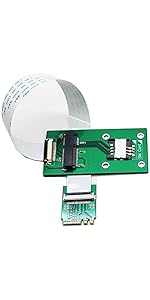
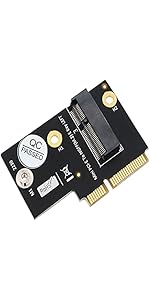
The Sintech M.2 M-Key Adapter transforms M.2 Key-E or Key A+E WiFi modules into desktop-ready devices by converting them to M-Key sockets. Supporting PCIe 1X and USB 2.0 interfaces, it offers plug-and-play convenience with broad compatibility for Intel 7260, 8260, and 9260 cards, enabling seamless wireless connectivity upgrades for professionals seeking cutting-edge network performance.




| ASIN | B07WBXP632 |
| Amazon Bestseller | #121,662 in Computers ( See Top 100 in Computers ) #420 in Network I/O Port Cards |
| Batteries Included | No |
| Batteries Required | No |
| Brand | Sintech |
| Color Name | multicolor |
| Compatible Devices | Laptop |
| Connectivity Technology | Bluetooth, USB |
| Customer Reviews | 4.5 4.5 out of 5 stars (136) |
| Date First Available | August 10, 2019 |
| Item Weight | 0.01 Kilograms |
| Manufacturer | Sintech Electronic |
| Manufacturer reference | VAR7421 |
| Package Dimensions | 11.4 x 8 x 1.7 cm; 10 g |
| Wireless Comm Standard | 802.11a, 802.11ac, Bluetooth |
R**D
M.2ソケット(Mキー)を持つマザーボードに、A/Eキーを持つ無線LANモジュール(Intel AX210)を取り付けるために使用しました。 マザーボードへの取り付けは器用さが要求されますが、LAN/Bluetooth共々問題なく使えています。
A**ー
下記環境にて、Intel AX210NGWを取り付け、問題なく動作しました。 CPU:Intel XEON E5-2696v4 M/B:ASUS X99-WS/IPMI
A**ー
必要最低限の世代が少し古い低価格マザボでM.2にストレージではなく WiFiモジュールを付けるため ネットのもたつきが嫌で購入 ネットの動画視聴専門PCで予備の予備PCな位置づけ 問題なく認識し速度も速くなった 1軍のマザボにはWiFiモジュール接続端子があるので不要なもの WiFiモジュールをそのまま付けられる USBWiFiよりM.2WiFiの方が速いのでは?な思いからM.2にしています 速度測定していないので知らんけど
A**R
Good
E**Y
This item performs spectacularly. I’ll start with the cons: I can only think of 1, and really it’s not a con if you consider the nature of this item. The con that isn’t really a con is that obviously you’re using an m.2 slot for this, but if you’re looking at buying this item anyway that is a sacrifice you’re willing to make. Now for the pros, which there are several. 1.) this item actually is more compatible than the description let on. I had an Intel AX200 (AX200NGW, or Wifi 6, or 802.11ax) from an internal WiFi card. This item does not list this WiFi card among the compatible chips, but it certainly is. I have the some connection speed as when it was in the networking card as I did when it was finally setup. 2.) If you already had a WiFi card in your pc but had to get rid of it, this is a great way to ensure you still have WiFi, and there are no extra drivers to install. Of course, you can only make use of this if you have an m.2 slot you’re willing to spare. 3.) Bluetooth is enabled with this device, as long as you connect the supplies usb cable to the card and to the header on the motherboard. 4.) Considering that many of the new RTX cards are larger than 2 slots, this is a great alternative for small form factor PCs. My pc is an M-Atx, so I only have 3 PCIE slots, and they are ordered in such a way that my GPU covers all of them. I bought this hoping for the best and it pulled through for me, so maybe it will for you too. They also supply a tiny (non-magnetized) screwdriver to help with installation if need be. Overall, great experience with this product so far. I will update if any issues arise.
L**O
Es funcional, solo que me costo mucho trabajo hacer que lo reconociera el sistema
A**O
I bought a recommended wifi card by you, installed in a m2 type m entry and my computer stopped getting any image or keyboard signal. I tested without graphic card and adapter and it still doesnt give signal
J**N
My graphics card is very large for my case (microATX; Gigabyte B550M motherboard) so I can't fit a normal PCI network card in it. I bought a competitor's product which was £5 (this is £15 at the time of purchase), which has less pins on its USB port but otherwise looks mostly the same. Sadly, it didn't work. Bluetooth was identified by my system but wasn't working, while WiFi didn't work at all with my AX210 card. Let me tell you, this is a different product and not one you will find with no-name brands. Sintech also signed the card which tells you it's more of a brand than most are on Amazon. Because the moment I booted my machine, I was connected to Wi-Fi. I'm free of poor USB cards at last. This was tested in both Linux and Windows 10 for people's assurance. So spend just a bit more, it will save you a lot of pain.
TrustPilot
1天前
3 周前