We remain fully operational. Our teams are working around the clock to ensure your deliveries continue safely.

下载应用程序



🚀 Upgrade your home to smart status with precision timing and voice control!
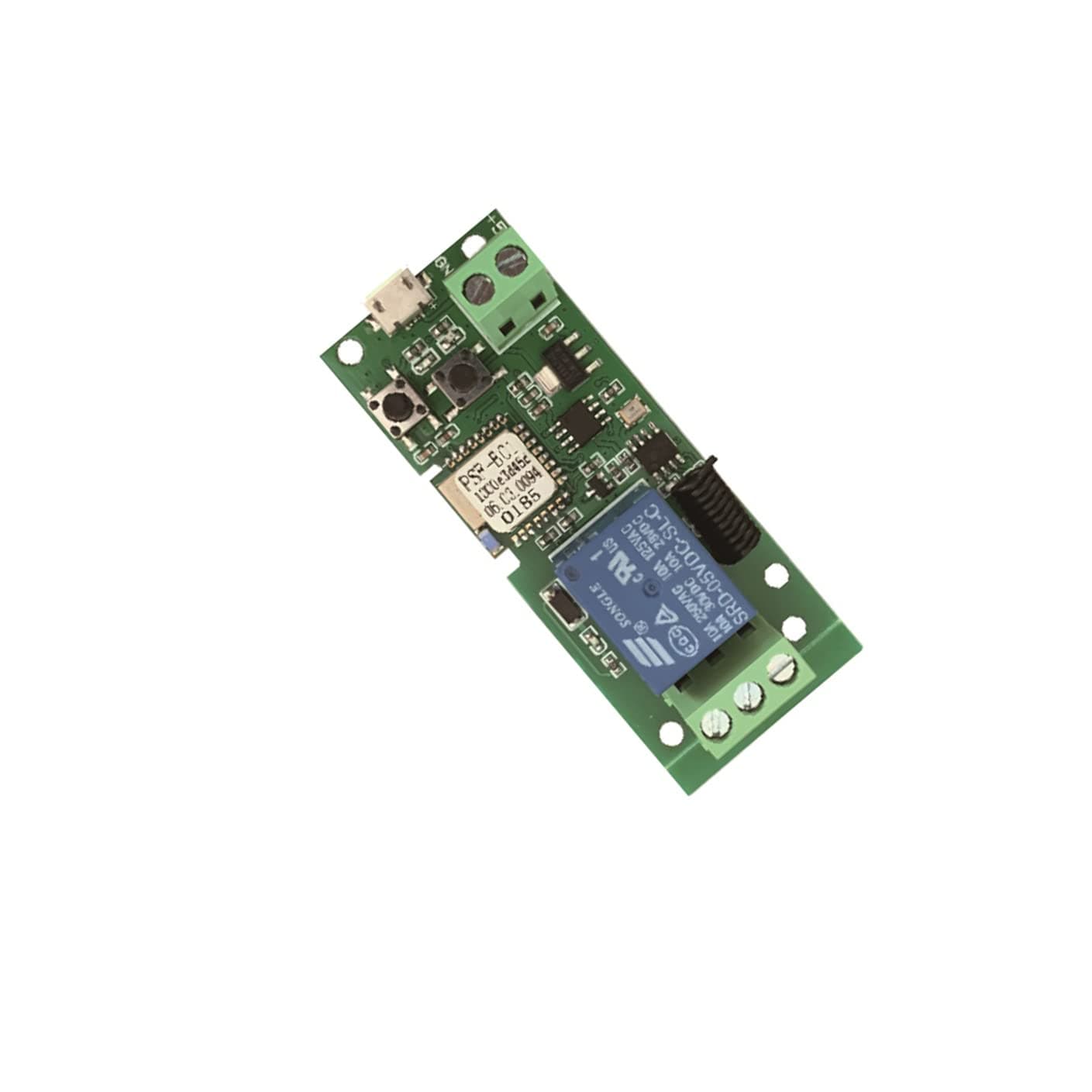
The MHCOZY Updated WiFi Wireless Smart Switch is a compact 5V relay module designed for smart home automation. Supporting both inching and self-locking modes, it allows remote control of appliances via the eWeLink app and voice assistants. With a max current of 10A and adjustable inching time from 0.5 seconds to 1 hour, it integrates seamlessly with most home devices, enabling scheduling, group management, and device sharing for a connected lifestyle.
| ASIN | B07L69HD6N |
| Best Sellers Rank | #829,161 in Tools & Home Improvement ( See Top 100 in Tools & Home Improvement ) #2,681 in Garage Door Keypads & Remotes |
| Brand Name | MHCOZY |
| Coil Voltage | 5 Volts |
| Connector Type | Plug-In |
| Contact Current Rating | 10 Amps |
| Contact Material | Silver |
| Contact Type | Normally Open |
| Current Rating | 10 Amps |
| Customer Reviews | 4.2 4.2 out of 5 stars (404) |
| Manufacturer | Mic technology |
| Maximum Switching Current | 10 Amps |
| Maximum Switching Voltage | 5 Volts |
| Minimum Switching Voltage | 250 Volts |
| Mounting Type | Surface Mount |
| Number of Terminals | 3 |
| Operating Time | 0.01 Seconds |
| Operation Mode | Automatic |
| UPC | 783057191340 |
| Wattage | 1 watts |
T**D
Originally couldn't get it connected, but it finally did and works GREAT.
This thing is awesome. I originally had a hard time connecting it to Wifi with the app, instructions were correct, but it just wouldn't connect. After doing it 2 or 3 times, it finally worked and I was excited to then install it for my garage door. Wiring it up was literally the easiest thing. I added more wire to my original garage door button that went in to the wire terminals on the side of it and now my garage door can be opened with Alexa and with an app on my phone anywhere in the world. I might also wire 5v to it from the garage door button itself. I would have to bust out my digital multimeter to see if it's outputting enough power so I can ditch the USB-Micro and have it tucked away behind the original button. The Micro USB cable I used (Not included) came from a Raspberry Pi Zero W kit I bought on Amazon as well and it has a switch on it for power On and Off so if I'm going away for awhile or if I'm worried something is going wrong with it, I can just turn it off at the power source instead of having to disassemble everything. I might buy more of these for small projects around the house. If you're on the fence with buying this because you aren't sure if you'll be able to understand the electronics, it's unbelievably easy and I even had my daughter put the wires in and screw the terminal clamp down.
S**E
Excellent devices for home automation with Alexa
Bought 2 of these and both are working great. Using each one in separate modes. One is used for my fireplace and is on locking mode where the switch stays latched on. The other is used to power on my PC in inching mode. Inching is where the switch is activated briefly before turning off. Opening your garage door would be a good example of this mode. To switch modes, you use the ewelink app. When the device shuts off from inching mode, Alexa does recognize that it's turned off. The app and device functions are pretty well thought out. I like that ewelink is in the list of manufactures in the Alexa app to choose from. Integration is super easy after you setup the ewelink app and account. Installation note: the device doesn't come in pairing mode. You hold down the button that's on the center of the board for 7 seconds until the led blinks rapidly. Then use your ewelink app to pair to the device.
J**H
Works!
This works! Very cool product for the price.
D**R
Ewelink app needs work
I bought this because I wanted to allow Alexa to open and close a gate. I saw a video where someone did this using a gate remote control. I did the same with an old remote which had the solder and pins on the underside, the newer remotes that I had don't have this and touching the two solders on the top didn't short the remote to open the gate so not sure how those new ones work. I soldered on bell wire to the underside of the remote control button for the two of four that created a short that opened the gate, then connected those to the wifi rf bridge. Before that though I had a hard time connecting the bridge to the network - it turns out that although I thought it was close enough, the distance between the router and bridge was too far. When I moved it closer the two connected. However, there is a light near the relay that will come on when you hold down the button close to the dc input (manual pair) which isn't even shown in the leaflet. I can't remember now if when this is on if it will or won't pair because of the amount of time and tries it took me to pair. Because I got this installed before attaching the bell wires to the remote (I did that another day when I found the old remote) I couldn't find out how to set it to inching at first. You have to click on the plug (Ewelink saw this as a plug for me) and then click on the three dots in the top right then select setting from the drop down menu then scroll down to inching and set it to on. The default setting is 0.5s which I left it at but it took awhile for it to decide to connect and change the setting for inching on! The gate in the meanwhile was opening and stopping until I got the inching switched on. Alexa sees this as a plug so to open the gate I have to tell it to turn the name I gave it on, then off, to open, then to close the gate tell it to turn NAME on then off otherwise it will be stuck in ON and the gate will remain in whatever state it was and will not respond to turn NAME on to open or shut, this is the one drawback. It is nice to have the ability to open and shut the gate from anywhere a speaker is rather than have to use a gate opener in line of sight of the gate or the wall switch to open or shut the gate, so much more convenient.
E**C
Relies on unreliable eWeLink App
eWeLink App is unable to connect to this device in compatibility mode. The Phone connects just fine, but the app gets stuck either trying to find the device AP or Retrieving the device info. Also, neither the instructions nor the eWeLink App mention that quick connect should NOT be used if your WiFi has the same SSID for both 5GHz and 2.4GHz. And since neither explains what quick connect does, that fact isn't obvious. I ended up trying compatibility mode. The phone connected just fine. And the app listed the device's SSID and password. But it was unable to connect. The flow for compatibility mode was confused as well, with states that seemed copied and pasted from quick connect at points where they don't make sense. This could probably be a fine product if it just didn't rely on such an immature app.
B**N
Used as garage door opener
Used this as a garage door opener for my 70’s garage door. So thankful we stumbled across this. Works great. Pretty easy to install.
M**E
No voltage
It took a moment to get this paired. Like any other Sonoff device. You absolutely have to be on a 2.4ghz network. Even if your router is dual band the device used to pair has to be on 2.4 side before pairing will work..... That being said this has NOT worked on my garage door. Not sure what this is supposed to work. I get zero volts on the NC (normally closed) side. I do have continuity. Then on the NO (Normally Open) side I get continuity when the device is activated......I even hear the relay working but still no voltage.
M**E
works great
It was a little hard to figure out how to pair with WiFi, but I did it.
D**.
genial como interruptor y como pulsador. Fácil ajuste desde 0.5 seg pulsando hasta un buen rato... No transmite ningún voltaje. Para abrir puerta de garaje genial... yo tenía el pulsador en el salón, así que el montaje fácil y rápido. Si no tienes esos dos cables sacalos de la placa del motor, y los llevas cerca del ruter.... y poco más que añadir. Con ewelin fácil sincronizar
S**.
Io l'ho utilizzato per togliermi lo sfizio di domotizzare l'apertura del citofono spendendo in tutto meno di 10 euro. Fa quello che deve fare, integrazione semplice con eWelink e con Home Assistant anche senza modificare il firmware di fabbrica. COnsigliato
D**K
I used this to wireless open/close my garage door using Google Home. Very easy to setup, no gotchas that I came across. Paired easily to the app, app was easily connected to Google Home, wireing was simple. Setting to inching (to use as a wireless button press for the garage door) was easy in the app. Highly recommend.
M**N
C est le 2eme que j achete. Je les utilise pour le contrôle de ma porte de garage et de mon portail avec google home. Très facile à installer et la puce wifi est plus que correct.
F**Z
Es handelt sich hier wegen sehr guter Erfahrung um Nachschub für weitere Projekte. Ich habe ca. ein Dutzend dieser 1-Kanal Variante, sowie einige 4 Kanal WIFI Smart Relais im Einsatz. Sowohl im Innenraum als Taster programmiert um bspw. PCs per ALEXA auf Zuruf oder Routine zu schalten, als auch im Außenbereich. Hier in Wetterfesten Verteilerdosen zum Schalten von diversen Außen Leuchten und anderem. Hier zum Steuern per App, aber hauptsächlich per ALEXA Kommando, Routinen (Zeitsteuerung oder Sonnenauf-untergangszeiten) und sogar mit RING Kamera als Aktor. Hier mit Bewegungserkennung. Diese Relais sind bisher ohne Ausfälle oder Fehler teilweise mehrere Jahre in Aktion. Funktioniert wunderbar über die universelle eWeLink App. Hier genügt irgendeine E-Mail Adresse zum Account erstellen. Die App kann für sehr viele Geräte wie zum Beispiel von Sonoff und andere benutzt werden und ist somit ausgereift. Die Erstverbindung funktionierte hier sofort. Als Alternative gibt es noch die Funktion das Relais als WIFI Gerät über „kompatibles Pairing“ zu koppeln. Hier sollte die Verbindung auf jeden Fall funktionieren…. Immer vorausgesetzt man verwendet das 2,4GHz WIFI Netzwerk oder erstellt sich für diese Geräte hier ein eigenes… Kann als Taster oder Schalter eingestellt werden. Als Schalter ist das Relais natürlich als NC (normal Closed) oder NO (normal open) zu verwenden. Umschalten zwischen Taster oder Schalter Funktion geht per Taster auf der Platine. NICHT per App! Spannungsversorgung funktioniert per USB Micro Buchse und 5V. Altes Handy Netzteil und Kabel reicht völlig. Oder per Input-Anschluss mit DC 5V. Hierfür habe ich diese Step-Down-Module / Trafos verwendet. (Muss natürlich gelötet werden). https://www.amazon.de/gp/product/B088NJKG8N/ref=ppx_yo_dt_b_search_asin_title?ie=UTF8&psc=1 Passt für Outdoor Anwendungen wunderbar in Spelsberg 040 Verbindungsdosen mit entsprechenden Kabelverschraubungen. Sehr zuverlässiges, preiswertes Modul für DIY-Anwendungen von Smarten Steuerungen. Gute einfache App. Kann aber auch in bestehende Steuerungen oder in ALEXA per Skill integriert werden.
TrustPilot
2 周前
1 个月前