Buy anything from 5,000+ international stores. One checkout price. No surprise fees. Join 2M+ shoppers on Desertcart.
Desertcart purchases this item on your behalf and handles shipping, customs, and support to Hong Kong.
⌨️ Elevate your typing game—comfort, silence, and control in one sleek package!
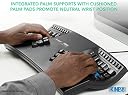
The KINESIS Advantage2 Quiet LF Keyboard redefines ergonomic typing with its patented contoured design, split key wells, and integrated palm supports. Featuring ultra-quiet Cherry MX Silent Red mechanical switches rated for 50 million keystrokes, it offers a premium tactile experience with minimal noise. Fully programmable via the driverless Smart Set engine and compatible across all major operating systems, this USB keyboard is engineered in the USA and backed by a 3-year warranty—perfect for professionals seeking comfort, durability, and customization.


| ASIN | B07K1SMRGS |
| Additional Features | Ergonomic, Split Keyset Design, Wrist Rest |
| Antenna Location | Office |
| Best Sellers Rank | #1,002 in Computer Keyboards |
| Brand | KINESIS |
| Built-In Media | Keycap Puller, Mac Keycaps, USB Cable |
| Button Quantity | 104 |
| Color | Black |
| Compatible Devices | Windows, Mac, Linux, Android, Chrome |
| Connectivity Technology | USB |
| Customer Reviews | 4.4 4.4 out of 5 stars (260) |
| EU Spare Part Availability Duration | 3 Years |
| Enclosure Material | Aluminum or Steel |
| Generation | 3rd Generation |
| Global Trade Identification Number | 00607998600115 |
| Hand Orientation | Ambidextrous |
| Item Dimensions L x W x H | 16.5"L x 8"W x 3"H |
| Item Weight | 2.2 Pounds |
| Keyboard Backlighting Color Support | RGB |
| Keyboard Description | Ergonomic |
| Keyboard Layout | QWERTY |
| Manufacturer | KINESIS |
| Mechanical Keyboard Switch Model | Cherry MX Silent Red |
| Model Name | KB600LFQ |
| Model Number | KB600LFQ |
| Number of Keys | 68 |
| Number of Sections | 2 |
| Power Source | Corded Electric |
| Processor Count | 1 |
| Style Name | Ergonomic and Quiet |
| Switch Type | Linear Quiet |
| Theme | Ergonomic |
| UPC | 607998600115 |
| Warranty Description | 3 Year Manufacturer |
| Water Resistance Level | Not Water Resistant |
M**T
Very innovative, ergonomic and cool! Learning curve requires patience.
I was so excited when this product arrived at my house! I'm obsessed with good design and ergonomics, and this product did not disappoint. I was looking for something that would have absolute minimum impact on my fingers because I had tendonitis and pre-osteoarthritis from overwork. With this product, it feels very good to type, and I love the quiet cherry red keys. I read some reviews that said cherry red felt "mushy: but to me they feel awesome!! I love low-impact on my body. It warps my mind and makes me realize everything I've been doing wrong with typing. It also makes a fun parlor toy to show off to friends when they come over. None of us have ever seen anything like it before--even the nerdy tech guys in my family! I find the thumb keys the most difficult to relearn, though I know there are options to reprogram the way you want it--I haven't done that yet. I normally type 100-120 WPM on a traditional keyboard, but I'm super slow with this one as I get used to the curved keys and new thumb position keys. It's a great product for anyone who is serious about ergonomics--knowing as well that ergo is highly personal and it's important to find the right products that feel great and work for YOUR body and workspace setup.
U**R
FABULOUS keyboard. Absolute MUST-HAVE for a writer.
The BEST keyboard on the market!! I own 2 of them ... one for each computer. I LOVE my Kenesis Advantage Keyboard!!! I have retired 2 others over the past 20 years... one got urped on by kitty cats and the other finally just gave up the ghost after 16 years. LOL. I have used a Kinesis keyboard since the mid-90s. Could not live without it. Just lay it across my lap and go. No more carpel tunnel syndrome. Literally. I was in deep pain transcribing notes from a director (197 single-space pages) and the pain was terrifying through my arms and back. I was either going to go to the hospital or find an ergonomic keyboard. I went online and found this keyboard. Bought it... spent a few days getting used to it.... and never looked back. ALL the pain left while I kept typing. (I have clocked in on an old Selectric typewriter at 111 wpm @ Kelly Girl Services.) Everything else is primitive to this. It's definitely worth the few days of getting used to. I LOVE being able to sit the keyboard in my lap, rest the pads of my hands on the keyboard and just clatter away. Keyboard quality: Fabulous. A+++ Typing speed: Fast. And faster than fast. Easy peasy. Literally NO PAIN because of positioning of keys and use of thumbs for heavily used keys like Backspace, Shift, Delete, etc. Build quality: Fabulous. Top quality.
J**I
Just plain WOW!
BACKGROUND: I have used Macs since 1986 and, therefore, many of their keyboards. I have also tried several other brands over the years - but none can compare to the ease of typing on my Kinesis, which I have used for 15 years. I don't remember when I got the first one, but the original keyboard was the white model, and, over the years, it has gradually turned a dull yellow. The first one took a little time to get used to it, but it was/is fantastic once I did. I'm 6' 1" and broad-shouldered, so I had to squinch my arms together and bend my wrists. And I used to wear wrist braces for carpal tunnel issues. After using the Kinesis for a while, I stopped wearing the braces and have not had wrist issues for a loooonnnnggg time. :-) Also, I can touch type on the Kinesis keyboards. I say boards because this purchase was my 4th one: upgrading the office keyboard, home, and 2nd home. In December, after waiting for six weeks, I was excited to try one of the new 360 models - and frankly LOVED both the flexibility of adjusting each hand's key's angle and elevations together with the feel of the keys! But unfortunately, despite all of Tyler Sullivan's (in their tech support department) efforts, I could not conquer the programming skills needed to make it operate as a Mac keyboard. His efforts were much appreciated, but although I have used Macs for all these years, I have never done any coding. It was literally Greek to me! Since I liked the keys on the 360, I decided to try the Advantage 2 model to see how it feels. It arrived yesterday. The new model keys are so silent and touch-friendly. A tiny detail - the home keys are slightly more cupped, so one's fingertips tell you instantly that they are “home.” :-) Overall: WOW! Nice! Smooth! And Quiet. Worth updating! (Even without my carpal tunnel issue, I’d update just for the superior feel and quieter typing!) And consider that the A2 is one-half the cost of the 360 (which I had just returned), so there is that. And finally, FYI - I will likely upgrade the other two keyboards. Considering the extra cost of replacing two more keyboards tells you how much I like the A-2 model. Nonetheless, I will wait awhile with my fingers crossed - yep - it is challenging to type that way ;-) I am hoping that, once the original demand for the 360 has been caught up, Kinesis will consider making the 360 available ready to use as a Mac Keyboard! KINESIS, ARE YOU LISTENING? So, I strongly recommend you give their technology a try. I hope you find it as appealing as I do.
G**G
I received the keyboard after waiting for weeks, and the package is missing the hands rest cushions... Disappointing...
R**S
TL:DR the Kinesis Advantage 2 LF (KB600LFQ) is a phenomenal keyboard for anyone spending significant time typing. It's a solid investment in your work comfort and overall hand health. If you're on the fence about purchasing, I highly recommend giving it a go. As someone sat at a keyboard all day writing and programming I have tried many different keyboards with both standard and ergonomic layouts. The Kinesis Advantage 2 LFQ (Low-Force, Quiet) keyboard is the best so far. The biggest selling point for this keyboard is its ergonomics. The Kinesis Advantage 2 LF features a key well design that comfortably accommodates your hands and fingers in their natural resting position, which drastically reduces the strain typically associated with long periods of typing. The key wells are split and angled for a more natural position for your arms, wrists and hands. Additionally, the keys are highly responsive and don't require much force to activate, leading to reduced hand fatigue and a more enjoyable typing experience. One feature this keyboard has that the newer 360 models lack is a piezo speaker. This speaker creates a key click sound on key actuation so you can hear when the key is activated. It's a small detail but helps to avoid "bottoming out" the keys which is a common cause of pain in your fingers from typing. I bought this keyboard because I suffer from RSI, it's not a cheap keyboard but for me the keyboard enables me to keep working pain free. If you are suffering from RSI do seek expert advice though, RSI is a catch all name for a variety of different symptoms with different causes, what works for some may not work for others. The keycap profiles on the Advantage 2 is fantastic with the home row being a different shape so your fingers can quickly recognise where they are on the keyboard without looking. Sadly these keys are made of ABS plastic, giving them a sticky feel. They are pretty thin and wear out quickly getting a very smooth and shiny texture. You can buy replacement PBT keycaps direct from Kinesis, they aren't quite the same profile as the originals but they do feel nicer to type on and should not wear out. The keyboard sounds very hollow which is a real shame, I feel kinesis could have improved on this and with the Cherry Red silent switches it could have been a very quiet keyboard. There are various discussions online on how best to reduce the sound on these keyboards, I personally haven't tried any of them yet though. The Advantage 2 also has powerful programmability with Kinesis own Smart Set system, offering the ability to customise every key to suit your specific needs. It's possible to program it from the keyboard itself switching key positions and recording macros which is useful if your IT department limit the control you have over your PC, but you can also mount the keyboard as a USB device by using a key combination where you can create more powerful customisations such as "mod tap" keys where if you tap the key it performs one action and if you hold the key it performs another. For example, on my keyboard I have the Caps Lock key mapped to Ctrl when it's held down and Esc when tapped. The keyboard has two layers per layout, but supports many custom layouts which you can activate using a keyboard shortcut. It takes a little while to adjust to having come from using a regular keyboard but I was back up to typing at around 90 wpm within a week. The instruction manual that comes with the keyboard provides some useful guidance. If you buy this keyboard, do make sure you read the instructions. This is by no means a cheap keyboard, but given it's programability, and potential to prevent repetitive strain injuries, I believe it's a worthwhile investment. The Kinesis Advantage 2 LF (KB600LFQ) is a phenomenal keyboard for anyone spending significant time typing. It's a solid investment in your work comfort and overall hand health. If you're on the fence about purchasing, I highly recommend giving it a go.
M**L
Avant, je n'arrivait pas de taper sur un clavier sans regarder les touches. Car avec dix doigts sur un clavier standard, mes mains commençait à faire mal au bout de dix minutes. Avec ce clavier ergonomique, je peux écrire pendant des heures sans douleur. Et ma vitesse d'écriture a plus que doublé ! Seul conseil : prendre la version silencieux (LF), car il est beaucoup moins bruyant que la version de base.
C**L
As a programmer, having on of these is a must. It's really good and helped me get rid of the pain in my hands
A**I
The positioning of the thumb clusters is poorly designed and led to tendonitis in both of my thumbs. After prolonged use, I experienced significant discomfort and strain. If you’re prone to repetitive strain injuries, I’d strongly advise against this keyboard.
Trustpilot
5 days ago
1 week ago