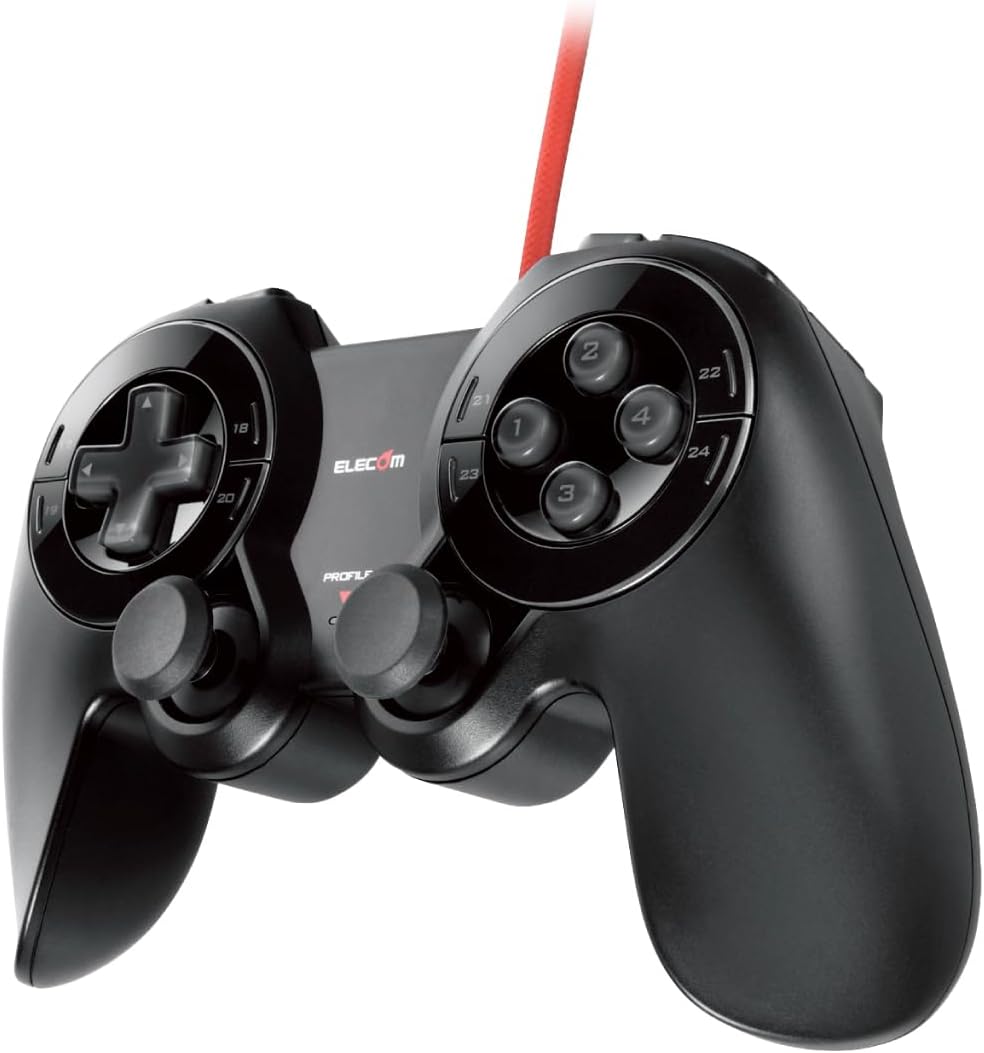
Elecom JC-DUX60BK USB 24 Button MMO Gamepad Black
Product ID: 101406693
🎮24 programmable buttons
⚙️hardware macro & recording
🕹️2 analog sticks
Desertcart purchases this item on your behalf and handles shipping, customs, and support to Hong Kong.
🔥 Level up your MMO game with 24-button power and pro-grade macros!
The Elecom JC-DUX60BK is a robust USB MMO gamepad featuring 24 programmable buttons, dual analog sticks, and hardware macro recording for seamless, repeatable commands. Designed with durable Japanese rubber buttons tested for 3 million presses and ergonomic grips, it offers immersive vibration feedback and customizable controls to enhance your gaming precision and endurance.


J**D
No deal brakers, kinda underrated tbh
5 stars bc this is my favorite controller and think the overall should be higher. That being said I plan on purchasing more simply because I believe my joysticks may break on the sooner side. Build quality overall is good, buttons are responsive and there's so many. I didn't know until looking into the reviews that support was only in Japanese, I setup this gamepad using a software called JoyToKey that recognized the button inputs right away. Unfortunately my computer doesn't recognize this device as a game controller so a game with native support still requires JoyToKey, but I've been using it for Elden Ring and actually prefer it over the native support. If I were to truly nitpick it would be nice if the toggle sticks were slightly farther from main ring. I don't usually hit other buttons or the sticks when hitting the lower quadrant buttons closest to the sticks but it can feel a little cramped. All in all an excellent controller that innovates, all be it slightly, on the traditional controller formula.
A**N
Good controller with lots-o-buttons
It arrived b4 i expected it to making me very happy. Amazon still thinks i hav not gotten this for sum reason but i hav. Anyway, it definitely works. The analogs r the mini type meaning i was able to (barely) use nintendo switch analogs stick covers to cover the analog sticks & giv me betr grip which so far after about a month of use, hav been able to stay on the sticks. So in all is a good mmo controller. I use this in my left hand in conjunction with a mmo mouse in my right hand. I mapped the controller to a 3rd party app on my pc to make macros, sets & turbofire capablities. The instructions that came in the packaging is all in japanese....im american & so i cud not read it but it for me was plug & play so my pc & 3rd party software had no problems picking the device up. In short its a good controller in all. Wud hav rated a 5 star but the analogs r just a tad too far down on the controller making it slightly uncomfortable & the flat buttons arounds the d-pad & "a b x y" buttons is a bit too hard to press for my personal tastes. but rather too hard than too easy. I just use them for functuons i hardly use in a game.
J**.
Worked great until it broke
First off, this is by far my favorite controller for MMOs. I've been using it the last 6 months and it's been phenomenal, until it stopped being recognized by any PC I attached it to. The wire connection inside the controller got finicky. If I moved the wire a bit and held it, it could connect for a second. This is usually an issue of bad connections or soldering inside the controller. So, it may be salvageable by opening it up and re-soldering the connection, but it would be far better if it didn't break after a few months of use. There is another review here that says much the same thing, so it's not an isolated issue. Also, there is no good way to get customer support outside of japan, so consider carefully before buying.
C**T
All in Japanese, NO Support Response.
The controller seems okay, but all buttons have to be configured (no default configuration) and all instructions are in Japanese. The software is also in Japanese. Zero support, no responses at all from support. US-Elecom won't assist because it's not a U.S. product. No videos online to assist with configuration. Basically, it's a useless, unconfigured paperweight. I would rather have Chinese trash, at least you get support from them. Where is the honor in business nowadays? DO NOT PURCHASE UNLESS YOU CAN READ JAPANESE AND ARE OKAY WITH NO SUPPORT.
O**N
I finally got a controller the fits most of my MMO needs.
Wished I had this controller when I first started my current mmo, and before the muscle memory skill chaining had set in. It has enough buttons to cover all the macros I use, without needing to waste a button for funtcion shifting. I would definitely use this on the next MMO. If it's missing anything it would be Xbox styled counterpart and a touch pad for ground trageting skills but that is a personal preference as other get by with using the analogs.
S**N
Cool concept, poor execution
I bought this controller thinking that it would be perfect to use for PSO2 since I could map many different shortcuts to the different buttons and press a single button to use my items on the hotbar instead of having to manually scroll through them, however the initial setup is incredibly confusing. The instructions and software are in Japanese so if you don't know how to read it, it'll be an ordeal getting it set up, and even when you do get things set up, some of the button mappings don't work properly. In addition to that, you can't simply plug-n-play with the controller, so you're spending 30 minutes after opening the box just to hope that the controller will work for you. As if that wasn't bad enough, the analog sticks are very gritty and don't move as smoothly as any other competing controller, and the buttons are inconsistent with how they feel. Some buttons are very mushy and feel sluggish to press, while others seem very brittle and ready to break if you press it too many times like a myriad of the shoulder buttons. All in all, this is a fantastic design for a controller that falls short when it comes to practicality, and I can only hope that another controller manufacturer takes inspiration from this design and makes a more solid and worthy product from it.
D**E
24 Button MMO Game Controller
The game controller is really well made, the buttons are solid and responsive. The left joystick on mine was a bit stiff and it's base button almost seemed stuck but worked out with a bit of play. The software is all in Japanese and really difficult (almost impossible) to decipher. How does a company (Elecom) sell a product globally but only write driver software and user guides in one language. Ok, so you drag drop the .pdf user manual into Google translate which does a pretty fair job of translating the document into something usable. This paired with having the original document opened side by side with the translated one (Google translate strips the images and just gives text) you can just about figure out how to set this thing up to do just about anything you want. It's a really good controller support docs and drivers need work.
L**A
Just what I was looking for
Exactly what I needed. The extra buttons are easily programmable and the control response is great.
ぼ**ぼ
スティックが←に勝手に入力される不具合
1ヶ月程度使用又はコントローラーを逆さまにして置いていると不具合が発生し始める。 直し方としては 1、スティック部分へのシリコンスプレー塗布 ┗ 1~2日で再発する 2、スティック基盤接点不良改善の為のワッシャー加工(他レビュー参照) ┗ 不具合発生後ではほぼ意味がなかった 3、スティック基盤の交換 ┗ https://www.amazon.co.jp/dp/B01AVUC6ZA/ 上記商品にて3個すべて交換したがすべて 1週間~1ヶ月程度で不具合が再発した 4、Joytokey によるスティックしきい値設定 ┗ 不具合をある程度防げるが程度がひどくなるとこちらでも補えなくなる 5、ゲームコントローラーの調整 ┗ コントロール パネル\ハードウェアとサウンド\デバイスとプリンター ELECOM MMO Gamepad のゲームコントローラーの設定 →プロパティより 設定タブより調整 6、ドライバーの削除(おすすめ) ┗ win7環境では コントロールパネル → ハードウェアとサウンド → デバイスマネージャー ヒューマンインターフェイスデバイス から 【HID準拠ゲームコントローラー】【HID準拠コンシューマー制御デバイス】 2点を削除、コントローラー差し直しで動く(再起動を求められる場合あり) ・公式より「JC-DUX60」用ファームウェアが公開されているので入れましょう http://www2.elecom.co.jp/search/link/search.asp?kataban=JC-DUX60BK&link_type=3 私のコントローラーは現在1~6全て施行済みで最近は4,5、6のみで不具合防げている状態です。 以上参考になれば幸いです。 -------------- 2018/10/12 追記 やっぱりダメでした。 こちら購入して3台目ですが、だめですこれ。 いらついてスティック基盤ごと水洗いしました。 左スティックのすごく調子が良くなりました。おすすめです。
A**S
Parfaite si ce n'est ..
Parfaite ! l'interface japonaise n'est pas difficile a comprendre avec quelques notion et allié a JoyToCon la manette permet un control total autant en jeuxque hors jeu ! Et comme si ce n'était pas suffisant l'ergonomie est fabuleuse *~* Mais les jeux les plus récent ne reconnaissent pas toujours les joystick ^^
ば**ち
デメリット有りの必需品
【デメリット】 • DirectInputなのでSteamのゲームではほぼ使えない(多ボタンの代償) •酷使すればどこかしらが一年以内に壊れる。私の場合スティックよりも十字キーやABXY周りのリング状のボタンが陥没して壊れる。 •スティックの入力方向が12方向程度で、緻密な移動操作はあまりできない。 【メリット】 •他の多ボタン製品を圧倒するボタンの多さ • ボタン配置は十字キーやABXY、LRの周りに増設されているので割とすんなりと受け入れられる。(慣れは必要) •マクロも対応 ドデカいデメリットを抱えるこの製品ですが、得られる恩恵が唯一無二、代替が無いから消耗品と割り切ってこれを買う…という感じで、もう5台目になります。心なしか最近のロットは少しだけ耐久性が上がっているような…? これがあれば、例えばPSO2とかではサブパレット1〜0全てと他のショートカットが2つほど(周囲のキャラ確認や自キャラのステータス確認等)設定を変えればそれ以上の操作がパッドから直接実行できるので非常に楽です。 椅子のリクライニングを倒してダラダラプレイしたい時など、キーボード操作が難しい時に活躍してくれてます。普段であれば壊れやすい製品をリピートする事はまず有りませんが、これに限っては得られる恩恵が大きいので仕方なく買い直している状況です。20ボタンオーバーなので当然DirectInputモードの製品になり、Steamのゲームではほぼ使えませんので注意を。古のMMO向きの製品です。
W**R
応用力が試されるコントローラ
モンゴリアンプレイヤーには注意が必要なのとある程度の対応力は必須 まず持ち手の尖った形状が、片手持ちには食い込んで痛い。→削るのもアリ サラサラ感の表面はグリップ力なし→滑り止めパッドを裏面に貼りました。 スティックも滑りやすい→プロコンのキノコカバー買いました。 多ボタンだが密度とか利便性考えてないので誤操作もあるしかなり玄人向け 一番困っているのは、専用ソフト スティック2つと十字(pov)ボタンで 「pov(矢印)」「wasd」「スティック操作」「x」「y」の5つしか選択できないこと これで3つのうち1つはコントローラの設定しかできず、コントローラ非対応ゲームでは使用できません。 特殊な使用用途をしている側なので何も言えないけど、独立キーを指定させてほしかった。 joytokey含め、外部ソフト使用禁止のゲームが増えてるのでどう活用しようか…悩んでます ※余談 重量気にする方で片手プレイの人は取っ手部分ぶった斬ってもいいです。振動機能もそこにはないので中身なんもないです(両方切ればスーファミっぽくもできます)
A**ー
ダメ
外れ個体だったのかもしれない
Trustpilot
3 weeks ago
3 days ago