Desertcart purchases this item on your behalf and handles shipping, customs, and support to Hong Kong.
💼 Power your data hustle with the ultimate dual-drive docking station!
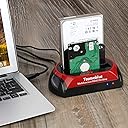
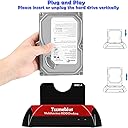
The TCC-S868 USB 3.0 Hard Drive Docking Station is a versatile external enclosure designed for professional users needing quick access to both IDE and SATA hard drives or SSDs. Supporting up to 20TB SATA and 1TB IDE drives, it offers tool-free installation and blazing USB 3.0 transfer speeds of up to 5Gbps. Its one-touch backup feature streamlines data protection on Windows systems, making it an essential device for efficient data management and recovery.


| Asin | B07MVFPJ5K |
| Best Sellers Rank | 54,000 in Computers & Accessories (See Top 100 in Computers & Accessories) 55 in Hard Drive Docking Stations |
| Box Contents | Power adapter, USB cable |
| Brand Name | Tccmebius |
| Colour | Red+Black |
| Compatible Devices | Desktop, Hard drive, Laptop, Smartphone, Tablet |
| Country Of Origin | China |
| Customer Reviews | 4.0 4.0 out of 5 stars (1,077) 4.0 out of 5 stars |
| Data Transfer Rate | 5 Gigabits Per Second |
| Enclosure Material | Plastic |
| Hardware Interface | IDE, SATA 6.0 Gb/s, USB 3.0 |
| Hardware Platform | Windows 10, Windows 11, Windows 7 |
| Item Dimensions L X W X H | 18L x 11W x 10H centimetres |
| Item Weight | 239 Grams |
| Manufacturer | Tccmebius |
| Manufacturer Part Number | TCC-S868 |
| Memory Storage Capacity | 22 TB |
| Model Number | TCC-S868 |
| Network Connectivity Technology | USB |
| Number Of Items | 1 |
| Product Warranty | Product Warranty Rules: 1. Within 30 days after the product is purchased, you can contact Amazon Customer Service directly to return the product and return the full purchase price. 2. Within 6 months after the product was purchased, the product had quality problems. You can send pictures or videos to us by email. The pictures or videos show the normal working state of the products when they are used normally. Our technical staff will review the picture or video, determine the problem of the product and re-send the new product to the customer. The product in question does not need to be returned. 3. If the product has been problematic for more than 6 months after the product is purchased. The customer can send the product in question to our factory in China (this freight customer pays) and we will repair the product within 7 working days and then mail it to the customer (The transit time from China to the customer's destination is approximately 25 days). |
| Supported Devices Quantity | 2 |
| The Standard Size Of The Hard Drive Or The Bay The Hard Drive Is Compatible With In Inches | 3.5 Inches |
| Unit Count | 1.0 count |
| Upc | 799577101066 |
User
Handy and portable.
Handy device to have, cheap and does what it’s meant to. If you got a laptop or anything that has hard drives this is something if you can afford it to have in the back of your wardrobe in case something goes wrong. Was super easy to get my data from a 1tb drive after a failed windows update that rendered the system unusable. Plugged this in found the drive took off everything I wanted then formatted the disk popped it back in the old laptop done some magic then I had it up and running again within a day. I’d hope I’d not have to buy another one of these but I’d recommend it.
User
Good Service So Far
Does what it says, little tight when plugging in a disk but ok. Deleivery was as stated, no problems. Early stages for use but so far so good.
User
Great product - but read the manual, questions and reviews
I bought this to recover data from an ancient 3.5 IDE drive from a desktop computer, and it did the job perfectly.Before using it, I read the manual, and then the questions and reviews on Amazon.So - a few quick tips for new users ...1) Read the manual, and then the questions and reviews on Amazon.2) If all you want to do is connect a hard drive to your computer to copy the files from it, you can ignore the OTB software stuff, and the red button on the top of the device. Your computer's file explorer will do what you need.3) If you are copying date from a 3.5 IDE drive, then you need to move the little cap on the 4 double pins on the drive to set it as a "slave" rather than a "master". The disc drive should have a label on it telling you which pins you have to cover. See page 17 of the manual.4) Be patient. When you turn the device on, your get the red light and the blue light. You may not see the drive appearing as an external drive in file explorer on your PC for a few minutes. Wait! I found that after a few minutes, the blue light started flashing, and then the drive appeared in file explorer.5) If you find it still doesn't work when plugging the USB lead in to your USB 3 computer, just dig out an old USB 2 hub, and plug that in between the lead and the computer.Overall I am very please with this device.Like all things techy, it can depend on your knowledge start point.I'm certainly not an expert, but I found the questions and reviews on Amazon very helpful, so thought I'd summarise a few key points that enabled me to get going quickly.
User
USB 3.0 with this device is useless...
I tried one of these some time ago. USB 3.0 was useless and made my computer freeze up for ages. Bad product and it was useless and came all the way from China. Tried to return it, was a complete nightmare and I learned that China don't do returns they don't want anything coming back to their country. Had a nightmare trying to get the money back and opened up a case with my credit card company so I could claim back the funds. The item probably went missing due to the poor return system and bad return address given. The guys in China were useless and demanded that I send them video footage of it not responding when it froze my PC up. USB 2.0 did work okay and there was no issues it seems the USB 3.0 connection is the problem due to badly written drivers and poorly programmed firmware issues that need addressing and taking right back to the drawing board and starting all over again. I would avoid this completely unless you want to open up a nightmare in your life. A poorly designed product that doesn't work and never will just like lots of other products the same. I was surprised it was sent from China and I had to pay to return it which wasn't cheap and wasted my money fighting to get my funds back only because the credit card people said I could have it back.
User
Impressed. Does what I need it to do!
My pc was throwing a wobbler every time I tried to connect old ide drives via pci card and couple 2tb sata drives via x dock hot swap. This was my last chance of accessing the drives without pulling pc to bits. It worked where my pc failed. Very impressed. To do full format on 2tb sata drive, via the usb3 connection, 3.5 hrs. Not great, but not bad either as a 2tb hdd connected via sata cable to motherboard was only 20 minutes faster.IDE connection is a bit fiddly with the movable power connector positioning.The software... put the web address in as shown in instructions. Missing out www for me just timed out. Files needed for backups are in RAR file. Instructions you already have in book are a ZIP file.I didn’t bother installing software as not going to use for backups. Works fine without it. (Thanks to other reviews for that info.)
User
Poor Quality Control - Works but not the best design!
There's no denying that the Tccmebius USB 3.0 Hard Drive Docking Station isn't a useful product, but here lies a very annoying problem! Having returned one faulty device (TCC-S862 - USB 2.0 E-SATA Model), i replaced it with this model (TCC-S868) which also has the exact same fault! Talk about poor craftsmanship, is there no quality control at this company?!The problem I refer to is the bottom mounted slider button for adjusting the position of the Molex plug. This button wouldn't move at all on the returned and this replacement isn't much better. It takes considerable force to move it and even then it tries to ping back to it's original position. Clearly something is foulding this switch inside.I have contacted the manufacturer via email but it's taken several attempts to explain this problem to them and whilst they've thanked me for the feedback they've made no attempts at resolving the issue for me. To be honest, I don't really want to return this second one because despite it's faults, I can still use it but it's a pity I'm expected to pay full price for what is essentially a faulty product.I think a complete redesign is needed here, not just the Molex switch but also the docking cradle itself, it's really difficult lining up this molex connector and IDE pins when you can't see them.Otherwise, it seemed to work well with my SATA drives but 2 out of 4 IDE drives weren't accessible despite them working previously in my older PC.2 Stars deducted for poor quality control.
User
What a great device.
Absolutely brilliant piece of kit, that saved precious memories after an accidental folder deletion of family photos and videos. All of my kids, photos and videos, in their glorious pictorial history, are now restored from a backup i'd made, which i honestly thought i'd never have to use (arrogantly, i thought i was too smart and PC savvy to delete all my images...wrong!) My wife and I are so relieved to have our files back.This device was easy to use, efficient and frankly, worth every penny i paid for it.Thank you seller.
User
A few niggles but it serves its purpose
UPDATE: I found a USB 3 hub that allows the docking station to work at USB 3 speeds. Therefore, YMMV - try different ports/cables. Increased from 3 to 4 stars.--The docking station is useful for accessing hard drives that I have accumulated over the years. 2.5", 3.5", SATA/IDE all work fine. Hard drives can be accessed via Windows 10, Linux and in a virtual machine.Unfortunately, it can only be accessed over USB 2, at least over my computer, which is a shame as I spent the extra money on a USB 3 model. Directly plugging it into a USB 3 port on my laptop makes drives inaccessible. Strangely, the dock works fine using a USB 2 hub plugged into a USB 3 port...Other issues- Handling of drive errors: I'm not sure whether it handles drive errors gracefully. It seems to just lock up, requiring me to turn the docking station off and on again.- Handling of multiple drives: It doesn't want to get data off two docked hard drives at once, though they are both recognised.- Fiddly docking of 3.5" IDE drives: Inserting requires some care and practice in order to line up the pins and power connector properly before docking. As a little bit of force is required for the power connector, I did bend a pin on one of the hard drives by not being careful (I was able to bend it back).Despite the complaints, it serves its purpose, which is to access my old files.
User
Precies wat ik nodig had
Diverse oude harde schijven kunnen controleren. Tevens een oude 4TB schijf gebruikt als backup die ik op een veilige plaats kan bewaren
User
USB 3.0 Festplatten Dockingstation
Schneller Versand, Artikel wie beschrieben, USB angeschlossen an einen Laptop und eine Festplatte in die Dockingstation reingesteckt und alles funktioniert.
User
Efficace
Fonctionne très bien : on le branche à son PC par USB, on insère un ancien disque dur et hop! il est détecté par le système.
User
Estación HD's
El producto funciona perfectamente en Windows y se le pueden acoplar HD's IDE y Sata sin ningún problema. Pero, en cambio en el sistema operativo Linux, La estación de acople de HD's es expulsada al poco tiempo de estar funcionando conectada en Linux sin dejarte acceder o pasar archivos.A mi opinión, la estación de acople de HD's deja mucho que desear en formato Linux, pero en cambio en Windows va de maravilla. Por eso si estas pensando en comprar esta estación de acople para trabajar con Linux, mejor no lo hagas. Si en cambio es para trabajar con Windows te la recomiendo porque funciona de las mil maravillas.
User
Valido
Funziona bene. Incastri a volte un po’ difficoltosi, ma con un po’ di pazienza il problema si supera.
Trustpilot
3 days ago
3 weeks ago