


Desertcart purchases this item on your behalf and handles shipping, customs, and support to Hong Kong.
๐ Elevate Your Data Game!
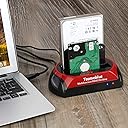
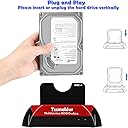
The Tccmebius USB 3.0 Hard Drive Docking Station is a versatile external enclosure that supports both 2.5" and 3.5" IDE/SATA hard drives, offering a maximum storage capacity of 20TB. With lightning-fast data transfer rates of up to 5Gbps and a convenient One-Touch Backup feature, this docking station is perfect for professionals looking to streamline their data management. Compatible with multiple operating systems and backed by a 1-year warranty, it's the ideal solution for your storage needs.





| ASIN | B07MV6XC3C |
| Best Sellers Rank | #93 in Hard Drive Docking Stations |
| Brand | Tccmebius |
| Built-In Media | Power adapter, USB cable |
| Color | Red+Black |
| Compatible Devices | Desktop, Hard drive, Laptop, Smartphone, Tablet |
| Connectivity Technology | USB |
| Customer Reviews | 3.9 out of 5 stars 180 Reviews |
| Data Transfer Rate | 5 gigabits_per_second |
| Enclosure Material | Plastic |
| Hard Disk Form Factor | 3.5 inches |
| Hardware Interface | IDE, Serial Interface, USB 3.0 |
| Hardware Platform | Windows 10, Windows 11, Windows 7 |
| Item Dimensions L x W x H | 7.1"L x 4.3"W x 3.9"H |
| Item Weight | 239 g |
| Manufacturer | Tccmebius |
| Material | Plastic |
| Memory Storage Capacity | 20 TB |
| Mfr Part Number | 8541662377 |
| Model Number | 8541662377 |
| Number of Items | 1 |
| Product Dimensions | 7.1"L x 4.3"W x 3.9"H |
| Supported Devices Quantity | 2 |
| UPC | 799577101035 |
| Warranty Description | Product warranty rules: 1. Within 30 days after purchasing the product, on the basis of not damaging the product packaging and appearance, you can directly contact Amazon customer service to apply for a return, and the Amazon platform will refund the corresponding amount. 2. Within 6 months after purchasing the product, there are quality issues with the product. You can send us pictures or videos โฆ |
O**9
Got 25 years of computing back
Perfect gadget. Easy to use. I have about 4 to 6 EIDE HDs from my old desktops with over 25 years of memories, downloaded music, and documents. Just got them all back by plugging this reader into my laptop. Was able to read a drive that no longer would boot windows because of a HD error. Just because your hard drive crashes doesn't mean your information is gone. Sometimes it just means windows won't load. Also worked for a old laptop HD. Great multi format reader or drive b/u if you are running out of storage space.
J**S
Did work great
I was a little worried when I got it having trouble putting in an IDE drive until I realized power slot moved to fit the drive.
S**E
This device WILL NOT access ANY IDE drive that does not support LBA protocol
This device WILL NOT access ANY IDE drive that does not support LBA protocol (ONLY โnewer IDE drivesโ) if you have an original IDE drive from the 1990s (mostly drives under 3GB) that use the original CHS protocol you are totally out of luck this device will NOT work with ANY CHS IDE drives. The dock has a slide/moveable IDE-MOLEX power connector, (Since not all IDE drives have their power connectors in the same place!), it can be VERY tricky to get aligned to allow the IDE drive to seat properly. TRICK-- get a piece of paper and mark the --exact-- distance on your drive between the last IDE PIN and the closest MOLEX power PIN, then put that paper into the dock and move the slider on the bottom until the dock's IDE to MOLEX power PIN aligns with the marks on the paper, this will make it TREMENDOUSLY easier to get the drive seated. (SATA drives do not have this issue obviously, and ALL SATA drive work fine). I give it a 4/5 because the manufacture KNOWS about the CHS issue, but deliberately left this information out of the description, (but ALL the other ones do the same thing to, so whatever......)
S**I
Itโs Ok, but not great
Mounting 3.5โ drives is a pain in the butt. The bottom four pin power connector is spring loaded (why anyone knows) and makes it very difficult to get it to line up and connect to a hard drive. The software is also really basic and glitchy. I ran Microsoft Windows 10, and wasnโt able to see the program after minimizing it. I had to run Windows program manager to restart it. The instructions are also less to be desired - poorly written. After a little frustration connecting a drive and getting the software to read, the device worked fine - albeit I only used it to read and copy files.
F**K
Tccmebius USB 3.0 Hard Drive Docking Station
Good Device
J**N
Broken on Arival. Now a lovely trash ornament.
I plugged this in and when trying to turn it on via the rocker switch on the back, the switch just loosely flopped back and forth. It's obvious that they did not plug this in and test it before it was boxed. How could you miss a bad power rocker switch? I figured it wasn't worth my time and hassle of sending it back for the short time I needed it - I was looking at some old IDE drives before destroying them. So I removed all the screws, removed the bottom plastic plate, pulled the wires off of the rocker switch, and tied the wires together. Worked for the 30 minutes I needed it. Now it's in the trash. QA? What QA? Garbage product. Maybe I can use the wall wart for something.
J**Y
Plugging the IDE drive can be difficult
Plugging the IDE drive can be difficult. I read people issue with the adjustable power align up plug. It can take awhile and if not careful, you can bend some pins.
T**R
works right out of the box, I recovered IDE HD files immediately
Works with no added drivers or SW; Windows sees the external HD as another HD on the system. However, sometimes a window pops up saying something like Admin Privies Required to Access, but I just click OK and it proceeds; maybe a Windows thing. I only wish it didn't need an external PS. I would have thought that the USB port on my laptop would be able to power it. Now that I've extracted the old files I wanted, I formatted an old IDE drive and use it as a .MP3 backup drive. And another for pix backup. I'm of the opinion that older sub-TeraByte HDs were built better than today's stuff (what with continual cost reduction in manufacturing and data compression schemes) and I won't be held ransom by cloud services. So a side benefit is data BU.
Trustpilot
2 weeks ago
2 weeks ago