

๐ฝ๏ธ Elevate your media experience with style and speed!
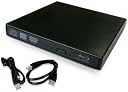
The Epartsdom Blu-Ray Player External USB DVD RW Laptop Burner Drive is a compact and efficient external drive that supports a variety of disc formats, including Blu-ray and DVD. With a sleek design and high-speed performance, it is perfect for professionals who need reliable media playback and burning capabilities on the go. Compatible with multiple Windows operating systems, this drive is powered via USB, making it a convenient addition to your tech arsenal.
| Additional Features | Blu-Ray Disc |
| Asin | B001TVAU0E |
| Brand | Epartsdom |
| Cache Memory Installed Size | 137 |
| Color | black |
| Compatible Devices | Laptop |
| Connectivity Technology | USB |
| Customer Package Type | Box |
| Customer Reviews | 3.2 3.2 out of 5 stars (1,165) 3.2 out of 5 stars |
| Enclosure Material | Panasonic |
| Form Factor | External |
| Hard Disk Interface | USB 1.1 |
| Hardware Interface | USB |
| Hardware Platform | Laptop |
| Manufacturer | Epartsdom |
| Media Speed | 8 multiplier_x |
| Mfr Part Number | FBA_113s |
| Model Name | FBA_113s |
| Model Number | FBA_113s |
| Operating System | Windows 98SE/2000/ME/XP/Vista/ Windows 7, not for Mac |
| Optical Storage Read Speed | 8x |
| Optical Storage Write Speed | 2.4x, 2x, 4x, 5x, 8x |
| Read Speed | 8 x |
| Specific Uses For Product | personal |
| Upc | 705105993799 520141412758 |
| Warranty Description | 180-day warranty |
User
Couldn't be happier - using on an iMac
I specifically want to make this review easy for iMac or other Apple users to find; being one myself, hunting for another review that was relevant to my specific needs was a bit difficult.I purchased this drive solely for use with MakeMKV. I was having to use a desktop PC on the other side of the house, rip a disc, then transfer the .mkv file to my iMac (either physically with an external drive or memory stick) and use Handbrake to process it. The final product is then copied onto my home server. That meant that it took 3 machines to take a BR disc and convert it to a watchable file on my Apple TV.I purchased this drive with a bit of hesitation. I almost purchased the Samsung BR writer, but after a bit of research realized that it would require further investment into software that can write BR discs, and I decided that since I'm going all digital anyway, burning BR discs was a step backwards. Due to the 100+ reviews on this reader, I decided to take a chance on it.It came in a simple box with a mini-CD with drivers (trashed it), a couple of slips of paper for "instructions" (trashed those), and the prerequisite amount of plastic (trashed all that.) All that was left was the drive and two USB cables: one for data transfer, and one for power. Now... I know there is some conflicting information out there on whether or not the power cable is necessary. I felt that it was worth 1 extra USB slot to just be sure I was fully powering the device, so I'm using both. I can't tell you if it'll work just on the data cable, or if the performance is degraded by doing so. Frankly, I'm not interested in testing it. It works with both cables, it came with both cables, so I'll just keep using both cables. The process of ripping discs and converting them takes long enough without dragging it out further for a rather arbitrary test. I know for MBP/MBA users, those USB slots are precious; for you, I recommend the Action Star USB Hub 2.0. It's extremely cheap, gives you 7 powered USB ports, and alleviates your USB slot shortage. It's a fantastic device that will power anything you throw at it. But I digress.I was able to plug this blu-ray drive into my iMac and immediately it recognized it as an optical drive. I put a blu-ray disc in and it showed up on the desktop. I'm sure if you can obtain a blu-ray viewing app, it'd work just fine with this drive. That is not my intent, so I have not done so.The drive does, however, work perfectly with MakeMKV. I have had absolutely no problem with the application finding the drive, accessing the data, and creating the MKV file. In Windows I'd have an occasional issue of it not seeing the internal BD drive, or forgetting to use "administrator" mode, etc; in OSX, it just works (cliche, but true.) Once the file is done, I go straight to handbrake, which upon completion opens Subler, where I add the metadata, and finally on to my home server for future consumption.If you're on the fence about buying this drive to convert blu-ray discs using an Apple system, fear not. It will work, and it will work well.
User
Mostly works, other times fails hard
UPDATE 2 years later: Though this little drive has done it's fair share of ripping my Blu-rays, I am now logging in to lower the score from 2 stars to 1 star. Why? Because this thing sometimes can't read perfectly new discs. I locate a second copy of the disc and sometimes that's sufficient, but the amount of time and resources I waste trying to get this thing to read discs over the last few years has probably added up to a sum of time far greater in value than the cost difference of simply getting a better unit. Avoid this drive, it's a headache.UPDATE 8 months later: Ok, so I've ripped quite a bit of discs to my Mac mini with this thing, and I've had my share of problems. It's not uncommon that I need to unplug this thing and plug it back in 5 or 6 times before it reads a disc properly, and other times I need to reboot the computer completely because this thing just won't load the disc. Occasionally, it never loads the disc: brand new discs out of the cellophane, this thing thinks they're blank or unreadable. It's certainly worth what I paid for it, but now I need a new one. I'll be going for a better-known manufacturer this time.Original review: So I've ripped all my Blu-rays to my (Mac) computer, now, with this drive and it worked. Every so often I would eject a disc and the drive would just not eject it after the OS unmounted it. Unplugging and replugging it in did the trick, but every so often other USB devices (drives) dropped off the radar in this process. Either I'm experiencing the low power issues other users are reporting or my computer's USB bus is having issues... I tend to think it's the drive.That said, it's got the job done, it's got a small form factor, and in theory you could find the adapter you need to plug this into a wall and potentially fix the problems.
User
It works perfectly! But you must have the correct software for blu-ray playback!
For those of you complaining this drive doesn't work for blu-ray, you are WRONG. The drive itself works perfectly. It's simply plug 'n play. Do not install anything from the CD that comes with it. Your computer will install the correct driver automatically.It plays without skipping and doesn't overheat. There's nothing wrong with it. The problems you are experiencing come from the blu-ray licensing cartel. No operating system is allowed to play a blu-ray without special software codecs. I tried to get VLC and Media Player Classic to work with blu-ray but had no luck.Aiseesoft Blu-ray Player is what worked for me, but it is not free. You can try to fiddle with vlc and media player classic, maybe you can get it to work for you, but it certainly didn't work for me. Currently I don't think there is any free software for blu-ray playback available right now because of the licensing cartel.Your only other option is to get a blu-ray ripper. There are some free ones which will rip the entire disc to your hard drive. lookup 'dvdfab hd decrypter'NOTE: This is a blu-ray PLAYER. It is not a WRITER! The price alone should tell you it's not a writer. Make sure you pay attention to what you are buying! You can only 'rip' a blu-ray using this drive. You cannot 'burn' blu-ray discs.If something isn't working, GOOGLE is your friend! You may already have software capable of blu-ray on your computer and don't know it because you didn't bother to use google.Thank you blu-ray licensing cartel and hollywood for making it as painful as possible to playback a blu-ray on a computer.
User
You may need Software - and it's not cheap.
I purchased this optical drive so that I could watch Blu-Ray movies on my laptop which does not have an optical drive. I'm not interested in using it for anything other than that, just watching movies. Out of the box, the dive did not serve that purpose because Windows doesn't include the required codecs (decoders) for the proprietary Blu-Ray encoding. That means if, like me, you are looking at this drive to watch Blu-Ray movies, you are going to need to purchase some software. That is no fault of the hardware, it is just something a person looking at this drive needs to be aware of. The software (I purchased PowerDvD) is not cheap - on sale, I paid ~$36 which is almost as much as the optical drive itself. WinDVD by Corel didn't work with Windows 10 and VLC doesn't support Blu-Ray w/out a hack and even after the hack...I couldn't get it to work with Windows 10.After I purchased the required software, the drive worked flawlessly. My only complaints are that it requires TWO USB ports - one for data and the second for power. I also found the tray a bit difficult to close, sometimes it just seems to not fit, it's difficult to explain...it just doesn't shut right unless I push the tray in slowly and deliberately.Would I but it again? Yes, 100% - at this price you'd be nuts not to if you want to watch Blu-Ray on your laptop. One last thought, I could find no website for firmware updates which makes me a little nervous since my Sony home Blu-Ray player routinely requires firmware updates or it fails to load discs.
User
YOU CAN NOT PLUG IN AND JUST PLAY BLU-RAY DISCS!!!!!!
I highly suggest if you are considering to purchase this item to read the reviews and sort by newest first. I own a Windows 7 Premium Dell Laptop and had no luck whatsoever getting this player to run blu ray discs. Upon opening the package I looked at the manual which had several typos in them indicating that this wasn't of your higher quality product. The external drive is slim and extremely portable but that's about where the convenience stops.Windows 7 automatically loaded the necessary drivers in order to operate the device and when looking at the "E:" drive under the computer directory I saw the device name and blu-ray disc title. This unfortunately is as far as I got to playing a blu-ray disc with my laptop and the next few hours where nothing but pure frustration. Windows media player would not play the disc because of various disc format issues and what not. I found numerous posts here in the Q & A section pointing to a VLC player which is free to download which lead to another dead end because VLC would give various errors in regard to certain files not being present in its directory. I continued to research the forums and goggling the error messages with signs pointing to creating a new folder in the APP directory or the roaming folder and downloading other files from mirror sites to place in my Windows 86x directory..... is anyone still reading this?!?Semi long story I know, but it doesn't work plain and simple because of copyright issues and blu-ray format. The only option available would have been to pay for the PowerDVD software that retails for 49.99 online. So one can purchase an authorized blu-ray drive, an authentic blu-ray disc and still be out of luck unless you purchase additional software on top of that? I don't think so...What disc was I trying to view? Escape from New York. which I purchase brand new right here on Amazon. I heard the audio commentary with Kurt Russell and John Carpenter was very entertaining and decided to make the flip to blu-ray.
User
Great Drive but NOT RECOMMENDED AS A BLURAY DRIVE FOR WINDOWS
This is a great little drive - reads and writes just about anything you can throw at it: CDs, DVDs - even Dual layer DVDs. It will also read Bluray discs... IF you have the drivers and/or software. (Thats a big IF) Windows users: prepare to purchase software separately - $70-100 more, bringing your total Bluray Investment to $100-$130 for this little drive. I have tried using VLC Media player without luck - it simply won't recognize the disc, even after adding the key database and required library files. (Your mileage may vary, but I didn't get it working) As noted by other reviewers, if the Bluray reader is used you will need to supply 5V via a power supply or the included secondary USB cable adapter.EDIT: I tried the Arcsoft Total MediaTheatre software to play a blu-ray disc, and it will only play the first title (anti-piracy warning). I can see the folders and files on the disc, so I know the drive is physically able to read the disc, but both VLC and Arcsoft are unable to play the actual disc. I returned the Arcsoft software for a refund, and I'll keep the drive as an extra burner/boot drive for my other PCs. Not sure if it is a driver issue or some other quirk, but in SUMMARY: I DO NOT RECOMMEND THIS AS A BLURAY PLAYER FOR WINDOWS USERS.If your intention is to play Bluray discs, you really should look at getting a regular standalone Bluray player: you will save money that way. (A standalone Bluray player only runs $60-$100 depending on the model).You might also consider something like a Sony PlayStation instead, which also plays games (around $150-$200).On the other hand, If you are a Linux user or just need a good external DVD drive/burner, this one works just fine!
User
Cheaper than buying the drive by itself
I ordered one of these specifically for the actual UJ-220 Blu-Ray drive itself to replace the DVD/CD drive in my Lenovo E420 laptop with Windows 7 Professional. This drive does NOT come with any software to play Blu-Ray movies so you will have to purchase that separate. This external USB Blu-Ray drive is really just a laptop optical disc drive inside an external enclosure. Opening this drive will void the warranty.-For the tech savvy, you can do the same at your own risk:To easily swap the drives, just make sure you have the same style slim drive in your current notebook/laptop and that it is actually removable. You can find out this info by looking for the service manual on your Laptop/Notebook manufacturer's website and comparing the pictures to that of a UJ-220, Google it. Take your time, this whole process took me 20-30 minutes but I've replaced laptop disc drives before.To get the drive out of the enclosure there are 2 screws on the back side where the USB connectors are. 1 is visible, the other is under a tiny white warranty sticker. Unscrew both Phillips screws, then easily pop the top off and you can access the drive and the enclosure adapter and unplug the drive from it. If you do not unscrew both before removing the top you will break 2 small black clips on the enclosure.Follow these easy instructions to pull out your current disc drive if you have a Lenovo e420 laptop: http://support.lenovo.com/en_US/product-and-parts/detail.page?&DocID=PD015066Eject the drive tray and power off your laptop. Then remove the battery from your laptop, unscrew the bottom cover where your memory resides and look for a single screw right in the middle area on the side where the disc drive is and unscrew it. At that point you should be able to pop the drive out with very little effort. If you are careful you can easily swap the face plates on the drive in the laptop and the one on this external drive. Make sure to move the little black hook on the back of the drive that was in the laptop over to this one. You should be able to put the new one in and screw the 1 screw back in place and have it look exactly like it did before except now you will have a Blu-Ray drive.You can put the face that came with the external drive on your old laptop optical disc drive. Then you can attach the drive to the USB connectors and fit it right back into the external enclosure and still have a working USB DVD/CD drive to use if you ever need it. Take your time and organize your screws as you remove them so you can remember which goes where since there are a couple that are different sizes. Take your time, if you are in a rush wait until you have nothing better to do in the afternoon. Rushing will not help you swap the drives right and being forceful can and will break some of the plastic clips on these parts. Do this at your own risk!
User
Terrible Product
Firstly I would like to mention that this doesn't come with any sort of manual or link to a website where any troubleshooting information is provided. It's quite literally the Blu-Ray drive in a box with not even a mention of a brand name. It's also important to state THIS DRIVE WILL NOT WRITE BLU-RAYS, ONLY READ. The product is a bit misleading, as it doesn't state anywhere that it's unable to write blu-rays.That being said, it's extremely unreliable. 75% of the time it simply does not work and the drive does not spin up. If it does then it might stop in the middle of a movie. With my 27" 2014 iMac it seems that it will only work at all if you find the right USB ports to plug into. It works in some and then doesn't work in others. Regardless it's an extremely frustrating product and not worth the effort to get working. Even if it does work it would probably fail 100% in a short period of time. Not worth the money. Go with something better.
Trustpilot
2 months ago
3 weeks ago