





iConvert Scanner for iPad Tablet
Product ID: 1378112
📏Adjustable Feeder
📱iPad Compatibility
🖼️JPEG Scanning
Buy anything from 5,000+ international stores. One checkout price. No surprise fees. Join 2M+ shoppers on Desertcart.
Desertcart purchases this item on your behalf and handles shipping, customs, and support to Hong Kong.
📄 Scan, Save, Share – Your Documents, Your Way!
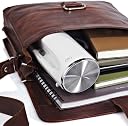
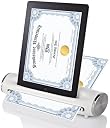
The iConvert Scanner for iPad Tablet is a user-friendly device designed for quick scanning of documents and photos directly to your iPad. Compatible with 30 pin connector iPads, it features an adjustable feeder for various sizes and a compact design for easy portability.
D**R
One Star
Worked fine for a while. Then, dead. Not worth the time to send back, etc. Save your money.
G**S
Doesn't do what I needed
I have no way to convert scanned photos to JPEG files which I need since I am scanning sheet music and need to keep all the sheets for each song together in a file on the Ipad
P**M
Does the job but I kind of expected more!!!
This is something I really liked when I saw the ad. I should have waited to see the product demo. I thought of returning it however; I do think it is a nice product compared to other competition. My sleeve (for scanning small photos), got all kinds of scratches after I am thru 150+ pictures. I had to clean the sleeve almost after every other picture. Now I am at a point I cannot scan any more small pictures because my sleeve is all messed up. I am not sure if I can go out and buy just the sleeve.Likes: Integration with iPad and iOS is very good. Once you install the app I had very minor issue with it.Don't Like:1. Without the sleeve, it is very difficult to scan pictures (small size)2. Scanner rollers gets slippery after scanning 100 + pictures3. Cleaning the rollers (procedure came with the product) does not fix the problems4. iOS app gets slower and slower if you go past 200 + picturesImprovements:1. Modify the app to automatically save (rather than asking/message or confirming save to the iPhoto)2. Provide additional sleeve(s) for different size pictures3. Some sort of tray in the back to hold the pictures when they come out4. Include or provide attachment options with iPhone/iPad (9 pin connector)
V**J
Simple, compact
I have two original iPads (30pin), and needed something that I could use to scan documents reliably. While it would be nice to have an autofeed flatbed scanner in my home office, I just don't have a spot. This can sit on a shelf, or even in a drawer, and just connect when you need it.FWIW, this didn't work with my iPhone 4 or 4s. Not a big deal, but it would of been nice.
J**E
Family photo copies
I do like it. sometimes it is hard to get photos to run through it. I have found it will get line on copy if not cleaned often. Very handy size even to travel with. Very useful item.
A**X
Not advertised properly
Received the product which was completely different from what was advertised. It reads to be a scanner bunt doesn't deliver the function. I would not refer this item to any customers.Bad customer service. You cannot deliver what are you advertise.
R**A
great promise with weak delivery
I was excited to purchase this item with thoughts simplifying my life by carrying my scanned paper clutter in my ipad2 or scanning documents for easy emailing or efaxing. Set up of the scanner was easy, but either I received a defective product, or one is expected to spend an unreasonable amount of time just getting a document to load. After several "jiggling" attempts, I got some paper to feed. Other times the scanner just would not load a plain 8.5 X 11 paper. When successful, image quality was inconsistent.Be aware that back of feeder needs to be clutter-free or paper fed will just stop or slow down while being scanned, distorting the scanned image. Even the scanner's own power cord ,if not positioned correctly ,can interfere with the rear outflow of the document.I gave this item about 1 hour before deciding that simplifying things was taking too much time and effort. I think I'll stick with Scanner Pro app- using no additional hardware, getting pretty decent results with just ipad's own camera.
F**L
Good but not great
The scanner is good for very thin paper or pictures, the clarity is a little off and I have to calibrate it often when paper gets stuck. All in all its okay, when scanning pictures you have to put them between a plastic cover that comes with the scanner for the pictures or it will not scan your pictures. Some times you will get streaks on your pictures.For the price it's a good buy.
Trustpilot
3 days ago
1 day ago