

⚡ Unlock lightning-fast storage access anywhere, anytime!
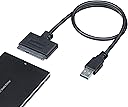
The StarTech SATA to USB Adapter is a sleek, bus-powered cable that connects 2.5" SATA SSDs or HDDs to USB-A ports, delivering up to 5Gbps transfer speeds with UASP support for enhanced performance. Compatible with Windows, MacOS, Linux, and ChromeOS, it offers plug-and-play convenience without drivers, making it an essential portable tool for data transfer, backups, and drive cloning on the go.


| ASIN | B00HJZJI84 |
| Best Sellers Rank | #5 in SATA Cables |
| Brand | StarTech.com |
| Brand Name | StarTech.com |
| Cable Type | USB |
| Color | Black |
| Compatible Devices | Laptop, Personal Computer |
| Compatible Phone Models | No Compatible Phone Models |
| Connectivity Technology | USB, SATA |
| Connector Gender | Male-to-Female |
| Connector Type | Sata/Usb |
| Customer Package Type | Standard Packaging |
| Customer Reviews | 4.6 out of 5 stars 38,030 Reviews |
| Data Transfer Rate | 5 Gigabits Per Second |
| External Testing Certification | CE, FCC, REACH |
| Frequency | 60 GHz |
| Global Trade Identification Number | 00065030854696 |
| Included Components | 1 - USB 3.0 to SATA 2.5" HDD Adapter Cable, 1 - Instruction Manual |
| Indoor Outdoor Usage | Indoor, Outdoor |
| Item Shape | Flat |
| Item Type Name | Data Transfer/Power Cable |
| Item Weight | 0.09 Pounds |
| Manufacturer | StarTech.com |
| Maximum Current | 1.5 Amps |
| Maximum Voltage | 5 Volts |
| Model | USB3S2SAT3CB |
| Model Name | USB3S2SAT3CB |
| Number of Items | 1 |
| Number of Pins | 7 |
| Other Special Features of the Product | 5Gbps transfers for files, Driverless, Universal Compatibility: Windows, MacOS, Linux, ChromeOS, Hot-swap, Plug and Play, UASP Support |
| Outer Material | Plastic |
| Recommended Uses For Product | Peripheral Connection |
| Special Feature | 5Gbps transfers for files, Driverless, Universal Compatibility: Windows, MacOS, Linux, ChromeOS, Hot-swap, Plug and Play, UASP Support Special Feature 5Gbps transfers for files, Driverless, Universal Compatibility: Windows, MacOS, Linux, ChromeOS, Hot-swap, Plug and Play, UASP Support See more |
| Specification Met | No |
| UPC | 006503085469 065030854696 |
| Unit Count | 1.0 Count |
| Warranty Description | 2 Year |
| Wattage | 7.5 watts |
F**D
Good quality. Works well.
Worked great for me. No issues, no complaints. I got this to clone the old HDD drive in an almost 10-year-old laptop to a newer, much faster SSD. Super easy to use; my first time doing the whole drive cloning thing so I was a little nervous but the whole process went very well. I ended up using the old HDD as an external drive and storage device, running it straight off this cable for a few weeks until I got around to buying an enclosure that came with a cord of its own. Great item. Price is right. Works well. Recommended.
R**Z
Works with a Mac, Perfect!!!
Works very well, have no issues using with a Mac. Perfect!!!
B**Y
ITs a tight fit
Got it in today and used it to see if I could save some files fro ma dead laptop from 08 and it worked jsut fine no issues I have seen people say it does not work on Windows very well tbh I would not know I use Linux Mint Debian edition (LMDE) So on linux at least it works good tried it on 2 drives first worked no issues the other not so much but to be fair the second came from a different laptop that had water damage so that could be why the hdd could have been buggered but I was able to sue it with no issues on the firs drive and then a follow up sata ssd so I think its worh getting at least if you have linux like me if not I cant say one way or the other but it did work for me .
G**.
Plug and play
This worked perfectly. I was able to retrieve data from a hard drive I took out of a non working laptop. Easy to us, just plug in and go.
R**N
StarTech USB 3.0 to 2.5" SATA III Hard Drive...Sold By STARTECH.com
StarTech USB 3.0 to 2.5" SATA III Hard Drive... Sold by STARTECH.COM This Sata drive adaptor is packaged in a plastic bag and shipped in a bubble wrap bag. It is brand new and in good visual condition. Made of mostly molded rubber and plastic. I have not had good luck with these kinds of adapters and when I tried to use this on my drive, it did not work. Do consider the other reviews as this may be a problem on my side but there is really nothing that I can do or change, it is simply plug and play. I cannot tell you why it did not, or why it should have worked. I did not receive anything for my review of this device. 170128 0015 -- UPDATE May 31, 2017 -- I had placed this adapter in the bag and forgot about it until I was working on a computer and had a drive problem come up. All my enclosures were in use so I took the adapter out and plugged it in. It worked perfectly. My earlier review did not respond positively and I can't tell you why there might have been a problem, perhaps one of the drives I tried to run. But this spun up the hdd and accessed the information with no problems at all. I have changed the rating to a 4. This is most convenient for those fast fixes. AGAIN, I did not receive anything for this unbiased review. 170531 2303 Update 05/21/2019 Since my last positive review, this adaptor has been in use constantly, and is still operating as needed. Some have suggested they only last so long. My thought is maybe a pin bent or a wire broke in their adaptor kit. I use this on many drives in normal practice, and I treat it more gentle because I don't want to break or bend anything. It has always worked and is still working. Recently it has been connected to the computer and spins up the drive for access everytime I turn on the computer. Absolutely works as described. -- I use a LENOVO ThinkCentre M91P desk top, I have several and this adapter works on all of them. Works for me... 190521 2142
A**B
Worked great, exceptional tech support, check your SSD's software and system bios settings
As the headline suggests, the cable is fine, check elsewhere if you run into an issue. And please, folks, this connects to a single USB port. USB power is limited to 500mA (USB 2.0) and 900mA (USB 3.0). You can't power a 3.5" HDD or an older 2.5" HDD with this cable, it's not the cable it is your computer's USB port. I've purchased several Startech products over the past several years. I like the quality and no-nonsense presentation. This cable has the added benefit over an older USB-SATA cable setup I had, in that it has 2 little led's to indicate data access (like on your computer). I bought this cable at the same time I purchased a new Samsung 500Gb 860 EVO SSD. I've done the laptop HDD to SSD clone process 6+ times. In the past, I've used a different USB-SATA cable and Samsung SSD's without a hitch. I like the the Samsung's because they're good and the cloning software is rock solid and a no brainer. When I hooked things up and used the latest version of Samsung's software, I had an issue with the software not recognizing the new SSD. Hmm, bad cable? bad SSD? I tried a different older SSD I had pulled from an earlier laptop upgrade and I could see it no problem in Win 10 explorer. Still nothing with the new SSD. So in one of the reviews of this product I saw the Startech tech support phone line. Lo and behold it (the number) worked and I was talking to an actual human tech support person in less than 3 minutes. Folks this is an $11 cable, I am impressed with this level of tech support. The tech person suggested I try to format it with drive manager in windows, which I did, while he was on the phone no less, and yes, I could format it and I could then see it in file manager and read/write files to the new SSD, so it is really, really unlikely to be the cable or a dud SSD, that leaves the Samsung software. This one phone call was really helpful and saved me from sending back the cable and the SSD as it would have been difficult to tell which was the culprit (neither in this case). I then did the old Google search and found the Samsung Magician software has a reputation for not seeing some of the newer versions of their SSDs. Further reading suggested that their Data Migration tool (which you use for cloning) didn't have the problem. After downloading the Data Migration software, I was able to see the new Samsung SSD and do the cloning. I really can't stress how big a time saver the support I got from Startech was. It wasn't their knowledge of Samsung's issues, but at least how to get to that point where I could establish it wasn't the SSD or cable that was the issue. Kudos to Startech and their tech support! One issue that was mentioned in the various support posts on the Samsung site (but I suspect is relevant to other newer SSDs), is you may want to check your bios setting for the HDD controller (SATA), mine was set to RAID, but the preferred is AHCI. I can't say whether this was part of the issue or not, but something to keep in mind. Hardware/software Dell Precision M4500 (circa 2011) i7 chipset Win 7 PRO, 64 bit -> cloning to Samsung 500 Gb 860 EVO SSD using Samsung Data Migration software (not Samsung Magician)
J**E
Works Well
Works well with the internal hard drive I took from my first laptop. I connected it to my current computer, changed ownership and now I have access to 400 GB of my old files.
D**.
Used to clone a dying HDD to a new Kingston SSD to upgrade my Dell Inspiron 5559 laptop
The factory original HDD on my Dell Inspiron 5559 laptop (circa 2017) was limping along with 3+ minute boot times and occasional error messages. The machine itself is fine (previously upgraded RAM from 8 to 16mb) so rather than drop a bunch of coin on a new machine, decided to try the upgrade route. Watched a thousand YouTube videos to get ready. Got a 960gb Kingston A400 SDD. Needed a way to connect it to the laptop to clone from the failing HDD. This StarTech cable did the job in a no nonsense, budget friendly way. Used the USB3.0 to 2.5 SATA cable (data + power). Both ends made solid, trouble free connections. The cable and connector moldings seem well made with no obvious flaws or defects. Used a free trial version of Macrium Reflect X software to perform the clone. Everything – including this cable – worked flawlessly. For less than $60 total (the SDD + this cable) was able to give my laptop a new lease on life. Saved hundreds over taking it to a shop or purchasing a new laptop. Will hold on to this cable for the next time.
Trustpilot
3 days ago
3 weeks ago