

Desertcart purchases this item on your behalf and handles shipping, customs, and support to Hong Kong.
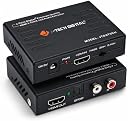
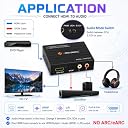
This device extracts the digital audio signal from the HDMI input and converts it to 2 channel analog stereo output or 5.1 channel Audio outputs. To improve our customers experience, we posted the following three methods if you experience no sound from output. 1. The EDID Option Switch: Switch the EDID Option buttom in the front, change it between 2CH, 5CH or pass. 2. Turn Off Dolby Digital Plus: TOSLINK (SPDIF) does not support Dolby Digital Plus, you need to turn off Dolby Digital Plus function, then the sound can go through the extractor. a: desertcart Fire TV or desertcart Fire TV Stick Settings Display Sound Audio Dolby Digital Output Dolby Digital Plus off b: Apple TV Settings Audio Video Dolby Digital on c: Chromecast Chromecast plays the contents from your video source, please make sure to turn off the Dolby Digital Plus on the video source through the play devices. 3. Do Not use HDMI to DVI or HDMI to VGA cable, will result in no audio come out. Instead, please use HDMI to HDMI cable. Review: Connection problem solved with audio out - Everything nicely work as describing by j teck. Review: Work Well with my chromecast. - Works with my chromecast & computer monitor setup. Now I'm able to connect speakers to my computer monitor casting chromecast videos.


| ASIN | B00BIQER0E |
| Audio Output Mode | Stereo, Surround Sound |
| Best Sellers Rank | #559,149 in Electronics ( See Top 100 in Electronics ) #1,249 in Audio & Video Adapters |
| Brand | J-Tech Digital |
| Brand Name | J-Tech Digital |
| Compatible Devices | Television, Projector, Blu-ray Player, Gaming Console |
| Country of Origin | USA |
| Customer Reviews | 4.4 out of 5 stars 5,625 Reviews |
| Interface | HDMI |
| Interface Type | HDMI |
| Item Weight | 0.01 Ounces |
| Model Number | JTDAT5CH |
| Mounting Type | Cable Mount |
| Number Of Pins | 38 |
| Number of Channels | 5 |
| Number of Items | 1 |
| Number of Packs | 1 |
| Number of Pins | 38 |
| Part Number | JTDAT5CH |
| UPC | 654367438947 |
| Unit Count | 1 Count |
B**I
Connection problem solved with audio out
Everything nicely work as describing by j teck.
A**A
Work Well with my chromecast.
Works with my chromecast & computer monitor setup. Now I'm able to connect speakers to my computer monitor casting chromecast videos.
C**I
Ótima qualidade, cumpre sua função!
T**M
Works perfectly
Great product. Does exactly what is needed. Hooked up a projector and external speakers. Worked perfectly.
P**Y
Great Product, using it for over a year without issues
I have been using this over a year without issues and with excellent performance. I wanted to be able to use my Xbox One in both my living room and my basement home theater room simultaneously and get the benefit of Cable TV integration from my Xbox One in my home theater as well as my living room. With the wireless controllers and the Xbox phone app, I would have full control over my xbox and cable TV set top box from my home theater via WIFI as if I was in the living room. This box, plus 2, 25 foot HDMI cables and an HDMI Splitter, enabled me to do this. All in it was about $85 to make it all work. Great deal! I have an XBox One in my living room hooked up to my Cable box via the HDMI input, an Onkyo 5.1 surround sound center connected via SPDIF and my 60 inch TV via HDMI out through an HDMI Splitter. The HDMI Splitter has two outputs and is located right behind my Xbox one in my entertainment center cabinet. One output goes to the TV and one to my J-Tech Digital HDMI 1080P HDMI to HDMI + SPDIF Audio Extractor via a 25 foot HDMI cable that goes down through the wall, through the basement ceiling to my entertainment center cabinet in my home theater. Then from the J-Tech device to a ceiling mounted 1080P Epson Projector with 120 inch screen via another 25 foot HDMI in my Basement below my living room. The SPDIF output from the J-Tech then connects to a 7.1 Onkyo receiver via SPDIF. The end result is that I get a duplicate 1080P video signal plus digital audio to both my living room and my basement home theater without loss of quality of video signal or sound quality with a combined HDMI run distance of 50 feet, having the JTech device in the middle. I actually can play games, watch Blu-rays, Cable TV in 1080P HD, and use all the Xbox One streaming apps, with full Dolby Digital 5.1 surround sound in my living room and DTS 7.1 (or Dolby digital depending on the Xbox One source app) in my basement simultaneously. I expected to get the same video and audio for both, but with the XBox I can choose to send audio signals in different standards to the SPDIF out in my living room and via HDMI to the JTech device in my Home Theater. I was pleasantly surprised this worked, instead of just have two 5.1 signals. One note, I had to set my Xbox One to output uncompressed audio digital signal through the HDMI port so that the JTech could pass that to my downstairs receiver at full fidelity and let the receiver decode it as needed. This has worked beyond my expectations and has been working perfectly for a year. I have even considered getting another one or two of these, and a 4 way HDMI splitter to replicate this to my bedroom and my back porch, both of which have their own audio systems. Only issue would be run length to those rooms would be longer than 25 feet and I would need some boosters for HDMI. I probably will do it eventually now that I have confidence in this device.
P**U
SEPARA MUY BIEN EL AUDIO DEL VIDEO
Lo utilize en un projector y funciono perfecto audio a amplificador y video a projector no pierde nitidez
M**.
Fantastic! Sharp Aquos soundbar connection
Was recently gifted a used large Sharp Aquos tv that is replacing a 19 year old Sony Bravia (Sony still works great btw, but had been thinking about a larger screen). What stinks is Sharp just doesn’t have the necessary inputs to run a soundbar, unless you are using coaxial input. Anything coming in over hdmi doesn’t have an audio output. No joke, wish I was kidding. No hdmi arc either. We stream all of our tv and movies and missed the soundbar and sub woofer sound. Considered giving back the tv as the larger screen size wasn’t worth it. Enter this hdmi splitter. From a US company! I know components all come from the same place but, that’s everything these days. Knowing there’s a group of USA employees building and supporting these solutions made it an easy purchase decision. The Sharp is HD 1080 not 4K so no reason to buy the upgraded version in this instance. For $20, this is a great solution. I already had the aux component connections for the soundbar from the Sony so, I only needed to use one of my extra hdmi cables already on hand. If you don’t already have an extra hdmi, you’ll need to pick one up. Crazy easy setup - hdmi from roku into the new splitter, hdmi out to tv, and aux out to soundbar. Can choose to run tv audio and/or soundbar, based on need (tv or movie) without needing to do anything other than turn on the soundbar. Perfect. Took maybe 5 mins to unpack and setup. No audio processing delay or shadowing. We are now enjoying our new to us 60” tv.
Trustpilot
1 month ago
2 days ago