We remain fully operational. Our teams are working around the clock to ensure your deliveries continue safely.

DOWNLOAD THE APP


Customer Services
Copyright © 2025 Desertcart Holdings Limited
DOWNLOAD THE APP
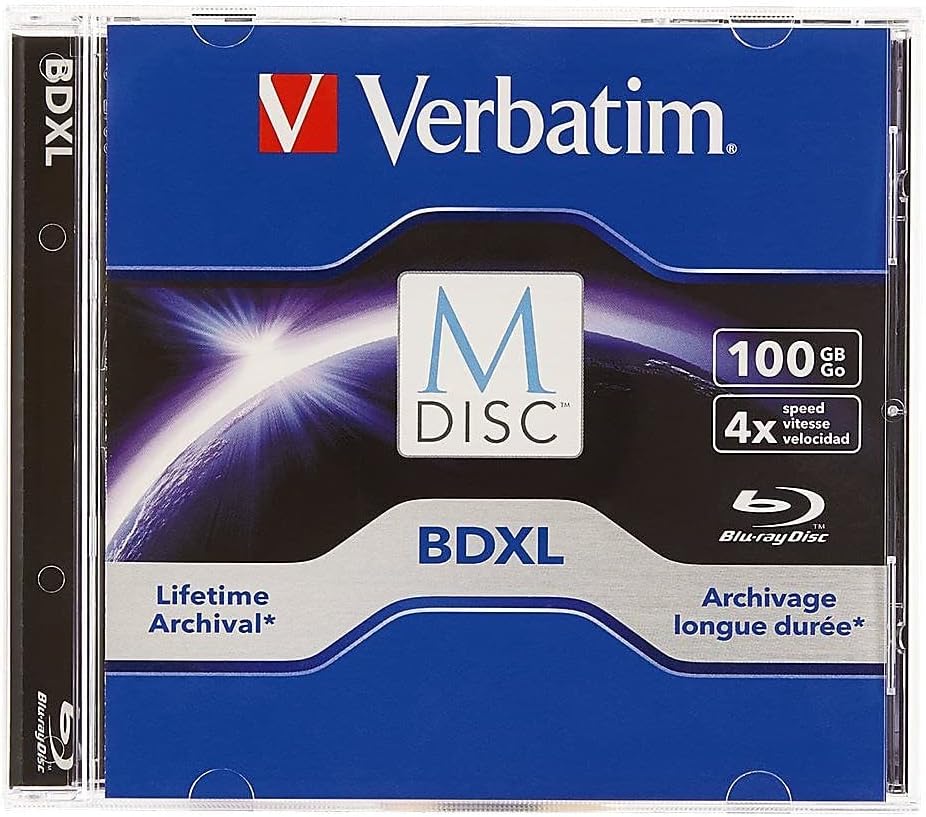
💿 Archive like a pro—because your data deserves forever.
Verbatim M DISC BDXL 100GB is a premium archival Blu-ray disc featuring a patented inorganic write layer that engraves data for unparalleled longevity, impervious to environmental damage. With 100GB capacity and 6X write speed, it’s designed for professionals seeking reliable, long-term digital preservation. Tested by the US Department of Defense and compatible with standard BDXL drives, it offers military-grade durability backed by Verbatim’s trusted 10-year warranty.


| ASIN | B011PGT2FQ |
| Best Sellers Rank | #2 in Blank BD-R Discs |
| Brand | Verbatim |
| Built-In Media | Verbatim BD-R XL optical disc |
| Color | Blue |
| Customer Reviews | 4.5 out of 5 stars 182 Reviews |
| Format | Blu-ray |
| Global Trade Identification Number | 00023942989127 |
| Item Weight | 0.02 Kilograms |
| Manufacturer | Verbatim Americas, LLC |
| Media Speed | 4x |
| Memory Storage Capacity | 100 GB |
| Recording Capacity | 10 Hours |
| UPC | 023942989127 |
| Unit Count | 1.0 Count |
| Warranty Description | 10 years warranty |
| Write Speed | 4x |
M**M
IF you DO have data that you want to preserve 'long term', then this may be it.
I've always been concerned about exactly HOW LONG data could be stored over the years. Mag tape definitely isn't it, nor is data stored on SSD drives, etc., nor 'paper'....really! Come on! Not likely. Well, if you maintain a CD drive that can record & playback these 100Gb disks then THIS might just be what you are searching for. I finally did get one that seems to work well, after an earlier failure, and am in the process of testing it out. It seems to work well, with only a couple of minor hesitations during playback, but I think that's not an error, just the fact that it's mechanical and probably subject to such things occasionally with very large files-- I'm continuing testing and proving to myself how reliable it will be. The lifetime prospect (storage) for this type of media is way better than what I used before, despite the slower record time and greater cost. Something to work out later, I suppose. OK -- this 'later', and I got some blank BDXL Verbatim disks.....I experimented on the 1st one and was VERY happy with the quality, however the 'but' part of the testing is a 2-parter......Number 1 is the COST per disk is high, and since I'm sure you can't re-record over, you better not waste it.....the 2nd one is a killer, and it was SO slow recording you almost have to start the copy when you go to bed, because by the time it's done (91 Giga bytes writable space) it'll be next morning anyway. Probably minimum of 5-7 hours per disk. However, IF it works out to be the 'longest' storage capability, then so be it. It STILL works good.
R**D
Excellent Optical Archival Medium, Good Price
For the average consumer, this is likely one of the best options for a local backup or archive, and is very space efficient. Flash drives, SSDs, and HDDs all have a limited lifespan and shelf life. An M-Disc is made to be much more long-term. I used a single 100GB disc to backup thousands of pictures from several family members' phones and the ol' desktop computer. Over 14 years of digital family pictures are now safe and secure on this disc, with over half of the disc still available for future additions and adjuncts. The disc will go in a safety deposit box for safe-keeping, and I can trust it to still be good in a couple decades.
L**L
Worked great with an LG burner and Nero
I purchased this to burn 89GB of data files (mostly docs, xls, ppts, pictures, Downloaded programs, and lots of GPS data/image files/maps, and a few home movies--collected since the 80s). . References: . This LG Burner 3.0 SuperMulti LG Electronics 14X USB 3.0 Super-Multi External Blu-ray Disc Rewriter BE14NU40 (DVD+/-RW with M-DISC Support) $109.00 . 1 Verbatim M-Disk 100GB Verbatim M Disc BDXL 100 GB 4X 1 Pack Jewel Case 98912 $29.01 . 1 Nero 2016 Classic Download Nero 2016 Classic [Download] - Currently $99.99. I Paid $29.99. . FYI, My Computer: Lenovo IdeaCentre Mini-Tower H505s Desktop, AMD E2-1800 APU 1.70 GHz with Radeon HD Graphics, 4GB RAM, plus a 32GB ReadyBoostCache on a SDHC Memory Card inserted into one of the SD Reader Slots (I just leave it there) . I initially bought a LG Electronics 8X USB 2.0 with M-Disk $27.25 (Super Multi Ultra Slim Portable DVD+/-RW External Drive with M-DISC Support GP65NW60). This burner was NOT recognized by either of my 2 computers as BDLX - M-Disk (3TL) compatible. None of my burning software (Nero, Power2Go, LenovoBurn, and 2 freeware programs) would recognize this as M-Disk compatible either. This was useless for Blu Ray, with my computers. . So, I purchased the 2016 NERO Classic and this LG 14X USB3.0 burner. I Really wanted to make an Archival backup (you can get info on why M-Disks are so valuable for almost permanent/lifetime Data storage on the M-Disk website). . This burner was immediately recognized by my computer as M-Disk BDXL compatible. I put in the Verbatim 100GB BDLX Disk and stepped through the proper process to span unbroken files (See Nero Burning for M-Disks on the M-Disk website for the correct settings. Amazon will not allow a link, but it's under Step-by-Step Instructions - a downloadable PDF). . It ran flawlessly. It verified the data flawlessly. It burned 89GB of mixed data and verified it in 58 minutes. I was utterly impressed. I viewed some of the more complex data files directly from the finished disk and they were perfect. . This combination worked better than I had hoped for (Nero Classic + this Blu Ray M-Disk burner) and was worth every penny. Notes: I tried some of the freeware for burning, but they do NOT have the Ultra buffer (in Nero's program) that seemed to make this process run flawlessly. I was pleased I purchased the Nero Software for this task.
C**G
Wow!
I had burnt my videos on this Verbatim 100GB BluRay M Disc and it had burned successfully. So I had tried to copy a video file from the M BluRay disc, and it successfully worked, by dragging and dropping the file to the desktop. I highly recommend this BluRay M Disc for anyone who wants to save or archive any type of file or files. These diss are awesome to scan and save important documents, memories, or anything that is of value. And portable enough to where you could store or hid safely. Even scanning important documents and saving the documents to an M disc is like compressing every document or any other files on to one disc. Amazing!
D**2
Almost half had damaged jewel cases
The discs themselves appear to work as advertised. However, out of the 10 discs I purchased, 4 had cracked jewel cases. I had three orders and all were shipped in envelopes. The discs appear to be OK but it makes me wonder. Considering this product is intended for long term storage, most people would want to use the jewel cases. At $18 each regular price, they could pack these in a box. For anyone using Linux, Brasero and K3B will work fine however neither seem to know the maximum size of the disc (~97GB ... not 100GB) and will start burning the disc only to fail when it runs out of space.
O**S
Perfect back up to your future
Purchased this M-Disc to back up my photos. One of my hobbies is photography, I recently had a Arafat’s hard drive crash. This caused me to lose 4 TB of photos. I did research to find a medium that would help me back up my photos so this does not happen again. I found this disc, and did research on it. The technology makes since. I purchased two 100 GB. The first mess up on write, but I think that was my fault. This was my first time writing to an M-Disc, and may have used the wrong software. On the second try I used a burner software, and it wrote to this disc. I tried it on a computer and a DVD player for T.v. It worked . Will be purchasing more when I get the chance. I recommended waiting till the price comes down, this disc can be pricey.
C**S
Temper your expectations
As long as you have the right kind of optical drive, and you are patient, you will have about 90GB of safely-archived data. In my tests, I found it was better to copy the data from the disc than to try reading/playing audio/video files directly from it. The purpose for this disc is strictly business. Also, if you have a lot of files to archive, it might be better to store them all in one compressed file and then copy it over to the disc. Get it written-on, then copy the file back to your computer, then unzip it to see the files. Write speed is very slow, on purpose. This is archiving and it's practically writing your data in stone. Expect it to take all night if you plan to use all the space on the disc
H**U
I'll let you know in a few years if it still works
( Okay, probably not ) This is mostly a review to give a few pointers if you're doing a long-haul write: - Make sure you have a reliable writer, preferably using a SATA connection. My first attempt with a SATA to USB converter had an issue where the converter stalled. The disc itself had the data, just not all of it. - Zip up the files as much as possible. When I went to look at the results of a successful write I did, it took forever for the explorer to look through the files (presumably to read the info and such). Zipping them up makes those files act like one file. If you're worried about bit-rot, you can create something called a PAR file to go along with it. While this reduces the usable space, in the event of bit rot, a PAR file can help fix it. - Windows' default writer is fine. I used it for my purposes.
Trustpilot
1 month ago
2 months ago