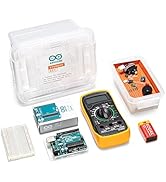
![Uno REV3 [A000066] - ATmega328P Microcontroller, 16MHz, 14 Digital I/O Pins, 6 Analog Inputs, 32KB Flash, USB Connectivity, Compatible with Arduino IDE for DIY Projects and Prototyping](https://m.media-amazon.com/images/I/71ok6q+8tEL._AC_SL3840_.jpg)

Desertcart purchases this item on your behalf and handles shipping, customs, and support to Hong Kong.
🚀 Unlock your maker potential with the Uno REV3 — where creativity meets precision!
The Arduino Uno REV3 features a robust ATmega328P microcontroller running at 16MHz, equipped with 14 digital I/O pins (including 6 PWM outputs) and 6 analog inputs for versatile interfacing. With 32KB of flash memory and USB connectivity, it offers seamless programming via the Arduino IDE, making it the go-to development board for prototyping, education, and innovative electronics projects.


| ASIN | B008GRTSV6 |
| Best Sellers Rank | #3,825 in Electronics ( See Top 100 in Electronics ) #3 in Robotics (Industrial & Scientific) |
| Brand | Arduino |
| Built-In Media | Contents: 1 item |
| CPU Model | MediaTek MT8125 |
| Chipset Family | AVR |
| Compatible Devices | 1 |
| Customer Reviews | 4.8 out of 5 stars 10,364 Reviews |
| Global Trade Identification Number | 07630049200050 |
| Item Dimensions L x W x H | 3.15"L x 2.17"W x 0.98"H |
| Item Type Name | Arduino® Microcontroller UNO Rev3 DIL ATMega328 |
| Item Weight | 1.6 ounces |
| Main Power Connector Type | 24-Pin |
| Manufacturer | ARDUINO |
| Memory Clock Speed | 16 MHz |
| Memory Storage Capacity | 32 KB |
| Mfr Part Number | A000066 |
| Model Name | ARD_A000066 |
| Model Number | A000066 |
| Number of Items | 1 |
| Number of Packs | 1 |
| Platform | Windows 8.1 |
| RAM Memory Technology | SRAM |
| Ram Memory Maximum Size | 2 KB |
| Total Usb Ports | 1 |
| Unit Count | 1 Count |
| Warranty Description | 12 Month |
M**Z
Expected quality.
While I ordered this instead of a kit for online training, it came in perfect condition. I returned it, unused.
M**.
It works
Honestly, my nephew asked for this for Christmas and I don't know what it is. But, he picked it out and put it on his wish list. When he opened it, two of my other nephews said it was cool....smh, I had to ask. They explained and said it was a necessary microcontroller for something. I stopped listening 😁. But they all told me it was a good thing. I asked my nephew before this review how well it worked, and he said he is still using it and it was fairly easy to install. He said it is doing exactly what it is supposed to do with no issues at all. So, I am not sure if my review helps anyone, but know that he is one satisfied customer.
C**L
Terrific - And it's expandable in many ways. POWER my world.
Great device. I bought 3 of these and they are my go-to controller for some pretty sophisticated DIY projects. Do read about how not to over-drive the pins (demanding too much current from them). And, DO read about the difference in the +5v and "Vin" pins. There is a company that sells just the processor chip. They are reasonable (pkg 3) and I recommend having them on hand in case Murphy stops by for a visit. If you follow basic principles and NEVER try connecting a pin to something for "trial & error" but instead, be certain of the voltage AND current potential that you are supplying (or demanding), and this beautiful device will work like a horse. When it comes to your connection to the computer, some Windows serial "portage" issues arise but it's a matter of persistence. The Arduino IDE (programmer) has ways to let you see how things are going and which PORTs are connected and working. This is the only part that can be frustrating (other than writing software bugs. :-) Enjoy.. here's what I think about it and how I use it this week: Have fun: Keep in mind that if your project is complex and you need more pins, you can use the nice I2c bus that this UNO has available and you can connect Slave devices to expand the "pin-age". :-) I am going to add a AdaFruit Trinket Pro (powered from this UNO 5v bus) and let these two guys talk to each other over I2c; exchange info, and I get tons more PWMs and digital pins too. The cool thing is that the Trinket fits right on the back of this UNO's added shield. SWEET !! As usual, these are great. Notice that this is the R3 -- exactly what you want. I've written some great control software for controlling the RF oscillator in radio transmitters and this made the project a success. I added a stacking shield (Gikfun Prototype) for the additional hardware I needed and this UNO allows the flexibility of updating my own sketches if a new feature in my RF unit is warranted.
E**D
Great product, Great price.
This Arduino is a very quality build, From now on I will buy name brand items when possible. This is well worth the extra pennies.
R**D
Arduino UNO R3 is a cool micro-PLC
This is a micro-PLC. (Programmable logic controller). The setup () loop does first time execution. the loop() does continual scanning of Inputs and writing outputs. I'm an electrical engineer and control systems engineer, and I was enjoying learning to program the arduino as an embedded controller (PLC). The arduino.org arduino is a spec product (same as other Chinese knockoffs, but as long as they meet spec, they are a hammer...just not with the same namebrand). If you look on the web, arduino.cc is the Italian webpage with rights...but arduino s.r.l. also says that they have rights. it is confusing. the software from arduino.org for the ARDUINO IDE (The programming environment to make arduino code, to compile it, and to push it to the controller) is software revision 1.7.5. When you load it, it says that it is a modified version of the arduino.cc software. this is messed up, as arduino.cc has version 1.6.5. I found it suspect after installing the .org software so I uninstalled, ran a virus scan, and installed the .cc software. (.cc software will work on any arduino that meets the arduino specification). All in all it is a cool product. for intro to programming, it gives quick results. if you are a control systems engineer like me, then you have a $25-ish PLC that you can make to do any amount of awesomeness (provided that you use the 14 digital In/outs and 6 analogs to accomplish said awesomeness). Tomorrow night I get to work on using add-on cards. Word of advice: D13 is internally connected to an LED with inline resistor on the board. You don't need any extra stuff (LEDS, resistors, etc) in order to do a first program to make the D13 an output and toggle it high and low, and feel good that the board works. Similarly, a blinking D13 can prove that a program is running when it blinks on at the beginning of the loop() function and off in the midst of the loop() function. Word to the wise.
S**R
Missing usb??
Excited to use this to further advance my skills with microcontrolling for my major! Gave 4 stars because my Arduino Uno did not come with its usb cable unless I misunderstood the packaging.
N**6
1st time ever trying an Arduino Uno - Interesting little thing. Learning to do simple things.
I'm a senior nearly 70 and never touched any Arduino or anything similar. I wanted the device to reset a color printer item with an already written program. I have never written any code and boy am I learning. One simple character mistake and running the compile program will surely tell you. I am using the Arduino IDE 2.1.0 program with this Uno Rev 3. Nevertheless I am happy with this little thing and there are so many projects out there in the community, this will surely keep my mind going and my interest. Setting up was easy. I first got the Arduino IDE program (free on the net) and installed... went fine on my Windows 10 computer with no problems. Once installed, I connected the Uno Rev 3 to my computer via the USB port only (no ext power supply used). Plugged into the USB port, about 3 seconds (literally) later it already installed drivers and the thing was running. It selected Com Port 6 on my Win 10 system. On the Arduino IDE program you just have to make sure you select the Arduino Uno Rev 3 from the list... that is it, and your up and going. From beginning to end I probably spent 5 to 10 minutes doing everything to make it run. On Ease to use and Easy to learn, I gave a 4 star only because I have never done anything like this. If you are a pro or some kind of advanced user, or if I was, I would give a 5 star across the board. This is only my first day trying it, so I will update later on. I checked out Youtube video's and tried writing / typing 3 different programs on the Arduino IDE screen. I ran the compiler program on the IDE... said it was good, tested it in the simple serial monitor (included in the Arduino IDE) and was interesting to watch the board respond. I then saved my program for later.
D**R
Included mounting bracket is a plus!
These are great! They came with a plastic mounting bracket that fits snugly around the board, enabling the board to sit on a table top easily, and it also has mounting holes for screws.
A**R
SATISFEITO
TUDO OK COM O ITEM
W**L
Goede kwaliteit en geen problemen.
Werkt goed, op Windows 11 64bits.
E**R
It’s great product, original green ATML329
ATML iC programbel chep , it’s all about it, green or blue, doesn’t mean anything Bay it as it’s ATML
M**N
Ok
Ok
M**G
Worth buying
Pros. Good quality Cons. None
Trustpilot
1 day ago
1 month ago