We remain fully operational. Our teams are working around the clock to ensure your deliveries continue safely.

DOWNLOAD THE APP


Customer Services
Copyright © 2025 Desertcart Holdings Limited
DOWNLOAD THE APP

🎬 Own the Live Stream: Pro Switcher, Zero Compromise
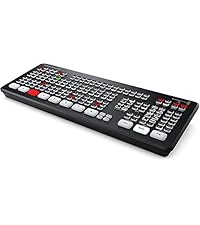
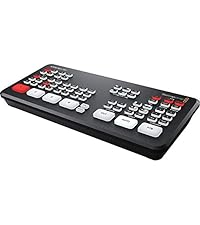
The Blackmagic Design ATEM Mini Pro is a compact, professional-grade live stream switcher featuring 4 HDMI inputs, advanced transition effects, and a built-in audio mixer. Designed for seamless multi-camera streaming and recording, it supports direct Ethernet streaming and USB-C external drive recording. Perfect for corporate events, education, and eSports, it combines plug-and-play ease with powerful software control for polished, broadcast-quality productions.


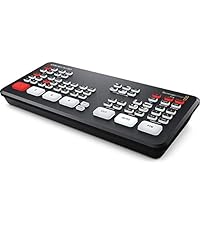




| ASIN | B086R79PBC |
| Best Sellers Rank | #5,954 in Electronics ( See Top 100 in Electronics ) #43 in Streaming Media Players |
| Brand | Blackmagic Design |
| Cable Type | HDMI |
| Color | black |
| Compatible Devices | Camera |
| Connector Type | 3.5mm Jack, HDMI |
| Connector Type Used on Cable | 3.5mm Jack, HDMI |
| Customer Reviews | 4.7 out of 5 stars 1,918 Reviews |
| Global Trade Identification Number | 09338716006797 |
| Item Dimensions D x W x H | 4.07"D x 9.35"W x 1.38"H |
| Item Weight | 1.2 Pounds |
| Manufacturer | Black Magic |
| Number of Ports | 4 |
| Unit Count | 1.00 Count |
| Warranty Description | Manufacture |
M**.
Near Perfect—Just Missing an On/Off Switch
⭐️⭐️⭐️⭐️⭐️ (5/5 stars) Near Perfect—Just Missing an On/Off Switch This switcher is a powerhouse for live streaming. I use it for multi-cam worship broadcasts and retail AV setups, and it handles HDMI inputs, transitions, and streaming with ease. The interface is intuitive, the build is solid, and the integration with ProPresenter and PTZ cams is seamless. Only gripe? No dedicated power switch. You have to unplug it to turn it off, which feels like a small oversight on an otherwise pro-grade device. Pros: Flawless HDMI switching and streaming Compact and durable design Works great with ATEM control software Plug-and-play with OBS, Zoom, and ProPresenter Cons: No physical power switch
W**H
Prosumer price. Pro output.
I do live video for a living for large production companies, and bought this for my own small production company. Out of all the switchers I use professionally, the ATEM MINI PRO is, by far the best small scale solution at the pro level. We use them for video switching to projectors and monitors at entertainment and corporate events while simulcasting to live streams or tv. The learning curve is not difficult and operation is simple enough that a complete novice can take it out of the box, watch a couple YouTube videos and start streaming with it in a very very short time. With some practice, one could op it like a pro. Sometimes on corporate shows we leave these running for days at a time with no issues. With everything you need for polished, professional output, you can’t go wrong with this switcher, and you don’t even need to use software control from a laptop to do it. The Mini Pro can be used as a standalone solution. Transitions, audio mixing, and much more can be controlled right from the unit which is ready to stream via ethernet or record to any portable drive via the USB-C output. Use software control and you get some more cool features like drag and drop graphics and more. It also frees up an hdmi input if you were using one for graphics. You connect to the computer, phone, or tablet using the USB-C output AND either directly to the computer or through a router. Now the USB-C becomes two-way communications and using the ATEM Software Control, you send your graphics down that connection, freeing up an HDMI input! You can also set the colors, do more in depth audio tweaking, drag and drop graphics, up and downstream keying and more. Also he Mini Pro, unlike many of its competitors , has 2 stereo audio inputs, with noise reduction, eq, compression and more. You can also use the camera audio through the HDMIs. A very cool feature is you can set it to make camera cuts automatically to whomever is speaking, with it reverting to a different angle when no one is speaking. My typical small event and live edit set up is: ATEM Mini Pro HDMI inputs 1-3: Cameras HDMI input 4: video playback, IPad. ( iPad can also be used as a camera) USB-C: graphics and Software Control All in all a great product.
G**N
Great price for feature set. Easier to use than software driven capture/streamers.
These units are really amazing and have a lot of features. They're like a Cricket phone for audio-visual staff (volunteers) who are not technical or easily confused by too many tasks / demands during a livestream broadcast. Easy to accomplish the basics but has a lot of advanced features if you want to dig in and make things a lot fancier. One major note of caution: the picture in picture feature is essentially broken for practical use. The macro-workarounds are nice and all but the PiP has been lacking the feature to just save a custom sized PiP for a second HDMI feed to populate that PiP window. The PiP buttons cannot be re-programmed to run the macros for you either -- the buttons are hardcoded to the useless values supplied by the manufacturer -- these values yield a super tiny PiP box which is not broadcast ready. This issue has been known for years and is unaddressed by Black Magic.
E**E
If you want to scale up your virtual presentations, this tool is a must.
This is my second ATEM. I used the first one so much that I wore it out. This one works great. I’m on 4-9 Zoom calls a week, plus monthly workshops, podcasts, and occupational keynote speeches. I’m able to put my slide deck on one laptop and Zoom on the other. Plus, I can use other cameras and my phone as a camera. I can switch smoothly between all of these devices. My clients rave about my virtual presentations.
I**R
A small switcher that packs a punch. Pro features but only has hdmi inputs.
Great little switcher. Definitely impressed with the capabilities of this atem mini pro. Being a pro Technical Director, directing shows on Grass Valley, Sony, and Tricaster switchers, makes me extremely critical of switchers and their form factor and functionality. Only a few buttons, and only hdmi inputs has its limitations. But using this switcher out the box, with the atem software that was already installed on my laptop, was able to do everything I expected and so much more. Was using it for a sub-switch for talent, controlling what they see on their screen like a down stage monitor, was originally using my 8th ME row with macros but was too many simultaneous clicks and I needed the row for other tasks. So I threw the atem mini pro in there, and was able to install switching software on tablet, and another person could easily do my sub switch from the tablet! Freaking amazing! When I saw that black magic added the multi view to the atem mini, to this new pro model, I immediately purchased it. It’s a small console, and everything has to plug directly into it, which makes a small console on a desk look sloppy. But has the power and functionality of the bigger atems all squeezed into this tiny package. I’m sold! HDMI isn’t a pro format. But this switcher is a pro switcher, with all the pro options of the more expensive Atems, packed into a little package. It actually has some features that the expensive atems don’t. The ability to record on 2 thumb drives with usb c dongle. And the ability to stream directly to web without using a computer. I’m happy. If you’re a pro or aspiring pro that uses console switchers and only need 4 inputs, this switcher packs a punch. Especially at this price point. On, some of my small jobs, I’m using this instead of my $50k tricaster because it’s smaller and quicker.
E**S
Great for what it is
This is the smallest ATEM with the most limited functionality, but that's simply what the product is: there are bigger, more elaborate units in the same line from the same company, but I got a tiny device that fits in my mobile kit for quick, stopgap applications. And it fits in the kit because it's got a flat top-- a lot of competitors have an easily broken T-bar that undercut their portability. Personally, I wish the usb-c was also a thunderbolt video out so I could dedicate the HDMI out to a multiview, and I would trade the pip buttons for macro buttons in a heartbeat (I have never wanted ATEM's pre-prescribed window locations), but chances are: if I'm breaking this out, I've got it networked with a StreamDeck and control software. That's all personal preference stuff-- on the whole, it does exactly what it says it does, and solves a lot of problems if I need a quick record or simply to put something with a blackout or hold image between a video source or destination.
J**G
This is a great little HDMI switcher
Wasn't sure what to expect as this was my first foray into HDMI switching. I'm pleased! The Blackmagic Design ATEM interface with a computer is nearly a requirement to get access to all of the features. I would recommend it. We thought we'd use the Ethernet for a direct connection to Facebook Live, but that didn't work out. You'll have to look outside of the Blackmagic Design support world to find out how to do that. We chose to go with the streaming service, Resi, instead. We connect our ATEM Mini Pro to the Blackmagic Design Streaming Bridge, via Ethernet cable, to get access to another HDMI output for "program" out. That frees up the HDMI output on the ATEM MIni Pro for multi-view. We use the USB 3.0 out to communicate with the laptop loaded with the control software. Audio is easy to use and you also get access to the embedded audio coming from your video cameras. We have three different grades of camcorder and all of them sync up just fine and look great. Using the keyers takes some training, but YouTube has a ton of tutorials for this device. For a small multi-camera set-up, this switcher is just what you need. So far, we're really pleased with it.
A**5
best little small studio video switcher with tons of features
I've have been using this video switcher for almost 8 months now with weekly live stream broadcast to Youtube Live This box has everything one needs to do a live stream - title keying, audio insert, 4 hdmi cam switching I even did both Zoom and Youtube live - using the usb as a webcam into another PC for Zoom The only draw back is there isn't any multiview if you need to use the hdmi output as another program view for say - audience in the studio, but I have been able to just use the Blackmagic Design PC control panel to do my switching and just use the LCDs on the camera to see what preview I have going I also have the Blackmagic Studio HD - which I also use for other studio work - but this little box with h.264 encoding and usb is so much easy to use in one tiny form factor
Trustpilot
2 months ago
1 month ago