⚡ Print smarter, faster, and safer — because your workflow deserves the best.
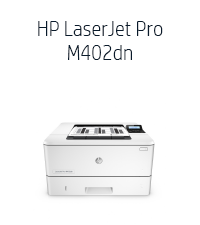
The HP Laserjet Pro M402n is a monochrome laser printer designed for professionals who demand speed, security, and efficiency. With a rapid 27 ppm print speed, built-in Ethernet connectivity, and advanced security features, it seamlessly integrates into wired office networks. Its compatibility with Amazon Dash Replenishment ensures hassle-free toner management, while energy-saving technology reduces operational costs. Ideal for business environments prioritizing reliability and performance.


| ASIN | B013SKIC7G |
| Additional Printer Functions | Scan |
| B&W Pages per Minute | 27 ppm |
| Best Sellers Rank | #82,990 in Office Products ( See Top 100 in Office Products ) #101 in Laser Computer Printers |
| Brand | HP |
| Built-In Media | Printer Accessory |
| Color | Lj Pro M402n |
| Color Depth | 1 bpp |
| Color Pages per Minute | 27 ppm |
| Compatible Devices | Laptops, PC |
| Connectivity Technology | USB |
| Control Method | Voice |
| Controller Type | Amazon Alexa |
| Customer Reviews | 4.3 out of 5 stars 542 Reviews |
| Display Type | LCD |
| Dual-sided printing | Yes |
| Duplex | Yes |
| Global Trade Identification Number | 00787322066548, 00888793328644 |
| Hardware Interface | USB |
| Ink Color | Black |
| Item Dimensions D x W x H | 14.06"D x 18.26"W x 8.5"H |
| Item Type Name | HP Laserjet Pro M402dn Monochrome Printer |
| Item Weight | 18.9 Pounds |
| Manufacturer | HP |
| Maximum Copies Per Run | 27 pages_per_minute |
| Maximum Copy Resolution Black and White | 1200 dpi |
| Maximum Copy Speed Black and White | 40 ppm |
| Maximum Media Size | 8.5 x 14 inch |
| Maximum Print Resolution Black and White | 600 dpi |
| Maximum Sheet Capacity | 850 |
| Model Name | M402n |
| Model Number | C5F93A |
| Model Series | LaserJet Pro |
| Number of Trays | 1 |
| Other Special Features of the Product | Ethernet,Wireless |
| Paper Size | A4 |
| Power Consumption | 591 Watts |
| Print media | Card stock, Envelopes, Fabric, Glossy photo paper, Labels, Paper (plain) |
| Printer Connectivity Type | USB |
| Printer Output Type | Monochrome |
| Printer Type | Laser |
| Printing Technology | Laser |
| Processor Count | 1 |
| Resolution | 600 x 600 |
| Scanner Type | Sheetfed |
| Special Feature | Ethernet,Wireless |
| Specific Uses For Product | business |
| Total USB 2.0 Ports | 1 |
| Total Usb Ports | 1 |
| UPC | 787322066548 888793382912 888793328644 |
| Unit Count | 1.0 Count |
| Warranty Description | 1 year |
| Warranty Type | Limited Warranty |
| Wattage | 591 watts |
J**N
Nice printer, and I can print wirelessly - thru Wi-Fi.
Works great! Although this model, M402n, does not have wireless capabilities built in, i can print wirelessly from laptops easily thru Wi-fi. Set up was so easy. First, connected the printer to my Wi-Fi router with a USB cable. Then turned on the printer. Then opened my Mac's System Preferences, "Printers and Scanners". Just clicked "+" to add a printer. The printer shows up , I selected it and ticked the box, "Share this printer on a network". Now, as long as my laptops are connected to the same Wi-Fi network as the Wi-Fi router, the printer shows up. I had an antiquated non-network printer. I had it connected to my desktop via USB. For or other computers, like our laptops, to print, they had to go thru a computer to computer network, so the desktop computer where the printer was connected had to be on, and the first page took a long time. Now, connecting this printer to the router, our MacBook and Chromebook can print without the desktop being on, and the first page is out super fast.
H**I
Great monochrome laser printer
Though it took some time to understand what I purchased, I really like my HP laser printer. This was a replacement for an HP color laser than we used for many years. The monochrome one cartridge printer will be much more economical to operate than our previous color laser and we current have little need for color output, especially for the extra cost. This is a very low volume application in our household, we like the sleep mode that wakes up just about instantly when asked. What took me the time to understand is how the network part worked, I finally plugged it into my router, followed the instruction for initializing it and it is now seem by all my computers (3 Apple computers), my iPad and all the iPhones in the household, all wirelessly. HP has done a great job of integrating software within the printer to allow wifi access by Apple products. My only regrets is now having capability for dual sided printing, 11x17 printing and a true wifi printer, but each of these features dramatically increased the cost of the printer.
A**E
Great Printer, Great Price, Extreme Happiness
I'm delighted that I got this printer. It's hooked up to my Mac running MacOS 10.12 Sierra. It's wicked fast and super easy to set up. I got it to replace my Xerox 3250N that, while good, started giving me fits. I'm back to HP after multi-year absence from them for laser printers and I am very happy that I made the right choice. It's not quite as solid as the laser printers of old in some of the paper alignment aspects, but then again it's probably consistent with others on the market. The image is super crisp. And the power button is on the FRONT of the unit right where I would expect it! (How many other pieces of equipment do you have that you need contortionist training to access the power on button?)
W**.
HP LaserJet Pro M402n Monochrome Printer.
Works very well. I basically bought HP because I run Linux Ubuntu 16.4.2. HP had drivers for this printer and none of the other brands had any information on their web sites about whether their printers would work with my Ubuntu version. I gave it 4 stars because I haven't had it long enough (2 weeks) to see how long it will last, and toner cartridge cost. Cons: Black cartridges of toner are very expensive, so I will be using after market ones when the original is empty.
D**M
Nice printer if it worked
After a long research, I bought this printer because it had all the features that I was looking for, plus, it was capable to print on cardstock. The first printer wouldn't install through the network and after trying everything, HP support said it was because of a defective network port: when connected through the RJ-45 port, it will show 49 service error. Amazon replaced it in less than 48 hrs, but to my surprise, the new printer had exactly the same problem. I know, many of you will think that the problem was somewhere within my network, but nope, even just connecting the printer to the computer using the network port, will give the same "49 service error". Tried replacing cables, tried all the possible alternatives with exactly the same result. The other printer that I was replacing works just fine in the same network connection. I finally decided to keep it and install it using the USB port, because I really like the printer and couldn't find another with the same features and similar price. But it will never be a network printer and many features like eprinting, etc. are not available :( I didn't want to replace it again (which Amazon offered free of charge) because I believe that it's a problem that affects many of these printers, if not the whole batch.
S**G
Best printer for your buck! Ethernet card for an IP address!! Refill like crazy, and PRINT like crazy!!
Fantastic! Operating systems printing on this printer: 2 Chromebook Laptops, 1 Kindle Fire, 2 Android Phones, and 1 Windows 7 computer. No issues. Fastest install ever. The 2 Chromebooks need an extension call HP Print to Chrome and after that fast addition with the printers IP address, we were in business. Wow. WOW!! You will find something useful in this printer guaranteed. I have struggled with print issues for years and have always wanted a laser printer with and ethernet card that provides a simple IP address to direct my printing traffic similar to printers at work but the past few years most printers were very expensive that included an ethernet card. I even tried a printer with wireless wifi connections and google print, BIG MISTAKE. Try this very affordable laser printer, jack in the ethernet connection to your router/switch, and watch you print worries go away. The damn printer even decided to print on its own at one point to remind me that it (the printer) had a specific email address I could email it to with any print stuff. Wouldn't you know it? IT PRINTS when you EMAIL IT as well!! I would be surprised if you could not find a method to simply get your print on with this thing. Well worth the money. HP nailed it with this one. Regarding pricing on print cartridges: GET THE REFILL BOTTLE AND LEARN HOW TO REFILL THE TONER from youtube and you will save $$$. Example, for $8 you could get a bottle of toner on amazon and learn how to empty the used ink/toner cartridge and refill (twice with one bottle) with some fresh toner. OR you could spend $100 and get a new one. YOU DO THE MATH. Print, print some more, PRINT LIKE CRAZY. Get some baby.
A**Y
Fantastic printer, super fast.
So far so awesome! Super fast, clear printing. This is my second HP printer. my first lasted over 15 years! I couldn’t get the toner cartridges anymore and the off brand cartridges ruined it, so I reluctantly gave it up and bought this one after a bit of research. I’m so glad I finally pulled the trigger, it’s grest. We shall see if it lasts like the old one. Good looking, small foot print...I definitely had heard and experienced horror stories about all in one printer scanner etc so purposely got a printer only device. The only thing I don’t like is how bright the on light is—but that forces me to switch it off when I’m not using it, probably a good thing.
G**O
Great little printer. Decent value for money.
We bought over 40 of these printers for use in classrooms, and although I've only installed about a third of them, they have been in use for several months now. No issues at all. Installation was smooth, and drivers worked fine for our Windows 7 Enterprise x64 systems. Only thing that really annoys me is they don't include a USB cable. I know not everyone will use it but considering we use all these printers for one computer, I had to go buy some USB cables. I can understand not including it on a large workgroup printer, but this is a nice individual PC sized printer and I think it should come with it.
Trustpilot
1 month ago
3 weeks ago