Buy anything from 5,000+ international stores. One checkout price. No surprise fees. Join 2M+ shoppers on Desertcart.
Desertcart purchases this item on your behalf and handles shipping, customs, and support to Hong Kong.
💜 Light up your Switch, level up your style!
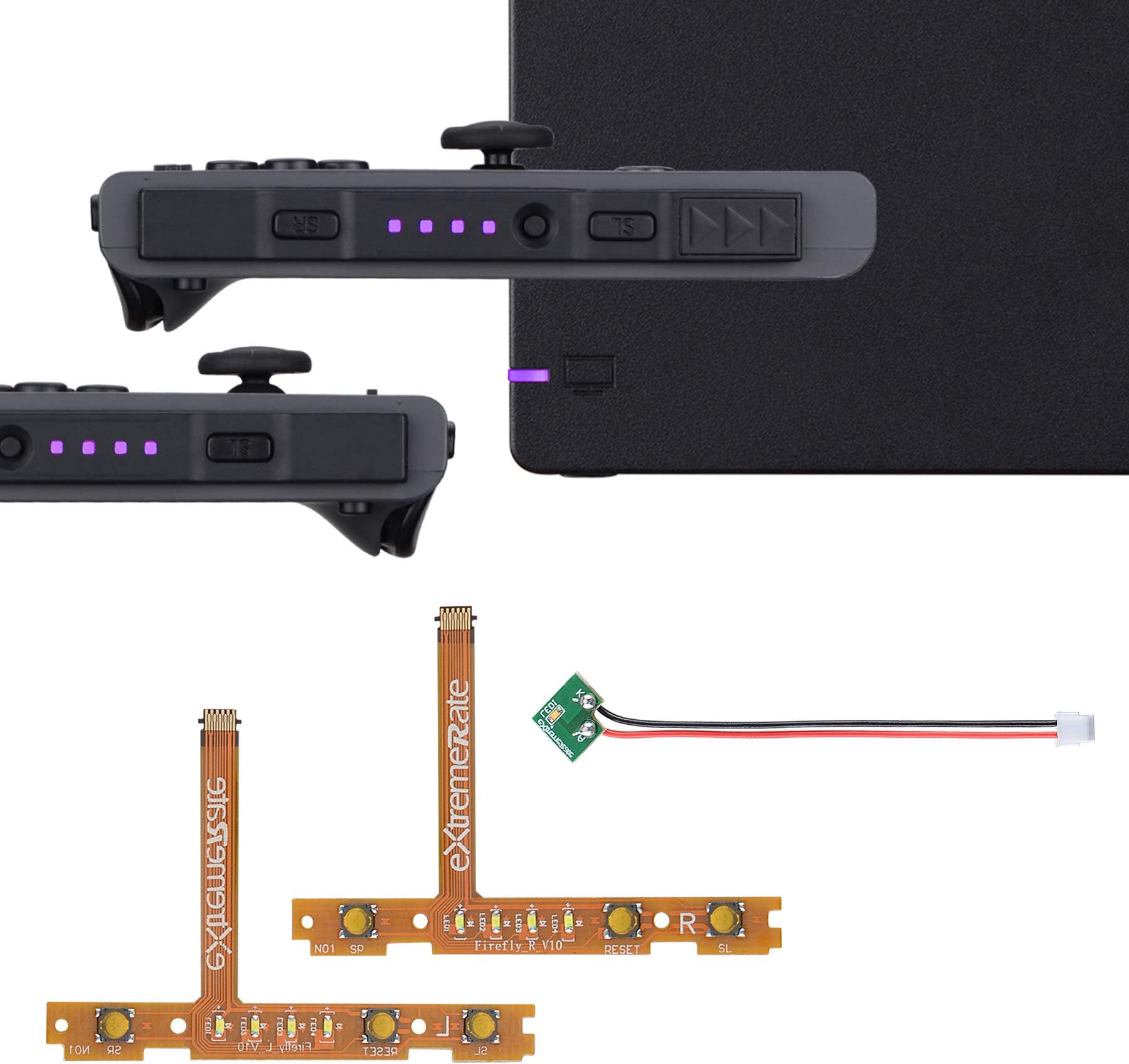
The eXtremeRate Firefly LED Tuning Kit offers a vibrant violet LED upgrade for Nintendo Switch Joycon and OLED Joycon models, featuring flexible ribbon cables to repair SR/SL buttons. It includes precision screwdrivers and spare screws for easy DIY installation, enhancing both functionality and aesthetics. Note: Joycon dock is not included.


| ASIN | B08F7MVJR2 |
| Best Sellers Rank | #8,590 in Video Games ( See Top 100 in Video Games ) #43 in Nintendo Switch Repair Tools & Replacement Parts |
| Brand Name | eXtremeRate |
| Color | Violet |
| Compatible Devices | Charging Adapter |
| Connector Type Used on Cable | Flexible Circuit Board |
| Customer Reviews | 4.7 out of 5 stars 1,031 Reviews |
| Hardware Platform | Nintendo Switch |
| Item Dimensions | 3.94 x 3.15 x 0.79 inches |
| Item Weight | 50 Grams |
| Manufacturer | Extremerate |
| Unit Count | 1.0 Count |
D**N
Custom LED, great edition with the look of my custom shells & buttons.
I recently upgraded my joycons with the ExtremeRate Soft Black shells, along with their Scarlet Red Buttons. I came across the custom LEDs shortly after, and figured I’d give it a go. I am very happy with the final result and will be upgrading more stuff really soon. It was pretty straightforward and only took about 20 minutes to do the pair. This time I didn’t need to follow a tutorial, because I was already very familiar with the inside components from previously swapping out shells for 2 Joycon sets. I am very satisfied with ExtremeRate’s upgrades, and love the look and feel of everything I’ve upgraded thus far. Their products feel very premium and do not feel cheap at all considering how affordable their stuff is. If you’re like me, and love customizing your controllers and gadgets. This is a one stop shop for video came console and controller upgrades. I will say people who are not familiar with taking things apart but what to give it a try, take things very slow and pay close attention to what you are doing. Some of the upgrades take time and patience. I’ve been in I.T. for over 10 years, so it was much easier for me because of my profession and training. One note to ExtremeRate: Love that you include tools with your products, and I do appreciate you provide them. However, I’m hoping in the future there’s an option to not include the tools. I’ve ordered 2 sets of shells, 2 sets of buttons, and now the LED upgrade. I now have 5 extra sets of screwdrivers and a ton of bits now. I’m just saying it might be cost effective and less wasteful on your end if you give the option of tools or no tools. I love free stuff don’t get me wrong lol, but I hate to see things go to waste.
T**H
Simple DIY, powerful, and look great
Arrived fast and on time. I ordered ice blue, they look great, it’s hard to show it on camera but you can see the color reflecting on the right joycon. The LEDs are brighter than the stock LED, that may be just due to color choice so there’s a bit more of a flare effect (totally fine), just mentioning it as the stock LEDs have a certain type of look with their brightness level. That said, super simple, if you’ve done anything inside a joycon you probably don’t need instructions, though recommended of course. I think in total it was 8 or 9 screws in each joycon. Just be sure to unplug the battery to avoid shorting it out accidentally. Also came with various screws that work at replacements for screws in the event that you strip one. Anyways, for this price I highly recommend it.
A**S
Looks incredible
Couldn't be happier. Super easy to install. I haven't tried the dock light yet, but I use an aftermarket dock so... yeah.
A**T
Blue Flame Skull Set (Joycon LED Replacement)
I have purchased the set and this is my review on the LED kit. I went into the entire project blind and used my knowledge in electronics to carefully reverse engineer the console and perform this swap. Take your time (it took me 4 hours total) or find a shop or friend to do this for you. That being said, if you just plan to swap your LEDs and nothing else, there is an easier way to do it. When taking the Joycons apart, once you take the 4 main screws off and separate it, you can use your spudging tool to carefully lift the plastic piece holding the ribbon cable for the LEDs off and remove it, replacing it, just do it in reverse. If you're doing a shell replacement, you can do this step just about any time. Easiest when putting it back together and you have access to the circuit board under the battery compartment. When disassembling the joycons, do not under any circumstances take any other ribbon cable off. Transfer the guts as one piece carefully. See my matching Switch and Joycon Review for this kit for more tips. Dock is pretty easy, that was my first tackle in doing this job, if you see a screw, take out the screw and work your way in. When removing Y screws, use as much force as you can and use small movements when turning the screwdriver. This kit came with the nice gold multibit driver which was great to use, but you will need the small one to remove the screw on the bottom right after you take out the circuitboard. The LEDs are nice and bright but the diffuser of the Switch didn't make them annoyingly bright like if you put the Joycons into the comfort grip, they won't blind your face. Do the work for the entire project and you'll be satisfied with the results. I'll also have reviews for the Switch and Joycon set, and the Dock set, just look for the pictures above to find the review easily!
K**�
Easier than you think!
If you're patient, take your time, and have no trouble following instructions then you can do this!! 🫶🏻 It looks intimidating but is honestly really easy to do, don't let it fool you. I followed a couple of YouTube tutorials and everything went smoothly for me. You'll get more comfortable with it as you go. It's nice that you have tools provided in the package they work well, but if you have your own better quality tools use those instead. I wish that they sent tweezers, make sure you grab some before you get started because you will want them to hold on to the ribbon cables. I also recommend keeping some little bowls or containers where you work, one for new screws, old screws, old buttons, new buttons, etc. The more you keep things organized the less intimidated/stressed you will feel while working. Good quality, the purple lights fit great with my purple shell, I love it!!!
A**Y
Very bright, but fits and works fine
I purchased this to replace a broken LED strip in one of my original Joy-Cons. It fits and works perfectly. As others have mentioned, they are significantly brighter than the original LEDs, which bothers me a tad. I installed these using tools I already had from replacing my Joy-Cons' analog sticks, so I can't speak to the quality or comfort of the included tools. Additionally, I didn't install the dock LED, so I have nothing to say about it either.
L**A
great replacement
great part for your joycon, i had to replace it twice because the original and the replacement failed, and the third time i bought this one and fantastic, its a little bit expensive compared to the other options but it came with all you need even a screwdriver, give this item a oportunity because the quality its all it offers
A**Y
Works.
Color was correct, easy to install and works exactly like it should. BE CAREFUL when you install them, always work on a cleared surface over some flat cloth so tiny screws don't fall and bounce into the void. Will happily buy again for any other joycon mods.
Trustpilot
1 week ago
3 weeks ago