Desertcart purchases this item on your behalf and handles shipping, customs, and support to Hong Kong.
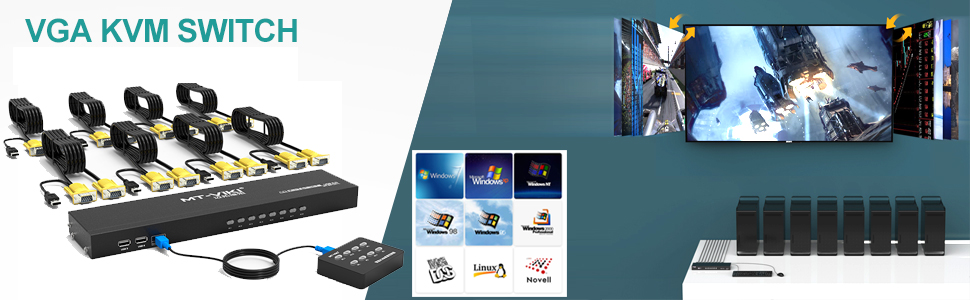
🔄 Master your multi-computer setup with MT-VIKI’s 8-port KVM switch — because juggling devices is so last decade.
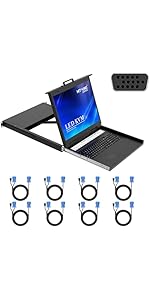
The MT-VIKI 8-Port KVM Switch (model 801UK-L) is a professional-grade, rackmountable device that enables control of up to 8 computers using a single USB keyboard, mouse, and VGA monitor. Featuring dual switching options (wired selector and push-button), it supports a wide range of operating systems and requires no external power supply. Its durable metal chassis fits standard 1U 19'' racks, making it ideal for IT managers and tech professionals seeking efficient workspace consolidation and reliable multi-device management.


| ASIN | B0881RPWCJ |
| Actuator Type | Push Button |
| Best Sellers Rank | #34 in KVM Switches |
| Brand | MT-VIKI |
| Brand Name | MT-VIKI |
| Circuit Type | 8-way |
| Color | Black |
| Compatible Devices | Computers, Game Consoles, Set-top Boxes, DVD, TV, Notebook, Projector, Monitor |
| Connectivity Protocol | Usb |
| Connector Type | Vga |
| Contact Material | Metal |
| Contact Type | Normally Open |
| Control Method | Remote |
| Control Type | remote |
| Controller Type | Push Button |
| Current Rating | 0.5 A |
| Customer Reviews | 4.4 out of 5 stars 265 Reviews |
| International Protection Rating | IP56 |
| Item Dimensions | 1.5 x 2.81 x 5.98 inches |
| Item Weight | 16 ounces |
| Manufacturer | MT-VIKI |
| Material Type | Metal |
| Model | MT-801UK-L-US |
| Mounting Type | Rack Mount |
| Number of Items | 1 |
| Number of Positions | 8 |
| Operating Voltage | 5 volts |
| Operation Mode | ON-ON |
| Part Number | VC-801UK-L |
| Specification Met | CE |
| Switch Type | Push Button |
| Terminal | Button |
| UPC | 749185499871 |
| Unit Count | 1 Count |
T**N
Works great as a dedicated USB Switch
I had the need for a 8-port USB switch between multiple computers. Most dedicated USB switches are 4-port so I knew I was looking for a unicorn solution. I thought I would try to use this 8-port KVM VGA switch and just not connect the VGA cable. Pros: - using as an 8-port USB switch only worked perfectly, I just never connect the VGA cable - no beep when switching ports - I see this as a pro - left/right brackets included to mount in a 1U+ rack - I used a 1U rack to mount the switch under my desk, worked perfectly - I didn't realize the switch is actually 2/3 the height of a 1U rack row so I have a 1/3 space which is OK - port switching isn't faster or slower than any other USB switch I have used in the past - 2-3 seconds to switch - mine came with a power supply, I am guessing this might help with the switching speed and the glowing active switch red light - USB input ports on the front and back - comes with a full set of 8 KVM cables, amazing for this price point - case is metal, doesn't feel like it will fall apart I am not using the remote, but I tested it out and it works. With the buttons not marked (i.e. PC 1) I would have to remember which button is for which computer. Not a deal breaker, but I like pushing the marked buttons on the face of the switch.
S**E
Outstanding value for the money and support is responsive to questions
It was time to replace our old rack mounted PS/2 based KVM switch. Using PS/2 to USB adapters with the newer servers had problems with connections from time to time. While we have virtualized our network, we like to have physical access to our servers via a KVM switch just in case. I ran across this 8 port KVM switch and the pricing was very attractive. I was a bit dubious but decided to give it a try anyway. It has worked extremely well. It works with our servers and our surveillance system without any issues. Each port has its own light on the front of the KVM switch so you can tell at a glance which KVM port is active. I did have to buy a 10 foot KVM cable to reach a device but the vendor at least had them readily available. They also have a 16 foot version as well. I also had reason to contact the company for support several times and they usually responded within a day to my questions. One of my questions was about the cabling for the remote controller which is mini USB to mini USB. The 6 foot cable was too short to reach where I wanted to put the remote controller. They told me that it was a standard USB wiring. It is very difficult to find a longer mini USB to mini USB cable, so I finally bought a 15' USB A to mini B cable along with a USB A to mini B adapter from Amazon. This made the total length about 15.5 feet. Works like a champ and we no longer have to get up from our server workspace to change ports on the KVM switch. One previous reviewer said using a cable extension for the remote controller did not work for him and even claimed it must be a custom cable configuration. It is a standard USB cable. The thing that caught my attention was that he was trying to use a 20 foot cable. I think that is beyond USB specs for cable length. Beyond about 16 feet, you need a USB cable with a repeater. What makes this a five star item? *Great price which includes the KVM cables *Quality - works well with no problems so far *Support is responsive to questions
B**Z
Multitasking
Works perfectly for my homelab project
C**S
Working well for what it cost you
Okay first off this is a $80 KVM so you should expect it not to do everything aas well as a $500 kvm. This one is my my lab rack. I racked mounted it near the top of rack. The mounting ears are included. you have 2 screws and the ears, the other 4 screws are already screwed into the KVM as shown in the pictures. Unscrew those 4 and reuse them to get the mounting ears onto the switch. The ears are not very sturdy and thin compared to some of the network switches I have but they are sufficient as this kvm is very light. When you switch from one device to another there is about a 1.5 sec delay and you will get some delays even with a top of the line KVM. I am using thes as a console for virtual machines and for the HMC console. so not pushing any graphics across the switch and it really is not designed for high quality and refresh rates. It is VGA and it is fine and works well. Power to the unit comes from any USB port that is active and ad long as you have a system online and power over the USB the KVM will power on. There is no power port in r connection it gets the power from the USB port that is pinned out to a port on the VGA cable that plugs into the KVM. I mounted the KVM in the back if the rack and mounted the remote control unit on the front of the rack. looks clean and functioning well.
B**1
KVM Switch 8 Port Rackmount KVM Console VGA USB +the Cables !
It Works Good ! It is not a 1u its only about 1/2U But Like I Said It Works Good With my 17' Rack Console Most of my Gear is Supermicro an a Dell R210 II & a old Hp That i Use For a Windows 11 Test Box & No Issue's What so Ever With any of my Servers ! ----Update---- this went bad a fuw months in But let me tell ya i just messaged the seller on amazon & told them it had messed up & did i have a warranty & they said i had a 6 month (it was up) an asked for my Name & shipping Info & i gave it to them and low n behold New One just Showed up 2 days later no more questions asked & No Hassle what so ever & I am glad to say the new one is perfect & I am Really Really impressed with this Company More so than Ever now days ! ..my warranty was out to btw like i said an a new one just showed up that is awesome IMHO & i wish other company's was this easy to work with i tell ya i just cant explain how Pleasantly surprised i was/am ! so if you are into home servers/data management & you have a server rack at home an are looking for a good very affordable usb 2.0 kvm switch Then i really do recommend you go with this company ..im a tech nerd & IT/network/admin & build a lot of Custom gaming & work Computers for people & honestly i have not ran into a company as good as these folks sense probably ever honestly..i have had Had multi billion dollar company's treet me like crap over the years
.**.
Device works great, rack mounting is another matter.
Switch works well. However, the rack ears for the KVM switch are too short - the mounting holes are spaced only 18.75 inches across instead of the correct 19 inches. Each rack ear needs to be 0.125 inches longer. Secure rack mounting of this switch is not possible with the provided rack ears
P**.
Works like a charm
Solid and dependable easily into my rack even gives a little bit of space for Cable management since it only uses 2/3 of a U
B**S
Nice rack mount KVM switch
This works as expected. This was easy to setup. I was able to mount easily in my rack. I was able to connect this to an older rack mount keyboard/monitor with ps2 converters. This came with 8 cables which fit my needs nicely. I did order 2 additional 16-foot cables to reach the lowest portion of the rack. The quality of the construction is good. Fast switching time to get the next screen up. I would recommend this product to others.
J**H
buen producto, buen precio
M**Ş
güzel ürün
ürünü uzun zamandır kullanıyorum. işlerimi çok kolaylaştırdı. en kısa sürede tekrar stoğa gelmesini bekliyorum. tekrar alacam.
C**E
Fait ce que ça doit faire. Propre.
Robuste, fiable, très pratique dans mon "rackmount" de serveurs.
N**D
Works great!
Works great with old crt monitors.
A**E
5 ältere Computer problemlos eingebunden.
Ich habe 5 ältere Computer damit eingebunden. Funktioniert seit Wochen ohne Probleme. Sehr praktisch, nur einen Bildschirm und eine Maus verwenden zu müssen. Umschalten geht recht zügig.
Trustpilot
5 days ago
2 weeks ago