Desertcart purchases this item on your behalf and handles shipping, customs, and support to Hong Kong.
๐จ๏ธ Elevate your workspace with Epsonโs A3+ all-in-one printing beast!
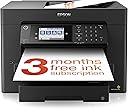
The Epson WorkForce WF-7840 is a heavyweight all-in-one inkjet printer designed for professionals needing versatile A3+ printing, scanning, copying, and faxing. Featuring dual 250-sheet front trays plus a 50-sheet rear feed, it supports automatic duplex printing and scanning with a 50-sheet ADF. Wireless connectivity via Wi-Fi Direct, Bluetooth, and Ethernet enables seamless mobile and desktop printing. Its 4.3-inch tiltable touchscreen and individual DURABrite pigment ink cartridges deliver sharp, vibrant prints ideal for business and creative projects. Weighing 20.6 kg, itโs a substantial, feature-packed machine perfect for home offices or small businesses demanding large-format, high-quality output.


| ASIN | B08J7G93QT |
| Additional Printer Functions | All In One |
| B&W Pages per Minute | 32 ppm |
| Best Sellers Rank | 1,101 in Computers & Accessories ( See Top 100 in Computers & Accessories ) 11 in All-In-One Printers |
| Box Contents | What's in the box Individual Ink Cartridges, Main unit, Power cable, Quick Start Guide, Warranty document |
| Brand | Epson |
| Brand Name | Epson |
| Color Depth | 24 bits_per_pixel |
| Color Pages per Minute | 12 ppm |
| Colour | Black |
| Compatible Cartridge | Epson |
| Compatible Devices | Smartphones |
| Connectivity technology | Bluetooth |
| Control Method | Touch |
| Controller Type | Android |
| Country of Origin | Japan |
| Customer Reviews | 4.0 out of 5 stars 204 Reviews |
| Display Type | touchscreen |
| Dual-sided printing | Yes |
| Duplex | Automatic |
| Global Trade Identification Number | 08715946668383 |
| Hardware Interface | Ethernet |
| Ink Colour | Coloured (CMYK) |
| Item Type Name | Inkjet Printer |
| Item Weight | 20.6 Kilograms |
| Manufacturer | Epson |
| Maximum Copies Per Run | 50 |
| Maximum Copy Resolution Black and White | 4800 x 2400 |
| Maximum Copy Resolution Color | [EO] 600x600 dpi o 1200x1200 dpi |
| Maximum Copy Speed Black and White | 32 ppm |
| Maximum Print Resolution Black and White | 4800 dpi |
| Maximum Sheet Capacity | 50 |
| Maximum Supported Paper Size | A3 |
| Maximum print Resolution Color | 4800 x 1200 dpi |
| Model Name | C11CH67401 |
| Model Number | C11CH67401 |
| Model Series | Workforce |
| Model name | C11CH67401 |
| Network Connectivity Technology | Bluetooth |
| Number of Drivers | 1 |
| Number of Ethernet Ports | 1 |
| Number of Trays | 1 |
| Other Special Features of the Product | A3 Print |
| Output sheet capacity | 50 |
| Paper Size | 457 millimeters |
| Power Consumption Size | 20 Watts |
| Print media | Labels |
| Printer Output Type | Colour |
| Printer Resolution Horizontal Max in Color | 4800 Centimeters |
| Printer Resolution Vertical in Black and White | 2400 Centimeters |
| Printer Type | Inkjet |
| Printing technology | Inkjet |
| Product Warranty | 1 Year Manuacturer |
| Resolution | 600 x 600 |
| Scanner Type | Flatbed |
| Special feature | A3 Print |
| Specific Uses For Product | small office, home office |
| Total USB Ports | 1 |
| Unit Count | 1.0 count |
| Warranty Type | limited warranty |
| Wattage | 20 watts |
L**Y
Sturdy, practical and much better than I expected
This is my first Epson printer after many years of owning HP printers. I needed a printer capable of A3 printing for my business, and my daughter swears by Epson, so after doing a considerable amount of research I decided to give Epson a try. I am very glad I did. The price was right at ยฃ222. First things first: this is a substantial printer! It weighs around 20.5 kg, so this is not something I would recommend casually tucking under one arm and carrying upstairs. My husband and I are both in our later years, so getting it upstairs and onto its new printer table involved two golden oldies, one 20.5 kg printer and a certain amount of determination. Happily, printer, husband and wife all reached the top intact! It came very securely protected in the manufacturerโs packaging, without an enormous additional box around it, which I appreciated. I would advise allowing yourself plenty of time for the initial setup. From setting up the printer itself, installing it properly on my MacBook and then setting it up on my iPhone, the entire process took me around four hours. I used ChatGPT to guide me through everything step by step and the whole process went without a hitch. Once everything was installed, I tested printing from both my laptop and my phone and it worked like a dream. I have even tested sending something to print from downstairs while the printer is upstairs, which worked perfectly. The printer has two substantial 250-sheet paper trays at the front plus a 50-sheet rear paper feed, and it can print up to A3+. Having two front trays is going to be extremely useful because I can keep different paper available rather than constantly changing what is loaded. The rear feed is particularly useful to me because I bought this printer partly for art, craft and specialist printing. I have the printer sitting on a sturdy printer table with wheels, so when I need access to the rear feed I can simply roll the whole machine away from the wall. One of the things that particularly attracted me to this model was that it is not simply an A3 printer. It is also an A3 scanner and photocopier. I havenโt tested those functions yet, so I canโt comment on their performance, but I am looking forward to using them. The Automatic Document Feeder on top was another important feature for me. Rather than having to put documents onto the scanner glass one page at a time, the ADF can take multiple originals โ including A3 โ and can handle up to 50 sheets. It also offers automatic double-sided scanning. For someone using the machine for business as well as creative work, I think this is going to be extremely useful. The large colour touchscreen is another pleasant surprise. It is clear, responsive and easy to understand. The whole control panel can also be tilted out to make it easier to see when you are standing over the printer, or folded back when appropriate. Then there is my favourite little feature. The first time I sent something to print, the output/catch tray automatically extended itself. I genuinely did a double take. It sounds like such a small thing until you have lived with a printer where somebody has to remember to go over and pull out the paper catcher before printing. With this Epson, I can be downstairs, send a document to print upstairs, the sleeping printer wakes itself up and the output tray comes out automatically. No sprinting upstairs to open the tray and arriving gasping for breath before I can press Print! The Epson Smart Panel app on my iPhone has also impressed me. I can see the printer and its ink levels from my phone and access printing, scanning, copying, maintenance and other printer functions. Once everything was connected to my home network, mobile printing was very straightforward. I also installed Epsonโs full printer driver on my Mac rather than relying solely on basic wireless printing. This gives considerably more control over printing than may be obvious at first glance. The Mac print dialogue allows me to select the paper source, media type and print quality. There are settings for plain paper and various specialist media, including photo, glossy, high-gloss, matte, semi-gloss, coated and heavyweight papers. That flexibility is particularly important to me because I intend to use the printer for artwork and business projects rather than simply letters and office documents. You can also save frequently used combinations as print presets, which I think will become very useful once I have established my preferred settings for different jobs โ for example, everyday A4 documents, artwork and A3 printing. My only minor criticism so far is that some of these useful Mac printing controls are not immediately obvious. They are there, but you need to expand the Media & Quality section of the print dialogue to find settings such as paper source, media type and print quality. Once you know where they are, however, they are straightforward to use. The four individual ink cartridges were very easy to install. I know refillable tank printers are extremely popular at the moment, but I deliberately chose a cartridge model because of my particular requirements. I wanted the DURABrite pigment inks because I intend to experiment with printing my artwork onto prepared fabric as part of my creative work. For my expected volume and type of printing, cartridges suit my needs better. Having four individual cartridges also means that when one colour runs out, I can replace that particular cartridge rather than replacing a combined colour cartridge. Print quality from my first tests has been excellent. Even using ordinary paper at the normal quality setting, text is crisp, fine lines are clean and pale coloured areas reproduced beautifully. I havenโt yet properly tested photographs, artwork, A3 or fabric printing, so I will not comment on those until I have actually used them. Overall, the WF-7840 feels sturdy, substantial and very well made. It really is a monster of a printer โ in the best possible way. My strongest advice before buying one is: measure your available space carefully. Donโt just measure the footprint of the printer itself. Think about access to the rear feed and the space required when the output tray extends. Also put it on something suitably sturdy; this is a 20.5 kg machine. I paid ยฃ222 for mine and, based on my experience so far and the amount of functionality it provides, I consider that excellent value. After years of being an HP printer owner, this was quite a change for me. My daughter may now be entitled to say, โI told you so.โ So far, I absolutely love this printer. It is a great big, sturdy, feature-packed monster of a machine and I am thoroughly impressed. Five stars from me.
P**!
Versatile, feature-packed and particularly strong for A3 and A3+ printing.
The Epson WorkForce WF-7840 is a very capable all-in-one printer, especially if you regularly need larger A3 or A3+ prints but still want something practical for everyday home or office use. The twin paper trays are a major advantage, as you can keep different paper sizes or types loaded at the same time without constantly swapping them around. Print quality is sharp and colours come out well, making it suitable for documents, graphics, posters and general business printing. The scanner is also very useful, particularly for larger documents, and having printing, scanning and copying in one machine saves a lot of space compared with running separate devices. Wireless connectivity is convenient and makes it easy to print from multiple computers, phones or tablets once everything is set up. It is a fairly large printer, so you definitely need to consider where it is going to sit before buying. Ink costs are also worth keeping in mind if you expect to do very high-volume colour printing. That said, the flexibility of A3+ printing, dual trays and all-in-one functionality makes it much more versatile than a standard home printer. Overall, this is an excellent option for anyone who needs larger-format printing without moving into much more expensive professional equipment.
J**N
Brilliant printer, reasonably priced.
I love this printer! I can print double-side booklets and A3 pages really fast. The wifi connection is great - my last wifi printer constantly dropped the connection - which means I can print from multiple devices from all over the place. The initial connection is made with a phone and you have to download the Windows drivers if you want to print from a PC (how old-fashioned!) I couldn't see a mention of this in the quick guide. The only reason it doesn't have 5 stars is because I thought one of the paper trays was for A3 - however, it is just another A4 tray, the A3 goes into the back so not quite as neat as I'd hoped.
N**E
Waste of money
Bought to replace a WF-7620. First off, the build quality of the WF-7840 is poor. The plastic of the paper trays is flimsy - they can almost be snapped when removing them from the main unit. Secondly, and more crucially, the printer wonโt connect to a wifi network unless it is very close to the router, which in my case makes it useless. All other devices next to the printer connect easily to the wifi network. The signal strength of the printer is poor or weak - even within approx. 10 m of the router. My iPhone signal in the same location has 3 bars. Donโt waste time and money on this - buy something else.
E**F
Resistance is futile!
Slightly reminiscent of the Borg cube! I needed something that would scan and print A3 and this beast fits the bill and does everything (scanning and printing) full duplex too. Reviews were favourable and after a day or so of play time with it I'm pretty happy. I've also invested in a set of refillable cartridges with ARC (auto reset chips) which will save a fortune in consumables costs. The equivalent (and functionality the same) EcoTank ET-16650 version of this printer is over a grand. If you want to go down the reusable cartridge route, make sure you do NOT update the printer firmware when the printer and PC software install (which is the least slick part of the experience) tries to make you to. With a bit of additional set up effort all the functionality can be operated from the printer colour touchscreen too to scan to email, or Windows shared drive and also USB memory stick. Settings profiles can be saved to the printer that reflect your setup and used like a telephone contact. Nice! Photo printing on 'best' setting, even on plain copier paper, to my eye is more than very decent. Regular printing of more usual text and graphics is all excellent to my eye. Print speed, scanning quality and functionality is all much better than my last printer. Given the weight of this thing and the number of bits in it, I have no idea how they do it for the money quite frankly. Back in the day I paid 50% more than the cost of this multifunctional beast for my very first HP A4 inkjet back in 1991! Extraordinary! The third paper feed at the back means thicker card can be put through. All paper trays will accept more paper and envelope sizes than you could practically shake a stick at. So far it's exceeding my expectations and I think remarkably good value.
M**Y
Easy to set up and a great workstation
I bought this as a replacement for a similar Epson that lasted 14 years without a problem but then just fell apart. I wanted a direct replacement and this was the nearest: like all Epson printers/workstations it was easy to set up and use. The one thing to be wary of is firmware updates: it seems that if you accept any, the printer will no longer work with compatible cartridges. This may be true or not, but I am not willing to find out the hard way, so I reuse to accept them.
R**6
Fills a big gap in inkjet prining and large format scanning
A beautiful machine. Neeeds careful calibration for colour pictures, but well worth iT: results as good as I've ever seen from a YCM+B printer. Tried the 7310 before buying this, which seemed to have a number of small mechanical glitches which are ironed out completely in the slightly bigger machine. Well worth the extra ยฃ60. I'd happily have paid ยฃ100 or so more for a tank-fed ink delivery system, but I suppose you can't have everything all at once. Not crazy about the interface or the manuals which seem to have been written in a pre-web age, but it interfaces well enough with W11 and Adobe software, and after a little work it'll do a lot it was never designed for. A really competent A3+ printer/scanner.
A**R
Does not print from usb
Print quality is good, scanner works well and I've enjoyed the easy setup and network connectivity. The only downside is it won't print from usb. Which is a little frustrating. It can scan to usb, it can read usb, but it won't print from it.
S**E
Tutto bene
Ottimo
Trustpilot
2 weeks ago
4 days ago