Some deliveries may take a little longer than usual due to regional shipping conditions.

DOWNLOAD THE APP


Customer Services
Copyright © 2025 Desertcart Holdings Limited
DOWNLOAD THE APP

🎶 Elevate your sound game — be the host everyone envies!
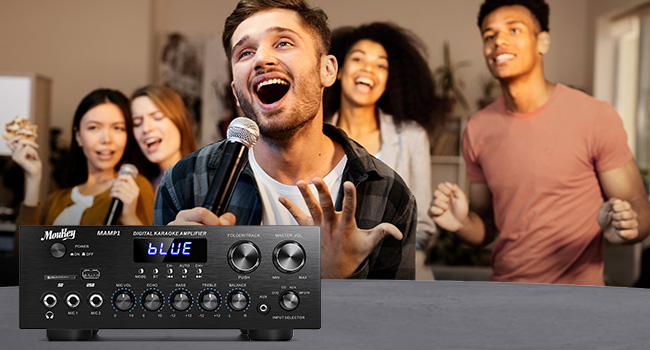
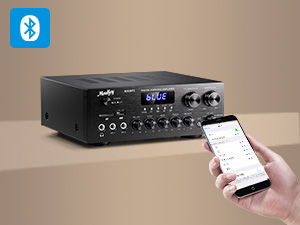
The Moukey MAMP1 is a compact 2.0 channel stereo amplifier delivering 400W peak power and 25W×2 RMS, perfect for karaoke, home theater, and multi-source audio setups. Featuring Bluetooth 5.0 with a 40-foot range, 7 versatile inputs including USB and SD card support, dual microphone inputs with echo control, and an HD LED display with remote control, it offers professional-grade sound customization in an affordable package favored by audiophiles and casual listeners alike.









| ASIN | B08H4R221Z |
| Best Sellers Rank | #9,236 in Electronics ( See Top 100 in Electronics ) #32 in Audio Component Amplifiers |
| Customer Reviews | 4.3 4.3 out of 5 stars (4,882) |
| Date First Available | October 21, 2019 |
| Item Weight | 0.564 ounces |
| Item model number | MK0101-US |
| Manufacturer | Moukey |
| Product Dimensions | 12.6 x 12.2 x 6.69 inches |
J**K
Want to transmit from the MouKey? Use a turntable? Enjoy cable FM radio from the whole world?
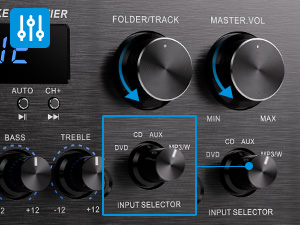
This is an amazing piece of gear. The sound is excellent and it can manage an incredible number of sound sources, truly remarkable for such a small thing. I'm a tinkerer, so after spending most of the first day of ownership connecting, reconnecting, jiggering, testing out, and sometimes cussing, I'm now sitting at my laptop LISTENING with my Bluetooth headphones to a vinyl LP recording of Mozart's Clarinet Chamber Music sourced by my AUDIO-TECHNICA TURNTABLE. I capitalize these items because the experts on this site have said that neither of these things could be done...or that they "might be able to be done" but how to do it is another question. Well, I'm doing it right now. So here is how it is done. It is NOT difficult once you know the tricks. First, though, a really easy one. You've probably noticed that the included FM wire antenna isn't the greatest. At least the one they sent me isn't. The automatic station finder found 40 signals, which isn't too bad, but the closest one and the one I like to listen to has static, no matter how I position the wire antenna. Soooo, during my tinkering and jiggering, I connected the FM input connector on the back of the MouKey to a cable outlet in the nearby wall. I used the same sort of coaxial cable connector that you use to connect your router to your coaxial cable feed, It worked! I now have 65 stations from all over the country and every one crystal clear. Next another easy job - the turntable. I'm using an Audio-Technica turntable that gives me a choice of using it's pre-amp or it's unamplified output. You want to use the unamplified output because the MouKey is an amplifier. If your cord out from the turntable has RCA connectors, just plug them right into the DVD RCA receptacles in the back of the MouKey. If you don't have RCA connectors, simply purchase a jack to RCA connector somewhere and turn the cord into one you can use. You may also need a short connector that has two female ends. Connect them up, then connect your speakers if you haven't already. I'm using the RCA connections just to the right of the DVD RCA connectors, and have the amplifier connected to 8 Bose ceiling speakers. They sound fabulous. I haven't even connected speakers with the wire connections on the back left of the amplifier. I probably won't. But...if you want to be adventuresome, read the rest of this. If you want to connect other things via Bluetooth, and/or if you want to be able to send music (say) or more FM station connections to the MouKey AND transmit the same to another device - Yes... it can be done. Read on. Now first make sure that are no jacks plugged all the way into the receptacles for the microphones or the headphones on the lower front left side of the MouKey. They cut out all other outlets, and you don't want to do that right now. Now it's time to buy a Bluetooth transmitter. I don't think it has to be a fancy, expensive one. Depends on how much of an audiophile you are. I have an inexpensive little square transmitter/ receiver that is very, very touchy, and if it works, anything you buy will probably be better than what I've got. And my cheap little thing sounds devine. Teaching moment: The more work it takes to connect, the more valuable and appreciated the experience. So cheap and hard is good. (Up to a point.) I digress. OK. Using a cord with a double-band jack connector (for stereo) on each end, plug one end into the female headphone receptacle on the lower front of the MouKey. Push the connector all the way in until it clicks. Connect the other end to your Bluetooth transmitter. Now, turn the MouKey power off. You need to do this so your headphones, or whatever, do not connect to the Bluetooth receiver of the MouKey or to your speakers or some other device and sabotage your project .I use my smartphone's Bluetooth to check, and then turn off any interfering devices. There's also some apps on Google Play that find errant Bluetooth devices. Everything off? Now do whatever your Bluetooth transmitter requires to connect to whatever Bluetooth receiver you want to transmit to. (This is where my cheap transmitter and my headphones argue for a while.) When they are connected, power on the MouKey. Set the input selector to whatever you want your source to be. Turn on the source (say turntable) if you have not already done so. Right now mine is pointing at the DVD and my turntable is on, so I can listen to Mozart. The little LED display shows our local NPR station, but I don't think that is really important. What's transmitted is what you have chose with the input selector. You are now listening to sound TRANSMITTED from your MouKey - which is supposedly impossible. Is that really cool or what? Now here is a trick. Your speakers or headphones are picking up a signal sent by your external Bluetooth transmitter that's connected to the headphone jack of your MouKey amplifier that's connected to your MouKey that's connected to your sound source via the RCA connectors on the back. But your MouKey has a Bluetooth receiver that isn't being used. Hmmmmm. You can now connect your smartphone, or something else (I'll call it device #2), to your MouKey's unused Bluetooth receiver and listen via your headphones or speakers to another sound source (device #2) that you may not even thought of. True, you could connect your speakers or headphones directly to this device #2, say your smartphone, but what's the fun in that? Besides, then you would miss out on the great sound of the MouKey. Soooo, set your MouKey so the display reads "Blue." Then use your #2 device's Bluetooth and connect to "MouKey MAMP1," which in my case happened immediately and makes me want to replace my cheap Bluetooth transmitter. However, staying on task, turn your "Input Selector" on the right side of the the MouKey all the way to the right, to "MP3;W" and there you are...your smartphone (or whatever - device #2) is now transmitting to your MouKey, and your Moukey is transmitting to your headphones or speakers or whatever you connect via the new Bluetooth transmitter that's connected to the MouKey. And if you want even more FM options, download free from Google Play, "Radio-FM Radio Station App. Local Radio Free" (FM Radio App & Photo Gallery and Notes). Your phone will be connected to crystal clear FM stations all over the world. I suspect there are 250 stations. Send your chosen station's output to the MouKey Bluetooth receiver and let the Bluetooth transmitter fill your linked headphones or speakers with FM music from all over the world. Enjoy.
D**S
Exceeded my expectations
Note: this review does not speak to the radio function or karaoke mic inputs - I do not use either of these features and have only reviewed the stereo amplifier functions. Other reviews can provide more information on these features. I use the MAMP1 exclusively for the Bluetooth, USB and CD playback capabilities. After checking out a number of units in this amplifier/receiver class and price point ($50- $75) I selected this Moukey MAMP1. I couldn't be more pleased with the performance - plenty of power to push my 8-ohm 12" 3-way floor speakers with the EQ nearly flat - plenty of bass and treble for any style of music. As a lifelong musician I play and listen to a wide variety of genres - jazz - both acoustic and electric, rock, folk, orchestral etc. so I do know what instruments are supposed to sound like. The MAMP1 faithfully and cleanly reproduces anything I've thrown at it with no audible distortion, hiss or hum at low or higher volumes. I have a very large digital music library on my laptop and was able to pair and connect easily via Bluetooth, giving me access to all my MP3's, WMA files, WAV files. The controls are very straightforward, the knobs and switches have a solid feel to them. By contrast the remote it comes with feels cheap and is rather limited as others have noted but I can live with that. On the plus side the remote does offer 5 different EQ presets via the EQ button that will allow you to adjust/compensate to your taste the recording mix, your speaker response or the ambient room environment - nice feature. Overall, the MAMP1 exceeded my expectations. No - it can't compete with a $600+ Sony or Yamaha or Marantz unit - and it's not designed to, but if you're looking for a low-cost amp that produces clean distortion-free sound I'd recommend without reservation the MAMP1. UPDATE: I've had the unit for four months now and my initial impressions have been borne out. I've had no issues with it performing as advertised and it continues to exceed my expectations. Some things to note concerning the USB and SD inputs: 1. Both USB drives and SD cards need to be formatted to the FAT32 file system. I had a number of USB drives that I had formatted to the newer NTFS file system and the MAMP1 would not recognize them until I reformatted them back to FAT32. Not a problem, as the default standard for these drives new out of the package is FAT32. 2. As stated the capacity for the USB is 32GB or less, the SD card is 16GB or less. That's not a serious limitation for either - 16GB on the SD card is a TON of MP3s, let alone 32GB on the USB. It will also play WAV files on both but bear in mind WAVs are much bigger files and require more space on the drive. I rip music files from CDs to MP3s on my computers at the highest 320 bit rate - the quality is excellent . Neither the USB or the SD card will play WMA files so I use Bluetooth from my laptop to play these - plays flawlessly (as all audio formats do via Bluetooth). 3. It's difficult to determine what order the folders on the USB/SD card will play - the display won't help you as it does not tell you what's playing, it only shows the play time of the tune currently playing. One thing I discovered - both USB and SD cards will play back music folders in the order you copy and paste them to the drive. I copy whole album folders individually (for example - Rush "Moving Pictures", Porcupine Tree "Deadwing", Miles Davis "Bitches Brew") from my laptop onto the USB/SD drives and it plays back the folders in the order I copied them. Hope this helps - overall it's a great unit (five stars!) and I stll highly recommend.
M**S
Just received and tested this little power amp. Very pleased especially that is has bluetooth receiver so I can connect my bluetooth hifi turntable and control the bluetooth volume from the amplifier. I was very surprised at the quality and compact size and very pleased. It also has line out for powered speakers or further power amp. Input for CD and DVD and an Aux input. I bought it specifically for the bluetooth and my turntable connected within a couple of seconds. (bluetooth is marked W in mine but it is bluetooth). My only ‘complaint’ is the tiny remote control and basic manual but the amplifier is excellent for the price. I’d recommend it. Edit: had time to check usb and snd card slot. Plays music files with no problem. Bluetooth connects within a second and also remembers bluetooth devices so can easily switch automatically from one bluetooth device to another. Connected large hifi passive speakers and sound is excellent. Friday 2nd Feb. I’ve had the Amp for just over a year and still going strong. Just recording on my computer some LP records and computer connected via Bluetooth to Moukey. At this moment recording classical organ LP and the sound is rich and powerful. Recording via Audacity and recording being monitored via the Moukey amp. to Hifi speakers. I definitely recommend this amp.
M**.
Teil 1 (Teil 2 weiter unten) Ja, was soll ich schreiben bei mehr als 3000 Rezensionen. Eins vorweg, an Amazon Lieferung Top. Das Gerät scheint eine Überarbeitung zu sein was ich habe, die Front ist angeglichen an die hintere Stahlblechabdeckung und der Ein/Aus Schalter plus Moukey Schriftzug wanderte 5 mm nach links gegenüber das Bild oben, beim runter Scrollen sieht man das jetzige Model. Kommen wir zum Gerät wofür ich es mir bestellt habe. 63% 5 Sterne, 22% 4 Sterne macht 85% gute Bewertungen und ich brauchte einen neuen Verstärker da mein 41 Jahre alter Studioverstärker die Segel gestrichen hat. Ich hatte in am PC angeschlossen gehabt über ein 2.1 passsiv Lautsprechersystem. Mit 2 Wege a'10L und einem 2 mal 60L 4 mal 10'Zoll Basssystem. Eins vorweg ich höre Musik über ein Röhrenverstärker Class A mit Vinyl und CD und Orbit Sound Lautsprechersystem mit einem aktiven Klipsch Sub. Also ist der Moukey für den PC für Film, Spiele, Radio und Mp3 usw. Fazit ohne viel zu Schreiben! Positiv: das Teil ist preiswert es wiegt 1/5 gegenüber mein alter (25kg) ist nur 1/3 so groß es ist gut verarbeitet im Augenschein für den Preis Radio mit einer guten Antenne für UKW gut ( Kein RDS und keine externe Speicherung der Sender möglich nur über die Auto Scanfunktion ) CD Klang ordentlich Klang über dem PC angemessen Kopfhörer Sound ist akzeptabel bis gut (Tecsun H-501x ist besser) Vinyl (noch nicht angeschlossen) Mics (noch nicht angeschlossen) Lautstärke Regelung hat feine Raster (wie der alte) Bass, Höhen getrennt regelbar ( extrem hörbare Veränderungen ) USB Sound, MP3 mit guter Aufnahme (320k) gut USB Regelung, über Folder/Track Regler gut ( Druck und drehen) Bluetooth (noch nicht angeschlossen) Balance Regelung gut Feinregulierung der Signalstärke (Lautstärke) per Fernbedienung bei USB, Radio Lautsprecheranschluss über Drehverschluss oder Bananenstecker Line out (noch nicht angeschlossen) Aux (noch nicht angeschlossen) Kommen wir zum negativen Teil aber vorerst zu einer kurzen Aufklärung! Der Moukey MAMP1 hat eine Peakleistung von 220Watt bei maximaler Auslastung am Stromnetz, entspricht einer Sinuslast von max. an den Lsp. von sage und schreibe aufgerundeten sechzehn Watt mal zwei. Laut Bedienungsanleitung steht dort 2 mal 25 Watt dies wird die Musikleistung sein. Die Stufe soll A/B geschaltet sein und das passt dann auch zur Leistung. Kurz 220 Watt Strom, 2 mal 25 Watt Musikleistung, 2 mal 16 Watt Sinuslast Negativ Hier gibt es nicht viel Fernbedienung ausreichend (aber funktioniert) Display ausreichend ( statt LED lieber LCD beleuchtet und abschaltbar) Master Lautstärke über Fernb. nicht regelbar UKW kein RDS und keine manuelle Speicherung der Sender UKW kein manuelles Tuning EQ kannste vergessen Lautsprecheranschluss nur für ein Paar ( Achtung! für mehr auf Reihenparallelschaltung setzen und auf die 4-16 Ohm achten, bei zu wenig Ohm unter Last macht es sonst Peng) Gesamtfazit Das Teil macht Spaß für den Preis, vorausgesetzt man hat Wirkungsgradstarke Boxen mit mehr als 90db/1m und 2,5 mm² Kabel dann kann der kleine richtig Giftig werden. Die Bass und Höhenregelung wirken extrem auf den Sound und Lautsprecher. Sterne von 10 gebe ich 5,5 Preisleistung Top Empfehlung ***** -------------------------------- (24.02.24) Moukey MAMP1 Teil 2 Warum Teil 2, ganz einfach ich habe mir noch einen zweiten Moukey MAMP1 vor 2 Monaten bestellt. Im ersten Teil habe ich den MAMP1 für den PC bestellt dort verrichtet er weiterhin hervorragende Arbeit. Hier im zweiten Teil benutze ich ihn für den HiFi Bereich statt meiner 12 Stromfressenden Röhren. Der Moukey MAMP1 verbraucht nur ¼ Watt bei Zimmerlautstärke gegenüber des RV mit 150Watt. Alle Zuspielerkabel sind Störumantelte beidseitig mit Filter versehende Kabel und mit mehr als 90 % Kupfer Anteil. An den LS Orbit Sounds ist jeweils ein YYW Super HiFi abgeschirmter Kabel mit Bananen Stecker angesteckt der aktiv Klipsch Sub hat normale 2mm² LS Kabel die hinten unter den Bananenstecker angeschraubt sind also nicht am Line out der als Sub Anschluss dient sondern am Hi Level Eingang am Sub selber, dieser hat eine Ein und Abschalt- Auto die sich bei Last zuschaltet. Meine Zuspieler sind Marantz CD60, Music Hall mit einem Audio Technica VM750 SH und den Vorverstärker Graham Slee Communikator an Chinch und einem TechniSat Digitradio 10iR an Aux angeschlossen. Das interne Radio und der USB sind nicht hier jetzt nicht in Funktion. (siehe Teil 1) Eins vorweg hier Rauscht und Brummt nichts alle Kabel fungieren hier nicht als Antenne, für ein RV ein muß. Bei dem Moukey MAMP1 Teil 1 sind gute Kabel angeschlossen da Rauscht und Brummt auch nichts. Der Moukey MAMP1 ist ein Class A/B Verstärker wie meine Röhre (mit 2 Röhren pro Kanal), ein hochwertiger Class D Verstärker Filtert einige Störungen besser raus, zum Beispiel das ein und aus Schalt Klicken der Zuspieler aber auch das Ausschalten des Moukey MAMP1 kann im LS Klicken deshalb den Master Vol. auf null stellen. Vorteil einer Class A/B Schaltung ungefiltertes Audio Signal gegenüber einer Class D Schaltung, der Vorteil eine Class D Schaltung sie verbraucht noch weniger Strom und hat weitaus mehr Leistung zur Verfügung für Leistungs- hungernde Lautsprecher. ( siehe Teil 1) Leistungsmäßig kann eine Class A/B Schaltung gegenüber einer Class D Schaltung im obrigen Lastbereich auch klanglich nicht mithalten, deshalb wie schon im ersten Teil geschrieben man braucht hier Wirkungsgradstarke Lautsprecher-boxen um oben mit zuspielen mit den großen. Hier empfehle ich für den HiFi Bereich LS von Klipsch z.B. oder Orbit Sound oder LS die für RV konzipiert wurden auch gehen PA Lautsprecher für eine Party diese LS haben alle einen Wirkungsgrad von weit über 90db/1W pro Meter hier kann man mit unter der 12Uhr Marke am Master Vol. locker die 100db Schallmauer durchbrechen. So verhindert man Verzerrungen über den Amp. Mit meiner Konfiguration und 10 Uhr am Master Vol. und beide Klangeinstellung auf 0 mit dem M.CD60 und der AC/DC Black Ice CD erreiche ich sage und schreibe 105db. in meinem 16m² Studio und das ganze ohne Verzerrung. Der Klang ist wie viele auch schon geschrieben haben richtig gut wenn man es nicht übertreibt. Man kann eine Menge Geld sparen und lieber in hochwertige Aggregate investieren wenn man im HiFi mitspielen möchte. Würde dieser Moukey MAMP1 nicht genauso gut Klingen wie meine Röhre hätte ich das niemals gemacht aber am PC Klang er richtig gut und ich wollte es versuchen die Röhre gegen den MAmp1zutauschen und ich wurde bzw. bin echt begeistert von dem Amp. ansonsten wäre er auch ins Esszimmer oder Schuppen gewandert. Beide laufen hier ca.14 Std. am Tag der eine am PC der andere als Background mit I.Radio.
S**H
Very bad quality..not worked after receiving.. returning is very difficult, we have to send through courier, they will not come and receive, this is third party trading, so Amazon will not take responsibility, don't go for it.
C**N
Lo recibí rápido y embalado perfectamente. Se ajusta a las explicaciones del producto y funciona de momento correctamente. La conexión Bluetooth es inmediata al móvil y con selección de graves, agudos + balance.La radio FM selecciona automáticamente emisoras pero con control básico. Se necesitan los conectores tipo banana para los altavoces que no vienen con el aparato.Cumple con lo que esperaba.
M**R
Inutile dire che è il prezzo l'elemento che, prima di tutti, richiama l'attenzione su questo prodotto. In realtà poi, andando a leggere la scheda tecnica, si capisce che c'è anche tanta sostanza. L'amplificatore in questione infatti riesce a gestire ben 4 zone controllabili indipendentemente fra di loro, ogni zona può essere dotata di 2 casse: vuol dire riuscire a creare un ottimo impianto hi-fi in casa propria, dotandosi di un massimo di 8 casse passive, con una spesa davvero ridotta. Buona la potenza erogata, il suono è pulito e privo di interferenze di sorta. Abbastanza completo anche il manuale di istruzioni che riesce a dare un'idea chiara e precisa del funzionamento e delle procedure di installazione anche a chi, come me, non è proprio tanto ferrata sull'argomento. Ultimo aspetto da non sottovalutare, l’amplificatore è gradevole anche dal punto di vista estetico e risulta abbastanza discreto e quindi adattabile ad ogni tipo di arredamento.
Trustpilot
2 weeks ago
1 week ago