Desertcart purchases this item on your behalf and handles shipping, customs, and support to Hong Kong.
๐ Stay Ahead, Stay Secure: The Future of Surveillance is Here
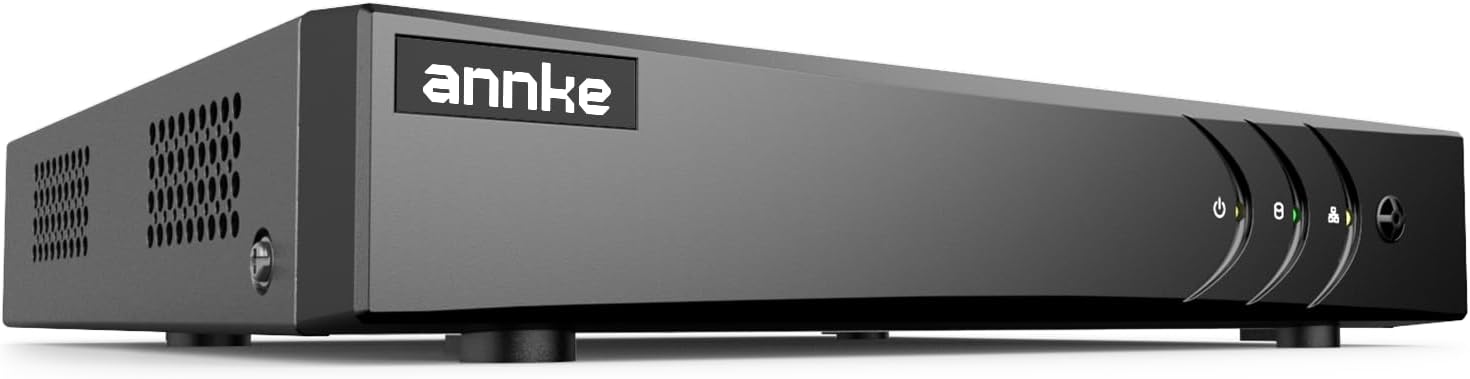
The ANNKE 3K Lite H.265+ Security DVR is a cutting-edge hybrid 5-in-1 recorder supporting up to 8 analog and 2 IP cameras. Featuring AI-powered human and vehicle detection, it minimizes false alerts while maximizing security. With advanced H.265+ compression, it saves up to 80% storage space and supports up to 10TB capacity (hard drive not included). Remote access via the ANNKE Vision app ensures you monitor your property anytime, anywhere, backed by top-tier certifications and GDPR-compliant data security.


| Asin | B00GB1IHSY |
| Audio Input | RCA |
| Best Sellers Rank | #3 in Surveillance DVR Kits |
| Brand | ANNKE |
| Built In Media | 1X 3.2 ft/1 m Ethernet Cable, 1X 3K Lite DVR with NO Hard Drive, 1X 5.9 ft/1.8 m HDMI Cable, 1X Power Adapter, 1X USB Mouse & 1X User Manual |
| Compatible Devices | Camera, Desktop, Smartphone, Tablet |
| Connectivity Technology | HDMI, USB, VGA |
| Customer Reviews | 4.2 4.2 out of 5 stars (3,424) 4.2 out of 5 stars |
| Hard Drive Size | 10 TB |
| Item Dimensions L X W X H | 8.66"L x 8.38"W x 1.73"H |
| Item Weight | 3.3 pounds |
| Manufacturer | ANNKE |
| Media Format Digital Video | H.265+, H.264 |
| Memory Storage Capacity | 10 TB |
| Mfr Part Number | N81R |
| Model Number | AU-DW81KD000-V3-OP |
| Number Of Channels | 8 |
| Number Of Items | 1 |
| Number Of Packs | 1 |
| Unit Count | 1 Count |
| Upc | 786471557068 |
| Video Input | AHD, CVI, CVBS, IP Input |
| Warranty Description | 2 year |
User
Excellent Replacement for NightOwl DVR
My classic NightOwl Security Camera DVR finally gave up the ghost; first the HDD failed so I replaced it, then the motherboard finally gave up. I didn't want to spend a lot of money on a new DVR setup, and found this on Amazon. At first, I was definitely skeptical... less than $100?? nah, something isn't right!Amazon delivered and I unpacked it, dropped my HDD in it; popped it up in its spot and connected the cameras; powered it on; and waited. Ok, the first time powering it up, took a minute to get rolling (completely understandable too).Everything came up! I renamed the cameras, set up the HDD (had to format it), set up the Annke online service (for remote viewing) and I must say I am impressed. Very responsive unit, very clean interface. Easy to search, motion detection for people AND vehicles works well. It has a lot of other features I don't think I would use, but for what I have it for it does way more than my old NightOwl DVR did!
User
Great DVR! Better than expected.
I've been using a DVR and some CVI cameras from Amcrest for a number of years now. One of the input channels on that DVR failed recently, so I was shopping around for a low cost replacement, just hopping to get something "good enough" and spend a minimal amount of money to get it. I decided to give this one a try after reading reviews here and watching a few videos on YouTube. I'm glad I did! It's so much better than I expected... lol In fact it's quite the upgrade from my old Amcrest unit. The interface is so much better, modern and faster. My old DVR only had 4 inputs, and I have 4 cameras. So I have 4 more empty inputs that I can use to expand later if needed. What's really nice though, is that it can handle two IP cameras in addition to the 8 coaxial inputs. I have one pan/tilt IP camera that I've added successfully. It's quite nice having all the cameras in one device, and also able to check them all in the one app on my phone or PC. Speaking of PC, I used a piece of software called Guarding Vision, which is recommended on Ankke's site. It works well! Having h.265 compression means I can store a lot more video on the same drive I was using, compared to h.264 with the old DVR. I took the 1TB Seagate Video drive out of my old DVR to put into this one. The AI motion detection works surprisingly well. On every camera/DVR I've had in the past, I end up turning off motion detection because I usually get just as many false positives as missed actual motion... lol This one works good though. I've seen very few "false" positives triggered by insects flying by, etc, but it's actually been able to properly detect people and vehicles, and tell the difference between then. I have it set up so it records 24/7, but with motion detection on, it still marks motion on the timeline in the playback which is perfect! I can also have it send emails or notifications too, but chose to turn those off for now. Definitely consider this if you're looking for a nice security DVR at a nice price!
User
Big improvement over older model
Summary:Bought to replace apparently failed DVR (older Sannce equivalent to this model), found two failed 12v adapters that might have fixed the problem, but new software and AnnkeVision app seem to be worth the $60.Exhaustive detail:Our Sannce 8-channel DVR quit working, so I ordered the Annke 5MP box that looked like it would be a direct replacement. With the coupon it was just over $60 with tax (no HDD, of course.) Way cheaper than anything else, and the reviews sounded like it was the best way to go for us.I moved the HDD from the old unit to the new box and did a cable-by-cable swap between the old and new boxes. I was really bummed when it worked just like the old one - the red power light was on, but no video on the monitor. I went to help.annke.com and saw that the first Troubleshooting step for lack of video was to try replacing the power adapter, even if the power light was on. I switched to the new power adapter, and immediately there was a beep and I heard the HDD spin up (hadn't noticed the lack of sounds using the old adapter.) Apparently they've seen this one before.I proceeded with the setup and downloaded the new app. The setup is not well-explained in the quick start guide, but the on-screen interface is a bit less confusing than the old one was, so I muddled through the basics. I had to provide an email and set a password, way more security hoops than the old one had. I now had video with pictures from 4 of our 8 cameras.More troubleshooting found that ANOTHER 12v adapter had apparently failed (it will power 1 camera, but when you plug in the 2nd one you lose the working one.) I was pretty upset to realize that I might have gotten by with just a couple of 12v adapters (I had replaced two or three of them since the original installation, so I should have known to start there, even though the lights were coming on.) However, the Annke Vision app is much more user-friendly than the XMEye one the old box used, and the motion detection actually seems to work, with the playback video that was captured leading up to the trigger event (I'll know more about false alarms when the other 4 cameras come on line, and when I see what happens after dark, but I had given up on making the old box detect properly.) And there are new functions (line crossing and other ways to trigger recording) that other reviewers rate highly. Maybe I'll even download the manual and check them out! Also note that you can add two wireless cameras in addition to the 8 wired ones the old box supported.Conclusion:Seems well worth the very reasonable price, definitely the way to go if you have wired cameras installed already.
User
Best bang for the buck in Home Security Surveillance DVRs
I have tried other brands (wonโt name them here) that were simply useless (unable to stop hundreds of false alarms, detection failures, etc.). With this DVR I was able to eliminate nearly all possible false alarms and still get 100% detection, real-time email/text notifications and event recording. The DVR records 30 seconds prior to and 30 seconds after an event and can send real-time email/text with multiple pics from the most pertinent images from that time range; which pretty much perfectly catches what you need to see to determine exactly what happened (i.e. who came to your door, etc.). You can remote live view any one or several cameras simultaneously from the mobile and PC app. Reviewing event history is straight-forward by simply jumping to tick marks on the timeline or searching for specific events on specific cameras. You can even view events with up to 2 cameras synchronized side-by-side (which is really handy for seeing people/vehicles entering one cameraโs view and then moving through to another).The UI appears better than most (nice graphics and easy to navigate). However, setting up the system takes an inordinate amount of time due to lack of useful common defaults (i.e. you spend a lot of clicks setting options for each day of the week for each cameraโso lots of repeat this for 7 days x 8 cameras = 56 windows to click through to set the most common โdo this alwaysโ setting). Several things (like configuring event triggering/recording and configuring event scheduling) are confusingly in separate places and easily missed. For example, you set up a bunch of event/alarm triggers but forget to also go to a separate menu section and set up the recording schedule and then nothing happensโleaving you confused and frustrated. The manual is better than most but there is still some poorly worded and badly documented features (like pretty much all of the Recording Schedule section of the interface). Making this worse, some of the features in this section simply donโt work (I worked with their support (which was very responsive) on these issues so hopefully they will fix this).Perhaps the most useful feature of this DVR is its ability to detect what they call โVCA Eventsโ. This allows you to set up things like โline crossingโ where you can draw a line and then specify that an alarm should trigger when something crosses the line in one direction, the other direction, or either direction. You can also trigger on โpeople gatheringโ, โloiteringโ, โobject removalโ, โparkingโ, โunattended baggageโ, โfacial recognitionโ, etc. I find that the โLine Crossingโ feature is the ultimate way of eliminating false positives associated with the more common block-area motion detection. When you block out an area for motion detection (most DVRs support this), you can never really eliminate false positives from shadows, bugs flying near the camera, sprinklers, clouds, car lights, etc. Detecting โline crossingโ means that something has to actually move across a line (like your front door step) as opposed to just set off a square somewhere in front of the camera. This eliminates 90% of the false positives. I set my system up to record on both motion and VCA events but only send emails/texts and audible alarms on VCA events (so I over record for historical info but only alarm when something really happens). Alas, you can only set up one VCA event (fixing this would make this a truly stand-out DVR). So I end up using the VCA event for the most important camera (e.g. the front door) and then limit the motion area and turn down the sensitivity for the other cameras to limit the false alarms there.When setting up block-area motion detection, like all other DVRs, you will have to play with the motion sensitivity to get it right. For me, setting the sensitivity to 1 works for detecting motion that is within 5-10 feet of the camera. Try 2 to detect motion within 15-20 feet and 3 or more for further out. The higher you have to set the sensitivity the more false alarms you should expect. Also, when setting the motion area, limit it to as few squares as you can. Try setting them all on then watch what actually triggers with different sensitivities set (you will likely be surprised). Then remove any areas you really donโt need. This will greatly reduce your false alarms.Bottom line, the hardware works. There are some bugs with the software and there are some UI issues (hopefully they will fix these in an update). Still this is the best security DVR I have tried. It has more features than most and it works. For what it costs, you canโt beat it.** UPDATE (2019) **While this is still the best low-cost security CCTV DVR system, analog security systems are all but obsolete now. Unless you have analog CCTV (i.e. coax) cabling/systems already in place, you are much better off investing in a digital NVR system. Your best bet is to go with wired POE cameras and a quality NVR like Reolink or Amcrest. The low-cost NVR systems tend NOT to have all the triggering features (line crossing, loitering, etc.) and will still cost you more than a CCTV DVR system. But, the ease of use, higher resolution, app independence and future proofing is worth the extra cost.
User
Great DVR, love the fact that I can also connect IP cameras.
I've been using it for a year without any issue. It's a great DVR that works as it should. I have both, Analog and IP cameras (with a POE switch) running in my setup. I also have some older cameras, some newer ones, of different brands and different resolutions, but the DVR handles them all and they are all working fine.
User
Nice unit ,Functional UI lacking, no manual E or otherwise
Begin forwarded message:ย Kyle , absolutely the worst UI i have ever encountered, try to configure a camera and select A4 as an example, make the a selection Motion, then go to Video tampering the UI goes back to A1 . Ridiculous, if you are not paying attention you are actually working on A1 parameters. This should not happen, very confusing makes configuring the system confusing. Issues with false alarms, I am sure if i beat it up enough or basically don't enable these features I won't have another problem ,but what's the advantage of having a dvr with AI , or plate reading , much less then other features. Now I am understanding that even though support both on the phone and online give instructions as to how to delete footage , i am now being told I have to reformat the complete hard drive, absolutely ridiculous couple that with the lack of any documentation either as an e manual or written one makes this system less than favorable. Your phone support Vania was spectacular but the system its self is severely lacking. Take for example the email setup , no where does it tell you that you have to make a passkey rather than a password , took me several days and only got through this with the help of Vania. Even she had to search the web and found someone on You Tube that figured this out ,again no help form any manuals. For these reasons , i am going to return this useless DVR for lack of better wording, on the plus side its a nice unit but its operational functions are severely lacking. If you have no further solutions , its going back to Amazon and I will be purchasing a different brand.
User
Great NVR for the money!!!
This NVR is not the most sophisticated or most powerful but for the money it is great. Awesome price with simple and easy to use GUI. You cannot go wrong with this NVR. The app is easy to use and it allows you to view in real-time and playback with fast forward, date/time selection, camera and speed. Great NVR
User
Somethings you should know before buying
First, this is a ok product. It works, it does what they claimed it would. But, they most certainly left some important details out.You will not be able to configure the dVR or view your cameras in any modern browser. The only browser that works is an old version of Internet Explorer. Firefox, Edge, Chrome, no others work. This is due to the fact that they're using straight RTSP streaming, and no modern browsers support that.You can use their app, I won't, but it probably works. I have no desire to install their app on my phone. If you do want to view this in a modern browser, the best way I found to do it was through a Raspberry Pi 4 running Buster Lite and ReStreamer. You can effectively take the RTSP stream from the DVR feed it through Restreamer and then embed the video stream into another webpage via an Iframe. You will still need IE, or their software to view any recorded video or make any changes to the DVR settings.Other than those major issues, everything else went well. I tossed aside the engrish Quick Install Guide and just winged it. The harddrive went in with no problems. The setup was fairly straight forward. The motion detection seems to work well. I'm seeing 30fps across 4 analog cameras.It's also a shame that the ethernet port is 100mb only, in this day, everything should be on Gigabit. So many things that could be improved and this would be a great product.
User
Fait le travail
Fonctionnement simple et efficace
User
Does the job and more..
I have tried many "cheap" dvr units, and they ALL fell short, this unit does the job and then some, has not let me down and worked straight out of the box, setup mobile viewing easily and the app is very nice and simple. I had multiple different brand cameras and i plugged them all in and this Annke dvr unit picked them all up instantly. Dont hesitate to buy this like i did, dont buy the other rubbish brands, just save your self the time and money and buy this unit. Excellent product and price.*Also to note, another reviewer said there was no on/off power button, this is by design as most dvr units don't have an on/off power button incase the power goes out or cuts off at home/work, when the power comes back on or resumes, the dvr unit also turns back on and resumes recording without having to wait for someone to "remember" to turn it back on. You could have lost all that footage in that time, this will just pickup where it left off.*
User
Very good product. Simple design, but effective. Does the job it was built to do.
Easy to work with the product.The initial setup was fast, straight-forward and the 2TB HDD that I used in it, was recognised straight away.Also, the user interface is very friendly with the new software version.I bought this DVR of Amazon after initially buying a 4Cameras Annke CCTV system of eBay that has proven to have a faulty DVR. Or at least I couldn't make it to recognise the HDD in the kit or any other HDD I have tested.All in all, I am happy with the product. It does the job and the app connectivity is more than useful, especially if you need remote access on a daily basis.
User
Great
For the low price this unit is superb. Way cheaper then the older unit it replaced and it works much better. Would not hesitate to buy again. Very easy unit to operate.
User
You get what you pay for, not actually HD!
I own a 4 channel DVR which is getting on for 10 years old so decided to replace it and at the same time upgrade to 8 channels and benefit from some new features.Several other customers have purchased CCTV equipment from hong kong and china and I must agree that the instructions are of no help. Having said this the DVR is straight forward to set up once you have purchased the hard drive you require for the unit. I went with the 2TB hard drive to allow for more than enough memory and to record at a higher fps.Once the hard drive is installed and you've connected all of your cables simply switch on the unit and it sets itself up apart from the basic time and date information.I purchased the Sannce DVR fully aware that I wasn't going to get the best on the market for my money and wasn't expecting the best. The resolution is adequate but almost impossible to see faces unless they are directly in front of the camera. My previous DVR produced much clearer images than this newer model. This DVR is excellent for home or small office use but don't expect crystal clear images. Although I use D1 cameras this unit will only produce 300X275 images (CIF quality)This model includes a lot of features but please be aware that although it has an HDMI connection it does not provide HD quality pictures, I was aware of this when making the purchase but just wanted other to know they won't get HD quality. Now, the unit takes a little while to get used to and does have a lot of features. There is a handy QR code to connect your mobile but you will need to provided 'port' to access the DVR from outside your home network. You will also require you own IP address provided by your ISP. There are several videos on YouTube which will show you how to set all of this up.Additional features such as USB back-up and PTZ cruise control are very handy. I have only had the unit for two days so will update if there are any changes.Overall this is a very cheap basic unit with a lot of features and ideal for anyone starting out on the road to CCTV for their home or office. Please be aware that if you're spending out on high quality CCTV cameras you won't benefit from the quality using this DVR!
Trustpilot
2 weeks ago
2 weeks ago