Desertcart purchases this item on your behalf and handles shipping, customs, and support to Hong Kong.
🌈 Light up your desk, level up your game.
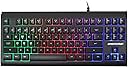
The Lumsburry 87 Keys Compact Wired USB Keyboard combines a sleek, space-saving design with durable, laser-etched keys and customizable rainbow LED backlighting. Featuring 12 multimedia shortcut keys and plug-and-play USB connectivity, it’s engineered for professionals and gamers seeking efficient, stylish, and comfortable typing across Windows and Mac platforms.


| ASIN | B07THJFXJN |
| Additional Features | Backlit, Ergonomic, quiet |
| Antenna Location | Business, Education, Everyday Use, Gaming, Student |
| Best Sellers Rank | #2,339 in Videogames ( See Top 100 in Videogames ) #165 in PC Gaming Keyboards |
| Brand | Lumsburry |
| Built-In Media | 1 * Compact Wired Keyboard, User Manual |
| Button Quantity | 88 |
| Color | Black Compact Keyboard |
| Compatible Amazon Tablet Models | Amazon Fire 5th Generation |
| Compatible Devices | PC, Mac |
| Compatible Operating System Family | Windows |
| Compatible devices | PC, Mac |
| Connectivity Technology | USB-A |
| Connectivity technology | USB-A |
| Customer Reviews | 4.4 out of 5 stars 3,299 Reviews |
| Enclosure Material | Acrylonitrile Butadiene Styrene |
| Hand Orientation | Ambidextrous |
| Item Dimensions L x W x H | 36.5L x 16W x 2H centimeters |
| Item Weight | 0.6 Kilograms |
| Keyboard Backlighting Color Support | RGB |
| Keyboard Description | Gaming |
| Keyboard Layout | QWERTY |
| Keyboard description | Gaming |
| Manufacturer | Lumsburry |
| Mfr Part Number | K-968 |
| Model Name | 87 Keys Compact Wired USB Keyboard |
| Model Number | keyboard-968 |
| Number of Items | 1 |
| Number of Keys | 88 |
| Number of Packs | 1 |
| Number of Sections | 1 |
| Power Source | Corded Electric |
| Recommended uses for product | Business, Education, Everyday Use, Gaming, Student |
| Series Number | 968 |
| Special features | Backlit, Ergonomic, quiet |
| Style Name | Contemporary |
| Switch Type | Mechanical |
| Theme | Rainbow |
| UPC | 682365795625 |
| Unit Count | 1 Count |
| Water Resistance Level | Not Water Resistant |
E**T
No corresponden los colores con los de la foto
No para mi.
A**R
Almost Perfeect
Everything is great except the up arrow key. It feels wrong because the side facing the down arrow is very high. It should be flush or slightly higher, just like the rest of keys on the keyboard.
S**M
Good value keyboard, lights look great
Still works after 2 years, good quality, lights look good, easy to connect. No issues
A**B
Great price on what promises to be a sturdy traditional keyboard
I just got this keyboard and am testing it out eagerly after a month using a cheap, annoying replacement BT keyboard after my Logitech BT keyboard (K811) finally died. I wasn’t going to spend $100 to replace a keyboard that lasted only about three years. So I thought I’d give this “LumsBurry” a try. I want to get out of the way what I, so far, don’t like about this keyboard: the return key is too far to the right of the standard typing keys. You REALLY have to stretch your pinky to hit the return key because, besides the keys on this keyboard being a bit larger than what you might be accustomed to, there's an additional key between the quotes key and the return key (backward slash, vertical slash key). I use mostly Mac OS at home, though I also have to use a Windows PC (Parallels won't work with some of our programs...). I began the keyboard in Mac OS X. The OS prompted me to do a basic keyboard confirmation (shift keys placement...) and in seconds the keyboard was confirmed. I began writing this review on a Mac then switched to a PC, unplugging the keyboard from the Mac (USB hub) and plugging it directly into a Windows laptop (direct USB). Windows 10 popped up a message that it was connecting a keyboard but there was no interruption to my being able to use the keyboard. I disconnected it from the PC, reconnected it to the Mac and was able seamlessly to continue working on the Mac. Excellent--true plug-N-play. Can't do that with BT keyboards. No productivity loss with mechanical plug-play keyboard. One important difference between Windows/Mac: to use the keyboard shortcut for cut-paste, you use the "WIN" key on this mechanical keyboard instead of the "control" key on the Mac native keyboard. Luckily, the two keys are in the same relative position so you don't make any/many mistakes. I'm pleasantly surprised that some function keys work even in Mac OS X—most notably the music control keys—pause, stop, next/last track, volume up/down, mute. Maybe I can learn a way to assign other keyboard shortcuts to other function keys. I also like that the keys are the old-fashioned mechanical type. They have a very satisfying return click feel. No wimpy membrane squishes here. This is a serious work keyboard--which means my typing speed is faster and I'm more productive. Everything just works. Also, the light function is extremely simple—one click of the clearly labeled light key to turn on and another to disable. Don’t know what effect using the under-keyboard light will have on computer battery or power. But this is a massive improvement over BT keyboards’ counter-intuitive backlighting solutions. I'd have preferred a muted white/yellow light, but I'm glad there's a backlight so I can work in dim/dark spaces. I didn’t expect the keyboard to be as large as it is: 14.5” x 6.5”. Should have paid more attention to the stated dimensions. But after YEARS of delicate, disposable BT keyboards, I welcome a keyboard that’s sturdy and that’ll last, hopefully, for many years. Best parts to me are: (1) No BT log-out after just a few seconds away from the keyboard so that when I try to continue working I get nothing or errors due to delayed activation while I’m typing. & (2) No waiting for the keyboard to wake after I’ve been away from my computer. I don’t think I’ll ever go back to BT keyboards. For the price, this keyboard is unbeatable. I’ll update my review if anything changes.
G**E
Very happy with this keyboard
Well made, like that you can turn the backlights on and off.
Trustpilot
1 month ago
3 weeks ago