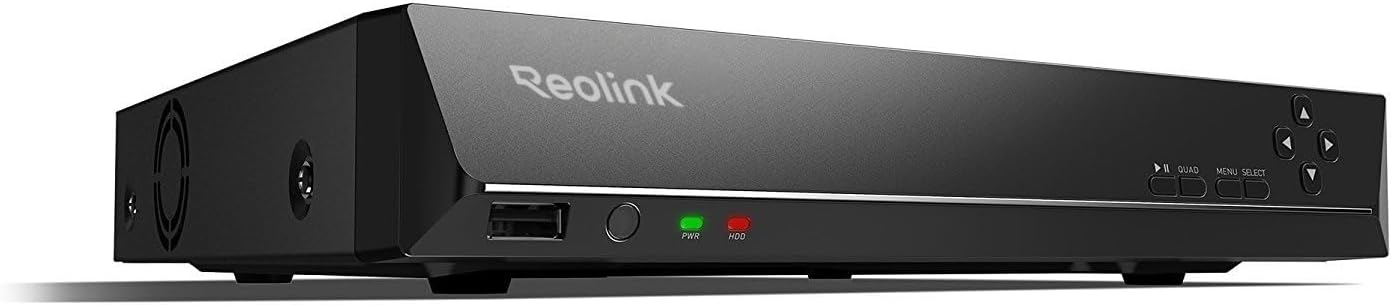
🔒 Elevate your home security game with 16 channels of crystal-clear, AI-powered surveillance.
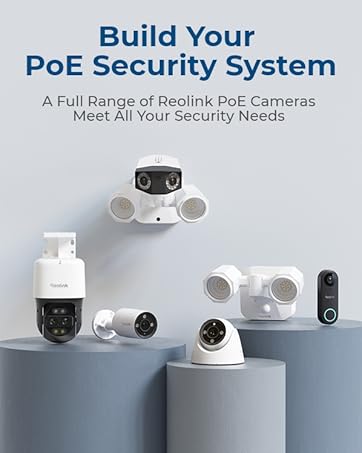
The REOLINK RLN16-410 is a professional-grade 16-channel Network Video Recorder designed exclusively for Reolink PoE IP cameras up to 16MP and 4K resolution. It features plug-and-play PoE connectivity, a pre-installed 4TB hard drive with optional 8TB expansion, and supports 24/7 HD video recording with audio. Integrated AI detection enhances security alerts, while free cross-platform apps enable seamless remote monitoring without subscription fees. Ideal for comprehensive, scalable home or small business surveillance setups.


| ASIN | B01DELNN82 |
| Audio Input | RCA |
| Best Sellers Rank | #5 in Surveillance Video Recorders |
| Brand | REOLINK |
| Compatible Devices | Camera |
| Connectivity Technology | Ethernet |
| Customer Reviews | 4.3 out of 5 stars 1,072 Reviews |
| Global Trade Identification Number | 00749110052355 |
| Hard Disk Size | 4 TB |
| Hard-Drive Size | 4 TB |
| Item Dimensions L x W x H | 12.99"L x 11.22"W x 1.77"H |
| Item Weight | 7.95 Pounds |
| Manufacturer | Reolink Digital |
| Media Format Digital Video | HDD |
| Memory Storage Capacity | 4 TB |
| Model Number | RLN16-410 |
| Number of Channels | 16 |
| Product Dimensions | 12.99"L x 11.22"W x 1.77"H |
| Total Usb Ports | 2 |
| UPC | 749110052355 |
| Video Input | IP Input |
| Warranty Description | customer service (support@reolink dot com); 30-day money back guarantee; 2-year warranty |
| Wattage | 15 watts |
C**Y
Peace of mind
This is a long review, but I have a long history with Reolink. : ) I have 2 different properties in different states and have Reolink systems for both. I have had these systems for years and have continued to expand on them. Over the years, I have needed to contact customer service for questions, trouble-shooting and issues with equipment. I have gotten nothing but excellent service. The associates I speak with are always friendly, helpful and genuinely concerned with resolving my inquiries. Knowing that I have that resource to connect with if I run into any questions makes me feel good about using these systems for my home security. The systems themselves work great. There is no subscription required, which I love. I am able to have all different kinds of Reolink cameras suited to the space they are for and I am able to view them all in one place. I have different Reolink wired, wireless and solar power camera models. Overall, the app and desktop client are easy to use and serve my needs. Being able to access all of the different model cameras for the different properties in two different states and to be able to do it all in one place, it makes keeping an eye on my properties much easier than other systems I've used in the past. Video quality is great, and connectivity is adequate for my needs. To be fair, setting up my expansive systems for these 2 properties has taken a lot of work, trial and error and time. I'm no home security expert by any means, so when I run into questions, the Reolink site has a lot of super helpful info and tutorial videos.. but if I ever get stuck, their customer service has been nothing but consistent and reliable. Over the years of having these systems, I have been able to fine-tune and adjust things to suit a very wide range of crazy variables for my own unique situation to have a security camera system that can cover all the bases. Point being, I've found these systems, cameras and accessories to be very versatile to suit a variety of different situations that someone might need surveillance for. My unique situation didn't permit me to make a rushed, casual decision about home surveillance. My experienced suggestion for someone at the beginning of setting up a new home security camera system...Just have patience, think about your situation to understand your security camera needs, do the research to understand how everything works and what products will serve your needs and don't be hesitant to contact their customer service if you have questions. The quality of the video is excellent. I'm able to decide when I receive alerts and what triggers them. My videos have enabled me to help with something as serious as a neighbor dealing with a trespasser but also something as fun as watching the wildlife that comes around. I can even set a motion audio alarm for specific times of the day/night in a specific area to scare off a bear if it decides to check out my trash cans! I can also say hello to my cat when I'm not home! I have no doubts that I will continue to use Reolink for my home security surveillance. The price for the equipment is fair, quality is on point and customer service is excellent. Based on my own experiences, I will continue to recommend Reolink to anyone who asks me about my camera systems. I always worry about my properties when I am away, but the peace of mind that I get from having these systems is invaluable. A sincere thanks to Reolink for a great product and awesome customer service. This is an honest review from a REAL Amazon customer and a long-term Reolink user. : )
A**R
Excellent capability for the money
I have this system setup with 9 POE cameras (5mp). The quality of the image is excellent. A few notes: the 3TB sounds like a huge amount, but with 5mp cameras set at highest setting with audio, it doesn't allow for more than about 6-8 days of recording storage. I had another 2TB hard drive (same type, brand etc. from an older NVR) that I mounted inside this NVR case- no problem. I have it all hooked up to a 4k 42" television through one HDMI cable. I have the NVR also hooked to my wireless router with a ethernet cable for remote access through my laptop or smartphones. I recommend not going small on your monitor or television. There are several options for display, which are great. I can watch all 9 cameras at one time, but with 9 cameras on a 42"- lets just say the individual camera feeds aren't huge... I like the fact that the audio monitoring comes through the one ethernet cable from each camera and also through the hdmi output to the monitor/tv. I did try a true dedicated widescreen computer monitor at first (34 or 35" screen), but it wasn't 4k and it was much more expensive than the 4k 42" tv. Advantage of the monitor- I could use my desktop computer and monitor the video feeds on the same screen by splitting the inputs. That didn't outweigh the disadvantage for me of the much more expensive screen and lack of 4k capability for future camera upgrades. It isn't clear on the description, but this NVR works with 4k cameras also. Also, while using my smartphone, I can review stored video feeds at up to 16x speed (audio only available on 1k speed). That makes it much faster if you want to review any strange situations. So, when is that important: I had a situation where we were on a trip and my back hose bib (outside water faucet) came on during a storm. I couldn't tell for sure that it was on while looking at the video feed while gone, but sure enough, it was on when I got home. The water ran for 3 days. Was it a vandal? I sure thought so, but I went back to the camera feed that covered that area and backed it up. A plastic lawn chair on my deck had blown into the faucet at just the right angle and bounced off, but turned on the water. I wouldn't have thought that was possible, but it happened. Never would have believed had I not saw it with my own eyes. My takeaways: I thought initially 4 or 6 cameras would be enough. To actually cover my house and detached carport took eight (8) cameras. The 9th is for my shop. You just can't do it with 4 or 6 cameras. The TV/monitor hardwire (hdmi) hookup only allows video review at 4X speed. Smartphone or laptop hooked up through my wireless router (or 4g) allows up to 16X review speed of stored video. Not sure why this is. Also, there is no phone number for tech support anywhere in the US. All tech support is via email. I am old school and I like to talk to a person. To me, that is the biggest downside. Supposedly, this only supports Reolink cameras. I haven't tried any other brands, but I may for the PTZ feature. I will update my review when I do. Why would I do that? Reolink only offers a 4x optical zoom camera at this time. Other makers offer up to 20x optical zoom. That would be nice. Also, the compression is a different standard (H264 vs H265). That may be why it doesn't work with other makes. All in all a very nice, easy to set up system with audio and excellent video quality. Hardest part was running the wiring. Any questions about my installation, please don't hesitate to message me. Hope this helps. UPDATE 11/17/2020 I saw some reviews that state this NVR doesn't work on 4k cameras. They make two versions of the RLN16-410. I do have the 4k version. Make sure when you order it, you go with the 4k for future upgrades. Also, I added an extra internal hard drive for as 3tb for 24/7 recording does only do about 4 days with 8 cameras. To me, I like the option of having 7 or 8 days and the fact that you can occasionally format one hard drive and not lose your settings. Only issue I have had is the firmware upgrades. I haven't been able to successfully do a firmware upgrade yet. Am going to contact customer support on this today.
F**E
Better Than Annke or Zosi
I was a little apprehensive going into this purchase as I have just gotten out of two short-term relationships with Annke and Zosi. I'm a little gun shy at this point. They always seem so good when you first get everything hooked up, but after using all the features over a couple week, you start to see some flaws or improvement that need to be made. I bought the REOLINK 4K 16 Channel Network Video Recorder RLN16-410 specifically because it came with the Reolink RCL-811a cameras. I did a lot of research on the Reolink RCL-811a's before deciding to go thru with this purchase. It has set me back $1000, so I wanted to be sure I wasn't just wasting money. I was very impressed with all the reviews I read and watched concerning the Reolink RCL-811a and decided that whatever system I get, it needed to include these cameras. There are some detailed reviews online if you want to dig deeper. After using the RLN16-410 for a few months now, I'm happy with the features and ease of use. Setup was easy for me because I already had the Ethernet cables in place from previous setups. I was disappointed nevertheless, that the package deal I got didn't come with any cables. Gee Whiz! It sure seems to me if your going to pay a thousand bucks for a security system, it should come with cables. I digress. I found the GUI (Graphic User Interface) of the RLN16-410 to be easy to navigate. Although there are some things different from the other manufactures, it didn't take me long to find what I needed in the settings. Reolink RLN16-410 has a prerecord feature, like most, but it doesn't say how much time it prerecords. It would be nice if I had more control over that. I would also like to see some times that are under a minute as to the length of time it keeps recording after an event. I would also like to see admin privileges on the mobile app to where I can change any setting I want - plus add users too. The Reolink RLN16-410 also records video in selected chunk sizes of time (called Packs). I think the minimum time is 30 min and the max is 1 hour. I'm still trying to learn the benefit of have files saved in 30 minute packs vs 1 hr packs. I'm not seeing the advantage of packing at all. There is also a 45 minute setting. The playback in Event mode is awesome. I have found the Reolink Smart Detection to be very accurate in identifying People, Animals (including bugs), Vehicles or Light Changes. I would guess that it is accurate about 96% of the time. I like that you can filter out any one of those four events to narrow down the event you're looking for. Reolink did a poor job on making the Event icon on the mobile app obvious to the average user. It is colorless and has no text to identify what it is. There's a moment when you think you're in Event Mode, but that's when you're viewing the "packs" as previously discussed. You have to click one more icon to get into the event filter. I'm fortunate to have bought Reolink after their GUI update. I got a look at the old interface and this one is much improved. Bravo! The old one looked a bit clunky. So other than the mobile app having some administrative limitations, I highly recommend the REOLINK 4K 16 Channel Network Video Recorder RLN16-410 as a little higher end (but not high end) security system. So far, I have found that there is a big difference in specific cameras and you should be a little concerned when you're buying a camera system that does not openly advertise the model of camera that comes with their system. Do your research on those cameras. They make or break the system.
B**E
It’s pretty impressive.
The 4 star never gets read. I am actually super impressed with this DVR. No issues hooking it up, no issues with app really. App could be more traditional, feels like I have to scroll through the views vs having a nice array of displays to click on like another system I have. Adding a new camera seems temperamental but eventually they will show up. Using mouse for the keyboard was immediately annoying. Found old Dell keyboard and plugged into second USB and worked great for setup. Platter hard drive is a bit loud. It’s not bad but where I put it, I wish I moved elsewhere as I can hear it. Cameras with multiple lenses, it’s really nice to be able to have one lens zoomed and the other regular, but both views on DVR and a TV we have to see people A few functions are annoying. Like I wish if I were to do voice or alarm, it would do through all devices, not just the one. Could have hooked up to alarm system like another device. So far so good. The cameras are good video quality so far but have a few annoyances I don’t love
A**R
Post-sale support is still impressive . . .
Five months after the installation and continuous use of a RLN-16-410-based system, the phone app would not connect to the cameras. An email to Reolink Support was answered within 24hrs--testing protocols suggested and pursued. All hardware components were deemed functioning as designed. It was ultimately discovered to be a software issue; specifically, the phone app had become compromised/corrupted--just how, we may never know. Deleting the culprit, downloading/installing the newest app version resolved the problem--now all is well. The quality of the support I received was prompt, on point, intuitive, and overall very helpful. It helped to ascertain the precise problem, which unsurprisingly was not with any of my Reolink system hardware components. It it worth noting that I have never experienced an inherent failure of a Reolink hardware component. Consequently, I rarely have an occasion to contact Reolink support. Nonetheless, this timely support and guidance were instrumental in identifying and ultimately resolving this frustrating issue--I am indeed grateful. Update: Sept. 5, 2025. About ten months post-purchase, the power adapter (the "brick") began to emit a cricket-like tone, a subtle burbling hiss in that constant cricket-tone. The brick was very warm, almost hot to the touch; a small thermometer registered 93F/33.8C. I contacted Reolink support, and dealt with a very savvy tech, Francis, who helped walk me through some troubleshooting steps. I learned that it is normal for the power adapter to get somewhat warm during normal operation, but that temp may be too warm. And clearly, it should not be making any noise. Upon disconnecting from AC power and the NVR, the brick eventually cooled to room temps (75F/23.8C). Testing continued. When reconnected to AC power, but not connected to the NVR, the power adapter illuminated its green "power on" light, but did not heat up or make any sounds. Only when the NVR is connected, and the designed circuit is complete/functioning does the brick resume heating up and start making noise at or above 90F/32.2C. The power adapter was thus deemed faulty, and subject to replacement per Reolink's warranty. Within a few days I received a replacement power adapter. Upon installation, all NVR systems are working as designed. I've been keeping an eye on the new power adapter's operating temp. Its normal range appears to be from room temp 75F/23.8C to about 85F/29.4C. I experimented with a small fan placed a little over a foot (310mm) away; the operating temp dropped to 81F/27.2C and held steady. Since it seems to work so well, I may consider a more permanent small fan arrangement. Bottom line: Monitor your power adapter for high temps and/or sounds--don't ignore such warning signs. Don't hesitate to reach out to Reolink Support if warranted--their post-sale support is still very impressive.
J**E
Reolink - 11/2/2017 - stay away from the 16 channel NVR, although the 8 channel model works fine
11/2/2017 UPDATE - originally 5 stars but after 3 weeks I'm returning this NVR. It locks up repeatedly and has to be manually rebooted 2-6 times a day. The advice from Reolink support? DISCONNECT THE HARD DRIVE! I have my original 8 channel Reolink NVR which worked flawlessly. I don't know what the issue is with the 16 channel version but it is NOT ready for the marketplace. My Number 1 requirement for security camera equipment is reliability. This one fails miserably. Reolink PoE NVR 16 Channel 3TB Hard Drive 4MP HD IP Home Security Camera System Outdoor Night Vision Motion RLN16-410 I've used most of the popular "Big Box" store security camera systems for over ten years. I had become increasingly disenchanted with their shortcomings, lack of reliability and cost. About a year ago, I started researching building out my own system from scratch when I stumbled across Reolink. Giving it a try, I bought the 8 channel NVR and a couple of their cameras. I can tell you that over this year period, there has been zero failures, no degradation of video, throughput on the NVR. It was as perfect as it was when I first installed. So - I decided to chuck my other quite expensive system, and buy the 16 channel version of the Reolink NVR along with 8 additional cameras. I am so impressed with the picture quality, the processing bitrate of the NVR and all of the cameras. It's relatively simple to install and get up and running. So from about 50% of the cost of the "name brand" systems, you get a completely reliable configuration that you can count on to help protect your home or business. I also bought the PTZ camera and am astounded by the low price and high quality. Are there shortcomings? Sure. Here's a couple but they aren't showstoppers for me: (1) I can only get wired mice to work on the NVR. No wireless device works (2) The internal capacity of storage is limited to 2 hard drives (it comes with one 3TB drive) for a total of 8TB. You can add an external eSata drive to bring it up to 12TB total. It's also very cramped adding the second drive to the 16 channel NVR, so be patient. (the 8 channel version is not expandable) (3) Funny quirk: There is no on/off switch. If you power down through the menu, you then have to actually pull the power plug. Very odd. Also - pay attention to the warning about when to connect/disconnect the HDMI device when powering up or down. (4) As far as I can determine, Reolink has no support presence in the United States. There is no 1-800 number, just their Hong Kong number. However, they are very responsive to questions posed either through email or on their website (5) Some people complain about the "primitive" nature of the client software. I personally LIKE how efficient and logically it is laid out. It works fine and intuitively unlike other Security Video software from some of the major manufacturers. (6) One last minor irritation - They have a bright RED led light on the front panel that signifies hard drive usage. It flashes and it is very distracting to me with all of the other led lights in my office. This one makes you think there is some glaring error or fault. Simple fix: I put a piece of black electrical tape over it. Problem solved. (7) One other thing to refute: I bought this unit October 11, 2017, and the fan on this is absolutely quiet. Perhaps some of the earlier models had a problem, but the current one is perfect. Bottom line: All of their products are well built, will stand the test of time and cost a fraction of what the competition is charging. Oh, and I love that their RLC-410 cameras have built-in audio. These are 4MB cameras that are far beyond any other 4MB cameras that I've used or tested. I've included a sample video from the PTZ camera when I just set it up.
D**C
Awesome system.
I first bought the 8 camera system it was breeze to install. But it came with 4 cameras, which I thought “put one on each side of the house and that should be good”. Wrong. I had to buy 4 more cameras to go with it because it is so cool, I did 100% of the install all the way to making my own CAT6 cables. I bought a 500’ spoil, crispers and the connectors. It was easy to do. It’s time consuming to do a professional type install but well worth it. So once I used up my 8 ports, I decided I wanted more. This 16 camera system was close to plug and play. You do have to set up the passwords and few other minor things but not a big deal. Worked just as perfect as the 8 camera system. One note to remember. The order in which you plug in the cameras will be the order they appear on the monitor. So,...if you want them grouped a certain way make sure you plug the into the NVR in that order. The 8 camera system did not have an internal fan, but the 16 camera system does. So you will hear it depending on where you place it. I have mine behind a dresser in our master and with the 8 system it was undetectable. But now with the 16, a smart burglar might hear it and have. Presence of mind to take it with him. Maybe I’m giving a bad guy too much credit. If they were truly smart they wouldn’t be a criminal. So I keep a small fan running in the bedroom and it now covers the sound of the NVR fan. One thing I wish REOLINK would do is add a fast forward search mode. You can run slow motion, but search has to be done with the slide bar at the bottom of the screen. You can slide it just a few minutes at a time and I’ve done this and been able to find what I’m search for. But how nice would it be to be able to fast forward 2X or 4X the speed. Also, to be noted once your all setup, 90% of your functions, adjustment, and changes can be done from a laptop with the downloadable free app like naming the camera, view, setting up alarms to email you, adjusting sensitivity, turning on audio...etc. Also, know that these are supper sensitive cameras. The ones I have setup to email me when triggered I set the sensitivity between 1 & 5. They go up to like 50 which would never be needed. You’ll get false triggers when bugs fly in front of the cameras, but set the sensitivity low and set the area that triggers small and it’s not too bad. Like on the approach to my front door I only have one line of the grid active and anyone walking up to my door has to cross that area. Worked incredible. I also set up a special free gmail account to use solely for the NVR and it sends an email to that account when triggered. I do wish it had a bigger HDD. If your recording audio and video on all of the 8 camera system you get about 5-6 days of solid recording. These are upgradable to I believe 6TB. I may do that later or you can even hook up an external with a SATA cable and I believe there is not limit size on that. Overall I love this system and the mobile app works flawlessly.
D**L
Impressive but be prepared to study and experiment.
Most of my comments that follow identical what I said about the two Reolink TrackMix POE cameras that were purchased at the same time. I purchased 2 cameras along with a Reolink RLN16-410 for the Primary purpose monitoring wildlife activity. Im impressed with the cameras. Optical quality is good, the dual lens design really works. The Pan Tilt Zoom tracking impressive. The recorder captures the video files Both wide angle and zoom lenses. Switching between cameras and views is fast once You learn. In playback you can select time windows and set filters so you only, or mostly, see activity From objects of interest. In our case it is Easy to filter out and view animal activity exclusive of other triggers. Be prepared to go down the rabbit hole of learning if you want to get all that these cameras and Recorder have to offer. When configured properly The AI does an impressive job of filtering animal activity from other activity. I'm quite certain the same would be the case for sifting out human movement or vehicle movement given how well it does with animal movement. It Would be easy to complain that The instructions aren't great and they're difficult. That's do in great part to the power and features available. Their website offers quite a bit of information, there's quite a bit that can be learned through general AI inquiries on the web and they offer good product support both through web chat They do take phone calls and handle them well. In the end you really need to spend some time poking around playing around and trying things because there's so much there.
Trustpilot
3 days ago
1 month ago