๐ Elevate your workspace with WiFi that works as hard as you do!
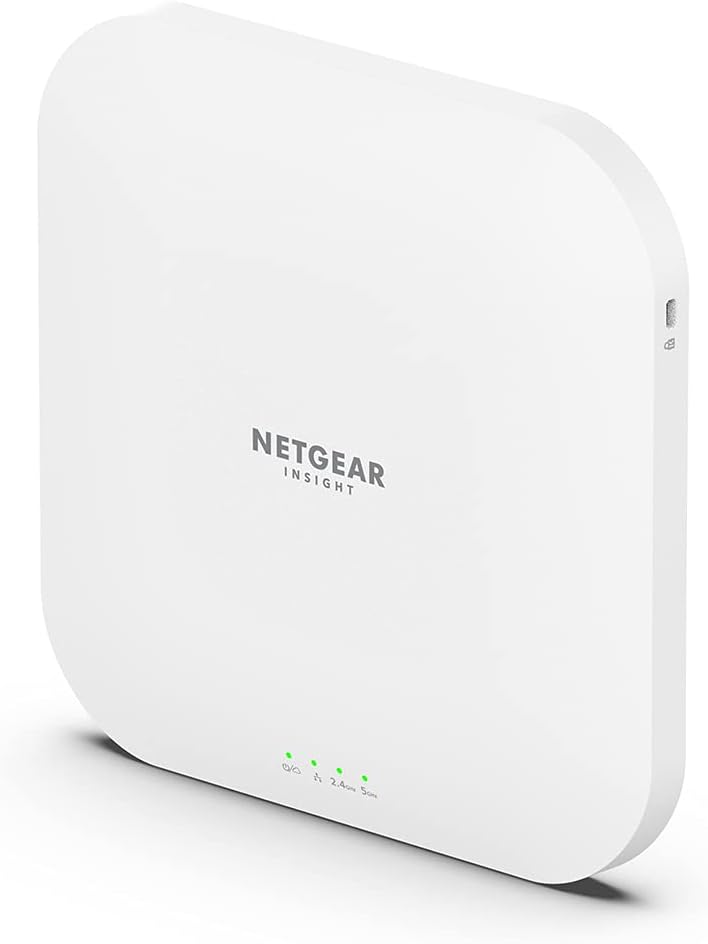
The NETGEAR WAX620 is a cloud-managed WiFi 6 access point delivering AX3600 dual-band speeds and supporting up to 256 client devices. Featuring a 2.5G Ethernet port, PoE+ power options, and advanced security protocols like WPA3, itโs designed for SMBs seeking reliable, high-capacity wireless coverage with remote management via NETGEAR Insight. Ideal for offices up to 3,000 sq ft, it combines future-proof technology with easy deployment and robust performance.


| ASIN | B0916KDL3Q |
| Antenna Location | Indoor/Outdoor |
| Antenna Type | Internal |
| Best Sellers Rank | #39 in Computer Networking Wireless Access Points |
| Brand | NETGEAR |
| Built-In Media | Insight Managed WiFi 6 AX3600 Dual Band Multi-Gig Access Point (WAX620), Installation guide, Warranty/support information card |
| Color | White |
| Compatible Devices | fgh |
| Connectivity Protocol | Wi-Fi (802.11ax), Ethernet |
| Connectivity Technology | Ethernet, Wi-Fi |
| Control Method | Touch |
| Controller Type | Switch |
| Coverage | 3000 square feet |
| Customer Reviews | 4.3 4.3 out of 5 stars (91) |
| Data Transfer Rate | 1 Gigabits Per Second |
| Frequency | 165.0 |
| Frequency Band Class | Dual-Band |
| Has Internet Connectivity | Yes |
| Has Security Updates | Yes |
| Is Modem Compatible | No |
| Item Dimensions L x W x H | 9.55"L x 9.55"W x 3.9"H |
| Item Type Name | Wireless Access Point |
| Item Weight | 2.3 Pounds |
| LAN Port Bandwidth | 2.5 Gbps |
| Manufacturer | Netgear |
| Maximum Upstream Data Transfer Rate | 20.83 Megabits Per Second |
| Mfr Part Number | WAX620-100NAS |
| Model Name | WAX620-100NAS |
| Model Number | WAX620-100NAS |
| Number of Antennas | 1 |
| Number of Ports | 8 |
| Operating System | Netgear Proprietary Os |
| Other Special Features of the Product | Remote Access |
| Security Protocol | WPA3 |
| UPC | 606449154504 |
| Warranty Description | 5 year limited warranty |
| Wi-Fi Generation | WiFi 6 |
| Wireless Compability | 802.11ax |
A**.
Easy to install, fast speeds, great price
Our 9 year old enterprise wifi access point was dying. It was almost putting out dial up speeds and Zoom/Teams calls were freezing up on me so it was time to upgrade. I really didn't want to spend a ton of money as we only get 200/25 mbps from Comcast business, but I definitely wanted good wifi coverage across our 3,100 SF office. I researched various enterprise access points and settled on this which claimed 3,000 SF of coverage. I also like that it has a Power of Ethernet port same as my old access point. Easy setup via the Netgear app. Hardest thing I did was wall mounting it, which wasn't hard. I now get full speed same as hardwired throughout my office.
M**.
Great wifi for even a home office
I wanted something a little more robust than a typical home wifi system. I wanted to segment out my home network via some VLANs to keep my IoT, home, and work items separated and this does the trick, assuming you have the other hardware to support it. The wifi signal is excellent and reaches all the areas my previous mesh system did with just this one AP. The Insight setup took a little bit to figure out and configure the wifi correctly, but once I did it was amazingly simple to use and configure.
B**N
These are great.
The WAP's work great. I really like the netgear cloud service(subscription) as it applies software updates when necessary. I am not a fan of all of these subscription services but I went for the Netgear subscription because we rely on our internet and wifi quite a bit. Great product.
F**G
Terrible Wifi 6 performance
[EDIT] After months of testing and even with the latest firmware update (9.6.3.2), the problem described below remains exactly the same :-( Thinking of testing another AP that can actually handle ONE Wifi 6 endpoint accessing an SMB NAS at highs speeds with high performance without lagging. This is NOT it. ------ Don't buy if you're planning on using it for Wifi 6 ( I know, right?). After testing 10 different wifi 6 clients (windows, android, ios, linux) for accessing a high performance NAS via this AP (I've tested 4 of them), I came to the conclusion that there's a serious software and/or hardware bug related to large file transfers over wifi 6. Slow performance and lots re-transmissions at short and medium distances (less than 10 meters) When I configure the APs in Wifi 4/5 only mode, everything works well. Tested 2 other wifi 6 APs with the same clients with exact same configuration and everything works perfectly.
L**K
wax620 very stable and fast
wax620 is very stable and fast. I live in an apartment in Korea. (1210 sq ft) walls were concrete and rebar, the existing ap (wifi5, ac) had weak signals outside. After replacing wax620, the signal on the outside is also good. wax620's led lamp turned off, because uncomfortable to blink at night I used over 15 home iot appliances that use wifi, 4 smartphones, 3 tablets, 3 laptops, 1 nas, etc There is no problem with a lot of equipment connected. Connected by poe in gs308ep and stable.
E**R
STAY AWAY!!
UPDATE: Knocking my review all the way down to 1 star because the 2.4 Ghz radio is complete garbage. It goes down all the time, taking my IoT devices with it. I thought the problem arrived with a firmware update but looking closer at the negative reviews here it precedes my purchase. Subsequent firmware updates have not touched the problem. Inexcusable at any price, much less the lofty amount NETGEAR charges for the WAX620. This is the last NETGEAR product I will ever buy. ORIGINAL REVIEW: Very easy to setup using the Netgear Insight portal. I'm not sure how I feel about using a subscription cloud service to manage my devices but I'll try it out for a year during the included free trial. I can't deny that this Netgear AP is much easier to manage than the Ubiquiti AP AC Lite it replaces. I like that the obnoxious LED indicators can be turned off. If you, like me, are replacing an existing PoE-powered access point be sure to check if your equipment supports PoE+. My router only supports passive PoE so I needed to order a PoE+ injector to use this access point.
J**A
They work...
Pure and simple, they work... needed to upgrade from a mesh wifi network that failed... decided on hard wiring to these Netgear Access Points... solid... there is a little intrigue, however, the lights on them flicker a bit so you know it is working and make for an interesting night light... if you are planning on getting them... I wouldn't put them in your bedroom or other bedrooms for that matter. Kind of like Close Encounters of the Third Kind... only not as bright...
S**0
Easy setup
Pretty easy to setup. Range could be better for this model.
T**L
Easy ceiling mounting next to the network jack. The only concern is that the access to the network cable is so small that only a flat cable will fit -- something that was not discovered until I was looking through the installation documentation.
Trustpilot
1 month ago
1 month ago