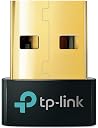
We recently purchased a trio of TP-Link Bluetooth USB adapters as a single Amazon order: 1.) TP-Link UB400 Bluetooth 4.0 Nano USB Adapter [UPC: 845973099664] 2.) TP-Link UB500 Bluetooth 5.3 Nano USB Adapter [UPC: 840030703447] 3.) TP-Link UB500 Plus Bluetooth 5.3 Long Range USB Adapter [UPC: 840030703447] The primary (and by far most important) of our 3 purchases was the first (UB400), intended to add BT functionality to an older – but otherwise pristine and fully-functional – XP-based laptop lacking that intrinsic capability, and which we intend(ed) to repurpose for LPPAN communications with a centralized BT receiver. The latter 2 purchases (those involving the UB500 series) were of far less importance, being simply speculative, spur-of-the-moment additions, intended to determine whether – as suggested by TP-Link – they might potentially improve BT function and stability in a pair of newer Window computers already equipped with functioning onboard Bluetooth stacks and radios, but positioned at increasingly greater distances, relative to the older laptop, from the referenced BT receiver [hence, the choice of plain and long-range versions of the UB500 series]. As per both TP-Link's UB400 website and Amazon pages (NB: not only at the time of purchase, but currently, as well), this particular Bluetooth 4.0 adapter is advertised as being compatible with ALL versions of Windows – with the apparent exception of Vista – from XP to W11 ["TP-Link USB Bluetooth Adapter for PC, Bluetooth 4.0 Dongle Receiver, Plug & Play, Nano Size, EDR & A2DP Technology, Supports Windows 11/10/8.1/8/7/XP for Desktop, Laptop, PS4/ Xbox Controllers (UB400)"] with the proviso that the two older operating systems (XP and 7) would first require installation of a "driver" available for free from TP-L's website ["Plug N' Play for Windows 11, 10, 8.1, and 8... For Windows 11,10, 8.1, and 8, just plug UB400 into your computer to enjoy a fast, convenient Bluetooth connection. Windows XP and 7 are also supported by installing the driver from TP-Link's website*... *To download the driver, go to TP-Link's website, search for the UB400 product page, click 'Support,' and then select 'Driver.'" / "Q: What operating systems are compatible with the UB400? A: Current supported operating systems include Windows 11/10/8.1/8/7/XP, driver needed for Windows 7/XP. Does not support Mac OS and Linux."]. Upon receipt of the UB400 (which for obvious reasons was unpackaged first of the three), we promptly downloaded and installed TP-Link's requisite XP/W7 software package in PRECISE accordance with their instructions. The so-called "driver" file from their website (UB400_Driver.zip), extracted and then run under elevated "Administrator" privileges on an XP Pro SP2 (32-bit) installation lacking ANY Bluetooth stack (let alone an active MS one capable of interfering with the process) and absent any active Windows Defender or anti-virus interference, installed successfully with neither problem nor difficulty. The resultant Cambridge Silicon Radio Ltd. Harmony Wireless BT Stack & GUI (for the record, at some 425GB uncompressed, a massive piece of bloatware for any typical-of-the-era XP installation on a 60-80GB PATA/IDE 2.5" internal laptop HD) were now obviously available, although unable either to recognize or activate the USB 2.0-installed TP-Link UB400 dongle. Furthermore, no appropriate driver for same could be found on the post-install system, whether via XP's built-in driver-search function or through our own extensive, system-wide exploration (indeed, unlike with its comparable W7-11 driver package, which contains a "BT_Driver" subfolder comprising multiple further OS-specific driver subfolders, each containing the anticipated .cab and .inf files, a thorough internal search of TP-Link's XP "driver" package, including within all archive files therein, likewise failed to identify and/or locate any actual driver files, per se). Scouring both TP-Link's website (and following all their "troubleshooting" advice, with careful attention to every detail, noting and testing every possible nuance or ambiguity) as well as a host of potentially pertinent postings from across the Internet, we identified and tested every conceivably useful variation in installation procedure, however minute or subtle, that might amend the situation, but all to no avail (despite more than a dozen such additional installations over the course of nearly two weeks' time, preceded in every instance with complete reversal of the previous via Revo Uninstaller Pro v3.2.1.0). When further extensive research failed to turn up even the slightest possible solution, we finally unplugged the UB400 adapter and returned it to its original (inner) plastic packaging and (outermost) cardboard box, preparatory to arranging for return of same to Amazon. Only at this point did we happen to notice that the box in which our (purportedly XP-compatible) UB400 arrived, contrary to ongoing TP-Link claims on both their own and their Amazon UB400 pages, listed only "Win 11/10/8.1/7" as the full extent of compatible operating systems, with further examination of the packaging disclosing a sticker beside the surface-printed UPC Code (845973099664) indicating – in addition to the particular "S/N" and generalized "P/N" (0152602538) – that the model received was "UB400(US)" (NB: "MADE IN VIETNAM"), and additionally identifying this particular adapter as being "Ver. 2.6" (with an additional signifier, of unknown meaning or importance, immediately below same, appearing in this instance as: "1L"). Further Internet research, including across all relevant sections of TP-Link's U.S. and (accessible) worldwide websites, strongly suggests that ONLY TP-Link UB400 "Ver. 1.0" to "Ver. 1.8" (introduced, apparently, in 2012 and c.2018, respectively) can be deployed under XP (SP2 or 3) via the TP-Link-provided software package (again, the questionably-named "UB400_Driver.zip") installing the previously denoted CSR Harmony Wireless Software Stack (i.e., BT stack & GUI). With introduction of the "Ver. 2" series adapters (c.2023-4), including the latest "Ver. 2.6" variant here at issue, the XP-relevant "driver" package available for download from the TP-Link website is no longer compatible with ANY of their BT 4.0 adapters presently available for purchase - whether through Amazon, their own website(s), or elsewhere - and the comparable driver package specifically for the UB400 Ver. 2.6 device (currently, V2_1.9.1051.3012.zip) contains no driver whatsoever applicable to Windows XP. In other words, TP-Link continues to advertise their current UB400 BT 4.0 adapters - whether on Amazon, their own series of worldwide web pages, or elsewhere - as being fully compatible with XP when, in fact, NONE of them are (and haven't been for at least a year or two); it likewise continues to insinuate that this non-existent XP-compatibility can be actualized by installation of a cartoonishly massive (but ultimately "XP-friendly") "driver" software package freely available for download from their website(s), when in fact, that software does not – because it cannot – do anything of the sort, being entirely incompatible with any currently available retail version of the UB400 BT 4.0 adapter; AND they likewise continue to then proffer an extensive series of "troubleshooting" steps in the now-inevitable event an unassuming customer, attempting to deploy this (TP-Link recommended) hardware-software combination for its express purpose (i.e., adding BT functionality to an XP SP2-3 installation otherwise lacking that capability), should find – against all expectations – that the purchased UB400 simply and repeatedly fails to work under XP, no matter how carefully TP-Link's installation instructions are followed, or how many slightly varied versions of same are attempted, essentially thus throwing good time and effort after bad. In the (unlikely) event TP-Link should respond productively to this review, which is to say, by 1.) providing a means to selectively procure a "Ver. 1" series adapter (with guaranteed functionality under XP via the still-available "driver" download package) and/or 2.) providing a functional new "driver" download package extending the advertised XP-compatibility to their current "Ver. 2" series adapters, or 3.) at very least (and at long last), correcting their long-standing false advertisement re. the (absolutely nonexistent) XP compatibility of their current product line, then we will revisit this review and, as warranted, amend the presently given rating (which, for the record, would for obvious reasons stand at zero stars, save that Amazon requires at least a single one be "awarded"). Caveat emptor (& venditor), Z.