We remain fully operational. Our teams are working around the clock to ensure your deliveries continue safely.

DOWNLOAD THE APP


Customer Services
Copyright © 2025 Desertcart Holdings Limited
DOWNLOAD THE APP

🚀 Cut the cords, not the quality—wireless HDMI that keeps you ahead of the curve!
The BovBox Wireless HDMI Transmitter and Receiver delivers flawless 1080p@60Hz Full HD streaming up to 820 feet using dual-band 2.4G/5.8G transmission. Featuring plug-and-play ease, loop-out HDMI for local monitoring, IR remote pass-through, and support for up to 4 receivers, it’s engineered for seamless multi-room entertainment, professional presentations, and gaming with minimal latency. Designed for compatibility with HDTVs, projectors, and DSLR setups, this extender is a premium solution for cutting-edge wireless video transmission.


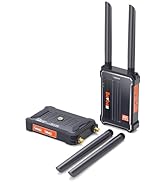


| ASIN | B09QT1NPMK |
| Best Sellers Rank | #18,611 in Electronics ( See Top 100 in Electronics ) #16 in Remote Control Extenders |
| Customer Reviews | 4.3 4.3 out of 5 stars (406) |
| Date First Available | March 21, 2022 |
| Item Weight | 1.38 pounds |
| Item model number | 2A9OZ-WL009 |
| Manufacturer | BovBox |
| Product Dimensions | 1.87 x 1.07 x 0.37 inches |
L**.
Works great right out of the box, better than I expected
I used this to send HD (1080p) video and audio from a cable TV box located in our master bath to a second TV in the master bedroom. This way we removed the requirement for a second cable box and CATV wiring in the master bedroom. The unit replaced an "ActionTec" (now "ScreenBeam") wireless TV extender purchased in the mid-20-teens. While I'm sure the ScreenBeam device has improved since then, the ActionTec device suffered from severe image and voice lag (1-2 seconds), slow activation (over 30 seconds), and a "wireless remote" feature which never worked. In contrast, the BovBox device has virtually no image/sound lag, comes up immediately, and the wireless remote function works well. (Clarification: You don't get a wireless remote control with this. Instead, the wireless remote "function" is an IR receiver which lives at the remote TV, and an IR transmitter which lives at the host TV. When you press the button on your TV remote, the IR receiver sees the signal and sends it to the IR device at the host cable box, which "repeats" the signal for the cable box, thus changing the channel.) In this installation, the HDMI output of the CATV box is connected to the BovBox HDMI input, and the HDMI output of the BovBox is routed to the input of the TV. (I call this the "Host" TV.) There is also a small "wall wart" power supply which is plugged into a wall socket and provides DC input to the BovBox. There are no provisions for using a USB connector on the TV for power -- that would be nice, but I suspect the current draw of the BovBox would be too high for the USB port. The BovBox receiver is placed behind the master bedroom (or remote) TV (which is in a cabinet) and is out of sight. It has only a wall wart power supply and an HDMI output, which feeds the HDMI input on the TV. Both the transmitter and receiver are "on" all the time, so there is no power-up or syncing time required. The transmitter and receiver are "pre-paired" from the factory, so no need to go through convoluted pairing processes. The transmitter power is more than enough to cover the distance from the bath TV to the bedroom TV -- probably 20 feet, including one tiled wall and the furniture cabinet holding the bedroom TV. There are two shortfalls. First, the tiny symbology and pictures with the installation guide make it very hard to determine which is the IR receiver and which is the IR transmitter. So I would up doing a "best guess" and I got it right .. but it was a guess and I could have gotten it wrong. Not sure how the IR devices would react if they were plugged into the wrong device ... I hope they wouldn't be damaged. Also: the adhesive pads holding the IR devices are very strong -- so strong, in fact, that you really can't move them once put in place. They just rip instead. Do your best to get them in the right spot the first time. Second shortfall -- and it's not the fault of the BovBox but of the TV manufacturer -- If you have a "smart" TV with built-in streaming, etc., you can't send the streamed video to the remote TV. There's no way to get the HDMI video *out* of the TV to get to the BovBox. If you want to stream on the remote TV, you'll need it to be a Smart TV or have an AppleTV, Roku, Fire device, etc. Final comment: I chose this device specifically because the "host" device has both HDMI input (from the cable box) AND HDMI output (to the host TV). There are other versions which have an HDMI input but no HDMI output -- it remotes the image only, and is more appropriate for conference rooms or computer presentations. You'll need both input and output for a local TV as well as a remote. All in all a very good device, works as advertised (and better than I expected). A little pricey but worth the money ... glad I bought it.
J**M
Great n easy to use
Love these. Had to buy second pair found very useful not only if you want to view a tv or such but works great for security camera monitor too
G**G
Tried a few and this was the best - but...
Great device when you want to put your plasma TV on the wall but it is not near your cable TV box. I tried other HDMI transmitters and they had picture problems (sometimes shaky picture and/or loss of sound) but this one works great and the picture quality is excellent. But I did not give it 5-star because: 1. I had the same problem as another reviewer. The TV goes on sometimes, for no reason, by itself in the middle of the night (fortunately, the sound bar stays off). It also sometimes goes on during the day too. I solved this problem by buying a wireless on-off switch on Amazon which I turn to OFF every night (https://www.amazon.com/dp/B07GNJ36CG?psc=1&ref=ppx_yo2ov_dt_b_product_details). I wonder if the Company knows of this problem and can start manufacturing them without this issue (or has a software fix??) 2. The Wireless HDMI transmitter does NOT come with the two HDMI cables needed to hook it into the cable box and the TV. These are inexpensive and can be purchased on Amazon too, but it was not clear the transmitter did not come with them, so I had to wait a couple more days to get the cables to install the device. But the Company may feel that different people need different length cable cords so does not guess as to the length. But even with the two issues above, I find this unit the best of the ones I have tried.
D**N
It all worked until...
I purchased this product and used it once, and I had one receiver that came with the kit. It worked fine then, I bought another receiver that looked identical, but it had a different brand name on it. When I tried to add the second receiver, the second receiver didn't work. After a while, the first receiver quit working. I tried everything for hours to get it working again with the original receiver. I about gave up thinking that the transmitter was broken. I looked up customer service and it gave me a phone number in China. I figured there's no way someone in China is gonna work with me on this. I was wrong. In two quickly responding request via emailings, the problem was resolved. Had I not had that email exchange, I would've been looking at three boat anchors. It all works now. I've got two receiver working with two different televisions and it all works! High marks for BovBox customer service!
A**G
Small, easy to use and great quality
I ordered this because I was tired of the messy look of the long HDMI cable running from my desktop to the projector, and I'm glad I stumbled upon this product. It wirelessly mirrors a phone or laptop on a large screen. This is very easy to use for presentations. You just connect the transmitter and receiver between your PC and the monitor in any conference room and start presenting right away without the hassle of configuration because it doesn't require Wifi or Bluetooth and the transmitter is already pre-configured. In addition, my kids and I use it to watch movies in different rooms. The transmitter works from the living room to my bedroom at a distance of over 65 feet. The transmitter plus the two antennas on the receiver make for a very stable connection with little to no perceived delay. Their advantages. 1. easy to set up and install due to clear instructions and good product design. Recommended 2. small size, don't take up much space, only need to connect to their power and HDMI input or output. No need to do anything else or connect anything else. 3. Works as expected, never a hiccup, and the performance of this wireless HDMI transmitter and receiver product I tried and other brands of similar products is very reliable. No latency (almost real time).
D**O
I recently moved my elderly parents in with us. Our primary Tv was in the family Rec room downstairs. My parents were unable to do stairs. I have multiple tv s , but only one cable feed. This product worked beautifully!!! So easy to set up. I followed the instructional video, and was watching tv in 10 minutes remotely. The distance between the two units was about 50 ft, and one floor up/down. Super clear picture, no delay or distortion. Would def recommend this product. We can now watch Netflix or Prime on one set downstairs, and my folks can watch ( and change channels) as they wish upstairs. No issues , and an early delivery topped it off. You do have to have HDMI cables though. Amazon had those for $16 for two.
P**C
送受信の安定性は良好です。送受信が上手くない時は一度、電源のリセットで復帰します。慌てずにセッティングをするのがコツです。レイテンシには注意が必要です。説明書きにある数値は信用しない方が良いです。実測すると2フレーム=1/15秒の遅れがあります。仕込み時間に余裕があるなら、有線でSDIケーブルを引き回す方が良いかもしれません。映像はキレイです。ご参考ください
U**D
Muy prácticos!
M**G
I had a similar product from POFAN https://www.amazon.ca/gp/product/B09FPHWNHY/ref=ppx_yo_dt_b_search_asin_title?ie=UTF8&psc=1 which kind of worked but with stutters, so I got this one. Works perfect, no stutters, lags, etc. I recommend it.
D**C
5時間連続で使いましたが、少し暑くなる程度で全く問題なく使えました。まだ数回しか使っていないので耐久性は分かりませんが、今のところ大満足です。
Trustpilot
4 days ago
2 days ago