✨ Elevate your creativity—fly smarter, shoot sharper, share faster! 🚁
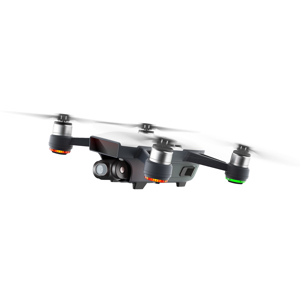
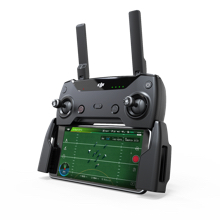
The DJI Spark is a compact, intelligent mini drone featuring a 12 MP 2-axis gimbal-stabilized camera, advanced flight modes including Face Aware hand launch and gesture control, and a top speed of 33 mph in Sport Mode. Designed for professionals and creatives on the go, it offers reliable Wi-Fi control, quick editing via the DJI GO 4 app, and enhanced flight safety with propeller guards. Perfect for capturing cinematic aerial content with ease and sharing instantly.


| ASIN | B072C36ZVK |
| Age Range (Description) | Adult |
| Age Range Description | Adult |
| Are batteries included? | Yes |
| Battery Cell Composition | Lithium Ion |
| Best Sellers Rank | #242,246 in Toys & Games ( See Top 100 in Toys & Games ) #930 in Hobby RC Quadcopters & Multirotors |
| Brand | DJI |
| Brand Name | DJI |
| Color | Alpine White |
| Connectivity Technology | Wi-Fi |
| Control Type | control |
| Customer Reviews | 4.3 out of 5 stars 1,658 Reviews |
| Effective Still Resolution | 12 MP |
| Global Trade Identification Number | 06958265149375 |
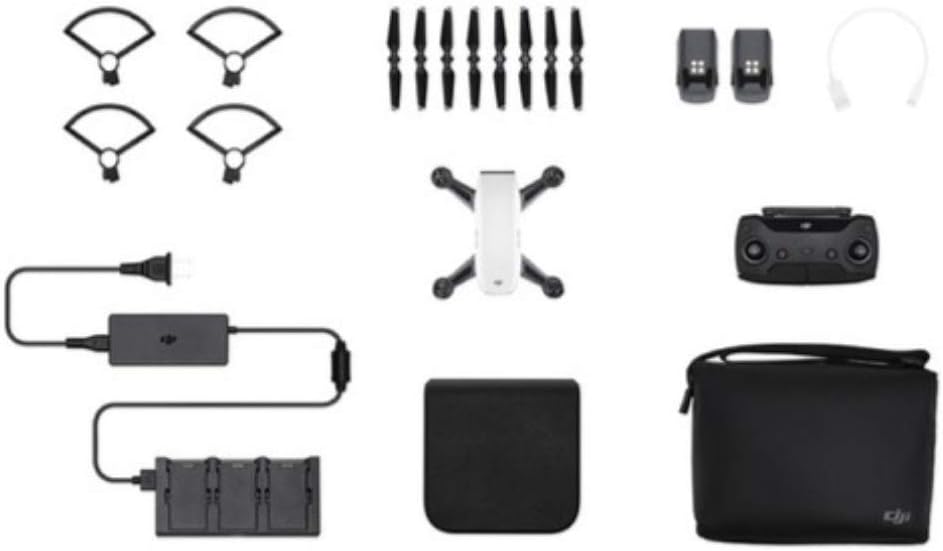
| Included Components | Aircraft body, Battery charging hub, Charger, Manual, Micro USB Cable, Propeller Guard, Remote Controller, Shoulder Bag, Storage Box, extra Intelligent Battery, extra Propellers |
| Includes Rechargeable Battery | Yes |
| Includes Remote? | No |
| Item Dimensions L x W x H | 9.8"L x 3"W x 8.2"H |
| Item Weight | 1.5 Pounds |
| Manufacturer | DJI Europe B.V. |
| Material | Plastic |
| Maximum Range | 30 Meters |
| Media Type | Flash |
| Model Name | Spark |
| Operating Temperature | 104 Degrees Fahrenheit |
| Optical Sensor Technology | CMOS |
| Remote Control Technology | Wi-Fi |
| Supported Image Format | JPEG |
| UPC | 190021295483 |
| Video Capture Format | HD |
| Video Capture Resolution | 1080p |
| Video Output Resolution | 1920x1080 |
| Warranty Description | 1 year manufacturer |
| Wireless Communication Technology | Wi-Fi |
T**.
Great for design
Moved my intro to the bottom so can get right into the Spark. Really impressed by this lil bird. I started out with a jjrc and that was a flop. Then I moved to the little Cheerson cx10wt. Pretty cool but needed 3 just to have any flight time. By the time I got this spark I was ready for a real bird. I found the first flight to be impressive. It was so stable in the air. I had the Spark out in +15mph winds and it just sat there locked in position. I got just the spark it self and used my iPhone6 to start. It was cool for a bit but was lacking that real wow factor after a time without the remote. I've been slowly amassing pieces and close to a sweet set up. I like going this route cause I get to set it up my self. I don't need their bag for instance. I've ordered a hard case. I got the SKYREAT 6 in 1 Rapid Battery Charger (nice fast charges). Got a battery from family for Christmas and my 3rd battery should be arriving today in fact. (Got the Spark just before the cold snap so now temp finally rising Chicagoland) I have flown it almost every day. I got it just before thanksgiving, arrived early so had time to set up practice and do a dronie for Thanksgiving photo. Everyone loved the footage. I got to test out the active track a few times before winter took over. It followed me around as rode bicycle down the street (was still using phone). There is a bit of a curve to tracking as I could tell. You have to know how to be tracked to keep the tracking going. Keeping your self fluently to its moments as to not wonder off screen and lose the track. Still very impressive. Once I got the remote it was a game changer going from 12mph to top speed showing in my app of 33mph. I thought that I would miss out on the flipping the other drones can do.The remote made this obsolete. Having more fun zipping around. To date I've sent it out 2000ft. Not even 1/3 its max distance. I had the otg cable from a tablet I had got before. Seems to make it one less step than going to settings and connecting WiFi then jump over to the app. Though I keep seeing weak video connection in the app with the cable, it has been very stable with the cable. I'm still putting together all the pieces ex. aftermarket case, backpack to keep it safe as I plan to take it on the motorcycle. I am very happy with the all the options out there. Other drones you don't get as much surrounding the product. Soon I will be able to just throw the case in the backpack and go. I went with a camera sling bag so I will be able to set up and have fast access to the spark. As I've been writing this my 3rd battery arrived. I'm currently charging it with the drone it self for the initial charge before moving to the Skyreat. Firmware has gone smoothly. I have done the first 2 batteries and spark firmware over the WiFi. Where you have to fiddle with the connection between downloading and updating. I plan to do this new battery firmware update with the otg cable to see if it fixes the back n forth with the connection loss when you do the firmware. I really love this Spark. I wanted to get the Mavic but the price just wasn't feasible at this time with all the extras would need. I can report that I have taken phone call in flight. Put them on speaker and was still flying flawlessly. Not one for Bluetooth ear pieces so not sure how that would work out. I have my Bluetooth still turned on on the iPhone6. I have not noticed any interference. I have not ran it with Bluetooth connected to anything yet. I did run into the messages about the phone cpu overload. I found that this was caused by keeping video in the editor in the app. Once I deleted the video content in the face of the editor the overload messages stopped.I also added this info to the DJI forum hopefully they will look into that. Signal strength is amazing with the remote. I could not go over my house with the phone but with the remote I am able to fly over the house, direct interference from the house and no signal loss. Wondering if could actually make laps around the house. The cold weather has kept me from flying too much. I still have brought it out and have flown it around in 0 degrees. The only problem I've found is the gimbal will not respond in the cold as everyone else says. Really wanted to do a 360 of all the snow cover yet even trying to warm the Spark up before flight the gimbal still does not respond well. I have seen that the spark can carry the weight of the LG 360 cam so will be getting one of those for next winter. I have tried to use the hand gestures. They work ok. Not sure with the cold as I've been all bundled up. I have gotten it to work yet it seems very picky. I could not get it to take a picture with the gesture. ( no gloves, still bundled up). I have used gesture to launch then connect to the Spark with the phone while in the air (have not tried with the remote yet). That works really well. Expecting hooking to the remote in the air should work well too. Over all I'm very happy with this purchase. I cannot wait for summertime when I can really get some use out of it at some of the events we produce. I would recommend getting a Spark. It has been a blast. I come from a very aerobatic aviation background. My father was headliner at Oshkosh, Sun n Fun, Chicago Air And Water show, and many others. We had Extra 300 #4.I was one of the only people to go through his whole routine without puking lol. Have so many hours never logged. We were doing what red bull does before they ever got into the game. We have moved into producing shows now and I wanted to get something more professional. This is turning out to be the perfect purchase to start with. I do a lot of 3d work and the image is perfect to place into Cinema4D R18 and Aftereffects. I also ride a lot, so I wanted something compact. This so far is measuring up well. I have already used the footage to place my 3d model airplane in our front yard. I've been working on another video placing more 3d into the footage. Its a game changer for my design. I wanted to use the cx10s to try and do this 3d work yet the footage was very lacking. Now I can get cinematic quality with the Spark. I also plan to use this with green screen so I can get many different angles without having to have a ladder for one lol. We do the pyro for WW2 reenactment hoping this will work well giving the ability to track vehicles and get a much broader view of the battlefield. Super anxious. The Spark has opened many doors a normal camera just cannot do. I will try to update more as time passes and I get to use the Spark more. I hope that this info will help. It is a really good purchase. I'm so happy that I decided to get the Spark. In the future I plan to get the way-point app and to try out the VR app with the iphone goggles I have. Just go for it.
M**M
Good Quad - Comparisons and suggestions included from long time DJI Prosumer.,,
** Full disclosure - no one has given me any equipment or freebies to do this review. All equipment I own and purchased myself. ** DJI did a nice job on this smaller quad. Flies well with Controller and not bad with the phone alone - though not as well with the controller. A couple of things you should be aware of and frustrated me when I got it: 1) Controller wifi password is DIFFERENT and on the back of the CONTROLLER - not to be confused with the wifi password on the drone (under battery) which is different. 2) The drone has to be switched between phone only and controller modes with the power button. 3) As usual manuals really aren't very clear. I ended up watching a few youtube videos to get me going right & quick. 4) Just assume there is a new release of the software/firmware when you open the box. Go ahead and connect everything together and apply it. 5) Assume your going to need to practice ( a while) to get the hand gesture features to work. Its not trivial, but once you get it down they work about 80% of the time. Good enough for a quick selfie. Quality of photos is very good and on par with my Iphone 6s or better. Video is great too - prefer 4k but will live until DJI does a firmware upgrade on these to 4k. Love that they put Sport Mode as a switch! That is a blast and works surprisingly well (Phantom 1 days in equivalent of "sport mode" was just plain scary.. DJI has made this extremely useful now. ) Compared to Dobby and S4 Quads - hands down no question DJI is 200% better and more stable. BETTER PRODUCT, BETTER COMPONENTS ETC..I tried both of the others out and they just don't fly well and they require constant tuning while flying. DJI - no such issues. Lastly - but a good one - THANKS DJI for the BAG (fly more package) not only is it designed to fit the Spark but it ALSO fits the Mavic! Seriously a great detail and one I will personally use a lot. I don't take both at the same time so the bag is a great feature FUTURE ITEMS: 1) 4k video firmware - should be easy to do and won't compete with Mavic. 2) Still think DJI should have a LOUD audible ping every 10 seconds if it is powered on for over 10 mins but not connected to controller or phone. This would be a HUGE HIT for those who have lost a drone and are attempting to find it. No hardware needed, just use the speaker - crank it to full and ping noise every 10 seconds until the battery dies or something connects. You could also do a disable of this feature too. Probably get a month of pings! More than long enough to find your lost toy... I've got (or had and lost..) every consumer quad DJI has built. Phantoms 1-4 (pro) Vision, Mavic and now the Spark. Why would I own the Spark? Its really about use cases; I wanted something small (tiny) with a great camera that I can take photos/videos while traveling. Mavic is close - but it is big unfolded and it garners a lot of attention where as the Spark is pretty discrete. I can take that out and fly it and not get a bunch of attention. The Mavic I use for distance - especially out on the ice (lake freezes over) or out in the field. Phantom 4 doesn't get much air time these days though arguably a better camera than the Mavic. I use the 4 for when I want pro quality shots. Similar story w/ my 2 with a Gimbal and Gopro. I still have my Phantom 1 which I use as a trainer for my kids and as well for my friends who want to try a DJI out before they buy. I've tried just about every quad manufacturer and returned them all.. DJI is just a better quad maker. They leverage their Professional equipment (Remember DJI's been a pro Quad company MANY years before ever selling a consumer drone.) and put it into their consumer lines - just can't beat that.
L**Z
PERFECT for what we need it for!
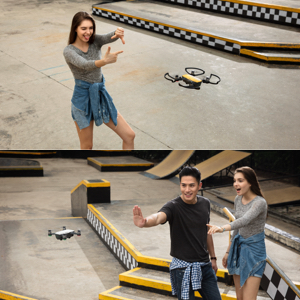
I had previously purchased a "toy" drone for my husband to use, it was only like $150 and he said it was really hard to fly. He has been wanting a real drone, but they are all fairly expensive and kinda big. So when he saw a preview video for DJI's Spark - he was all over it! The Drone: The drone by itself retails for $500, so this Fly More Combo from DJI is absolutely worth it! You get a bunch of accessories you would/should buy anyways and save about $150! You can definitely use the drone without the remote, but having the remote gives you the distance - up to about 1.25 miles. You get about half that distance without the remote (just using your phone). The drone is very small, just about the size of your smartphone, maybe even smaller! It is very light, weighing less than a pound, but the motor is very powerful AND stable! It has a 1080p camera, which is very clear and takes pretty good video. The gimbal is only 2 axis so it is a little limited in terms of what directions you can point the camera, but you have to keep in mind that this drone isn't necessarily made for professional videos. This is a consumer friendly drone - easy enough for the everyday person to use and figure out. If you need a 4K camera, you shouldn't be looking at this drone. Flying: This is the perfect drone for 1st timers. I had never flown my husband's toy drone because it always looked like he had such a hard time flying it. We went to a DJI demo event at the Micro Center store near us and I got to fly the Spark and it was SUPER easy! You can fly the drone 3 ways: 1) Gesture mode using only your hands to control it, 2) Using the DJI app on your smartphone, 3) Using the remote controller (with your smartphone connected to it). It is small enough that you can launch it directly from your hand or the floor. You can also land it and catch it with your hand. In Gesture mode, you turn on the drone, then double tap the button on the back of the drone, wait for the motors to start running and when you feel it has enough lift, you give it a little toss in the air and it will start flying. Then you take a step back and put your hand out with your arm straight to let it find you. Once the front lights turn green, that means it has found you and will follow your hand gestures. You can wave it away to send it about 10-20 ft in the air, give it a minute to track you again and then you can give it a gesture to take a photo! How awesome is that?? No more having to ask people to take photos for you! (That's really the real reason I wanted this drone - so I can have a personal photographer when we go on vacation! LOL!) If you don't have the remote controller, you can still fly the drone with just your smartphone - the app has virtual joysticks on the screen for you to control it. However, I definitely recommend getting the controller because I think it's easier to control and you get longer distance. The DJI GO 4 App: The DJI app is actually pretty cool too! I haven't used it much, but my husband has been playing around with it. There are different Quick Shots that you can do like Rocket, Dronie, Circle and Helix which will give you some professional looking shots. It also has Active Track where you can select your target (yourself or anyone else) and the drone will follow them as they move. After you are done recording, it will automatically create videos for you from your footage and include music. You can also edit the videos yourself, which my husband tells me is very easy. I've attached a video of my husband's first test flight video. Testing it out and playing with the app to create the video. Be careful, you may get a little dizzy! LOL! Enjoy!
T**N
Not fail safe, but generally cool.
TLDR: Do NOT fly under bridges. Look, it's really cool. It's a ton of fun to fly, people in the park are always interested in how it works, it's got lots of really neat features, the video quality is pretty good, and generally it works really well. All of that said, I had my drone for three weeks before I lost it. Today, I decided it would be cool to do a low-altitude water-skimming shot under a bridge. Everything was looking great until the drone got halfway through the bridge when the signal cut out completely. After a few seconds of signal loss, the drone is supposed to automatically return to the home point (the place where it took off from), but before it tries to navigate back to that point, it ascends to a specified height in order to clear obstacles. This does not work well when it is under a bridge. I watched in horror as my drone tried to save itself from being lost by flying up and crashing into the ceiling of the bridge, losing total control, and dropping helplessly into the river below. The splash that it made into the water was cringe inducing. The feeling you get when $400 crashes into the water never to be recovered is very painful. The moral of this story is that you have to be pretty careful about how and where you fly your drone. My guess is that the metal in the construction of the bridge caused the signal to get messed up, which ultimately caused the drone to meet its untimely demise. You need to constantly be thinking about what will happen if everything fails. How will the drone try to return home? Will it encounter problems along the way? Do you *really* need to fly under the bridge? Is the resulting shot worth the risk of losing the drone? Luckily there were no kayakers in the area at the time so no one got hurt, but it could have easily been very a painful injury for someone. Learn from me and my mistakes. Don't fly your drone under or through things unless you COMPLETELY disable the RTH on signal loss feature. I consider this a fault of my own and not the drone's, which is why I am still giving it a 4 star review. It's generally a cool device and a lot of fun to play with. I already bought a new one to replace the one that I lost this morning. Good luck and be safe out there.
J**E
Great first drone to own and test with, also a great field scout for pros
I can't say enough good stuff about this drone. As someone who has operated a few other drones, this one packs in a TON of great features in a very small and easy-to-use package. After about 100hrs of flight time on this, I feel much more comfortable using larger, more expensive drones, not to mention more confident in knowing what I want when searching for a professional drone to purchase. The first great function of this drone is it's size. Not only is it much easier to transport than even the Mavic Air, but it's much less noticeable when flying. Because it's so small, people tend to take it much less seriously and worry about it less when it's flying around. Larger drones tend to bring a lot of attention with them, as well as the occasional angry passerby who wants to tell you off. Also, a smaller drone means a quieter drone. Second, I quickly found both personal and professional applications for this drone. While I'm not a licensed commercial operator, I would bring this drone along for professionals to use as a scout. We would figure out our shots beforehand, then have much more battery life with the larger drones to use when we really needed them. We could also get an idea for base settings, making setup quicker for our larger cinema drones. This made our flight time that much more valuable, allowing us to get more coverage since we didn't need to scout our shots with the big drone and use up the life of its batteries. Finally, for personal applications this drone shines. The 1080p downsampled from a 4k sensor looks great, even with the digital stabilization applied. Also, I find the auto settings on this thing to be VERY forgiving. Not only does the image look great straight out of the camera without the application of expensive ND filters or lots of editing, but it takes up so much less space than it's 4k counterparts. A 32Gb card can last MUCH longer than the possible flight time of this drone, so I've been hitting record before I even take off and capturing every moment of my flights without ever coming close to filling up its storage. I would definitely recommend this drone to first-timers trying to learn, enthusiasts who want an easy drone for small video projects, and pros looking for a good little scout drone. Can't wait to give the Tello and Mavic Air a try, as I've already flown the Mavic Pro, and have a colleague who owns a Mavic 2 Zoom. Would love to see an upgraded version in this form factor, like a Spark with the camera capabilities of the Mavic 2 Zoom, or even just a smaller version of the Mavic Air!
B**N
Let down by a terrible app with tons of bugs and by poor wifi signal strength.
When it works its pretty good, but it doesn't work often. I bought this in anticipation of using it to capture some of my little sisters wedding which was outdoors. So a few days before I started to try everything out. I experienced a few glitches but overall it seemed to work. Then come wedding day and it pretty much just failed me outright. First the app would not recognize that I was connected to the wifi of the controller. I tried over and over to get it to work, restarting the controller, my phone (Google Pixel 2) and the app. Nothing worked, the app just wouldn't let me go. So I reset the wifi connections and tried connecting my phone directly to the quad. That worked, and I squeaked in 5 minutes of footage before the battery was done (wasted tons of time playing with trying to get it connected). I switched out the battery, the wifi reconnected but then the app once again failed to allow me to fly, prompting me over and over to connect to a wifi signal I was already connected to. So in the end I missed all the important parts of the wedding and this thing is going back. So despite the few pros listed below none of them mean anything if your required to use an app that is junk... Here are the pros: Fit and finish are excellent Feels like a premium product The tech it packs is quite amazing Love the small size Here are the Cons: Wifi signal is terrible, it will drop and/or get so bad the picture freezes often App randomly crashes, good thing altitude hold works because your stuck scrambling to restart the app When the app does work you are bombarded with pop up warnings constantly, very annoying You are forced to look at ads for other DJI products almost every time you launch the app Many times even though your connected to the wifi of the remote or even the quad itself, the app doesn't think you are and you cant fly Overall this was a very frustrating device, because on paper its awesome, in their marketing its awesome, in reality it feels like a beta product. I paid a premium price for this device because I didn't want to have to tinker with things to get them to work, and that just wasn't the case. The fact that its so expensive and potentially an amazing device makes even more frustrating that the core piece of the puzzle sucks so badly.
P**C
Amazing drone! I am only buying DJI from now on.
I bought a cheaper drone first thinking it would "do the job" all I thought I needed was an "ok" drone and "ok" camera for my needs. Within the first 10 minutes of flight I realized I needed something better. I saw reviews for the DJI Spark everywhere, they were great for the most part, I saw some footage of its camera and I was impressed, I decided to buy it and see for myself. First impression? Amazing quality, DJI really takes it to the next level, from packing to the smallest details, it comes in a small box, inside there's a hard case for the spark and a shoulder bag that fits everything in the fly more combo and then some. The drone looks, feels, and even smells like top notch quality, after flying a cheaper drone, flying this thing was like driving a corolla and then a new mercedes benz, smoother, more quiet, the controls are so crisp and responsive, the app and operation are perfect. The stabilized camera is amazing, the gimball really works great and even though it is only 1080p and 12MP the video and pictures are really good! Things to consider? Buy the fly more combo, don't even think about it, you will need the extra battery, the remore controller and why not some extra propellers too. It is a no brainer, in fact, I bought an extra battery (for a total of 3) and an extra set of propellers just in case, then, after using the drone I realized there are more accessories that are kind of a must have such as the gimball/camera protector for transportation, the usb cable for better phone/controller connection, landing gear (small legs so the drone is not so close to the ground) and maybe some lenses to improve your video and picture quality. Anyway, the drone performs amazingly all around. If you don't need a 4k drone, this thing is the best you can buy for the money, it is such a pleasure to fly and an amazing piece of equipment to own. Batteries charge in under 1 hour on their charging dock, flight time is 13 minutes consistently, about 14 when I keep it low and mostly hovering, takes 1 minute to get flying, my previous drone took about 5-10 minutes to setup. Enjoy! ____________________ Update: I have been flying over the beaches and ocean in Cozumel Mexico, yesterday I flew with very strong winds and the Spark performed great! It never drifted away, it responded and handled like any other time. I am impressed!
S**D
I love this little bugger.
I fly Inspires, Phantoms and recently a Mavik 2 Pro at work, but I always thought it would be nice to have my own machine. Wasn't willing to cough up a thousand dollars and up for one. "Ah, I probably wouldn't use it much anyway." Sound familiar? When I saw the spark I thought it would be worth a shot even though it probably wasn't "as good" as the big ones so I got myself one for Christmas. I am very happy I did. I am thrilled by the fact that a $450 (fly more bundle at Amazon's holiday price) had a lot of the same features as the big boys. It may not shoot in 4k or have a three axis camera gimbal or have the same flight time, but I don't need it to. I just wanted to have a drone for fun, and fun it is!!! So far, I have flown this sUAS 81,029 feet (a little over 15 miles) and have never had any issues with it, I would fly more but the temps have been arctic up here. The app did crash once on me while linked to the controller by wifi and when I restarted the app my phone would not reconnect to the controller. The spark was over a thousand feet out and while I had line of sight, that's a pretty tiny thing to be able to tell where it's facing at that kind of range. With no telemetry at all available I just pushed return to home on the controller and it came straight back and landed itself. Phew. Yesterday the temp hit 41 so I played hookie and went flying. I got in 7 flights with my 4 batteries, recharging with the 3 bay DJI charger hooked to a Bioenno BPP120 power pack. I used an OTG cable (has prevented any more disconnects between my phone and the controller) a landing pad, folding signal boosters on the controller antennas and a Nanuk 915 hard case. It was a great day to fly. Over a frozen lake, I easily flew to a horizontal distance of 6,754 feet at an altitude of 35 feet. Never had any signal breakup. A clear day over a frozen lake with perfect line of sight is certainly ideal conditions, but I do believe that the signal boosters helped. I have never gotten that far out with no signal loss without them. There is a lot of heated debate about whether or not these signal boosters work, but for $9, what do you have to lose. I think they help. By the way, if you fly in the cold like I have been doing, keep the spare batteries in your coat until you are ready to use them or better yet, I have a pair of heated Milwaukee Tools gloves. These make great Spark battery warmers. Here are my suggestions for what you should get for a complete drone package: Spark fly more combo. (Yellow of course, who could want any other color?) 2 extra batteries (for a total of 4). Nanuk 915 hard case (Yellow of course, who could want any other color?) Landing pad (you can see mine in the photo, there are tons of them on the market). Camera gimbal protector (I got the FS Labs one) Landing gear (FS labs again. Haven't used them yet because I use a landing pad). Folding parabolic range extenders (I got the Amazon's Choice marked ones.) Micro USB to Lightning OTG cable. (I got one from RCstyle and like it. Some say it extends range, don't know how it could do that but it provides a rock solid connection to the controller). Micro USB to female USB so you can use an Android phone with the controller. Get the DJI refresh insurance for $60 bucks or so. They will replace up to two wrecked Sparks for a year for, I think, about $60 per occurrence. If you are new to flying or like to push your luck, you will probably need this. A couple of over the top items if you really get into it: Bioenno BPP120 power pack to recharge in the field. I've heard the Smatree one is good too, but not as versatile. A phone/tablet holder by MavMount (Mavmount 3.0) This is more pricey than most because it is extremely well made professional hardware made in the US. It's worth it!!! There you have it. I really like this little drone. It has surprising range and capabilities, is surprisingly tough and is a ton of fun. Its the toy that didn't exist when we were kids, indulge yourself now! Happy flying.
Trustpilot
2 weeks ago
2 months ago