Desertcart purchases this item on your behalf and handles shipping, customs, and support to Hong Kong.
🔋 Stay powered, stay productive — never lose a byte or a beat!
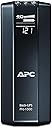
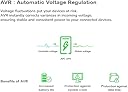
The APC Back-UPS Pro 1000VA UPS (BR1000G) is a robust tower UPS delivering 1000VA/600W power backup with 8 outlets—4 with battery backup and surge protection, 4 surge-only. Featuring Automatic Voltage Regulation (AVR) to stabilize voltage fluctuations, intelligent battery management for extended life, and a clear LED display, it ensures uninterrupted power for computers, networking gear, and IoT devices. Ideal for professionals seeking reliable, quiet, and efficient power protection to safeguard work and connectivity during outages.
| ASIN | B0038ZTZ3W |
| Amperage | 9 A |
| Battery Cell Composition | Lead Acid |
| Battery Cell Type | Lead Acid |
| Battery Charge Time | 12 hours |
| Best Sellers Rank | #774 in Computer Uninterruptible Power Supply Units |
| Brand | APC |
| Built-In Media | USB Cable, User Manual |
| Color | BLACK |
| Connector Type | NEMA |
| Customer Reviews | 4.6 out of 5 stars 2,015 Reviews |
| Enclosure Material | 1 |
| Form Factor | Tower |
| Frequency Range | 60 Hz |
| Global Trade Identification Number | 00731304278788 |
| Input Voltage | 148 volts |
| Item Dimensions | 19.41 x 15.03 x 9.43 inches |
| Item Dimensions D x W x H | 15.04"D x 3.94"W x 9.84"H |
| Item Weight | 11.6 kg |
| Manufacturer | APC |
| Material | 1 |
| Maximum Power | 600 watts |
| Mfr Part Number | BR1000G |
| Model Number | BR1000G |
| Number of Items | 1 |
| Number of Outlets | 8 |
| Output Current | 9 A |
| Output Voltage | 120 volts |
| Output Wattage | 600 watts |
| Power Plug Type | Type B - 3 pin (North American) |
| Product Dimensions | 15.04"D x 3.94"W x 9.84"H |
| Runtime | 6 hours |
| Specification Met | No |
| UPC | 112840035972 641438060534 971477756083 041114110735 731304278788 617407433401 640206656146 782386500069 731304286240 807030490876 804993337118 854032055343 521227122714 065949585711 640026110132 611101329886 809385661376 777050000891 731215385612 806293523901 014444607350 778888192109 163120317370 809185809756 809186266367 |
| Voltage | 120 volts |
| Warranty Description | 3 years |
| Wattage | 600 watts |
A**R
Reliable UPS for keeping desktop and network alive
Why I ordered this item: My power flickers a lot in the summer during storms and I lost a build I was working on last time it happened. I wanted something to keep my PC and router alive long enough to save my work and shut down clean. Likes: * The battery outlets kept my monitor and PC running through two outages. One was maybe 10 minutes and I just kept working like nothing happened. * My router and modem are plugged into it too. Internet stayed up during both outages. * The outlets are spaced out well so my chunky power bricks don't fight each other for room. * It's quiet. No hum, no fan noise, nothing. I keep it right next to my desk and forget it's even on. * The display on front shows load and battery percent, and it's easy to read without squinting. No likes: * The alarm beep when it switches to battery is loud. Loud enough that it woke my dog up from across the house. * No USB charging ports on it. Would I pay full price for this product: Yes Final thoughts: It's a good pick if you've got a PC setup and networking gear you don't want dying mid-task during a storm. The battery runtime won't run your whole house, just enough to save your work and power down right. Mine has already earned its keep twice.
M**G
Reliable and quiet
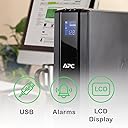
This summer I encountered several power outages at my home due to heavy thunderstorms passing through and decided I need a UPS for my computer. Among the Back-UPS PRO family I chose this model providing 1000VA/600W after weighing my power needs against the physical size and weight of the UPS. I run an iMac with a couple of external hard disks, having a total power consumption of about 180-200W in typical usage (web access or text editing). The UPS tells me it provides about 25-30 minutes runtime for this load which very well meets my goals. I mounted the UPS on a single-board shelf at the foot of my computer table - a laptop style table on casters which I had already heavily customized to hold hard disk and other accessories while hiding cables in the back. The shelf needed to be rather sturdy to hold the unit's weight of 23 pounds. A pair of braced brackets and a wooden board from a hardware store were sufficient. The shipping box contained the UPS, a USB cable to the computer, and a coax bridging cable, and no accompanying software, as several users noted. That said, add-on software is not needed on the Mac since Mac OS X has very good built-in support. Upon connecting the USB cable, the OS recognizes the UPS model and presents options relevant to UPS operation in the Energy Saver preference pane (under Lion, and I believe since Leopard). Sleep times and screen dimming can be customized specifically for the scenario of running under UPS power. A shutdown can be initiated based on one or more of three criteria: time having run on UPS, time remaining on UPS, or percentage charge remaining on the UPS. I chose the latter, with a conservative setting of 25%. The model does not make any noise during regular use. On loss of input power, it starts to quietly hum a little from the internal power source. On push of a front panel button, the font panel display cycles through various characteristics such as voltages, power, and estimated runtime. Its back-light can be set such that it is turned off during normal operations and comes on for a minute after pushing one of the buttons. I wish the display were a little more data-rich to avoid the cycling. The buttons are a little mushy and wobbly but suitable for the expected infrequent use. There is a sufficiently loud beeper which can be muted. By default, it beeps after loss of input power. As others noted, the beep would be rather inconvenient at night, and the ability to switch it off is very welcome. On loss of input power the computer is notified and Mac OS immediately pops up a warning message. After reaching a configured threshold while on UPS power the computer is shut down in an orderly manner. I had this unit for a couple of weeks now and I am very happy with it.
M**R
Does the job well
I bought this to deal with the blackouts I had been dealing with. After three power outages that abruptly turned off my gaming PC in the middle of usage, I needed to find a way to protect my PC from further power disruption so as not to break it. This back-UPS is heavy but sturdy. It is not a plug and play machine. You actually need to physically pull out the battery and flip it over to insert the battery in the correct orientation. If you don't do that, then it probably won't work. I didn't install the software or in fact mess with any of the settings. Once I installed the battery correctly, I plugged in my PC tower and my double monitors. After some consideration, I plugged in my TV and PS4 as well because I had extra plugs. And I did use multiple extension cords to fit everything. When my first power outage happened I didn't even notice it happening. My computer didn't flicker or react in any way. I was pleasantly surprised at how smooth the transition was from power to battery. Unfortunately, with my computer on, the display said it only had 10 minutes of power left even at full battery. Which is fine for what I needed--all I wanted was the chance to properly shut down my computer on my own terms in the event of a blackout. Once my computer was off, the display changed to around 100 minutes of power, and when I turned the TV on it changed to 60 minutes. The run time isn't very long but the UPS was satisfactory for me in providing continuous power to protect my computer. I haven't used it very long so I can't attest to its longevity. As a side note I noticed when I first plugged everything in I faintly smelled burnt plastic. The smell lingered for a couple days but I didn't see any issues with the device. After a while, the smell vanished. I'm not sure what it meant but in my personal experience it did not affect its ability to do its job.
E**K
Works with my Active PFC power supply
I just received this unit today. I was nervous because I read a review about it not working with "Active PFC" power supplies. I have a medium to high end custom built PC. My power supply is a Corsair AX850. I'm very happy to say that this unit works great with my system. I have a 28" Hanns-G monitor, the Corsair AX850 power supply, a GTX 670 video card, a modem and wireless router all hooked up to this thing and it works great. The battery comes charged over 75%. I pulled the plug to test it several times, last test was over 5 minutes and my system did not hiccup. Finally, I also installed the PowerChute personal edition CD that comes with it. The software will safely shut my files and pc down before the UPS turns off (after the battery is exhausted) in the event of a power failure. It connects to the APC via a USB to serial cable. (the serial side plugs into the APC). You can optionally set the display to stay on or turn off to conserve engergy. There are many power options to explore if you like. I personally like to keep my peripheral equipment on (ie router and modem) but you can set this to turn them off to conserve power when not in use. If I have any problems with this unit I will amend my review here. In fairness I haven't owned this for more than a day now but so far I like it a lot. UPDATE: I have owned this unit 3 weeks now and everything's been fine so far. The PSU can handle my PC. At maximum load I'm drawing about 375 watts. My PC has an i7 CPU, GTX 670 GPU and SSD. I also have a 28" LCD monitor, modem and router plugged into the UPS. So while my PC could in theory overpower this UPS - it would need at least another graphics card to do it.
M**P
Good Customer Service Report
Summertime when the storms roll in, we always get bad power flicker. And in the winer with just a little snow, the trees in the lines flicker the power even more. I bought this unit for a Mac and several external hard drives to combat the problem. Easy set up. The back up does communicate with the Mac and lets you know it's working and if it's running on battery or not, but does not display all information on the Mac such as percentage of charge. Easy enough, I can look down at the unit itself and see on the front display. I do not find the unit too noisy, about average to other UPSs I have used. Well, two months after I installed the unit, after it made it through hurricane Irene and the "Big Earthquake" of '11, a small summer thunderstorm blew up and lighting struck. I was working on the Mac and it went dead. Fearfully for my Mac and external drives, I waited for the storm passed, removed everything from the UPS and plugged them all straight into the wall. Everything was saved! The Mac was mad that it was not powered down correctly, but it was saved, the surge protection did its job. However, the UPS unit was toast. I could not get the unit to power up. I emailed APC customer support through the APC Web Site to see if there was anything that I could try or do with the unit. I did not have much hope, I mean it did save my computer, it did its job. I found emailing APC easy. Got a quick reply, went back and forth on email with information on the unit's serial number, placement, what was plugged in where and different things to try get the unit to start up. After just a few emails, they sent me a new replacement unit. I was responsible for shipping the malfunctioning unit back to them, but that is a small price to pay. I didn't have to call in anywhere and wait on the line for hours, all was done quickly and efficiently through email. It was a very easy, pleasant customer service experience.
D**N
Work great for years
I have these on the computers in my office, my wife's office, on the DTV main box, and on a few other things around the house that I don't want to lose power. I've had most of them for 7+ years on the original batteries with no issues. One did die after about 5 years, beyond the batteries stated life, and it wouldn't charge the battery any more. That one had been in storage for a few months so that may have led to the batteries pre-mature death by letting it drain too far. These have some nice features you can setup if you want, or just leave them a battery backups without connecting for those extra features, like alerts when on battery and such. If you're in a place with lots of power outages or just brown outs you know the frustration of losing power on your computer. This stops that and you can keep working with no issues. We have one on the DTV box because with any flicker that has to rebuild its menu and that takes several minutes. This stops that from ever happening. The mix of power saving outlets and regular outlets lets us plug in the surround speakers to a power saving outlet so they go off with the TV but the DTV box always has power. We've had this power our 65" TV and speakers for at least 20 minutes while we were trying to finish watching a show during a random outage so battery life is great.
L**R
APC BR1000G Back-UPS Pro 1000
I got this for Christmas and have only been using it for a few days now. I did have a problem with the set-up since there were no step by step instructions and you are left to figure out what goes where. I had omitted attaching the USB/phone jack between my old Windows XP computer and the UPS. I've used UPS's in years past, but they did not require a USB connection to a computer. I found out I had a problem when I was trying to install the software and it stopped loading and gave me a problem message, but no solution. I called the 1-888 number and without any fuss or waiting I got to speak to someone in the tech department who spoke very good English and solved my problem quickly. I was tempted to deduct one star for the lousy (or total lack of) any instructions on how to connect this to your computer but didn't since the tech help was so good. There was a picture drawing instructing the user to remove the battery and turn it over so the green tape is on top which I managed to do alright. I don't hear any fan noise whatsoever as some others were complaining of. In fact, it's so quiet I can't even tell it's on unless I go and see the 3 LED lights on the top panel. I tested it out a few minutes ago by turning off the power to the room that my computer is in. I was downstairs in the garage at the fuse box so I don't know if any beep occurred upstairs, but when I got there the computer was running off the UPS. Every 30 seconds I heard 4 beeps from the UPS telling me that it was being used as the power source. I only have my computer, monitor and modem connected to the UPS. I figure I don't need the extra peripheral equipment to stay powered up since it only sucks more energy from my UPS. I didn't wait to see how long the UPS would power my PC but I did sit there for about 3 minutes before I went downstairs and turned the power back on. My computer had a message on the screen saying that it was now being powered by regular current again (or something to that effect). So far I like this UPS a LOT. There's nothing more frustrating then losing your work if the power goes off for only a couple of seconds. I edit a lot of music and it's not always easy or convenient to save it while I edit it just because of the nature of the program I use. So, I really like the idea of hearing my 4 beeps to let me know I might need to close out and shut down and not lose any work. I don't always have lights on so there may be nothing to tell me there's been a power outage except for the beeps on this UPS. There is a mute mode, but I need to hear the beeps.
R**K
Best APC UPS Yet
I purchased two of these to upgrade from some really old UPSes. I really like the ability to see the incoming and outgoing voltage and the amount of power, which can be displayed on the numerical display, but is also displayed on a bar graph. So, for example, you can put the numerical display on voltage, but also you have an idea of the load in watts on the bar graph. Also, there is a dedicated display that shows condition of the battery charge. My home is equipped with a 60 KW whole house generator, and these UPSes have no problem when we are operating on generator (some UPSes do not like the quality of the power from generators, and stay on the battery which, of course, makes the generator useless for powering a computer). Also, I use these with two iMac's, and had no problem making the iMacs see and control the UPSes. Just go to system preferences, then energy saver, then select UPS and you can set up the iMac to have the UPS shut down your iMac when the UPS battery is at, say, 25%. Update March 9, 2015 -- More than two years, and these UPS's are going strong. I also purchased a BR-1500G 1500VA UPS in January 2014 which is working fine. Update April 18, 2016 -- More than three years, and the two BR1000G UPS's are still working great, and more than 2 years, and the BR-1500G is also still working fine. All are still using the original batteries. While I have had some last close to 5 year, I think 3 years is pretty good. I think I am going to routinely replace the batteries at 3 years. I put a 5 year battery in my 60KW whole house generator, and replace it every 3 years. It is a bad experience when you spend the money for a whole house generator and then it won't start due to a dead battery. Update June 16 2021 -- After more than 8 years I am still using the BR1000G UPSes. Have had no problems. Batteries last a long time. Current batteries have been in since July, 2016, almost 5 years. I should probably replace them.
J**O
Muy eficiente, silencioso y duradero.
Ideal para equipo de cómputo
P**M
Quality unit
I'm so far very impressed with the BR1000G, though I haven't had a brownout at all I have tested its capabilities. It's quite an attractive unit, and it looks nice sitting next to my components. Plugged into it, I have a Synology DS1815+, a Netgear Nighthawk AC1900 R7000 router, a Synology DS115J, a digital alarm clock and a cable modem. According to the LCD display, this represents 11% load, and can run all the devices for 68 minutes without power. It seems like a sturdy and reliable power backup for a smaller setup, and as I said, I did test it and it works well.
M**R
Unreliable product for a premium price
I am writing this product review after using it for more than two years: Un-reliable product for the price premium it commands. I had to replace the battery within the 7 months of purchase. 2 out of 3 buttons on the top stopped working after15 months of use. when engineer came for inspection, he told that the UPS should not be used for more than 50% of back up time and computer should be shut down as soon as possible. What is the use of paying such a high premium price if the system UPS cannot sustain the workflow for the committed time, the button quality is also very pathetic. They stopped working after 18 months.
T**Y
Great Backup!
I've already got another APC backup so this was actually a natural choice. I have this Pro1000 hooked up to my high-end computer, and another Pro750 hooked up to my Playstation 4. The package was complete, and the product works wonderfully. The software is also compatible with Windows 10.
M**O
APC Excelente Marca
Que puedo decir del producto, nada mas que es muy recomendable por que se puede hacer el cambio de la batería y no hace nada de ruido...
Trustpilot
3 weeks ago
3 weeks ago