Desertcart purchases this item on your behalf and handles shipping, customs, and support to Hong Kong.
๐ง Speak Smart, Code Smarter โ Own Your Voice with Movo WebMic!
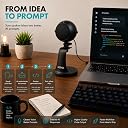
The Movo WebMic is a professional-grade USB microphone designed for AI coding, voice prompts, and dictation. Featuring a unidirectional cardioid pickup pattern, it minimizes background noise to ensure precise speech recognition. With hands-on gain and headphone controls, one-touch mute, and a desktop stand, it offers seamless plug-and-play use on PC and Mac without drivers. Backed by a 1-year warranty, itโs the perfect tool for millennial professionals seeking clear, efficient voice input.


| Antenna Location | Gaming, Streaming, Podcasting, Video Conference |
| Asin | B09DNRP7C7 |
| Best Sellers Rank | #179 in Computer Microphones |
| Brand | Movo |
| Built In Media | warranty card |
| Color | Black |
| Compatible Devices | Headphone, Personal Computer |
| Connectivity Technology | USB |
| Connector Type | USB |
| Customer Reviews | 4.1 4.1 out of 5 stars (54) 4.1 out of 5 stars |
| Enclosure Material | Crystal |
| Frequency Range | 20Hz 20kHz |
| Frequency Response | 20 KHz |
| Hardware Platform | Laptop |
| Impedance | 2200 ohm |
| Item Weight | 0.78 kg |
| Manufacturer | Movo |
| Mfr Part Number | WebMic |
| Microphone Form Factor | Table Array |
| Model Name | Webmic |
| Model Number | WebMic |
| Number Of Channels | 1 |
| Number Of Items | 1 |
| Polar Pattern | Unidirectional |
| Power Source | USB |
| Special Feature | Stand |
| Upc | 817711023958 |
User
Durable
Great quality for the price
User
Just what this writer needed
I'm a writer who likes to have the tv on at the same time and this works great. FYI for dragon users - a computer restart will throw the dragon settings back to the computer mic. Then AI will suggest three thousand fixes in windows but that's not the fix. Go into the little dragon task bar and change the settings back to the external mic. Otherwise, this mic is really sturdy, plug and play, and works great. Unbelievable value for the price.
User
Good performance at a low price
This is a decent value for the money but don't expect a professional mic. It is very sensitive to distance so for best results you need to be very close. It does not produce pops or booms. The form factor is a little weird; the curved stand moves the mic farther from you than the base. It cannot swivel on its base to adjust the position, and it only mounts in one direction. It is fine for video calls, and better than my web cam's built-in mic, so it meets my needs. It's bulky so I have to keep it out of the way when I'm not using it. and it's awkward to find a position for it where it's close enough to me yet allows me to use the keyboard.Build quality is excellent, much better than expected for the price. Base is heavy so isn't going to tip over easily.
User
New Mic works great nice & clear
Great mic as a gift from Amazon for making a few purchases. Mic works good nice and clear. Would recommend to anyone looking for a good reliable mic.
User
Works surprisingly well
It took a minute to figure out how to set it up, but the hardware was all there. The tablet recognized it immediately. Absolutely seamless operation. The sound quality was very good. Great value for money.
User
Not Windows 11 Compatible
What no Windows 11 drivers?
User
I love him
Best mic for the price. Sound quality is great, very directional. The mount is sturdy and honestly it looks and feels surprisingly professional. Main issue is there's no physical mute button but that hasn't bothered me much.
User
Decent Mic You Can Use for Different Things
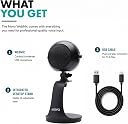
The reason I got this Movo WebMic is that it looked like a handy, compact, quality mic for my laptop. It is. And it really is "plug and play". Putting it together was easy. As soon as I connected it to my laptop(using the USB cable), the blue light on the mic indicated it was ON, and according to my sound indicator on my laptop, it was already recognized as the "sound source". I didn't even have to go into my Sound Settings at all. Just to double-check though, after plugging my headphones into the mic, I went to my Sound Settings and saw even the Playback was auto changed. I tested the mic out with 50% gain and 50% volume(as recommended) to see if it would register on the sound volume scale. It did. I then opened up a recording software and recorded a few samples with different gain and volume settings on the mic. I DID notice there was a little bit of an echo when the volume is higher than 50%. And there was an odd "other" sound(which could be my cooling fan sound coming through). But otherwise, the recording was fine and clear. I have to admit I am not that knowledgeable when it comes to sound recording, so I think it depends on which recording software you use(if you are doing recordings), the settings on the software and what your settings are on the mic. There should be a "secret sauce" to getting all the settings synced just right. I didn't try out the MUTE feature, but I am sure it works fine(as they mentioned by just pressing in the volume button). And it came with another cable which I thought might be for attaching to my smartphone, as when I was registering the warranty for it, the system asked me if I was using the mic with my smartphone(yet in the manual it doesn't mention that). I tried inserting one of the ends into my smartphone and it wouldn't fit. So, I am not sure what this cable is for(last pic). I like the fact that it has a "built-in" pop filter, is lightweight and is easy to set up and use. All around, for the price point, I would say this is a decent microphone that you can use for many different things.
Trustpilot
5 days ago
2 weeks ago