Desertcart purchases this item on your behalf and handles shipping, customs, and support to Hong Kong.
๐ฏ Capture Perfection with Every Click!
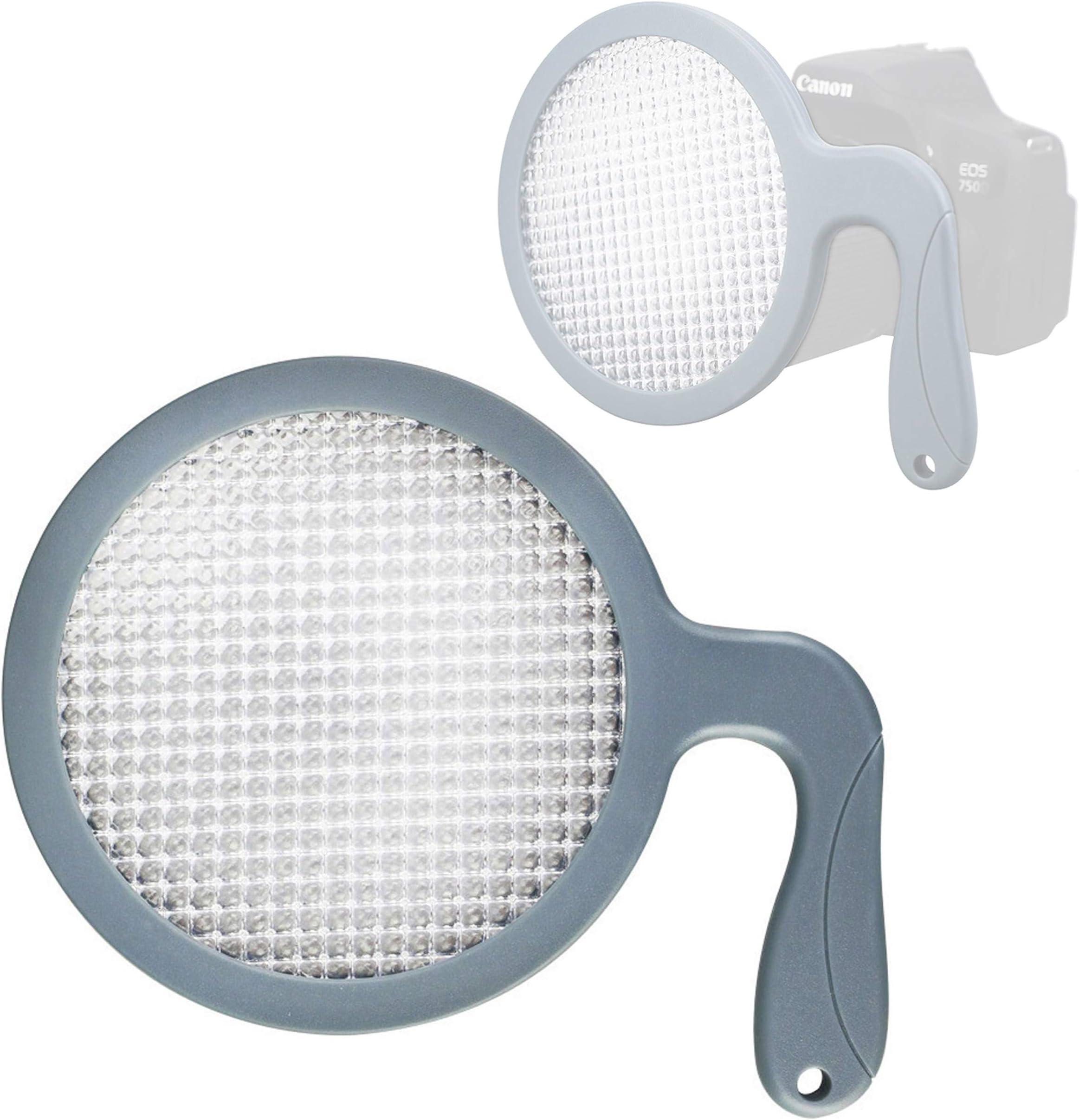
The JJC Hand-held Professional White Balance Filter is designed for digital photographers seeking consistent and accurate color representation. With a diameter compatibility of up to 95mm, this filter allows for quick white balance adjustments in-camera or during post-production, ensuring your images are free from unwanted color casts. Individually calibrated for neutrality and featuring 18% light transmission, itโs the perfect tool for achieving professional-grade results effortlessly.


| ASIN | B005MWKKPG |
| Best Sellers Rank | #120 in Camera Lens Effects Filters |
| Brand | JJC |
| Built-In Media | JJC WB-F1 Hand-held White Balance Filter |
| Coating Description | Multi Coating |
| Color | Clear |
| Compatible Devices | Canon Nikon Sony Fujifilm DSLR |
| Customer Reviews | 4.3 out of 5 stars 618 Reviews |
| Enclosure Material | ABS |
| Global Trade Identification Number | 01434334069324 |
| Item Dimensions L x W | 5.91"L x 3.94"W |
| Item Type Name | Jjc wb-f1 hand-held white balance filter. |
| Item Weight | 1.6 ounces |
| Manufacturer | JJC |
| Manufacturer Part Number | WB-F1 |
| Material | ABS |
| Media Type | ProductImage |
| Model Name | WB-F1 |
| Model Number | WB-F1 |
| Number of Items | 1 |
| Photo Filter Effect Type | Color Correcting |
| Photo Filter Size | 9.5 centimeters |
| Photo Filter Thread Size | 9.5 centimeters |
| Special Effect | Color Correcting |
| Thread Size | 9.5 centimeters |
| Unit Count | 1 Count |
| Warranty Description | no |
| Water Resistance Level | Not Water Resistant |
B**N
A simple and effective MUST HAVE tool for improving colors
I've used this on two Nikon DSLR's with WB preset function (D90s & D750). I ran several trials of my own comparing the auto white balance with presets using the filter. Here's the key to setting white balance using this method over your camera's auto white balance: Auto white balance looks for the brightest spot in the frame when you take the shot and assumes that to be pure white. It adjusts the color balance to make that spot white. In many photos that will work great, or at least be close enough that the colors look good. For my tests, I made sure that there was nothing white in the shot, which happens more often than you may realize. My trials were both indoors and outside. For each trial, I took two consecutive shots from the exact same position with only natural light using the exact same focal length, shutter speed, aperture, and iso - simply changing from auto white balance to a WB preset using the JJC WB-F1 white balance filter. The results were dramatic, with the preset reproducing the colors accurately while the colors in the auto white balance trials were conspicuously incorrect. In one example the brightest part of the shot was part of a beige wall in the background, and the auto white balance made it a white wall, shifting all the other colors accordingly. I love how quick and easy it is to use - and I put a lanyard on it using the hole in the handle for convenience when I'm shooting outside. I'm a Nikon guy and setting the preset is a simple as 1) change the WB from auto to preset 2) press and hold the WB button until "Pre" flashes on the LCD screen 3) face the light source* and hold the filter over the lens 3) squeeze off a shot - auto focus is inhibited, and it doesn't actually take a photo 4) look for "Good" on the LCD screen and you're ready to go! If the light changes (e.g. clouds or shade), simply redo steps 2-4. * when the predominant light falling on the subject is reflected - say, off a wall, that is the light source I understand many Canon DSLR's also have this capability, but it may take a extra step or two. Check with your camera's user guide. My tests were hardly scientific, but no reason for me to think the ExpoDisc would perform noticeably better, if any better at all. I've never held an ExpoDisc in my hand, so they may very well pass light frequencies slightly more accurately and may even be constructed more durably... I don't honestly know, Even so, I can buy three of these for the price of one ExpoDisc, and I'm very happy with the performance of the JJC filter. If you buy an ExpoDisc specifically for the size of your lens, it sits on the lens so you may not need to hold it when you take the calibration shot, but most ExpoDisc reviews advise you to buy the larger size so that you can use it with all your lenses regardless of filter ring size. That means you're holding it by hand anyway - and they don't have a handle. Even if you shoot RAW like I do, whether with the JJC or a competitor, this method is an easy way to get accurate baseline color balance in the metadata, streamlining your retouching process. I'm very happy with the JJC white balance filter, and would buy it again in a minute!
J**Y
Simple But Effective Device Allows Quick Setting of a Custom White Balance
This is an incredibly easy-to-use gadget to help set a custom white balance. I have used a gray card when shooting portraits, but asking the subject to hold it is awkward and then if you move to another location outdoors, you need to do it all over again. It really slows down the session. Once you've rehearsed the steps using this filter to set the white balance takes less than 1 minute: 1) Change focus mode on lens to manual 2) Change White Balance mode to Custom on the camera's menu (I can do it 2 different ways via the menu of the top control panel on the Canon 5D) 3) Shoot one image with the JJC Filter close to the lens, filling the frame with the filter. 4) Select this image as the Custom White Balance image on the WB menu 5) Change lens back to Auto Focus and start shooting. I do need to remember to change back to AWB after the shoot or I will end up with a weird color in later images. I do shoot in RAW, so it's easy enough to adjust in ACR, but I'm trying to eliminate that step whenever possible. The JJC WB Filter is sturdy yet lightweight (all plastic) and includes a hole at the end of the handle so that you can thread a string or cord to it to hang it from your camera bag or tripod. The surface appears to be many tiny lenses that bend and refract the light. I don't understand the light theory behind the design, but it definitely seems to work. I have tried it in several lighting conditions, one of which was a mixture of tungsten light bulbs of various colors, and it definitely improved the overall color of the scene.
T**A
Preliminary Review of JJC White Balance Filter and Comparison to ExpoDisc
This is a preliminary review of the JJC white balance filter. I will also offer a basic comparison with the Expodisc (version 1 aluminum). The JJC is very large and according to the packaging, can handle up to a 100mm lens. The product does seem a little flimsy and I'm not sure of the long term durability, but I am hopeful that it will last if I do not abuse it. Compared to the expo disc it is very flexible, but as long as it holds up, that's OK with me because of the lower price point of the JJC. I also notice that the JJC has the prism type material on both sides versus the expo disc having the prism material only on the outside and a smooth translucent white material on the inside. As far as performance goes, the JJC seems to get the job done. Based on preliminary comparison testing(my Expodisc came in today from ebay), the JJC delivers accurate results, although see below for more on accuracy. One caveat with these types of filters: using these things with consistent results seems to be an art in itself. Some situation are relatively simple, while others are trickier. Doing research online should be of much help. Documentation with the JJC is sparse while the Expodisc has a nice booklet guiding me through the difficulties we will encounter under the practically infinite lighting conditions in our world. Now as to the performance differences with the Expodisc, which I assume many are interested in because of it's popularity: The JJC appears a little warmer than the neutral Expo(without blue warming gel), but a little cooler than the ver. 1 Expo with the provided blue warming gel. As for dead on accuracy, I can't say for sure which one is more so, but I present this as a comparison at this time. For those wanting Accuracy(presumably what these products are about)this is important and when/if I get a better handle on this important metric, I will update this review. These discs may not always be necessary, but there are times when auto white balance will be fooled. That's when you pull this out. However, I also think it's a good idea to get used to "eyeballing" the color temp so we are better able to "dial in" the temp using our own trained color perception to provide the image we want, whether that's dead on accuracy, a little warm or a little cool. This can be done through Kelvin or WB fine tuning as often the presets are not what we want or need. In case anyone's interested, if you can find a CTB filter light enough (1/8 or lighter), you should be able to attach it to the JJC and turn it into a warming WB filter as Expoimaging has done with their product. Conversely, If you can find a light enough CTO filter, you can cool the image. As already stated if my long term experience/results differ, I will update this review. All in all, for the price, this is a good buy, particularly for someone who wants to try it or experiment without the investment of an Expo disc. Edit September 2015: As for comparing the JJC with the Expodisc, I spoke to an Expodisc rep and she told me the warming model I have is calibrated for use with the warming gel, but not calibrated with the gel removed. In other words, taking the gel out doesn't necessarily give a neutral result. It may or may not. It seems like a small point, but I add it for sake of accuracy and clarity. On the use of these types of white balance tools in general: Back in January 2015, though not hired, I took shots at my wife's nephews wedding shower (yes men were invited). I did not have this tool at the time and ran into mixed tungsten lighting and left it on AWB. I normally shoot JPEG and found WB correction really tough and wasn't completely happy with the results, although the nephew and everybody else seemed to love the results. Going forward to March 2015, I had my WB tools and found florescent lighting at the wedding. I decided to go with the Expodisc because of the warming gel. I couldn't have been happier with the results! Beautiful and consistent JPEGs throughout! I shared them through Photobucket and he was very appreciative and happy. Recently I got a call from the nephew. He told me he was disappointed with the shots from the pro that he hired (she used digital and film Nikons and took 5 months to get the finished photos to him) and asked if I would mail a DVD to him with the full size files that I took. Needless to say, that was a very rewarding feeling. I tell this story because whether you use JJC or Expodisc, it really does work. Especially if you shoot or want to shoot JPEG. If I was going to use the JJC for people shots, I would experiment with a warming gel to warm up the image a bit, since so many people will prefer this. Then you would have more options. One more thing: I have been looking for a simple yet effective post processing tool. I have not yet climbed the sharp learning curve with Photoshop, etc. because I really don't want to spend even more time in front of my computer. For the wedding shots I used Athentech Perfectly Clear with excellent results. Many of the shots look nothing short of glamour shots! They make plugins and are also working on a standalone version currently in Beta stage.
B**Y
This device "competes" with the better known and more widely-reviewed Expodisc
This device "competes" with the better known and more widely-reviewed Expodisc. Because I've not used the Expodisc, I can't compare the two products, but I CAN say that this JJC White Balance Filter works, works well, works simply, and, at least so far in my experience with it, works every time. Though I can't compare it to its $50 competition, I can say that I can't imagine any product product could work so much better than this one as to merit its costing an additional $35. In advance of receiving the JJC Filter, I viewed several YouTube videos and read a half dozen "how to" articles, all under the impression that using such an accessory would be complicated.... It isn't. Here's how I use the device to set white balance in my Nikon D7200: 1) I identify the main source of light that will fall on the subject(s) of the image(s) I'm about to take. That source might be the sun, or a cloudy sky, or a combination of light bulbs, or the light flowing in a window, or anything else. 2) I turn on my camera, and navigate to the white balance setting screen, on which I choose "Pre," then press and hold the WB button til the letters "Pre" blink. The camera is now ready to receive a custom WB via the JJC Filter. 3) I set my camera to "A," or Aperture Priority, hold the the JJC filter against the front of the lens, direct the lens toward the light source identified in step #1, then click the shutter. If on the LCD screen on top of the camera, the word "Good" appears, I have successfully set a custom WB. If "No Good" appears, then it's likely I need to change a camera setting (ISO or aperture) to allow more or less light in when I press the shutter. This happened once when I aimed the filtered lens at the sun - I had to reduce the aperture setting because too much light was coming in. 4) I am now ready to shoot IN THAT LIGHTING, for as long as that lighting is dominant on my subject. As the lighting changes - for example, the sun begins to set, changing the hue of available sun light - I have to repeat steps 1-3. Some Q&A: - Do you have to stand where you subject is? Not necessarily. I shoot nature pics a lot - trees, the Mississippi River, for example - so I just need to capture the light that's in play on the subjects I intend to shoot. For portraits, of course, standing next to your subject would give a more accurate picture of the light on your subject. - Do you point the filtered lens at the light source or back to where your camera will be when you take the shot? I've read various points of view on this, but aiming at the light source works well for me. - Is it hard to juggle the camera in one hand and the filter (against the lens) in the other? Once I got used to it, not at all. Remember that focus is not an issue in this process, so you don't have to hold the camera still as you take the WB shot. - What about setting the camera to manual focus? Nikon cameras turn auto focusing off during the setting of a custom white balance, then turn it back on when the setting is completed, so I don't have to bother with focus settings. However, not all cameras do what Nikon does, so you might have to disable auto focus for the process, then turn it back on before your next image. - How long does the WB setting process take? Once I have the JJC Filter in hand, it takes me 25-30 seconds. I'm sure I'll get more efficient, the more I use it. - What about the filter's build quality? To me, it looks and feels like it will last for years and years. - Do I recommend the JJC White Balance Filter? Unconditionally.
A**H
There's almost nothing I like better than finding a (much) less expensive item that ...
There's almost nothing I like better than finding a (much) less expensive item that works as well - or in some ways better - than the name brand item. I've wanted an Expodisc for years, have heard good things about them, but have never bought one for 2 reasons. 1) I couldn't stand to pay that amount of money on a piece of plastic (although I didn't mind spending $3400 dollars on a 5D Mark III - haha - great investment!); 2) the Expodiscs are sized to fit onto your lens, but I have 5 different lens sizes, so I could only use it on one of my lenses and would have had to buy 5 different sizes in order to utilize them. But I haven't had very good luck with using gray cards for custom white balance, and that has been a continual frustration for me, so I came back to Amazon resigned to finally buying and Expodisc. I found this little gem instead, read the reviews (don't we just love Amazon for that reason!) and decided that the price was so reasonable it wouldn't be much of a risk. I LOVE IT. Very easy to use, fits all of my lenses and the white balance has been spot on. I haven't used it outside yet, only in several challenging indoor lighting situations, which is usually where I need custom WB the most, but the WB has been perfect every time. I have also been using it to set my exposure and it's great for that as well. As far as the reviewers who said it was too big? I don't feel that way at all as it is one of the smallest, lightest pieces of equipment in my bag and I don't see how it wouldn't fit in ANY bag because it's so slim. I could see that's it's maybe a bit too big for some pants pockets, but geez, if you can't find a way to carry this thing around, you must not be very committed to accurate white balance. And that's all I have to say about that. Oh, and for another similar substitute for a name brand item that I have used for years and LOVED - check out this flash: http://www.amazon.com/Neewer-Speedlite-Panasonic-Fujifilm-single-contact/dp/B004LEAYXY/ref=sr_1_1?s=photo&ie=UTF8&qid=1452365121&sr=1-1&keywords=neewer+flash
L**N
Handy but Not Without Flaws - JJC Hand-held White Balance Filter
I recently purchased the JJC Hand-held White Balance Filter to improve color accuracy in my digital photography. After using it for a few weeks, I've gathered some insights worth sharing. Firstly, the concept of this white balance filter is excellent. It's designed to help photographers achieve consistent and accurate colors, which is crucial for professional-looking photos. In my experience, it does a decent job in this regard. The colors in my photos have shown noticeable improvement, with more natural and balanced tones. The ease of use is another positive aspect. It's quite straightforward โ you just hold it in front of your lens and set the custom white balance on your camera. This feature is particularly useful for those who are not very experienced with manual white balancing. The filter is also designed to fit lens filter diameters up to 95mm, which covers a wide range of camera lenses. This versatility is a big plus, as it means I can use it with different lenses in my kit. However, there are a few drawbacks. The build quality feels a bit flimsy for the price. I was expecting something a bit more robust. Additionally, while it does improve color accuracy, the results aren't always consistent, especially in mixed or challenging lighting conditions. I've had to make some adjustments in post-processing to achieve the desired look. Another minor inconvenience is the need to carry it separately, as it doesnโt attach to the lens. This can be a bit cumbersome, especially when you're trying to minimize the gear you carry on shoots. In conclusion, the JJC Hand-held White Balance Filter is a handy tool for photographers looking to improve their white balance accuracy without delving too deeply into manual settings. It's easy to use and fits a variety of lenses. However, the build quality and inconsistent results in certain lighting conditions are drawbacks to consider. It's a decent tool for hobbyists or those new to photography, but professional photographers might want to look for something more reliable.
W**R
Effective for color correction and an excellent value
How to use: (1) Put the white balance disc over your lens. (2) Aim your camera at the light source and take the picture in RAW (shooting RAW is the best for color correction). (3) When using the white balance selector in Lightroom, remember to put the dropper over a white area (or an area that should be white) that is the light coming from the light source. (Or use whatever is the Lightroom equivalent for this in your photo editing software.) When you follow these steps, it works great! Attached above is the before and after. It's proven to be highly accurate when I used the same color temperature and tint settings for other pictures that were taken with this sort of light source.
J**.
Durable and Accurate: Contender against ExpoDisc
I was old school using a gray card for white balance until I learned about the ExpoDisc. I couldn't' justify spending that much money on a tool for white balance when I've been using a $5 gray "cardboard" for years. Especially since the ExpoDisc is "fitted" to specific sizes of lens threads. So why spend more money on a bigger ExpoDisc that you'll essentially have to hold with your hand anyway when you can find other products out there? Cue this product. It was worth the investment to try it out and I'm glad I did. I purchased this in 2016 and it is now 2019 and we're still going strong. It is very durable, the diameter is perfect! It fits for all of my lenses ranging from Canon 50mm 1.2, Sigma 35mm Art, Canon 24-70mm, Canon 70-200mm, and Canon 100mm Macro. The handle and the ergonomic design of it makes it really easy during sessions and weddings to pull out quick, snap a shot, and update the white balance. Pro Tip: (Canon users) Set your "Set Custom White Balance" feature in your "favorites menu" for quick and easy access!
U**S
Setting White balance is a breeze
This product does its job pretty efficiently and helps you record accurate colours under most lighting conditions. Its a must have if you're very particular about accurate colour rendition.
J**N
Works like a charm for FX6, but it came shattered!
it works really well, however my unit just came damaged and I didnt have time to send it back! so buy at your risk! hopefully if they see this, they would be kind enough to do something about it, with that being said it works well as expected.
T**O
Grey card is better..
Does not give a proper wb as much as a grey card.
P**T
great to get your colors as real as possible
If used properly its a great helper to get your colors as real as possible
S**Y
not upto the expectations
it did not as it is supposed to perform. each time is shown different results
Trustpilot
2 months ago
1 month ago