🎨 Elevate your digital canvas—where precision meets freedom.
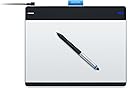
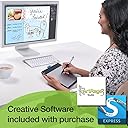
The Wacom Intuos Pen and Touch Medium Tablet (CTH680) is a versatile, professional-grade digital drawing tablet featuring a battery-free pen with 4096 pressure sensitivity levels, a spacious 10.75x8.75 inch active area, and multi-touch gesture support. It includes downloadable creative software like Autodesk Sketchbook Express and ArtRage Studio, customizable ExpressKeys for workflow efficiency, and compatibility with both Mac and PC. Ideal for designers, artists, and professionals seeking a natural, precise, and portable digital art experience.
| ASIN | B00EN27UC2 |
| Active Surface Area | 8.5 x 5.3 |
| Additional Features | Pen |
| Best Sellers Rank | #321 in Computer Graphics Tablets |
| Brand | Wacom |
| Built-In Media | Autodesk Sketchbook Express & ArtRage Studio |
| Color | Silver and Black |
| Compatible Devices | Personal Computer |
| Connectivity Technology | Wireless |
| Customer Reviews | 4.5 4.5 out of 5 stars (3,344) |
| Global Trade Identification Number | 00753218991096 |
| Item Dimensions L x W | 8.75"L x 10.75"W |
| Item Weight | 1.1 Pounds |
| Manufacturer | Wacom, Inc |
| Model Name | CTH680 |
| Model Number | CTH680 |
| Native Resolution | 4096 levels |
| Operating System | Mac OS, Windows |
| Pressure Sensitivity | 1024 Levels |
| Screen Size | 216 Inches |
| Specific Uses For Product | personal |
| Target Audience | Teacher |
| UPC | 753218991096 |
| Warranty Description | 2 years |
K**.
Great tablet for beginners, graphic designers, and game developers!
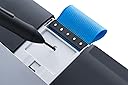
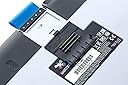
Note: Amazon likes to link reviews together when there are a variety of tablets to choose from. This review is for the CTL480! The Wacom Intuos Pen Small Tablet (CTL480) is a great tablet to get started with. As a graphic designing and game developer, I've always used a mouse and it's tricky to get nice smooth lines and a natural feel when drawing/sketching. When I picked up this tablet, it was like night and day, compared to the mouse. It feels so much more comfortable and natural, exactly like drawing with pen and paper. Let's jump into the details of this tablet a little bit. The Tablet ---------------- • Tablet overall size: 8.25" width X 7" height X 0.38" thick (Measurements were made myself) • Tablet active drawing area: 6" width X 3.5" height (Measurements were made myself) • Tablet has 4 "ExpressKeys" which are key shortcuts that can be used to simulate a keyboard key press, application switcher, mouse clicks, and more. The Pen ------------- • Pen has 2 buttons near the bottom which is similar to the tablet's "ExpressKeys" and can be set to whatever shortcut you wish. • Supports up to pressure level of 1024 (tip pressures can be set in control panel to prevent wearing of the nibs too quickly). • Pen does NOT have an eraser. • Battery free, no need to charge/recharge or worry about expiring/dying batteries. • Pen feels a little thicker than a traditional #2 pencil, but not quire as large as a mechanical ink pen. Box Contents -------------- • Tablet and pen • USB cord (relatively short. Can get a longer cord/USB extender/their wireless kit accessory). I couldn't use it in my keyboard's USB ports either). • Drivers on a CD (I just used the website's drivers without issues on Win 7 64-bit). • Extra Rings: 2 colored rings and pen holder (blue and black). • Replacement Nibs: Located on the tablet's backside, attached to the underside of the removable door. • Software: Codes for Autodesk Sketchbook Express and ArtRage Studio. Tips ----------- • Multi-Desktop Monitors - You can restrict which monitor the tablet will work on so you don't have to scroll across multiple screens with your tablet. This also utilizes less wasted space on your active tablet area. • Tablet Area - You can also restrict how much of your active tablet area will be used to cover your entire screen - in other words, if you don't want to move your hand across the entire tablet just to reach the edge of the screen, you can restrict the active tablet area to a smaller margin for quicker movement. • Set program-specific functions and ExpressKey shortcuts - If you want the buttons on your tablet to do one thing in Photoshop, but another thing in GIMP, you can set that individually. • This tablet is NOT a touch tablet - meaning you cannot use your fingers on the tablet like a laptop's touchpad. The CTH 480 offers this. Other Thoughts --------------- • I am one to read reviews of everything I buy to the point I start having nightmares about them. After doing extensive research, I went with this brand and tablet size and do not regret it. I was looking at cheaper options that Amazon sells, however, for the price and features, this does the perfect job. I also don't have to worry about changing/buying batteries for the pen. • I was skeptical when reviews said that it felt like drawing on paper with the tablet. Strangely enough, this is true. If you're an artist who draws with traditional pen and paper, it shouldn't take you long to get used to the digital style of doing so with this tablet. • Shaky Lines - I've not had this issue personally. I've noticed a few other reviews had this issue, but I'm not sure why that's happening. I don't have the most steady hands in the world, but I don't have that issue. • You can use this tablet outside of graphic design software. It can essentially be a replacement to your mouse (after a little configuration) and be to browse the internet, emails, and 3D applications. Final Thoughts --------------- • Do I recommend it? Absolutely. I highly recommend it to those who are just starting out or are new to tablets. It has enough features to get you used to the feel of a tablet without breaking the bank. While it may be great for advanced tablet users as well, I feel they may benefit more with a larger size, depending on their projects and preferences. However, that does not mean the active tablet area on the CTL480 is too small to work with for beginners. Give this tablet a try. I can't believe I lasted this long without one!
S**R
User friendly, beginner tablet that won't break the bank!
Perfect for beginners and seasoned artists alike. This tablet gives you so much bang for your buck! For under $100 you get advanced levels of art production in a small and easy to use package. The pen is battery free which is a HUGE plus since you won't have to worry about charging it or replacing any sort of disposable battery. The stock product comes with a power cord which isn't the longest and if I had to pick one thing to complain about that would be it, BUT there is an easy fix for that, you can just purchase a USB extension cable to go along with it, this one is a very good one: AmazonBasics USB 2.0 Extension Cable - A-Male to A-Female - 9.8 Feet (3 Meters) . This will make the cord longer and give you more slack to play with. Alternatively you can purchase the wireless kit that wacom makes for this tablet to make all the cords unneeded. Wacom Wireless Accessory Kit for Bamboo and Intuos Tablets (ACK40401) However with this option you will have to worry about charging it from time to time. This tablet comes with everything you need to get started as well as some extra nibs for your pen if you need them. It works great with photoshop (I use photoshop cs6). There is no lag with it and there is no 'shaky' lines when drawing. This tablet can also be used as a track pad similar to what you may find on a laptop. It features multi-touch and works very well with my computer. It is also windows 10 compatible for those who are wondering! If you have any questions about this product, feel free to ask me and I will answer to the best of my knowledge! And if this review was helpful to you, please consider leaving a positive rating!
E**O
You won't be able to use this as Wacom doesn't provide a driver that supports this device anymore. This was confirmed by their support. These shouldn't even be sold. Unfortunately, I have to return mine.
A**Z
WACOM siempre tiene excelentes productos y este es uno mas de ellos. Detecta la presion de la pluma , multitouch, se adapta perfectamante con la familia Adobe y otros programas de dise;o. Lo he probado en Mac OS y en windows , en ambos funciona bien , pero funciona mejor la interface en Mac OS
A**R
you can turn on and off the touch pad (for fingers) which can be a problem if you rest your hand down while drawing. There is a little switch on the side. I have used this for a long while, about a year and the cord is starting to break. That is a cheap fix, and the tablet works very well despite this! I haven't had to change out the pens nub yet (in a year), and it comes with extra's in a little slot on the back of the tablet itself. I would reccomend this product. It has a nice feel, easy to learn and a good size, though get something larger if you use more arm to draw instead of just wrist, as you will run out of room (the corners of the tablet is where it reaches the corners of the computer screen, so large strokes may be too large when on canvas.) Overall, great product, I would definitely buy this again!
C**O
great entry level tablet as it does almost everything you need it to do! I needed one of these for my game design/development course even though I am aiming towards the programming side. My college splits in 2 after first term, the first side specializing in arts (modelling, texturing, lighting, design, animation, etc) while the 2nd side specialized in (AI, frameworks, mathematics, debugging, fundamentals and so on) This tablet also comes with free downloadable programs including art rage and autodesk sketchbook (which are great!). The tablet features four programmable buttons to do what you want it to do, kinda like shortcut keys, the pen offers 2 programmable buttons as well. The tablet also comes with 3 replaceable pen nibs (yes they do wear off). This is the best budget tablet on the market for drawing.
A**R
excellent !
Trustpilot
1 week ago
2 months ago