Buy anything from 5,000+ international stores. One checkout price. No surprise fees. Join 2M+ shoppers on Desertcart.
Desertcart purchases this item on your behalf and handles shipping, customs, and support to Hong Kong.
🚀 Elevate your desktop with WiFi 7 — because buffering is so last decade!
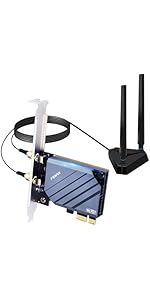
The FENVi PCIE WiFi Adapter FV-BE8800R delivers cutting-edge WiFi 7 tri-band connectivity with speeds up to 8774Mbps and Bluetooth 5.4 support. Designed for Windows 10/11 desktops (excluding AMD motherboards), it offers seamless switching across 2.4GHz, 5GHz, and 6GHz bands, ensuring ultra-low latency and high reliability for demanding applications like 8K streaming, VR, and gaming. Featuring Intel chipset compatibility and easy driver installation, this adapter future-proofs your network with next-level speed and responsiveness.


| ASIN | B073GW9SW9 |
| Best Sellers Rank | #385 in Internal Computer Networking Cards |
| Brand | F FENVI |
| Built-In Media | low profile bracket; bluetooth cable |
| Color | Red |
| Compatible Devices | Desktop |
| Compatible Operating System Family | Windows |
| Customer Reviews | 4.4 out of 5 stars 342 Reviews |
| Data Link Protocol | 802.11be, Bluetooth, wifi 7 |
| Data Transfer Rate | 8774 Megabits Per Second |
| Hardware Interface | Bluetooth 5, PCIE x 1, PCIE x 16, PCIE x 4, PCIE x 8 |
| Item Weight | 0.01 Ounces |
| Manufacturer | FENVi |
| Mfr Part Number | FV-BE8800R |
| Minimum Required Operating System Version | Windows 10 |
| Model Number | FV-BE8800R |
| UPC | 645195971690 |
| Unit Count | 1.0 Count |
A**N
Linux: Fenvi FV8802-8265 Review
I was a bit concerned when ordering from an unknown company, Fenvi, that this might be a knockoff and lack performance. However the product was as described and performed well on two Dell servers, both running Arch Linux with kernel 4.9.41-1-lts. Note that this PCIe card with antennae costs only a couple of dollars more than the Intel 8265 card alone. [giuseppe@gverdi ~]$ sudo lspci -v -s 04:00.0 04:00.0 Network controller: Intel Corporation Wireless 8265 / 8275 (rev 50) Subsystem: Intel Corporation Device 0050 Flags: bus master, fast devsel, latency 0, IRQ 32 Memory at 92b00000 (64-bit, non-prefetchable) [size=8K] Capabilities: [c8] Power Management version 3 Capabilities: [d0] MSI: Enable+ Count=1/1 Maskable- 64bit+ Capabilities: [40] Express Endpoint, MSI 00 Capabilities: [100] Advanced Error Reporting Capabilities: [140] Device Serial Number 34-13-e8-ff-ff-5a-01-ef Capabilities: [14c] Latency Tolerance Reporting Capabilities: [154] L1 PM Substates Kernel driver in use: iwlwifi Kernel modules: iwlwifi As you can see it uses the in kernel iwlwifi driver and requires the proper Intel firmware to be available, so install linux-firmware using your distributions package manager. Environment 1 I first tested this card in my own machine in a very challenging setting for the 5g band, one floor above and several walls from a Ubiquity AC Pro wireless access point. At first I was connecting only on wireless N, but at the full 300mbps rating of the 2.4g band. I have another device connecting as AC, but never getting better than N speeds, so I knew that the AC signal was at least available. I was, after a bunch of tweaking, able to connect at AC speeds varying from about 450-700mbps, probably averaging in the 500-550mbps range. In order to achieve this I needed to tweak one setting on the PCIe card and a couple on my access point. 1) On the access point I needed to dial down the power output of the 2.4g band and max out the power level on the 5g band. Those changes allowed the card to lock onto the AC signal instead of just wireless N in the 2.4g band. 2) I set the option "options iwlwifi 11n_disable=8" in "/etc/modprobe.d/iwlwifi.conf" which enable antenna aggregation on the PCIe card. These two tweaks provided very acceptable performance in this environment. Environment 2 After a couple of days burning in the card, I moved the card to a server in a different location with a wall + a partial wall between the server and a Ubiquity AC Pro wireless access point. This time without any tweaks to either device. I immediately was averaging a 600mbps connection. I altered only the 5g radio power on the access point and immediately connecting at 780mbps. The connection speed varied, but was always at or above 650mbps. I then turned on antenna aggregation and, while I never exceeded the 780mbps mark obtained without the tweak, speeds seemed to remain more consistently closer to that high mark. I'm quite happy with the Fenvi card. The Ubiquity AC Pro is a 3x3 11AC MIMO access point and in both environments was serving 8-10 other wireless clients. I did not test the Fenvi in an unobstructed environment, where performance should improve. Also, the nature of the antennae location relative to other possible electromagnetic interference from the server itself may be detrimental. If I had an extension, I'd test with the antenna somewhat further from the server. The Intel drivers make for a simple install on Linux, which is why I gravitated to this card. I would recommend this card for modern Linux kernels. Addendum: My Biggest Headach This card is great, but will drive you bonkers if you install in a Dell T130 server because the fan speed will kick permanently to full speed and none of the firmware settings in the Bios/iDrac gui will allow you to get your fans spinning at normal, quiet, levels. Do not despair. First, it has nothing to do with this specific card. Any third party PCIe card inserted into this server will result in the same issue. To fix this, you need to install the Dell Open Manage tools and run the command: racadm set System.ThermalSettings.ThirdPartyPCIFanResponse 0 I just saved you at least a day and handfuls of hair:)
H**H
It really is simple to set up best value for the money
I really like the fact that this device serves as a Wi-Fi and Bluetooth combo. Just plug and play very easy to set up. I did not interact with their text Support but I gave it five stars anyway because really the best tech-support is one way you don't have to use them because the dam thing works. Price was great and the range on the Bluetooth is pretty good. I do not do competitive gaming but the performance is great for my kid who uses it just for Minecraft and homework
J**.
Great WiFi/Bluetooth card, non-existent customer service
tl;dr - 5 stars for the product, minus 1 star for no customer service. Product support is just as important as the how well the product itself functions. Without support, the greatest WiFi card in the world could be useless. My motherboard does not have WiFi or BT built in, so I got the FV-8802 to add these functions. This WiFi card gives me around 65Mbs on a 100Mbs connection with the router 3 rooms away. The BT is fantastic. I previously had a cheap USB BT dongle, and my Bose headphones would cut out if I moved 5 feet from the computer. Now with this card, I can walk about 40 feet away with my headphones on, and the signal stays solid. My only complaint is the customer service. The card installed very easily, and the WiFi picked right up and started working with the Windows 10 drivers that automatically installed. However, I could not get a BT device to connect. I emailed customer service on August 8th and NEVER received a response. Mind you, that is the email address Fenvi provides on their website for Amazon orders. After 2 hours of frustration, reading through reviews to see what other people have done to fix this, reinstalling the drivers (straight from Intel's site, not the Fenvi-provided drivers), unpairing and re-pairing the BT devices did the trick. Something to note is that there are two separate drivers for the WiFi and BT, as other have noted. Get the drivers straight from Intel. You'll notice independent drivers for WiFi and BT. Don't use the ones from Fenvi's website as they are outdated; as of August 8th, 2019, they are a few revisions old. Also, the antenna magnet is very weak, so don't plan on mounting it on a vertical surface. I just put it on the top of my case. When I put it on the side, it slid down the case.
O**S
Plug and Play Ubuntu/Mint Linux, Windows 11
Good Connection, Speed. Easy Install.
K**H
Good product (Intel Driver fixed for Windows 7 after 20.60.0 on 6/14/2018)
This review is for FV8802 model: Hardware wise, this product is pretty good: Wifi is about 50% faster than my previous wifi donger, is consistent, and connects fast. The product uses Intel's chipset, you can download the latest driver on their website. Both the bluetooth and wifi drivers are needed. (This driver disc uses a rare format for packaging that you probably won't be able to extract without downloading additional software from the internet, and it is also outdated.) If you use Windows 10, the wifi driver might be needed, though it is suggested to install it. After drivers being installed on Windows 10, all my bluetooth devices connected without any issue, this include a drawing tablet, a headset, and a game controller. Do check your motherboard to see if there are enough internal usb 2.0 ports, you might need to purchase an internal usb 2.0 hub for the bluetooth. (I have mine occupied by a CPU cooling device and the front panel USB.) Without the internal usb2.0 port, only Wifi works. And be careful if you need Bluetooth, and want to buy it for Windows 7: Intel's Windows 7 bluetooth stack driver is problematic: as of "Version: 20.30.0 (Latest) Date: 2/6/2018", I could not get the driver to work on my Windows 7 . (My computer has dual Operating System installed, it works on 10, but not 7). You might need to use/buy a third party bluetooth stack, instead of the one from Intel, if you need it to work on Windows 7. But since I am pretty happy with the Wifi, I decided to keep it. Hopefully in the future, Intel would do something for Windows 7 so that the Bluetooth would work on Windows 7. ================================================================= Update 6/19/2018 Intel released 20.60.0 driver on 6/14 for Windows 7, which fixed the issues that I had. All my devices are working now. I noticed that if I connect airpods, there would be some drivers missing, but I can hear the sound without issues. I am now a happy user.
T**C
FV-8802 (8265): Great Installation, Great Performance
Bought 2 of the FV-8802 (8265) version, one for an Intel MB, and one for an AMD MB, both running Win10 x64. Both went into PCIe x4 slots, both were connected to USB headers on the MB for BT capability, and both showed up as devices upon bootup. So far, so good. Connected the extended antennas so they sat on the desktops for much better signal strength, loved that it wasn't just two antenna prongs fixed to the cards at the back and bottom of the machines where reception is not ideal. Did NOT install files from packaged CD, downloaded them directly from Fenvi site, which included latest WiFi and BT drivers for FV-8802. Installed drivers, device manager on both machines recognized the WiFi and BT of the cards. Connected them to my 5G router, was immediately off to the races, tripled my download and upload speeds from my older 2.4G N cards. Fantastic, very happy with this purchase.
S**H
Works great
Had a desk computer I needed to drive a shop TV display via miracast. Range was 25ft thru drywall. Unknown features were the desktop computer is now WiFi enabled. Previously wired, was able to move the computer anywhere within range of the router. Bluetooth also worked. Windows 10 install no issues. Did not need any supplied drivers. It just worked. A lot of functionality for $30.
N**N
Know what you buy.
Just got this and realized that both on the store page and on the box two different speeds are advertised. At the top in the header is 1200 megabits and then 867 megabits is what's advertised in the information section of the page and on the sticker on the box. I don't have speeds that go that fast for my internet but still it seems that there's some deceiving going on. Being as this is a knock off Intel card I am now concerned about the other features claimed.
P**N
Perfetta scheda WIFI
Ottima scheda. Ha il bluetooth e banda AC . Attenzione: scaricare i driver aggiornati dal sito del produttore. Ottima ricezione.
M**.
写真と違うものが来た
FV9801型を頼んだんですけど、写真とは全く違う物が来てびっくりしました。よくよく見れば、FV9801の写真はFV8802型が写っているようです。BT4.2が欲しくて頼んだのに、来てるのがBT4.0でした。これ、詐欺じゃないですか?
R**S
So much choice but this one works very well.
For a relatively inexperienced person fitting this was very easy. The instructions were adequate for the Wi-Fi although the Bluetooth option I did not connect. I installed it into my new HP DeskPro which I had assumed had Wi-Fi but did not. There is masses of choice out there but I chose this as a trade off between speed and cost. Also having an external antenna block that can be moved around for best results may be an advantage to some. The build and packing is very good quality. It comes with full and half height brackets and a lead for connecting to a suitable motherboard socket for Bluetooth. The included instructions were adequate - mainly pictorial. Driver wise, on my Windows 10 it worked straight away. In operation it is plenty fast enough and I have had no issues at all.
B**T
Marche nickel sous Linux et Windows 10
Marche nickel sous Linux (Kubuntu 20.04) et Windows 10. C'est d’ailleurs pour cette compatibilité que je l'ai choisi. L'antenne déportée est très pratique. Pas de coupure intempestives. Connexion stable et rapide. Donc du tout bon pour moi.
G**D
It just works!
I was previously using a wired connection through a Power Network Adapter, but I was finding that my connection was randomly dropping out and ruining my gaming experience. This card was easy to install and I have not been disconnected once. My last speed test was 115mbps which is better than I was getting with my wired connection.
Trustpilot
2 days ago
1 month ago