Desertcart purchases this item on your behalf and handles shipping, customs, and support to Hong Kong.
โจ๏ธ Stay connected, stay productive โ the ultimate travel keyboard for your iPad life!
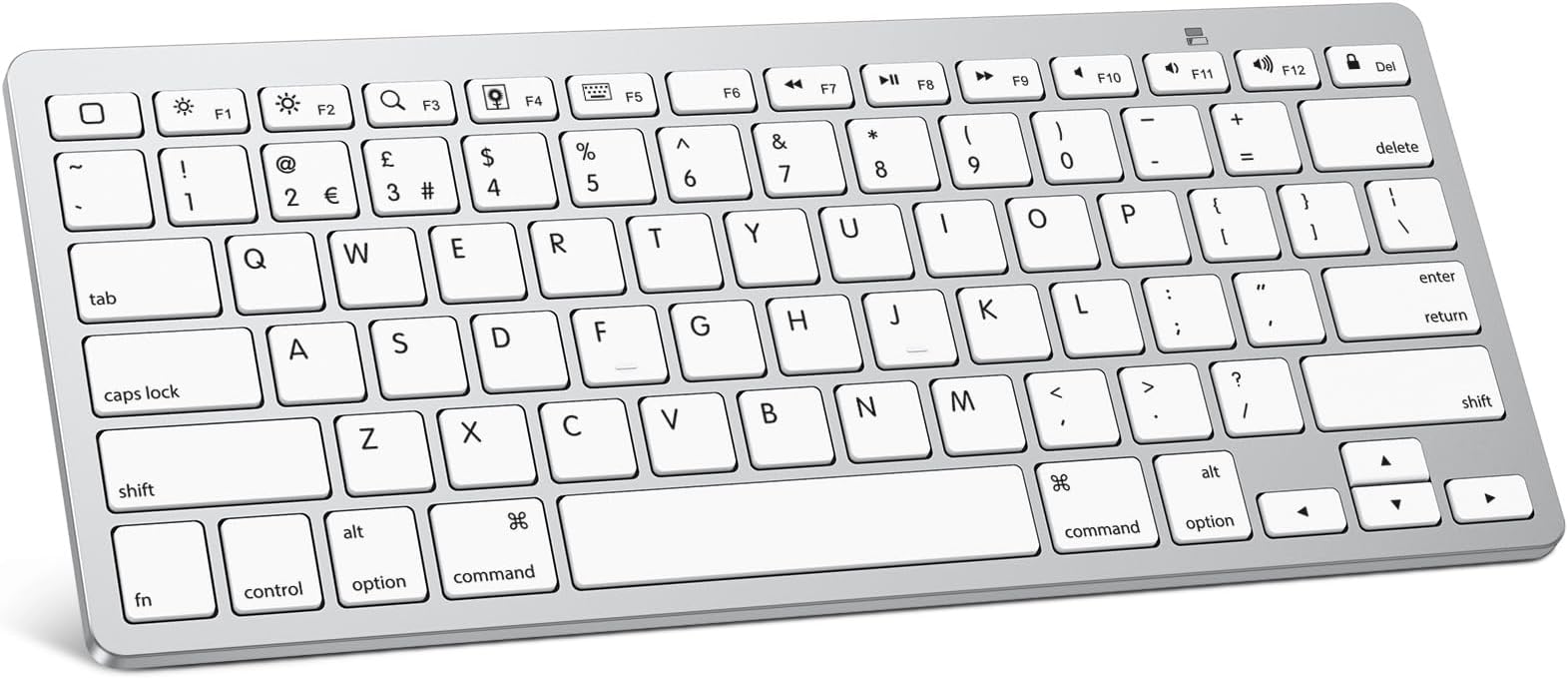
The OMOTON Bluetooth Keyboard is a sleek, ultra-slim wireless keyboard designed for iPads, iPhones, and other Bluetooth-enabled devices. Featuring a 78-key QWERTY layout with iPad-specific hotkeys, it offers up to 6 months of battery life powered by 2 AAA batteries. With a 10-meter Bluetooth range and lightweight design, itโs the perfect portable typing companion for professionals on the move.


| ASIN | B019O1R4DQ |
| Antenna Location | Office |
| Best Sellers Rank | 1,341 in Computers & Accessories ( See Top 100 in Computers & Accessories ) 18 in Tablet Keyboards |
| Box Contents | mini keyboard |
| Brand | OMOTON |
| Brand Name | OMOTON |
| Button Quantity | 78 |
| Colour | Silver |
| Compatible Devices | iPad 10th Generation, 10.2 (9th/8th/7th Generation), Pro 13/12.9/11 inch, Air 13/11 10.9 inch (5th/4th Gen), Mini 6/5, Phone Pro/ SE, other Bluetooth-enabled tablets, laptops, mobile phones |
| Compatible Operating System Family | MacOS |
| Compatible Tablet Computer Models | Apple iPad (10th generation) |
| Compatible devices | iPad 10th Generation, 10.2 (9th/8th/7th Generation), Pro 13/12.9/11 inch, Air 13/11 10.9 inch (5th/4th Gen), Mini 6/5, Phone Pro/ SE, other Bluetooth-enabled tablets, laptops, mobile phones Compatible devices iPad 10th Generation, 10.2 (9th/8th/7th Generation), Pro 13/12.9/11 inch, Air 13/11 10.9 inch (5th/4th Gen), Mini 6/5, Phone Pro/ SE, other Bluetooth-enabled tablets, laptops, mobile phones See more |
| Connectivity Technology | Bluetooth |
| Connectivity technology | Bluetooth |
| Country of Origin | China |
| Customer Reviews | 4.4 out of 5 stars 6,524 Reviews |
| Enclosure Material | Plastic |
| Generation | 10th Generation |
| Hand Orientation | Ambidextrous |
| Item Dimensions L x W x H | 28.4L x 11.9W x 0.5H centimetres |
| Item Highlight | Ultra-Slim Wireless Keyboard for iPad 11/10/9/8/7th, Pro/Air/Mini and iPhone ,with 12 Multimedia Keys for Home, School |
| Item Weight | 282 Grams |
| Keyboard Backlighting Color Support | Single Color |
| Keyboard Description | Multi Functional |
| Keyboard Layout | QWERTY |
| Keyboard description | Multi Functional |
| Manufacturer | OMOTON |
| Manufacturer Part Number | KB-APWhite |
| Mechanical Keyboard Switch Model | Membrane |
| Minimum Required Operating System Version | Android 3.0 Honeycomb |
| Model Number | KB-APWhite |
| Number of Batteries | 2 |
| Number of Items | 1 |
| Number of Keys | 78 |
| Number of Packs | 1 |
| Number of Sections | 3 |
| Power Source | Battery Powered |
| Product Features | Ergonomic design, hotkeys and Bluetooth connection |
| Product Warranty | 1 |
| Recommended uses for product | Office |
| Special feature | Ergonomic design, hotkeys and Bluetooth connection |
| Style Name | Modern |
| Switch Type | Membrane |
| Theme | Apple Accessories |
| UPC | 736950123093 |
| Unit Count | 1.0 count |
M**G
Light, Inexpensive and Well Designed
The OMOTON Ultra-Slim Bluetooth Keyboard, is the perfect companion for those who want a lightweight, easily transportable and well functioning keyboard to accompany their tablet or laptop. I travel with my iPad Pro everywhere. It's replaced my laptop in terms of portability, However, one thing I always decided against was the Apple Smart Keyboard Case for my iPad. It was a ludicrous price, not to mention I wasn't too sure on the aesthetics of the keyboard itself. But, I needed a keyboard to accompany the day-to-day tasks I was using my iPad for. The OMOTON Ultra-Slim Bluetooth Keyboard has certainly ticked all the boxes I needed from it. This keyboard looks like an exact replica of a Macbook keyboard (layout-wise of course, don't remember seeing white keys on a Macbook?!), so for those familiar with this keyboard layout, you will feel right at home. Not to deter non-Mac users however, this keyboard is very ergonomic. If you're not familiar with Mac keyboards/functions however, there are a few little quirks to be aware of. Such as the '@' symbol is actually Shift+2, not Shift+(@/' key). You'll also have to contend with the Command (CMD) instead of Ctrl, but for the most part these function EXACTLY the same as a normal PC keyboard. The keyboard is very lightweight, powered by 2 AAA batteries. It's non-adjustable, with it being propped up by about an inch at the very back by the battery housing, which suits myself as I prefer a keyboard to be 'propped up'. The connectivity couldn't be simpler. There is a on/off switch behind the keyboard. Simply flick on and connect your keyboard, much like you would a pair of wireless headphones or speakers and you're ready to go. The keyboard is very responsive and works on an iPad just as I would expect it to, allowing me to further utilise the iPad's potential.
C**S
Superb companion to you iOS device
Those Apple and Logitech keyboards for iPads are impressive arenโt they? Convenient too, as theyโre always attached by the case. However, not only are they incredibly expensive theyโre also a bulky addition. The case increases in size and becomes rather cumbersome, and youโre always carrying the keyboard around with you. I can go days without needing the keyboard, so why carry it around all of the time? These little Bluetooth keyboards are much more my thing, and for those moments when you want to type a lot of words, as I am in writing this to you, itโs ideal. The Omtron comes to you looking for every inch an Apple product. White keys on a silver board. Yes, itโs a bit plasticky but it at this price point itโs excusable. It has Apple function keys and shortcuts that work with iOS devices allowing you to navigate with minimal screen taps. The keys have a reasonable feel to them, not quite the chunky resistance youโd get with a laptop, but still feel better than the low rubbery keys on the official Apple product in my opinion. Thereโs a sliding on-off switch on the underside of the keyboard, alongside a Bluetooth connect button, and battery compartment for two AAA batteries (not included). All in all, if youโre after an occasional keyboard to grab occasionally, youโll do a lot worse than the Omtron.
K**Y
Compact and easy to use
Light, comfortable to use. It was very easy to connect with my Ipad and it works perfectly. I was a bit concerned about durability, but I've used it almost every day over the last few months without any issues. Due to it's smaller size it would probably fit into a bag, but it feels quite fragile, so it might not hold up. Only note is that it uses AA batteries instead of being rechargeable, but that is made clear in the product description, so I didn't get caught out by that. I use rechargeable batteries and they work just fine.
M**T
Works well
Worked really well with my iPad Pro. Wish Iโd brought the package with the mouse as well
R**E
Great!
Great value, quality condition, appearance as described. Fast delivery.
M**!
Perfect for my needs
This is perfect for what I wanted. I can pair it with multiple devices. Easy to set up and use. Makes typing on my Ipad and IPhone much easier. The keyboard doesnโt lay flat but instead is angled. Keys are responsive. Batteries seem to last well. Would defintely recommend.
N**S
It's a keyboard, but it's not an Apple keyboard
I bought this after a spillage on my bluetooth Apple keyboard caused it to stop working properly. This keyboard looked good and is, of course, a fraction of the price. However, two things go against it for me. 1) once it has gone to sleep it needs a few seconds to reconnect. So you can't just start typing and it goes, unlike your old Apple keyboard. So I often find the first half of my first sentence is missing. 2) Tactile use: The keys on an Apple keyboard are just that bit more tactile and softer for touch typing whereas it feels like this one needs a much more physical "tap" on each key. Consequently if you do quite a bit of typing (long emails/word documents) it feels like harder work and I make more mistakes that I then have to spend time reviewing and updating. I have given this a couple of weeks, but sadly I think it is off to Ebay with it and I am going to have to spend more money replacing the Apple keyboard with a like for like. Do I think the Apple keyboard is worth ยฃ90 more? No. Am I prepared to put up with something that will constantly remind me that it is the cheap alternative, No. If you are happy to put up with the compromise then I'd say this does represent great value, but then if you spent all that money on your MacBook/iPad/iPhone, are you really ready to scrimp on your keyboard?
G**A
Great Keyboard as a gift
I brought this keyboard as a gift for my niece. The keyboard works great and she liked the design and colour to go with her new ipad Air M4. Overall she was pleased with the product.
J**G
Nice little keyboard for iPad
This keyboard made it much easier for doing email and other apps like Zoom meetings. having keyboard shortcuts to muting and video using Zoom avoided my reaching for the iPad to do those functions. Only minor drawback is that the first time you press a key, nothing happens. Probably due to Bluetooth, After the initial lag, everything works fine. Had it for a couple of months and very happy. Good value.
B**Y
So much easier than pick at a virtual keyboard
This is my second type Bluetooth keyboard. I have always hated the small pick keyboard on a smartphone. Too many keys that are small to select, bad spelling, and crappy and missing commas, periods, etc. It is so much easier to get things right and done fast with a real keyboard. The price is great and reasonable too. Buy one. You won't be disappointed.
R**S
Not the classic keyboard layout
I have not used this keyboard much, so my ratings on ergonomics and value should be viewed with caution. I don't use it for gaming, so I can't rate it for that. My main complaint about this keyboard is the absence of a true Delete key. Other people complained about this, but no one who replied seemed to know what the person was talking about. Here goes. A classic keyboard has a Backspace button, which erases the letters to the left of the cursor. it also has a Delete button, which erases the letters to the right of the cursor. This keyboard (see photo) has a rectangular botton marked Delete, which is actually the Backspace button. Above it is a smaller button, also marked Delete, but which does NOT Delete. It turns off the screen! There is, however, a way to turn it into a Delete button by holding down the FN button at the lower left, then toucing that small Delete button. I just happened to find that solution on the page for a different brand of wireless keyboard. It's awkward, and I am totally bewildered as to why the manufacturer would put a button that turn off the screen, but mark is as Delete AND put it in the position of the "classic" Delete button. I can't tell you how many times I have inadvertently turned off my screen because I am used to that being the Delete button on all of my other keyboards. Buyer beware!
T**R
Nice feel, heavy enough, great value
This keyboard is nicely tailored. I especially like the way it is raise in the back for easier typing. MUCH better ergonomics than tha Apple wireless keyboard! I installed it easily and quickly on my iPad pro. I will buy another to replace the Apple wireless keyboard.
K**S
So nice, easy & affordable!
Super simple, but does the job! Looks chic & way cheaper than the apple one!
Trustpilot
1 month ago
2 weeks ago