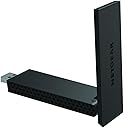
🚀 Elevate your Wi-Fi game—because buffering is so last decade!
The NETGEAR A6210-100PES is a sleek, black AC1200 dual-band Wi-Fi USB 3.0 adapter delivering up to 867 Mbps on 5GHz and 300 Mbps on 2.4GHz. Equipped with high gain antennas and Beamforming+ technology, it maximizes wireless range and reliability. Lightweight and compatible with multiple Windows versions, it’s designed for professionals seeking fast, stable internet connectivity with flexible desktop placement.


| ASIN | B00OT586RQ |
| Best Sellers Rank | 108,715 in Computers & Accessories ( See Top 100 in Computers & Accessories ) 800 in USB Computer Network Adapters |
| Box Contents | USB |
| Brand | NETGEAR |
| Brand Name | NETGEAR |
| Color | Black |
| Colour | Black |
| Compatible Devices | Desktop |
| Compatible Operating System Family | Windows |
| Compatible devices | Desktop |
| Customer Reviews | 4.1 out of 5 stars 3,332 Reviews |
| Data Link Protocol | USB |
| Data Transfer Rate | 867 Megabits Per Second |
| Data link protocol | USB |
| Global Trade Identification Number | 00606449103328 |
| Hardware Interface | USB, USB 1.1, USB 2.0, USB 3.0 |
| Hardware interface | USB, USB 1.1, USB 2.0, USB 3.0 |
| Item Dimensions L x W x H | 9.3L x 3.1W x 1.4H centimetres |
| Item Weight | 28 Grams |
| Manufacturer | NETGEAR |
| Manufacturer Part Number | A6210-PES |
| Model Number | A6210-100PES |
| Number of Items | 1 |
| Product dimensions | 9.3L x 3.1W x 1.4H centimetres |
| UPC | 606449103328 |
| Unit Count | 1.0 count |
S**S
Superb! + Can confirm working with Windows 10.
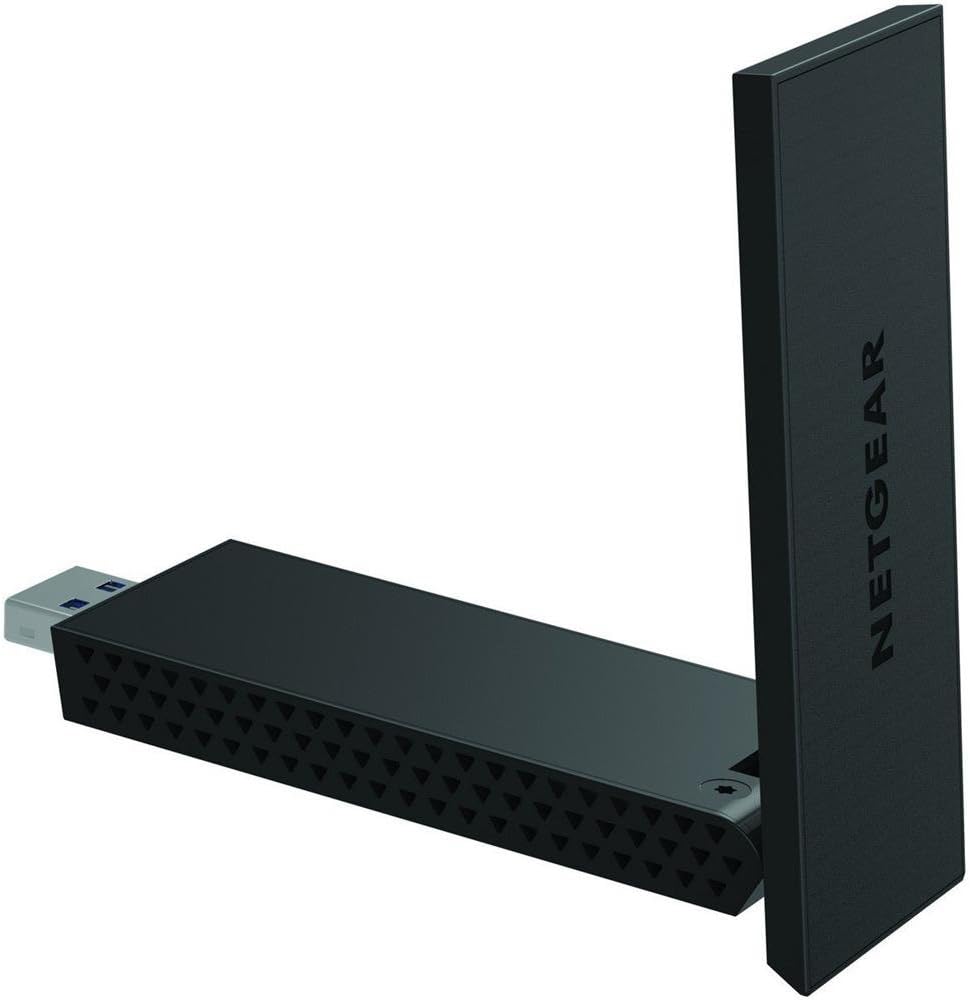
I built myself a new desktop PC a few days ago, finally moving back from laptops/all-in-ones, mainly for work purposes. I got an affordable WiFi adaptor and found my internet right down at standard Broadband speeds (5Mbps or so), which was frustrating. After upgrading to this thing, though, it shot up to the kind of speed I'd expect from my fibre connection, and about a third faster than any of my laptops or all-in-one computers reached. If I use the dock and cable and sit this thing on my desk, I get around 35Mbps from speedtest.net. That's right - it comes with a desktop dock, so you can move it away from all the interference your computer will cause and get maximum results. In desktop mode it also unfolds and extends if you need to squeeze a little extra speed out of it. I keep it folded up as it looks much nicer and tidier on my desk that way, but unfolding it does grant me a couple of extra Mbps if I'm in a squeeze (let's be honest, that's not often). If you're using a laptop and don't want to use the desktop dock, unfolded it'll sit at a decent distance from it to cut down on interference, but to be fair most laptops have built in WiFi these days, so you're more likely going to be using this on a desktop. To be honest, you need to use the desktop dock, because it's a little wideand plugged into a tower you'll find it ends up pointing sideways and obscuring the neighbouring USB ports, but the option is there if you really don't want it to be sitting on your desk. Sorted out all my WiFi problems and then some! Nice one guys! Also, I can confirm this is working like a charm on Windows 10 - UPDATE! After just under a month of use, one day I turned my PC on and it just didn't want to connect to the internet. After a lot of trial and error and frustration, the solution was to completely remove all traces of NetGear's drivers and just let Windows 10 do it's thing. In other words - IF YOU WANT THIS THING TO WORK WELL ON WINDOWS 10, DO NOT INSTALL THE SOFTWARE! JUST PLUG IT IN AND LET WINDOWS DO THE REST. NetGear's own software can cause conflict in Windows 10, but Windows 10 already has its own drivers etc to handle it for you.
S**N
Not Windows 10 Compatible
Edit : Update This Adapter is NOT Windows 10 Compatible. It gives me a blue screen every time it tries to or connects to the internet. Wish I could send it back as not fit for purpose. Very very disappointed. ............ Arrived next day, well packaged. Web address listed in the accompanying excellent "How To" guide on where to download drivers. It does come with a CD but I have no CD drive in my pc. Drivers easily found, downloaded and extracted files. Ran the exe, set up started and ran with no problems, after a very brief whirr and please wait, it asked to plug in the device. The Adapter was easily assembled and pulled out a bit like a transformer and fitted into the blue SS USB 3.0 port perfectly. Clicked "next", I decided not the use WPS method - I really hate the idea of running around the house jabbing vainly at buttons on devices, it prompted me for the router password and boom, my signal went from poor to Good and my mbps from 13 mbps to around 500 mbps in a few seconds. I used to suffer dropped access around 10 times a day but now, not a signal drop since I installed the Netgear and that was 6 hours ago. I am one happy bunny!
M**F
A solid and (so far) reliable adapter, just not an overly fast one
To get the full benefit of this, Netgear's A6210 Wi-Fi adapter, you'll need a PC with a USB 3.0 port, as USB 2.0 ports aren't fast enough to carry the data at full wireless `ac' speeds. You can still use this adapter in a USB 2.0 port, you'll just be limited to a transfer speed of 480 Mbps, at best; compare that to the fastest theoretical transfer speed for wireless `ac' of 1300 Mbps and you'll see the difference. However, it would still be faster than wireless `n', which transfers at a top speed of 300 Mbps, and far faster than wireless `g', which maxes out at 54 Mbps, so it might still be worth it, as long as you have a router capable of supporting it. On that subject, I'd also mention that, although wireless `ac' can transfer data at 1300 Mbps, USB `ac' adaptor technology seems currently to limit their speeds to 867 Mbps, so even using this adapter with a full-fat `ac' router will only get you speeds of 867 Mbps, regardless of what the router is capable of. The A6210 is a fairly chunky slab of black plastic with only a light-up WPS button on the side to give any indication that it's on and working. Unlike last year's A6200 - which hinged near to the USB port, allowing the adapter to stick upwards rather than outwards - the A6210 is hinge-less, so it sticks out of my Dell laptop like a bit of a carbuncle. There's a very real danger that it'll get knocked out (or, worse, broken off) if I'm not careful with it. There's not a lot in the box with the A6210, aside from an installation CD, a few paper manuals and a blocky desk dock with a 2.5' USB 3.0 cable. The A6210 has a built-in antenna, but, nicely, this has been incorporated into the body of the adapter on a hinge - to extend it, all you do is to bend the antenna upwards. This means that you can have it extended or retracted as you please, going from one to the other with the absolute minimum of fuss. I had wondered how much difference the antenna would make in daily use, but extending seems to produce a more stable signal, if not a faster one. Setting up the A6210 with my PC proved straightforward enough and Windows 10 began using the adapter within a few moments of me plugging it in, once I'd trawled through the control panel options to disable the internal Wi-Fi card. The included Genie software gives you some limited control of the adapter's functionality, but it absolutely nothing that you can't do through Windows, so my advice would be not to bother installing it. Once set up, connected to the faster 5 GHz band from a single room away and using the `LAN Speed Test' network speed test program, I achieved download speeds of about 175 Mbps and upload speeds of around 120 Mbps. From within the same room, the speeds only went to 190 and 150 Mbps, respectively. In each case the test was made using a transfer of a 50 MB file, so larger files would almost certainly do better whilst smaller ones would be the opposite. A connection to the 2.4 GHz band from two rooms away produced average download speeds of 130 Mbps and upload speeds of about 75 Mbps. From a single room away, these speeds increased to 160 and 95 Mbps. Using the adapter with its included dock, positioned above and away from my PC, proved better, with a more stable signal and slightly higher achieved speeds, although still nowhere near the quoted maximums. From my results, I'd surmise that the 300 / 867 Mbps (2.4 / 5 GHz bands) maximum transfer speeds are the best one could possibly achieve under the very best test situations, and the average user in average circumstances won't get anything like that. I own various other wireless adapters, ranging from simple plastic slab ones to one with an antenna and another that looks like a mini pyramid. They may appear quite different, but in my tests it's been surprising to see just how similarly they perform and how little affect their shape has on the quality and speed of the Wi-Fi signal they capture. In the case of the A6210, it's proved to be a solid and (so far) reliable adapter, just not an overly fast one; just bear in mind that it's my only `ac' adapter, so I can't say if better speeds would be achieved using other adapters, or if the ones I saw are about normal.
C**N
Super Fast Wifi Adapter (AC1200)
Bought this adapter as my PC's wifi adapter was faulty. Disabled the PC wifi adapter and enabled this one, attaching by its cradle.. However, i found when the unit switched off at random and then i had to fiddle to turn it back on. I have windows 10. I managed to fix this by: 1) going to the adapter settings and choosing properties (see pic) 2) Choose the power management tab and cclick the box off (as shown in pic). This fixed my issue and it has now worked perfectly every day for more than 2 months. I noticed quite a few posts where people have had intermittent failurtes (disconnections) with this unit, and i wonder if its due to the same issue. Thats why i wrote this review. Try what ive done and if it still disconnects, ALWAYS call their tech support who can probably fix it for you. Dont give up! Its speed is phenominal, better than my cheapo hard ethernet connection used to be ! It also came with miniml plastic packaging, so earning its 5th star. Excellent product!
R**B
Nice, but works with some computers if it wants to
I bought 2 of these due to them being cheap at the time and need to computer s on go on wireless, I bought them at around £20 I thought why not but when they were coming I thought why? why did I buy Netgear? In past experience with Netgear items the wireless range never claims to be what they say and the same applies here my ac wifi laptop card does better than this, also the dongle is good at scanning for lots of wifi access points in the ares just like my previous Netgear but not very good at actually connecting to the one you want. It also varies on the computer you connect it to, for example my main desktop doesn't really like this adapter it keeps disconnecting from the computer and also the wireless signal keeps dropping to and wifi ac speeds are very erratic which gets very annoying especially as it does it frequently. It also says you should connect it to a usb 3 port for the fastest performance even though it is. However on my other desktop I've had no issues plugged it and installed the driver originally I think it wasn't that sure on it but its ok with it now, no disconnections wifi speeds are slightly more consistent. I also swapped the adapters around to see if the it was hardware fault but they are both the same when I swap them around so there is no hardware faults, also both computers are running Windows 7.
T**M
Great for gamers that can't use a wired connection
This is a great network adapter. Annoyingly as a gamer, due to the position of my room and my router wired isn't an issue and I've always had drop outs with my wireless connection and the wiring in my house is so old that powerline adapters have never worked well. I've spent a fortune on routers and adapters for my PC and have always had issues, though I managed to get a decent connection I never quite managed to eliminate the drop outs completely. I got this with the intent of upgrading my ASUS router to a new version that supports beamforming but after getting this adapter my dropouts have completely gone so I'm still using my old router. I've had a very consistent internet connection since getting this and haven't been seeing the frequent drop outs I've had in the past. Add to that that it's at the cheaper end of the spectrum and I'm completely sold on it. It took no effort at all to set up, I just plugged it in and it was ready to go.
M**T
Connection drops - useless
When it works the adapter is pretty decent - it picks up signals well and I get decent performance. As other reviewers have mentioned there is an issue with random disconnects where the unit is no longer recognised by Windows (10, latest version). This can only be resolved by unplugging it and plugging it back in; not a great look for all those Zoom meetings we're having now. Update: I've been using this for a little while now and it regularly disconnects. I've tried the troubleshooting steps suggested by Netgear and they don't work. The device is regularly "disconnected" and the only way to resolve is to reboot or re-plug in the USB cable. Windows 10 drives up to date. Another update: I wouldn't normally come back to update a review again, but I've never been so infuriated with a piece of technology. You would genuinely have more connectivity using smoke signals... don't buy it
T**L
Great result
I was having problems with my built-in Realtek RTL8190 802.11n Wireless LAN (Mini-)PCI NIC (Windows 10 operating system). DCHP-related IP-address conflicts on my network kept on logging me off. I wasted a huge amount of time researching solutions but in the end the only solution that actually worked seemed to be rebooting my Virgin Media cable modem and the Mrs didn't like that much since it logged her off too.I figured a more modern dual band card could get round this. And with the benefit of a week's trial with the NetGear Dual Band: no more address conflicts and no wifi connection failures and, an unexpected bonus this, apparently considerably faster download speeds. What's not to like. £20-something well spent. Oh, and dead simple to set up: the usual thing: run the set-up DVD first: it identifies a newer version of the software which it installs: plug in the USB and your network comes up, asks for your usual password and hey presto you are in business! [A lot easier to set up some other, older NetGear products I have had in the past]
N**N
Netgear A6210 (AC1200) Wi-Fi USB 3.0 Dual Band Adapter replaces internal adapter
Some laptops face a peculiar problem with the internal network adapter working intermittently when used with Windows 10. Replacement of the adapter may not solve the problem. The Netgear device comes in handy. It can be plugged to an USB port and is easy to set up.. No need to open the laptop and experiment. The signal strength is stronger than the internal one and more reliable.
D**I
Disconnects often
The connection is often lost. This is a common problem with this model.
A**S
Fout
De verkoper vergist zich in het type adapter.
R**Y
Works great
Easy installation and very good connectivity!
G**S
Estable y veloz
Hola, por unos cambios en la colocación del router, necesitaba un conector Wifi USB, me decidi por este por que ya tengo un extensor de red de esta misma marca y me funciona bien. Ahora el router esta en la planta baja y el PC en el primer piso, y la verdad es que desde el primer momento se conecto sin ningún problema, la señal es muy estable, no se desconecta, la velocidad (unos 54 Mbps) se mantiene sin problemas. Incluso sin extender la antena se conecta perfectamente. Cuando cambie a fibra ya os comentare como va la velocidad, el router de ahora es N y son 300 Mbps teóricos, pero con el router AC espero mejorar la velocidad.(unos 1200Mbps) Recomendado
Trustpilot
2 weeks ago
2 weeks ago