Buy anything from 5,000+ international stores. One checkout price. No surprise fees. Join 2M+ shoppers on Desertcart.
Desertcart purchases this item on your behalf and handles shipping, customs, and support to Hong Kong.
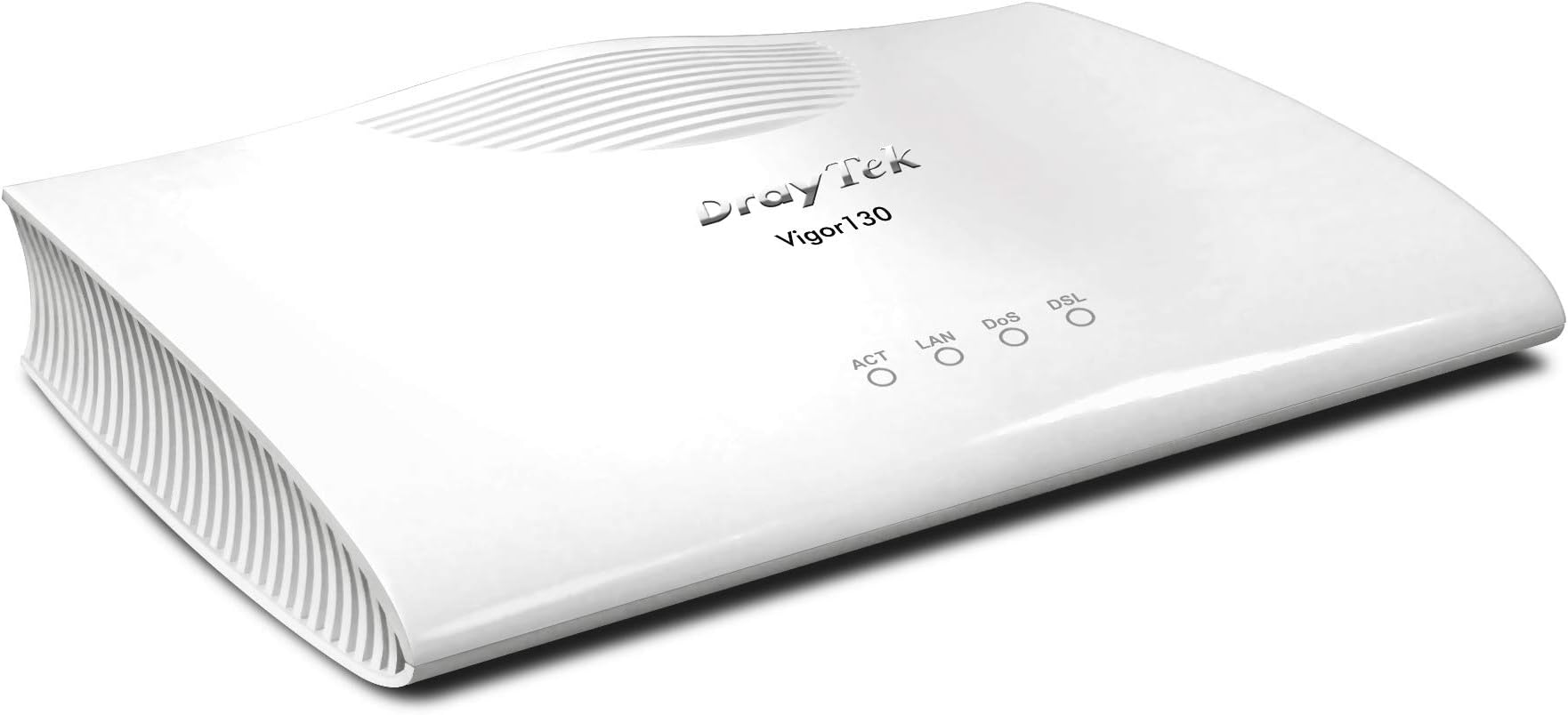
🚀 Elevate your home network with the Vigor 130 — the modem that means business.
The DrayTek Vigor 130 is a high-performance VDSL2/ADSL modem designed for seamless integration with modern WiFi 6 routers lacking built-in modems. It supports both IPv4 and IPv6 protocols, offers 3 Ethernet ports, and features bridge mode compatibility with dual-WAN routers. Approved by BT SIN 498 MCT, it delivers stable, plug-and-play connectivity ideal for UK DSL providers, ensuring a reliable and future-ready internet experience.


| ASIN | B00F9E5LQA |
| Best Sellers Rank | 48,292 in Computers & Accessories ( See Top 100 in Computers & Accessories ) 20 in Modems |
| Box Contents | 3 |
| Brand Name | DrayTek |
| Colour | black |
| Compatible Devices | Personal Computer |
| Customer Reviews | 4.5 4.5 out of 5 stars (931) |
| Data Transfer Rate | 3 Gigabits Per Second |
| Global Trade Identification Number | 04716779075205 |
| Internet Service Provider | DSL providers |
| Item Weight | 798 g |
| Manufacturer | Draytek |
| Manufacturer Part Number | 4716779075205 |
| Maximum Upstream Data Transfer Rate | 50 Megabits Per Second |
| Model Number | v130-B |
| Modem Type | DSL |
| Network Connectivity Technology | Ethernet |
| Number of Ethernet Ports | 3 |
| Number of Ports | 3 |
| Product Warranty | 3 |
S**Y
Wow, wow, wow. THE simple solution to all those WiFi 6 Routers with no integrated modem
This is a brilliant piece of kit. Simple instructions and dead easy to set up. If you are with a mainstream ISP in the UK, it is plug and play, no configuration to use this as a simple modem. Connect and power it up first, then connect to your router, it passes the internet signal via an Ethernet cable straight into your router WAN port for the router to use and distribute with no messing about required. An absolute breeze and does what it says on the tin. I haven’t explored it, but it also has a more advanced configuration user interface if you wish to access it via your PC, that’s one for the real techies. For me, I just wanted a solid reliable and separate modem to work with my new WiFi 6 router. This is THE solid simple solution to all those WiFi 6 Routers with no integrated DSL modem - all the new WiFi 6 routers I’ve seen are routers only, with no integrated modem. Been up and running now 24 hours, no drop outs just a great internet connection. UPDATE: July 2020: been running flawlessly now for nearly 2 months. Great plug and play modem if you are with a mainstream UK ISP.
D**N
Great modem for DSL
Firstly, this is a modem only and not a router. If you buy this on its own, you can only connect one computer to it. There is no router, no wifi and no access controls. Until recently I was forced to use the ISP supplied modem/router what was built to a low price and it showed. Drops, lockups and poor range. I'd been using a decent router in AP-only mode for ages but wasn't allowed to get the PPPoE settings. This suddenly changed and when it did, I ordered this. From a user perspective, it is fast, stable and has some useful options. Since moving over, I've seen a 50% reduction in ping returns, a 5% increase of download speed but no increase in upload. So far no lockups, Draytek supply firmware updates to keep the bugs in check. Well worth the money
M**E
Watch out if using with TalkTalk fibre and Apple Airport Extreme
This is a great modem and if you use anyone but TalkTalk as your provider then is simple to set up. If like me you use TalkTalk with fibre and an Apple AirPort Extreme it is a little more complicated. For ADSL you just plug the unit in and connect up to your router and away you go but for Fibre which uses VDSL then you need to go into the modem settings and alter a few things. This took me a while as Drayteck have not updated their site to include the latest software issue for the Vigorous 130 so the images shown are not what you get on the screen but having said that it does after a little thought make sense and once the Apple Airport is configured all bursts into life and works very well giving excellent download speeds as one would expect with a modem of this cost.
J**O
Works well out of the box but somewhat confusing GUI
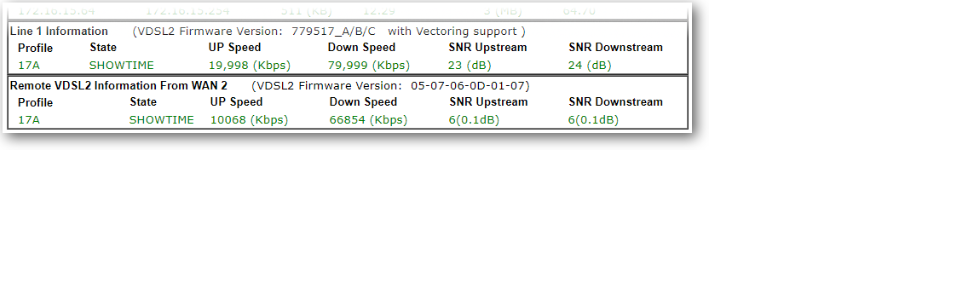
When my FTTC broadband started dropping it's connection, my router reported "modem hangup" so naturally I thought it might just be an issue with the BT Openreach fibre modem supplied almost 10 years ago and so ordered the Draytek Vigor 130 which was delivered the next day - I wasn't too happy with the item not being packaged in anything other than it's retail box, if I hadn't been at home and the box was left outside it would've gotten very wet. The Vigor 130 is indeed plug and play, I replaced the BTOR modem with the Vigor 130 and after a few minutes I was able to browse it's web page at 192.168.2.1 and see all the fibre connection status info which showed that line was playing up. Thanks to the detailed info from both the UI and via a Telnet session, I had a good idea what was going on with the line and was able to provide detailed info to Plusnet technical support once I'd raised a fault call. The web GUI is confusing though, with the dashboard/home page showing IPv4 internet access WAN1 as being disconnected, which quite reasonably leads you to think that the broadband connection is down, but in the Interface section below that, it shows that DSL is connected as is the LAN (to the router) so all is good. Regarding the reviews stating that the Vigor's DHCP server needs to be switched off in it's LAN settings, that should only be necessary if your router's IP address is in the 192.168.2.x subnet, which isn't usually the case as almost every router I've had uses 192.168.1.1 as it's address so any connected clients aren't going to be touching the Vigor's DHCP server unless explicitly connecting to it via it's IP address. However, if you plug a laptop into the Vigor, it's DHCP server will dish out an IP address for said laptop, so that's why it's there and why it's enabled. NOTE that if you do connect a computer directly to the Vigor whilst it's connected to the internet, make sure your computer's firewall is up and running or better still, invest in a good internet security software suite, otherwise your computer might get infected with all sorts of nasties in no time. It's worth noting that with the latest firmware version 3.8.4.1_BT it's not possible to set the date and time on the Vigor and it doesn't get it from a time server, so the date will be January 1st 2000 when first switched on. In hindsight I probably don't need the Vigor 130 as I suspect the BT Openreach modem is fine, but as it's locked there's no way to query any line stats or operating status, so for that reason the Vigor is worth having (assuming you can justify the expense) and I've also found that my download speeds have increased from around 69Mbps pre-Vigor to 73Mbps with the Vigor connected. If you regularly have problems with your ADSL or VDSL broadband (the Vigor 130 handles both) and are a bit of a techie, I'd recommend investing in a Vigor 130 as it'll enable you to monitor what's going on and who knows, the info it provides might make a difference to getting the problem fixed more quickly.
F**E
Il prodotto è arrivato puntuale e funziona perfettamente e corrispondente alla descrizione del fornitore. Quattro stelle perché il firmware è in tedesco e non era stato segnalato nella descrizione
D**N
Me parece se calidad pero no llego el libro en español solo en alemán. Aparte de eso no consigo entrar en la página de la configuración del router lo voy a devolver ya que no puedo darle uso.
R**I
Fonctionne en VDSL2 avec Orange. Il suffit de tagger le VLAN 835 à la place du 101 d'origine et on peut se connecter via PPPoE sans soucis. J'ai un léger gain de débit par rapport à une Livebox. Seul détail: le modem est livré avec un transformateur avec une fiche anglaise ! J'ai donc dû acheté un adaptateur !
A**X
Grund für die Suche war für den Umstieg auf VDSL100 (Vectoring) einen Ersatzrouter zu finden, welches Vectoring tauglich ist und noch als reines Modem betrieben werden kann. Der Speedport W921V macht zwar auch seinen Dienst sollte aber als Ersatzmodem dienen. Nach vielem Suchen in diversen Foren war der Vigor 130 von Draytek ins Auge gefallen. Ich kannte die Draytek's noch von damals und auch da waren sie immer positiv aufgefallen. Kurz noch im Netz eine Anleitung gesucht wie man das Modem für VDSL100 konfiguriert und schon war er auch bestellt. Zum Glück gab es schon ein Firmware Update (3.7.8.1) die schon diverse Bugs bereinigt hatte. Jetzt muss man allerdings wissen, das es hier verschiedenen Firmwaremodemversionen gibt. Diese gehen von 1 -7 und noch Standard. Jede Modemversion ist für bestimmte ADSL/VDSL Anschlüsse optimiert. Dies geht aus der Release.pdf hervor die man sich durchlesen sollte. Für mich war dann schnell klar das Modem7 für VDSL (G.vectoring) das richtige sein muss. Also Firmware heruntergeladen und über die Weboberfläche das Update durchgeführt. Ich will nicht verschweigen das das Draytek-Menü gewöhnungsbedürftig ist. Wenn man vorher Fitzbox-Menüs gewohnt ist, wird man hier erstmal große Augen bekommen. Ist aber alles halb so wild. Etwas Basiswissen sollte man allerdings schon mitbringen sonst wird länger dauern ;-) Das Einrichten als Modem dauerte nach Anleitung grade mal 5 min. Link kann ich gerne mal posten wenn gewünscht aber wenn man Vigor130 und PPOE eingibt kommt man auch schnell zum Ziel. Das gute ist, dass er auch VLAN-Tagging beherrscht. Grade bei Telekom und VDSL ist das ein Muss. Da ich kein Entertain habe reichte bei mir VLAN 7. Nachdem alles fertig war syncte das Modem und war nach knapp 1ner Minute fertig. Ich muss dazu sagen, dass ich hier 19db Dämpfung und eine SNR von 6db habe. Daher dauert es etwas länger. Aber das Resultat war erstaunlich. 71,6 Mbps Down und 26,7 Mbps UP und das stabil. Im Gegensatz zur Fritz und dem Speedport 67,7 Down und 27,3 UP hier hat sich der Down-Wert erheblich um gut 4Mbps erhöht. Sind zwar nur Peanuts aber immerhin. Das Modem hängt beim mir hinter einer Fortigate 60D von daher werden alle Firewalltechnischen Sachen hier erledigt. Zu erwähnen sei noch das der Vigor über Telnet zu konfigurieren ist. Hier kann man Statuswerte und auch alle anderen Sache die man sonst über die Weboberfläche einstellt auf Telnet-Ebene bearbeiten. Syslog und SNMP beherrscht er auch. Die Mibs für SNMP findet man auf der Draytek-Seite. Für diejenigen die es als Einwahlrouter benutzen wollen bietet der Vigor auch eine sehr große Konfigurationsvielfalt, die man sich bei anderen Anbietern nur wünschen kann. Allerdings und das muss man nicht unerwähnt lassen unterstützt er kein VOIP direkt. Damit mein ich man kann dort kein Telefon direkt anschließen. Das ist grade bei Telekom und auch anderen Anbietern ja mittlerweile unumgänglich wenn man auf ALL-IP umgestellt wurde. Ich habe es gelöst indem ich dies dann einer Fritzbox überlassen habe. Hier muss man Voip dann Firewalltechnisch speziell zu der Box routen. Wie gesagt es geht und man muss es auch jeden Fall im Hinterkopf behalten, bevor man sich wundert das Internet geht aber kein Telefon ;-) Abschließend sei zu sagen das ich den Kauf nicht bereut habe. Der Vigor 130 ist nun jetzt gut 3 Monate im Einsatz und habe vor 3 Tagen noch die FW 3.7.8.2 eingespielt und er rennt und rennt. In dem SInne noch viel Spass damit
P**X
Ich habe das Gerät als reines Modem gekauft. Am bereits länger vorhandenen All-IP 100 MBit Telekom-VDSL Vectoringanschluss (Broadcom auf der Seite des DSLAM) hing bislang eine AVM-Fritzbox 7580. DSL-Synchronisationsverluste mindestens 2 x im Monat waren an der Tagesordnung. Jetzt wurde hier zusätzlich eine 200 MBit Glasfaser verlegt und weil ich der Rufnummernportierung nicht traue und als automatische Fallbacklösung habe ich nach einer Lösung für den Parallelbetrieb von VDSL und Glasfaser mit Loadsharing gesucht. Diese Lösung ist ein Draytek 2925 Dual-WAN-Router, und weil die Fritzbox zum WLAN-AP degradiert werden soll, habe ich auch gleich in ein neues Vigor 130 Modem investiert. Ich war ein wenig skeptisch ob des 70er Jahre-Designs in weißem Kunststoff mit der gewöhnungsbedürftigen Delle im Gehäuse. In der Verpackung fand ich dann aber alle, was gebraucht wurde: Anleitungen, Steckernetzteil, TAE zu RJ 45-Adapter (auch RJ45 auf RJ45 beigelegt) und Netzwerkkabel für den einzigen vorhandenen Ethernetanschluss. Das Gerät kam bereits als Modem für den Telefonanschluss fertig vorkonfiguriert (also mit Modem7-Firmware, Routerfunktionen und DHCP abgeschaltet, PPOE abgeschaltet, korrekte Daten in allen Menüs, VLAN 7 bereits eingetragen). Die wenig komplizierte Installation bestand damit nach Überprüfung dieser Einstellungen aus: Netzteil in freie Steckdose, Ethernetkabel in einen WLAN-Port des Dual-WAN-Routers, TAE-Stecker in die Telekom-TAE-Dose, Einschaltknopf drücken, kurze 30 Sekunden Training abwarten und im Menü des Dual-WAN-Routers volle 100 MBit Download mit 30 MBit Upload angezeigt bekommen. Das Gerät wird im Betrieb handwarm im Bereich der LEDs. Die PPOE-EInwahl und sämtliche Routeraufgaben managt der 2925. Als Nächstes werde ich die nötigen VLAN-Einstellungen für den Zugriff auf das Modem auch im Bridging-Mode vornehmen. Auch das wird dank vorhandener step-by-step Anleitung sicher kein Hexenwerk. Alles in Allem: Top Gerät, exakt für meinen Anwendungsfall vorkonfiguriert, dennoch wäre (anders als bei Mainstream-Geräten, deren Menüs zwangsläufig stark vereinfacht sind) alles sehr flexibel einstellbar.
Trustpilot
1 month ago
3 weeks ago