Desertcart purchases this item on your behalf and handles shipping, customs, and support to Hong Kong.
๐ฏ Elevate your game and workspace with precision, style, and durability.
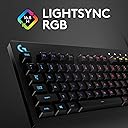
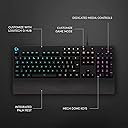
The Logitech G213 Prodigy is a full-sized, USB-wired gaming keyboard featuring customizable RGB LIGHTSYNC with 5 zones and 16.8 million colors, spill-resistant construction, and high-performance membrane keys designed for tactile, ultra-responsive feedback. It supports anti-ghosting for multiple simultaneous key presses and includes dedicated media controls, making it a versatile choice for both gaming and productivity. Trusted by millions, it combines durability, comfort, and style without breaking the bank.

| ASIN | B01L6L451Q |
| Antenna Location | Games |
| Best Sellers Rank | 264 in PC & Video Games ( See Top 100 in PC & Video Games ) 15 in PC Gaming Keyboards |
| Box Contents | Gaming Keyboard, User documentation |
| Brand | Logitech G |
| Brand Name | Logitech G |
| Button Quantity | 104 |
| Colour | Black |
| Compatible Devices | PC |
| Compatible Operating System Family | Windows |
| Compatible devices | PC |
| Connectivity Technology | USB |
| Connectivity technology | USB |
| Country of Origin | China |
| Customer Reviews | 4.3 out of 5 stars 8,793 Reviews |
| Enclosure Material | Plastic |
| Hand Orientation | Ambidextrous |
| Item Dimensions L x W x H | 45.2L x 21.8W x 3.3H centimetres |
| Item Weight | 1.1 kg |
| Keyboard Backlighting Color Support | RGB |
| Keyboard Description | QWERTY, UK layout |
| Keyboard Layout | QWERTY |
| Keyboard description | QWERTY, UK layout |
| Language | English |
| Manufacturer | Logitech |
| Manufacturer Part Number | 920-008091 |
| Minimum Required Operating System Version | Windows 10 |
| Model Name | G213 Prodigy |
| Model Number | 920-008091 |
| Number of Keys | 102 |
| Number of Sections | 3 |
| Power Source | USB Powered |
| Product Features | Adjustable Feet, Backlit, Customizable Display Keys, Multimedia Keys, Spill Proof |
| Product Warranty | 2-year Limited hardware warranty |
| Recommended uses for product | Games |
| Series Number | 920008091 |
| Special feature | Adjustable Feet, Backlit, Customizable Display Keys, Multimedia Keys, Spill Proof |
| Style Name | Gaming |
| Switch Type | Membrane |
| Theme | Gaming |
| Unit Count | 1.0 count |
| Water Resistance Level | Water Resistant |
R**T
Nice cheap keybord
Very good keyboard for the price. I bough it for my partner while I have a razer gaming keyboard but I have to say that these membrane switches are actually great. The noise is low, responsive and gives a great feedback while being very reasonably priced. Great product.
N**Y
The absolute GO-TO keyboard!
Dare I say that in my opinion, this is one of Logitech's best keyboards ever! I've had a few gaming keyboards during the last 6-7 years; From the Razer Huntsman V2 to Logitech 815 which I bought recently cause I adored it's slim design however both were disappointing, being more disappointed with the 815, which although being slim, it was also uncomfortable for me. I am using the 213 since 2020 and always kept it as a backup, thankfully! For me it is superior to every expensive mechanical keyboard I've ever owned. It is not mechanical, nor it performs in milliseconds like the more expensive ones , but it is comfortable and more than adequate for my gaming and typing needs. First of all a huge plus is the frowned upon palm rest on the bottom, which only very few mechanical keyboards have, yet is invaluable for me in terms of comfort, as the palm gets in the right position to properly engage the keys. I've tried buying aftermarket palm rests for the 815 but none worked properly due to it's slimline design. The Huntsman V2 had a magnetically detachable palm rest which was awesome. In addition to the palm rest the 213 has a superb sleek design. It is not tacky or gimmicky, but a rather seriously sleek and blocky design that integrates well in working environments as well as home. Coming in full black with a satin texture that gives it warm feeling touch. The keys are also well designed, having a slightly convex curvature, they 'hug' your fingers nicely without obstructing them while typing or gaming. The keys 'sit' (and are not pronounced above, as in most mechanical keyboards) on a wide all-round platform that adds a nice ergonomical form and great comfort in using the product. Yes it is a big keyboard and takes more estate on your desk than your average keyboard, but then again once you start using it, you will appreciate it's size and the comfort in using it. The build quality is superior for a keyboard at this price tag. This product has quality written all over it, I have been using this keyboard since 2020 and it hasn't failed or broken at all! No loose keys or hanging components, The 213 has been designed with quality and value in mind; very sturdy and long lasting product! The keys have a tactile feel although they do not use mechanical switches onboard. It is very quiet, you can type with it and have a person sleeping next to you and they won't notice the soft noise from the keys. It has RGB light functions for the key faces and connects to your pc via a USB cable. Also the media controlling keys and gaming mode switching key are welcome and useful additions. I can absolutely recommend the Logitech 213 as being ergonomically designed and very comfortable to use, well engineered in it's design, looks awesome and it is superb for everyday casual use; non competitive gaming and typing the odd email, your cv or even a novel. What's best? It offers all of these features without breaking the bank. So unless you want something that will perform in nanoseconds and you got the ability to realize non latency while you game and you're prepared to pay ยฃยฃยฃs for a keyboard, I'm absolutely recommending the Logitech 213 as a superb solution for your everyday needs. It's a shame Logitech don't make an upgraded version of this design with mechanical (Cherry) switches, it would absolutely dominate the market.
M**S
Not bad for the price, good upgrade to a standard keyboard.
I bought this keyboard to replace a far more expensive Corsair K70 keyboard that suffered the dreaded repeating key problem that seems to be common with open switch boards (cherry red switches - the problem got so bad that cleaning with the keys pulled off didn't resolve the fault any more). The Logitech G213 is obviously budget when compared to the Corsair and it shows with the quality of the lighting which is quite basic. The G213 board is split into five lighting zones, basically it is five vertical strips equally spaced across the keys which can be customised (per strip) - so for example it is not possible to program the escape key as red with the WSAD keys another colour as they all appear in the same left hand strip. The Corsair on the other hand was fully customisable with any key being allowed to be any colour. (but the G213 is a third of the cost remember). Both keyboards illuminate the letters on the keys whilst the Corsair would also have a hue beneath the key, the Logitech shows no light from anywhere other than the numeral/letter printed on the key. So, what I can say is that as an upgrade to a standard keyboard the G213 is reasonably priced and good value for money. It has some decent eye candy with the illuminated keys that can be programmed with some set routines to pulse with different colours, a breath effect (bright and dim slowly repeating) as well as a nifty screen capture effect where the keyboard mirrors what ever is on the screen (to a basic colour band obviously). The gaming mode will only disable a selection of keys with no other customisation, not even lighting. The Logitech software is very easy to use and far better in some respects than the Corsair equivalent but is limited as to the effects that you produce. As I mention earlier it is a shame that you can't customise the WSAD keys to be different from the surrounding letters. The effects of the colour waves etc are still quite good and do create a interesting lighting, and for the ยฃ40 odd quid it is quite acceptable. To use the board, as in typing, is very good with a definite feeling that the key has been pressed. The noise is not too loud in my opinion (nothing light the cherry red's of the Corsair which were like a ratchet clicking noise) and I really like that it is supposedly spill resistant (not tested this up to now so can't comment on this). The feeling of the board is decent quality compared to a standard board, nice finish on everything but it is slightly flimsy when pressing on the top outer bezel which makes distorting the whole board possible with a moderate press. The volume control works well. I preferred the barrel volume of the Corsair but the simple button suffices. Would I buy this board again? For the cost of ยฃ42.00 (which is what I paid in 2019), I think it is good value and I would buy it again. What did I like? Logitech brand, for me has always produced some decent gear that seems to last. The quality is good for the price and the software is easy to use. The board is also comfy on the wrists and the keys have good feedback and noise. I've had a fair few bits of Logitech hardware over the years and never really been disappointed. What did I dislike? It is a shame that individual keys can't be customised in colour, the banding arrangement seems a bit limiting with currently no downloads of lighting effects available (but that's down to the lower cost of the board). One point that I can note as well is that the LED for the num lock, caps lock etc is white and seems far brighter than the rest of the board, shame it can't be dimmed to reduce the way it stands out from the rest of the keys.
C**W
Brilliant, my old G910 failed and I needed a back lit keyboard.
Brilliant, my old G910 failed and I needed a back lit keyboard. I also line to program keys to open programs, the software allows you to do this, I have tree commands for video editing as a macro. Not there are no custom G keys on this keyb. Use the software to assign G-shift as f12, then assign the programs in the G-shift swich in the software. So F12+ F2 open my video program and doesn't affect F2 as the file renaming function. There are total o ZERO instructions with this keyboard and the online data for this keyboard is so out of fate as to be useless. The gaming software is downloadable - but reports it no longer supports this keyb anymore and is useless. However the keyboard is GOOD. Note accept the fact that Logitech keyboards has a short life, I have gone through three, but they are good while they last, about 3-4 years and I am a light user. Don't buy the ยฃ100+ one it won't last for cost effectiveness.
W**S
The G213 is an amazing budget choice
The G213 is an amazing RGB keyboard to consider buying if you're on a budget or looking to upgrade over a cheaper previous keyboard. Yes it's a membrane keyboard and not mechanical but at the end of the day keyboard switches are personal preference and having owned both membrane and razer mechanical kb's In the past I would choose the G213 over a cheap mechanical keyboard any day as when gaming the switches makes no difference what so ever but if you were typing a lot then maybe consider a mech keyboard. The membrane keys are nice and clicky and have a tactile feel with good feeback and dont feel cheap at all but if you're mechanical switch enthusiast then this isn't for you. What you get with the G213 this keyboard is worth the money, you'll always here people saying "but you can buy a mechanical kb cheaper than this" but they are always cheap Chinese brands and I'd rather pay more towards a more premium feeling product from a trusted brand even if it isn't "better" than the cheaper product but that's just me. The 16.8m colour RGB looks amazing and bright and isn't blinding like some kb lighting out there and the logitech software used to control the kb lighting is so simple and easy to use and it let's you control various lighting effects from having one static colour, individual lighting zones, the popular rainbow wave effect to other effects available. I also have the G203 Prodigy mouse and it's really cool to have the RGB lighting from the G203 and the G213 sync up together in the logitech gaming software. If you use macros when gaming this kb let's you program them to different keys as it doesn't have dedicated macro keys but I've never used macro buttons so this didn't bother me. The built in wrist support is really useful and comfortable to use for long gaming/typing sessions but its built into keyboard and can't be removed so consider that if you don't like wrist supports. In conclusion it is an amazing keyboard for the price with RGB control, the body is sleek and has a matte black finish which looks really nice and not over the top like some keyboards on the market. The G213 is definitely worth getting if you're on a budget or want an upgrade from a cheaper keyboard.
G**M
Good all round keyboard
Easily customizable for assigning shortcuts, simple software interface to customize lights, plug and play set up, nice size, being bigger than a standard keyboard with the extension of a lip beneath the spacebar to help rest the wrist, but still small enough to not be bulky. Smooth & responsive key press, not the quietest keyboard but not the loudest I've known either. Durable, this is my second buy and the last keyboard served well for 8+ years without any surface sign of wear or tear; one single key has become unresponsive and can't be fixed, that's pretty good going for a keyboard with such a level of high and varied usage. That's why I knew I wanted to go for this make / model again and I highly recommend it!
A**J
Average, I suppose.
UPDATE: 13/11/22. Keyboard is dead... I have never used such an awful keyboard in my life. It is overpriced and built badly seeing as it failed after a few months. The keys only responded when the force of the sun was used, otherwise they would not respond at all. I do not want to use nor see another Logitech keyboard again! UPDATE: 11/11/22. This keyboard is awful and I will have to claim on the warranty. The spacebar has completely stopped working, and I have only had this rubbish for a few months. Is this what ยฃ27.99 (now retails for ยฃ42) buys you these days? I am now using a ยฃ6 HP from Argos and it works better. I expected better from Logitech. I have downgraded the rating from 4 stars to 1 star, and I do NOT recommend this keyboard! UPDATE: 06/11/22. This keyboard is acutally getting worse the more I use it. The spacebar now appears to be affected by the issues with not responding when pushed or inputting a double press. The E key is mostly consistently doing a double press now, and it is becoming increasingly frustrating. I will not be buying any more Logitech keyboards after this one. ---- Original Review Below---- One of the negatives about this keyboard is that it will not input keys that I have pressed, and it will leave letters out of words, or it will even double press them. This situation occurs mostly with the R, 5, G, S keys, and it does become increasingly infuriating in a long document. I have had the German version of this keyboard before, and the issues I experienced on that one did not happen at all. A friend of mine also uses a Logitech keyboard, but not the same model, and I see in her text the same issues that I get but with more frequency. The build of the keyboard is good and strong, and it should last you for years unless your patience with the aforementioned issue gets the better of you, or if you are a gamer who is susceptible to bouts of rage during a game. The keys are nice to type with and the spacing is good. It has a dedicated Game button on the top and to the left of the media controls to prevent accidental presses of the Windows button... has anyone actually done that? The RGB is good and fully customizable within Logitech's own software that you will need to download from their website. With some games, the RGB lights will sync up such as with Battlefield 2042. In the game, the lights will stay a green colour, just the like they use within their branding and such, but if you die, the keyboard lights will flash red and then flash green if you are lucky enough to be revived. The cable is not braided so that might affect the longevity of the keyboard, but I don't think it will be a problem unless you are constantly manipulating it in such a way that it weakens. If you have a Logitech mouse with RGB, the software will sync the two devices together and the colours will be the exact same. However, I have noticed that in Battlefield, in particular, the mouse RGB switches off, and I am not sure if that is by design or a bug. Overall, I am not sure if I could recommend this keyboard as ironically enough, typing is its weakness. On the occasion that it does decide to work without an issue it is good, but when it doesn't, text will be looking more likke thiss, and overall, it beccomes highly annoying. I would say the ยฃ5.99 HP keyboard I bought from a high street store types better than this one. For gaming it is fine and there are no issues with input lag. If I were to put a score on it, it will be a 6/10. Pros: - RGB Sync - Soft touch keys - Media controls - Strong and sturdy build - Price - Syncs up to other Logitech hardware such as a mouse - Good for gaming Cons: - Double input of text or no response at all - Non-braided cable - Not a good experience for typing
C**S
Premium Gaming Keyboard From A Decent Pricepoint
The Logitech G213 Prodigy Gaming Keyboard is the best keyboard I have ever seen or purchased. The mechanical switches underneath the keys provide a satisfying click when pressed, and feel both premium and durable. The two adjustable feet underneath it put it at a slant which is very comfortable, especially due to its wrist-rest. The RGB lighting is very bright and can be seen quite prominently in all environments - be it day or night. I like the audio control pannel at the top-right of the keyboard - it is perfect for watching videos or listening to music. However, the main thing that sets this piece of hardware apart from its competitors is its customisation. The software, that can be downloaded from the official Logitech website, can be used on all OS, be it MacOS, Windows 7 (if you must), or Windows 10 (the platform I use it on). When downloaded, it is easy to navigate, and isn't too complex, unlike other software that I have used in the past. You can change the colours, the amount of colours, the type of lighting, and the frequency of the RGB lighting without effort, making it very user-friendly. Or, if you're a bit more of a tech-wiz (unlike me) you can further set tasks for different keys, or disable certain keys when enabling "Game Mode" (Trust me, it's not as complex as it sounds). Overall, a very premium keyboard that looks, feels and is durable and elegant. From both a productivity perspective and a gaming perspective, if you want a solid keyboard from a decent pricepoint - then this is the keyboard for you. I thank you for taking the time to read my review of this product, and I hope that it has helped you come to a decision in your purchase.
S**S
Less useful than I expected and risky to setup
In the middle of trying to set up a macro with this jonah of a Keyboard - the bloody keys wouldnt respond at all that is to say - I could not type a damn thing. So had to remove the keyboard from the PC and restart with the old kbd OMG this thing is a liability I dont trust it as far as I am about to throw it Logitech Bring back the K740 for Christ sake Do it today I will probably buy 3 of them
K**L
ลwietna ergonomia
Ok
P**B
Excellent all-rounder keyboard
Bien que non-mecanique, un tres bon all-rounder clavier. Je l'utilise pour travailler, en combinaison avec un G910... pour le gaming dedie.
M**E
buena calidad
cumple mis expectativas, ligero y de buena calidad
J**O
Nice!
Good keyboard
Trustpilot
2 months ago
2 months ago