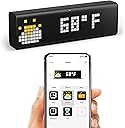
⏰ Elevate your desk game with the ultimate smart clock experience!
LaMetric Time LM 37X8 is a premium Wi-Fi enabled smart clock featuring a vibrant LED pixel display, thousands of customizable clockfaces, and seamless integration with popular smart home devices. It offers real-time notifications, voice control via Alexa and Google Assistant, and multimedia streaming capabilities, making it a versatile centerpiece for any modern workspace or living area.


| ASIN | B017N5FP0E |
| Alarm Clock | Yes |
| Batteries are Included | No |
| Best Sellers Rank | 352,664 in Home & Kitchen ( See Top 100 in Home & Kitchen ) 97 in Mantel Clocks |
| Brand | LaMetric |
| Brand Name | LaMetric |
| Clock Form | Multi Display |
| Colour | Black |
| Country Of Origin | Germany |
| Customer Reviews | 4.1 out of 5 stars 832 Reviews |
| Dial Colour | Black |
| Display Type | LED |
| Display type | LED |
| Frame Material | Plastic |
| Global Trade Identification Number | 05060415280003 |
| Included Components | Power Adapter |
| Indoor Outdoor Usage | Indoor |
| Item Dimensions W x H | 6.1W x 3.6H centimetres |
| Item Shape | Rectangular |
| Item Type Name | Smart clock |
| Item Weight | 223 Grams |
| Item height | 3.6 centimetres |
| Manufacturer | Smart Atoms Limited |
| Material Type | Plastic |
| Mounting Type | Tabletop |
| Number of Items | 1 |
| Operation Mode | Electrical |
| Power Source | Corded Electric |
| Product dimensions | 6.1W x 3.6H centimetres |
| Room Type | Living Room |
| Special Features | Adjustable Brightness, Adjustable Volume, Alarm, Auto Dimmable, Calendar Display, Day Mode, Daylight Saving, Hourly Chime, Humidity Display, Large Display, Loud Alarm, Mood Light, Multiple Time Zone, Musical, Night Mode, Programmable, Radio, Snooze, Temperature Display, Timer |
| Special feature | Adjustable Brightness, Adjustable Volume, Alarm, Auto Dimmable, Calendar Display, Day Mode, Daylight Saving, Hourly Chime, Humidity Display, Large Display, Loud Alarm, Mood Light, Multiple Time Zone, Musical, Night Mode, Programmable, Radio, Snooze, Temperature Display, Timer Special feature Adjustable Brightness, Adjustable Volume, Alarm, Auto Dimmable, Calendar Display, Day Mode, Daylight Saving, Hourly Chime, Humidity Display, Large Display, Loud Alarm, Mood Light, Multiple Time Zone, Musical, Night Mode, Programmable, Radio, Snooze, Temperature Display, Timer See more |
| Style | Modern |
| Style Name | Modern |
| Theme | Plain |
| Watch Movement | Digital |
K**N
Five stars, four if price taken into account
I've thought hard about whether to do a review for the LaMetric because of its very high price, but at the same time I think it's not nearly well selling as it deserves to be and I don't want to make that worse by giving it less than 5 stars. Elephant in the room first: it's _expensive_. Stupidly expensive for a clock, even a wifi one. I *would* be giving it four stars if I'd have had the slightest issue with it. It should be two thirds of that price at very most. Setup was easy for me, although your mileage may vary. You will need a free Android or iOS app for this, and strangely enough Android on tablet "isn't compatible", although it will work if you sideload it from a phone. I had no issues with wifi compatibility, but remember it isn't 5G. The LaMetric has a minimalist, retro, attractive look: it's a little chunk of matt obsidian with colourful, very noticable pixels (only the icon square to left of the device has coloured ones). The LEDs are vivid without flicker. The automatic brightness function works perfectly for however your room is currently lit, meaning you will still see it in bright sunshine; as does the "screensaver" option which dims the display to minimum when it's dark, so you won't get annoyed if you use it as a bedroom alarm clock. You can also switch that off and go with whatever brightness you prefer and time (or switch off) the screensaver instead. You can customise the function and appearance of the clock app, adding a coloured icon and time/date etc. if you wish. The alarm function is a little basic but functional (one alarm, with a snooze, or radio function). Radio is excellent and can play any internet radio channel with no switch-on delay, although not every station out there is built in to the app and you may need to add them manually. As a bluetooth speaker the clock isn't at all bad, but simply doesn't have the juice to be a party piece. It's good as a desktop radio and to attract your notice with notification chimes, not to replace your hifi system. I love the weather app as not only is it handy it looks pretty too. It'll tell you current weather, temperature, wind speed, humidity etc with colourful icons, but also today's (if it is before noon) and a forecast of tomorrow's. The app on display can be set to cycled in any order and with delays if this is what you need, but unless it is done as an office clock I'd find that distracting. I use it as a desk clock right next to me so prefer a fixed display and make heavy use of the buttons to cycle through apps, especially weather, radio and news. The functions I use it for most: - Clock (obviously), with time and date and day marker - Changing my LIFX lighting theme with a button press (IFTTT app) - Notifying me if it starts to snow or if the wind goes above 40 mph (IFTT app) - Notifying me and showing incoming gmails (gmail app) - Notifying me of any met office weather warnings (via RSS app) - Reading the news, traffic and met office weather feeds (via RSS app) There are plenty more apps that I don't use, including Twitter messaging (visit the website for full current list), and it has integral support for Amazon Alexa and NetAtmo. You can also make your own with a website-based builder; if you run a webserver at home then it'll be a sinch, if not then you probably won't be able to. What you can do is make your own icons (animated or otherwise) using the webpage designer, which is considerably easier; although there is already a very good selection. I haven't had any problems with the LaMetric and love it. Not only that, it's become a very handy tool for me and I don't regret spending so much on it at all. For that, I'm going to give it five stars purely to keep it from sliding into an undeserved obscurity - but if you're reading this it's just four if you factor in the price. Just keep it between you and me. ;)
W**A
Good hardware and software and tech support
Very cool But a bit pricey. Decided to buy this for myself for Xmas, coz my wife was going to get me wallpaper as a Xmas gift. The apps for it are very good and the level of customisation is very good. The wifi is only 802.11n, so if it can't detect wifi, you'll need something on the 2.4GHz range. Going to the URL(once connected to the lametric) to download the iOS/android app is the only way I could find to download the program. There were no links to it on their website and [...] didn't work for me either. After checking this device using nmap, it seems as though port 22 and port 9001 are open. Port 22 I know what that is for, but I can't get access to the device (and their support team said they won't hand out credentials due to some BS security issue - it's my device, i want access to it!! Why the backdoor?!). TBH, it shouldn't be open in the first place!!! Why would you need it there? Port 9001 is a bit more insidious. From a quick google, port 9001 is for Tor traffic. Now why would that be open on a lametric device? I fortunately don't have any crap consumer router (I built my own linux firewall), but I suspect if I did it might use something like uPNP to open a port and forward traffic to the lametric to act as a Tor exit node. I am still awaiting a proper response from Smart Atoms customer service as to why that is open.... * Network wise, it pings developer.lametric.com (2 ICMP packets) every 10 seconds - not sure why though - this is fine though. * For NTP, it goes went to random servers, which I found odd. I would expect it to use pool.ntp.org, rather than a static address, but I didn't see a DNS lookup for pool.ntp.org (used tcpdump) - I think this is odd * It sends keepalive type data via MQTT to port 1883, so this is probably running an esp8266 with LUA so it's probably registering itself with their network to say "hey - i'm alive here's some data" - I think this is fine. * It also scans the local network (239.255.255.250 port 1900 for SSDP) - again - why does it do this?! This is uPNP/SSDP, but it seems as though port 5000 is not open on the lametric device, at least not during my nmap of it Port 9001 and scanning the local network scans are really dodgy on this sort of device.... why would you do that? I will update this review when I get more interesting info... ==================== UPDATE 2015-12-24 - smart atom customer support replied with this info: 1. Port 22 – SSH. We left that backdoor for support engineers to be able to help or find the problem in really difficult situations (via TeamViewer or similar software). But as we see our recovery mechanisms we have are sufficient and we will remove SSH access from our future firmwares. 2. Port 443 – HTTPS. Is used by a Web server on LaMetric that talks with LaMetric mobile clients (Android and iOS) over HTTPS. We also use client certificates, so no one except our clients can talk to LaMetric in the network. 3. Port 6001 – actually this is a default port for MPD (music player daemon). It is responsible for playing internet radio media streams. Actually this port is left open by mistake and will be closed in the next firmware versions. Thank you for finding that. 4. Port 9001. This is not TOR :). This port is used for communication between lighttpd (Web server) and fastcgi (interface between Web server and our software on the device). We should have been done this via linux socket, but we had troubles with that approach. And the funny thing is that the port had been chosen randomly :). In next versions we will try again to move to linux socket way of communication and close the port. 5. As for pings – this way LaMetric knows that there is no internet and can handle this case in more user friendly way by showing "no internet" messages. ==================== UPDATE 2016-01-03 They got back to me regarding SSDP: We use SSDP to find LaMetric devices on the network. In order to do that our client app sends (broadcasts) discovery packet to the network and LaMetric devices respond with some additional information, like IP address and device name. ==================== UPDATE 2016-10-25 They are on v 1.6.2 of the firmware, nmap shows the following ports open: 22/tcp open ssh 80/tcp open http 443/tcp open https 4343/tcp open unicall 8080/tcp open http-proxy 9001/tcp open tor-orport 9002/tcp open dynamid traffic seems to be a lot less 'chatty' and more inline with what i'd expect.
J**N
Excellent clock to keep track of notifications.
If you have several smart home gadgets this is a excellent piece of technology to keep track of all the notifications. As other reviewers have said it is a expensive gadget made of plastic and with a retro look, but If you can buy it while on offer well worth the spend. When I bought it I thought: A- Why did I spent so much on a desk clock and B- this is going to be one of those things that sounds good in paper but then disappoint once you start using them. Well... I was wrong, I do actually like it very much and don’t regret buying it! I use it every single day without even realising that I’m using it! It is so easy to look at it and get the information you need at glance (specially notifications!). I use mine to keep track of different smart devices around home. I enabled different apps and automatically change between them to display the following: - Time and date (obviously!) - Weather (you can customise what information you want the clock to display) - Temperature and humidity at home (from Nest thermostat). Also notifies if the temperature is too high or too low - name of the song and artist of the song currently playing in my Sonos system (Which automatically displays it as soon as a new track starts) - Exchange Rate - RSS News (which I’ve configured to notify and give me the 5 headlines very hour) - Mirror the notifications on my phone (I really like this feature as I can see and read text or WhatsApp messages and email subject lines without having to pick up my phone) - Notifies and shows who is calling (again, this is great so you don’t need to grab the phone to see who is calling) - Notifies me when someone is at the front door (Ring Doorbell integration via IFTTT). - Set date and time reminders (I.e.: Put the bins out Tuesday evening! - You can even choose different wheelie bin icons!) I have the LaMetric time for over a year and only had a couple of issues with it so far. Both times an installed app was causing the device to freeze and just displaying a black screen. The technical support is great. Both times I had the issues I contacted support and sent them the logs. The display is quite bright and you can enable auto brightness so it changes based on the light in the room. You can configure a ‘Do Not disturb’ (they call it screensaver) so the screen turns off (or displays a dimmed clock) during the specified time period. I enabled this at night to stop notifications coming through. It has 3 large buttons at the top which they allow you to manually scroll between the enabled apps and make selections. The button on the right side turns off the device and on the left side there are two small buttons to increase or decrease the volume. If you are thinking to purchase this to listen to the music, don’t! You can play the radio or Spotify on it but the sound quality is terrible. To summarise, if you are looking for a smart display to keep track of notifications and other gadgets around the house, go for it - you won’t regret it.
L**O
Best Customizable Alarm Clock
I bought the stationary alarm clock as the portable alarm clock wasn't really useful for personal use, plus it has only 6 hours battery life which isn't very useful. BUT getting the stationary version however, this is probably the best bit of tech i've had for a while! The clock came in a decent well packaged box, inside with the clock covered in protective film and adapters for European, UK plugs & USB. Also comes with instructions which is easy to read and different languages are available. Setting up it's just plug in into the mains or computer, download the app and follow the instructions either on the paper or your phone and presto it's all up and running! The app is simple and responsive with no problems, easy to navigate. Easy to customise your clock with it's tutorials on the start of the app, and browsing the store of apps it comes with is fantastic! All free so you don't have to worry about anything once you buy this. Easily customizable, automatic brightness to lower it during night if you so wish to have it on. Also the radio is superb! I know German and you can have access to any radio station in the world and been listening to German pod casts as well! I couldn't find Heart or Kiss which worked but it will come eventually! The only con with it is that when you plug the cable into the adapter its in the front, which means you can't fit it behind any tight spaces. You need at least about 15cm from the plug socket outlet to make it fit. But, that doesn't flaw the product itself. This alarm clock with all of these apps is brilliant. I recommend it and it comes with a 1 year warranty if you sign it up on the site and ALSO you can create apps on their site which is completely free and help contribute your creations to the community! In the end, brilliant product. Get it!
L**E
Meh!
This is insanely overpriced for what it is and the display is really blurry, it has some kind of filter on it or something, it makes my eyes go weird sometimes when I look at it (500mm away on desk). I have played around with it a bit and it has some cool widgets for it, like Pikachu next to the time but I don't think it's very useful for the average person, I saw a few streamers use these on twitch so wishlisted it and was always tempted to buy it so decided to for xmas. I'll keep it for now but after looking into it these suffer from dead pixels after a while so will have to see. This should be £75 max, there's nothing special about it and as others have said you could get a cheap android tablet for this money and use that as a widget clock instead.
A**R
Works out ~£42.50 a year when pixels fail 4 years later and you get told to buy yourself a new one
When I first got my lametric time I was really hesitant about the price. a nice clock with some smart home capabilities was tempting but what eventually pushed me into the sale was that it's a one-off payment for a device that never gets touched or moved, and should last decades. I figured, despite being £170 currently (thanks to brexit), after 10 years it works out about £17 a year. Still pricey, for a clock, but I figured I'd include it into a lot of smart home routines and there was a bunch of lametric apps that would add functionality. This week the pixels on my Lametric Time started dying. I looked to check the time, and instead of telling me it was 9pm, it told me it was 3pm. I was very confused, the timezone changes in in a week, but 3 hours difference doesn't make sense.. make a firmware update bug? (look at the google play store reviews, the firmware has become very buggy in the past year) Then I got some smart home notifications and saw the text was garbled and it hit me, pixels are not turning on. I tried the obvious, unplugging/reconnecting, updating firmware, rubbing where the pixels are missing. Nothing helped. So I contacted support. First thing they asked for was my receipt. As soon as I sent that they told me their warranty is 1 year and "To get the best experience using LaMetric Time you may consider buying a new LaMetric Time device." Ouch. So that works out £42.50 a year. If I knew that before I bought it there was no way I'd buy it. I wasn't even offered a discount code outside the the standard 5% off newsletter subscription. (wow £8.50 off, remarkable!) I'd say the real value of a Lametric Time is about £80 tops. The apps available for it are pretty lackluster and mostly novelty, there's a few nice community made ones that work great for a year or so before they stop working and aren't updated again. The only real benefit of having a Lametric Time is if you program things yourself to use the API, or if you managed to get some smart home functionality out of it by using an IFTTT account (which requires a monthly subscription fee for more than a few routines). It's a fun idea, but the reality is at the price it is, you're better off just sending notifications to your phone and just buying a cheap desk clock.
S**R
BRINGS CHARACTER TO MY SMART HOME
When I first got this clock on an Amazon Flash Sale, I didn’t understand what all the fuss was about. I set it up and thought it was way too expensive for a glamourised clock. I wanted to send it back for a refund. I got lazy for a few days and then it grew on me... It does look amazing, but the feel is a bit cheap, especially considering the overinflated ridiculous price. However, I can’t live without it now and it’s a valid part of my household. I linked it to my Ring doorbell, Hue lights, iPhone X (texts, calls, WhatsApp, etc.) and Google Home Mini. There’s so much flexibility with this device, especially with the IFTTT protocol - the functionality is endless. It reminds me of my Apple Watch - you just glance at it. I can see what the weather is like, who’s calling, when the next train is, time/date/temp, countdowns, social media info, tube status, news flashes and so much more. It may be too expensive for what it is, but there’s no denying that it’s an astonishing product. Just don’t physically pick it up, because that ruins the magic with its cheap build quality. The screen is very vivid and the colours are excellent. The scrolling text is really clear and easy to read. Also the buttons have a nice click to them. I was actually surprised with the audio.. this obviously isn’t a speaker, but the sound is good for what it is. The alert sounds have a certain pleasurable ambience to them. I wish reviewers would stop comparing it to Bluetooth speakers - that’s simply not fair, because that’s not it’s purpose. This is no boom box and it doesn’t try to be. It’s primarily a notification device and a great one at that. I must say that this is the best of its kind on the market and really stands out with retro/modern style. I currently have Link from Zelda on my clockface, I swapped out Mario because he’s had enough time in my front room. You need the free iOS/Android app to manage the device and it’s simple enough. There’s a lot of functionality, especially when enabling IFTTT. There are a few bugs, but nothing that ruins the experience. I’m waiting for that next firmware update. If you have lots of smart devices, this is definitely worth getting, but if you don’t - think about it and whether it fits in your lifestyle. It is a cool device and will impress your visitors.
C**T
Excellent product which is continuously improving.
I recently purchased my first LeMetric device to integrate into my existing home automation setup. In its basic format it might at first appear as an expecive clock radio. However because it already has native IFTTT support there are many things that you can supliment the basic functions with. For me the real bonus is that the support team are continuously adding native support for other products. For example they have just released support for the Netatmo weather station in its entirety including rain, wind and additional modules. This now provides the information even quicker than cobling something together via IFTTT. If you look at the roadmap you will notice that integration with Smarthings is a current work in progress, and I have every confidence they will deliver on this project. As far as the product is concerned it is proving reliable and was simplicity itself to setup. I would most definatly recommend this to anyone who needs information displayed without having to reach for a mobile device.
Trustpilot
2 days ago
1 month ago